
The fastest way to dedupe a long list of lines is rarely a custom script. Off-the-shelf text-processing utilities already cover the four common shapes: case-sensitive exact match, case-insensitive match, whitespace-trimmed match, and per-occurrence counting. Knowing which one to flip on is what separates a 30-second cleanup from an afternoon of regex debugging.
When you’ve got a list, a log dump, or a CSV pasted straight from a spreadsheet, hand-rolled shell one-liners (such as awk | sort | uniq) usually fall over on the first unicode edge case — invisible trailing spaces, mixed casing, BOM markers, and “empty line” definitions all drift subtly between tools. A purpose-built utility takes those knobs out of the shell pipeline and exposes them as toggles.
The Remove Duplicate Lines tool at elysiatools.com does exactly this: paste your input, pick whether you want to keep the first or last occurrence, decide on case sensitivity, choose whether to trim whitespace before comparing, and report how many duplicates were removed. This field guide walks through when each setting actually matters, what to expect for different input shapes, and the failure modes that bite people in practice.
What the tool is for
A line-level deduplicator takes a block of text — a list, a log dump, a CSV column — and collapses runs of identical lines down to one. The four toggles I mentioned in the lead control which lines count as “identical” and which one survives in the output. Useful when you’re cleaning CSV exports, log files, mailing lists, API responses with repeated records, or any time you have unstructured text where you only care about distinct values.
The Remove Duplicate Lines page does one job: deduplication of plain text lines. It does not parse CSV, JSON, or any structured format; it treats every line as an opaque string and compares strings literally. That’s a feature for use cases where you don’t want field-aware collapse, and a limitation when you do.
Why line-level deduplication is its own problem
Most “dedupe” advice is written for arrays or database rows, where each record has a key. Plain text lines do not have keys — every character in the line is part of the comparison. That sounds trivial until you discover that two lines that look identical to a human differ by a trailing space, a Windows CRLF, or a non-breaking space.
Those differences are why naive tools disagree on counts:
– A spreadsheet export followed by awk '{print $1}' leaves whitespace you didn’t ask for. – Copy-paste from a Confluence page often appends a zero-width space. – Logs from Windows services carry carriage-return plus newline line endings even when the file extension suggests Unix line endings. – BOM markers attach to the first line on Excel-exported CSVs and to every line on some PowerShell pipelines.
The remedy for every one of those is to compare normalized lines, not raw lines. That’s the whitespace-trim toggle. Once the comparison runs on trimmed text, the duplicate count becomes trustworthy.
The four toggles and what they actually do
The Remove Duplicate Lines tool groups every setting under one of four decisions. None of them is exotic, but each maps to a real input shape you’ll run into.
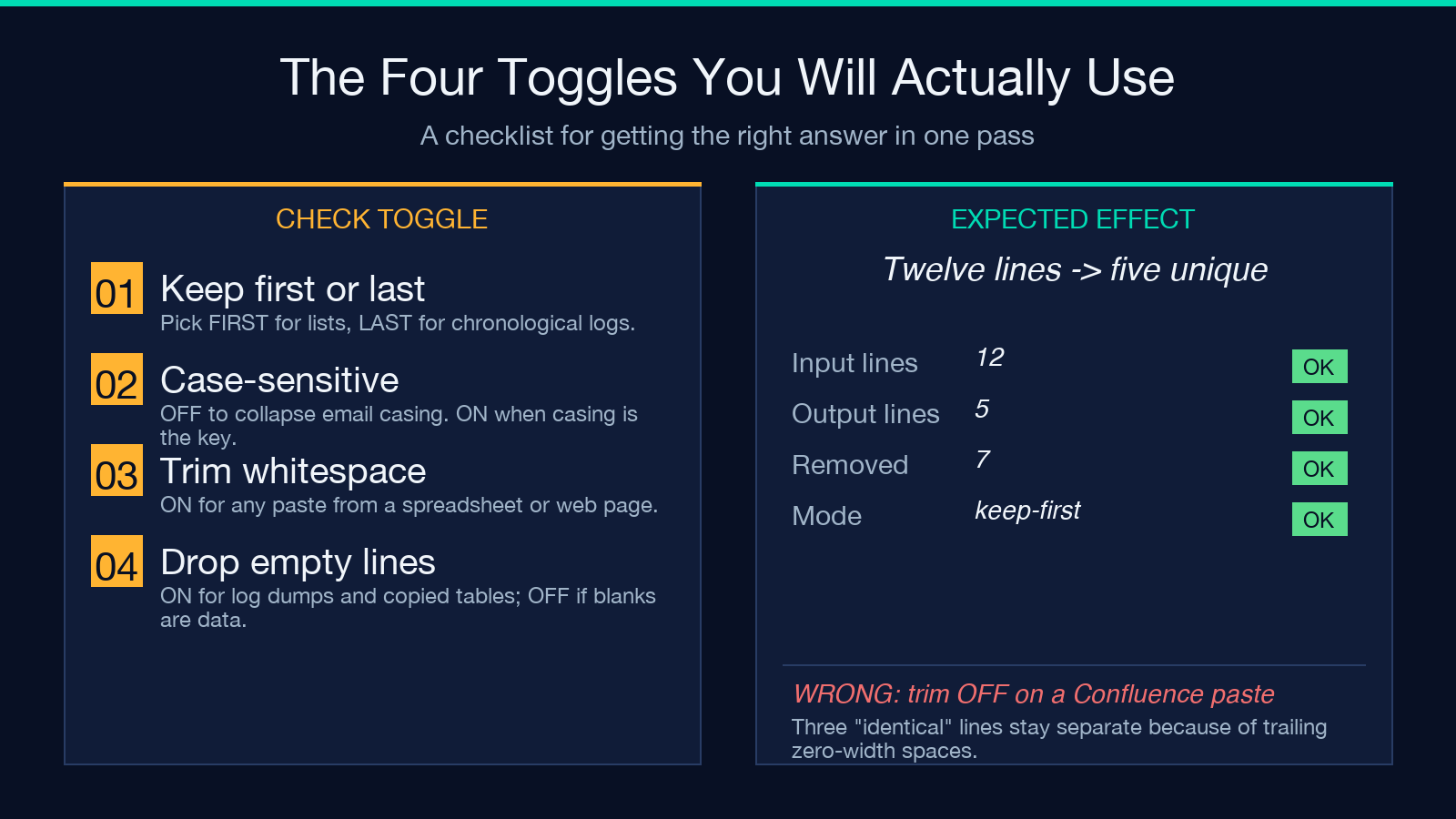
– Keep first vs. keep last. If your input is a chronological log, “keep last” surfaces the most recent version of each line. For a deduplicated mailing list, “keep first” is usually what you want so the first entry wins.
– Case-sensitive vs. case-insensitive. Toggle on for [email protected] vs. [email protected] to collapse. Off when casing carries meaning: identifiers, file paths on case-sensitive filesystems, hex strings, code tokens.
– Trim whitespace before comparing. On for any text pulled from spreadsheets, web pages, or copied tables. Off only when whitespace is part of the data.
– Drop empty lines. Toggle on when blank lines are obviously artifacts of pasting (logs, code, CSV headers). Off when empty lines might represent “no value” rows that you want to keep — say, an attendance list with N/A entries rendered as blank cells.
A useful default for ad-hoc cleanup: case-insensitive, trim on, keep first, drop empty. That covers most paste-from-spreadsheet jobs without further fiddling.
A worked example
Take this realistic input — twelve lines, with casing duplicates, trailing-space duplicates, blank lines, and one truly distinct line:
Alice
alice
Alice
Bob
alice
Charlie
Bob
Eve
Eve
Eve
Mallory
alice
Running with “keep first, case-insensitive, trim whitespace, drop empty lines” produces:
Alice
Bob
Charlie
Eve
Mallory
Five lines remain. The tool also reports the duplicate count: 7 duplicates removed. That number is what you quote in change logs and audit trails — it’s reproducible across runs.
If you flip just the case toggle off (still trim), you get a different result:
Alice
alice
Bob
Charlie
Eve
Mallory
Six lines remain, 6 duplicates removed — because the leading uppercase Alice and lowercase alice are now treated as separate keys. Both answers are correct; the difference is whether casing carries meaning for your downstream use. The most common misreading is to leave case-sensitivity on while expecting case-insensitive behavior — verify by counting on a tiny sample first.
When deduplication is the wrong tool
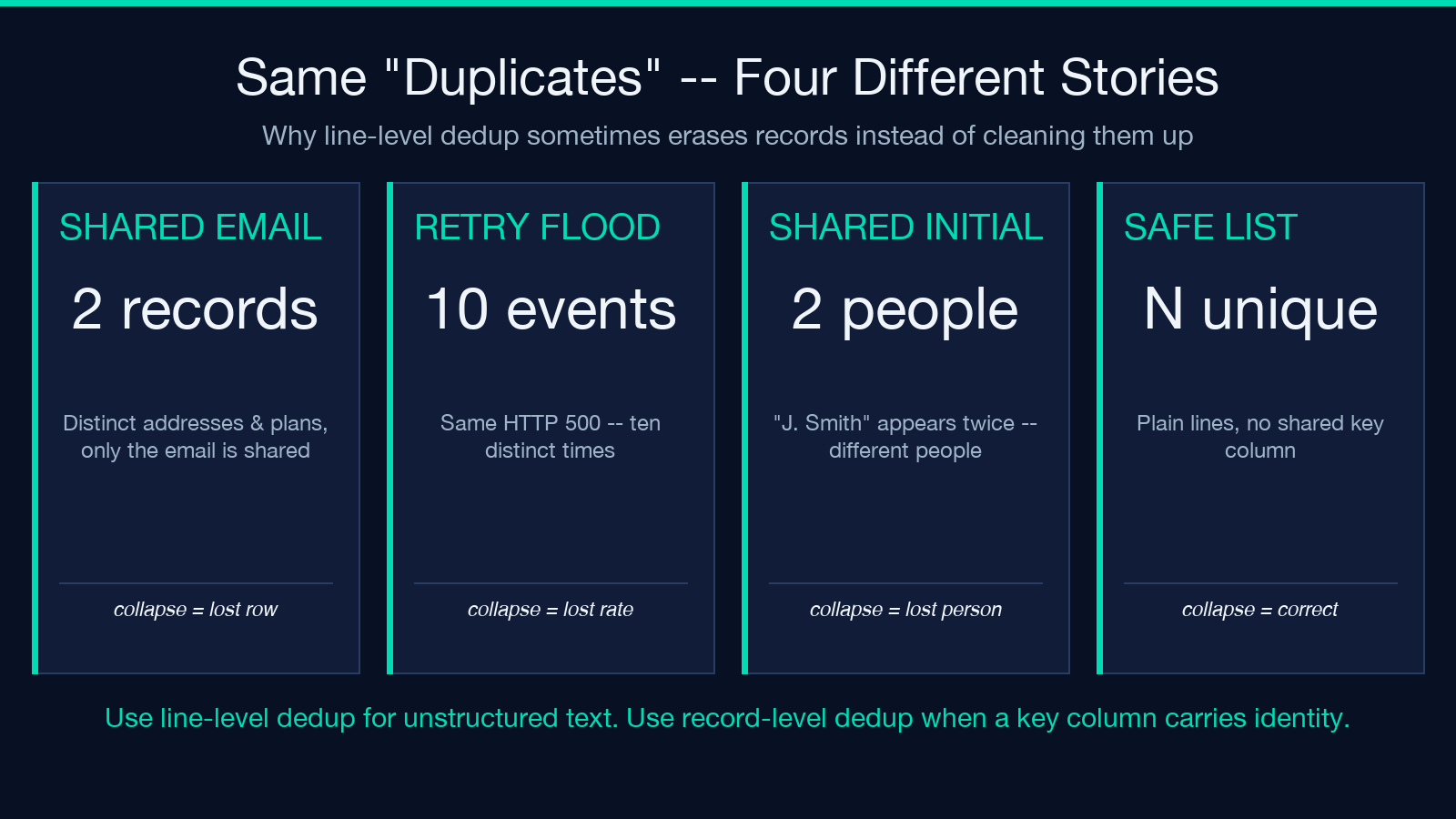
Deduplicating lines is the wrong move when two “identical” lines are actually different records that happen to share a field. Three patterns trigger this most often:
– CSV rows with identical key columns. Two customer rows that share an email but differ in address or plan. Line-based dedupe will collapse them — silently losing data — unless you route through a CSV-aware tool that compares the whole record.
– Log entries that share the message field. Ten retries of the same HTTP 500 at the same URL are ten events, not one. Collapsing them as duplicate lines loses the rate information that justifies the “we should alert on this” verdict.
– Identity lists with shared initials. “J. Smith” appears twice in a roster because two different Jennifers signed up. Treating it as a duplicate erases one of them.
For these cases, reach for a record-aware tool that hashes the logical key field instead of comparing whole lines.
The Remove Duplicate Lines tool is best for unstructured text and simple lists. For records with structure, use it as a coarse pre-filter, then run a structured dedup on the remaining entries.
Edge cases worth testing before trusting the count
Five edge cases move the duplicate count by more than one. Test on a small sample if your pipeline will quietly trust the result.
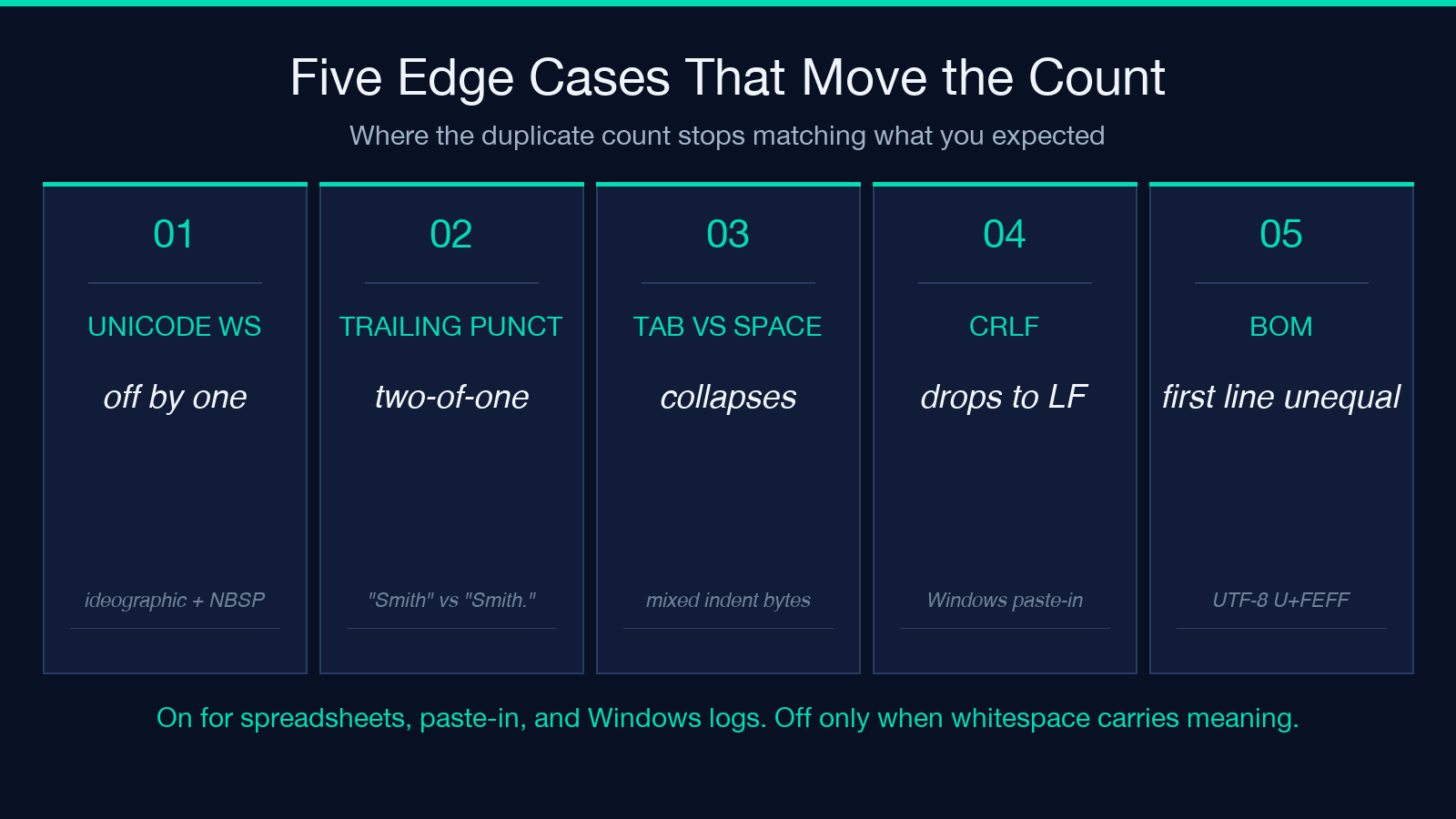
1. Unicode whitespace. Leading or trailing ideographic spaces (U+3000) and non-breaking spaces (U+00A0) do not trim with naive ASCII whitespace regex. The tool treats these as whitespace, so the count is correct when trim is on — but export your result back to a system that doesn’t normalize on import and the duplicates reappear.
2. Trailing punctuation. “Smith” and “Smith.” compare as different even though humans would treat them as the same name. There’s no toggle for this — if it matters, normalize upstream with a search-and-replace pass before dedup.
3. Tabs vs. spaces. Mixed indent characters past the comparator? They look identical visually but compare as different lines. Toggle trim on and the row count drops.
4. CRLF line endings. Lines pasted from Windows will compare as different to lines pasted from Mac/Linux if the comparison is at the byte level. Trim handles this — without trim, every CRLF line is its own “duplicate” of the LF version.
5. BOM at the head of the first line. Some exporters attach a UTF-8 BOM (U+FEFF) to the first row only. The first line will compare unequal to every other line that starts with the same text. Trim catches this; otherwise you’ll see one phantom “duplicate removed” you can’t reproduce.
If the duplicate count doesn’t match what you expected, the gap is almost always one of these five. The fix is usually a different toggle, not a different tool.
Common pairings and pipeline recipes
The tool is most useful when slotted into a wider text-cleanup pipeline. Three patterns recur.
Log triage. Pipe a server log through the tool with case-insensitive + trim + keep first. The output collapses repeated stack-trace headers, surfacing unique error conditions. Count the duplicates; that count is your “rate of repeated errors” signal.
Spreadsheet cleanup. Export a column as CSV. Paste into the tool with case-insensitive, trim, drop empty lines, keep first. The result is a unique-values list suitable for a dropdown or a category table.
Email-list hygiene. Paste a list of addresses with case-insensitive toggled on. The output collapses typos that only differ in casing. Pair the result with an Email Validator pass to catch malformed addresses — dedup alone won’t catch a missing @.
For deeper structured work, the Text Diff tool shows what changed between two cleaned-up versions, and the Array Sorter utility gives you deterministic ordering on the result.
Closing: ergonomics is the point
The number one reason people reinvent line deduplication in code is that they hit one of the four toggles in a hurry and got the wrong answer once. Once you know which toggle to flip for which input — case-insensitive + trim + drop empty lines is the safe default for ad-hoc cleanup, keep last only for time-ordered logs, leave casing on when casing matters — the operation becomes a single paste-and-click job.
The tool will never replace structured dedup on real records, and that’s fine. Its job is to take the repetitive 90% of “I just need the unique lines from this dump” jobs off your shell pipeline. Knowing where to stop and reach for a record-aware tool is the rest.
Explore more text-cleanup utilities at elysiatools.com/en/tools.
