
Cursive Unicode glyphs render the elegant hand-written look without a font file — paste any ASCII string into the Cursive Text tool on Elysia Tools and the output is a copy-pasteable run of Mathematical Script or Bold Script code points (ℋℯ𝓁𝓁ℴ / 𝓗𝓮𝓵𝓵𝓸) that travels through every chat app, every email, every README, every social profile field untouched. That is the whole job — convert, copy, ship — and the few edge cases worth knowing are all in the algorithm underneath.
What the tool actually emits
The output is plain Unicode text, not an image and not a webfont. Two stylistic flavours ride on different Unicode ranges. Script (U+1D49C–U+1D4CF) maps lowercase Latin to the Mathematical Script Capital letters with the elegant flowing baseline — ℋello, 𝒷𝓊𝓃𝓃𝓎. Bold Script (U+1D4D0–U+1D503) maps to the Mathematical Bold Script Capital letters — 𝓗ello, 𝓫𝓾𝓷𝓷𝔂. Both flavours are zero-width-incompatible with monospace styling in terminals but render with consistent glyph widths in browsers and modern chat apps.
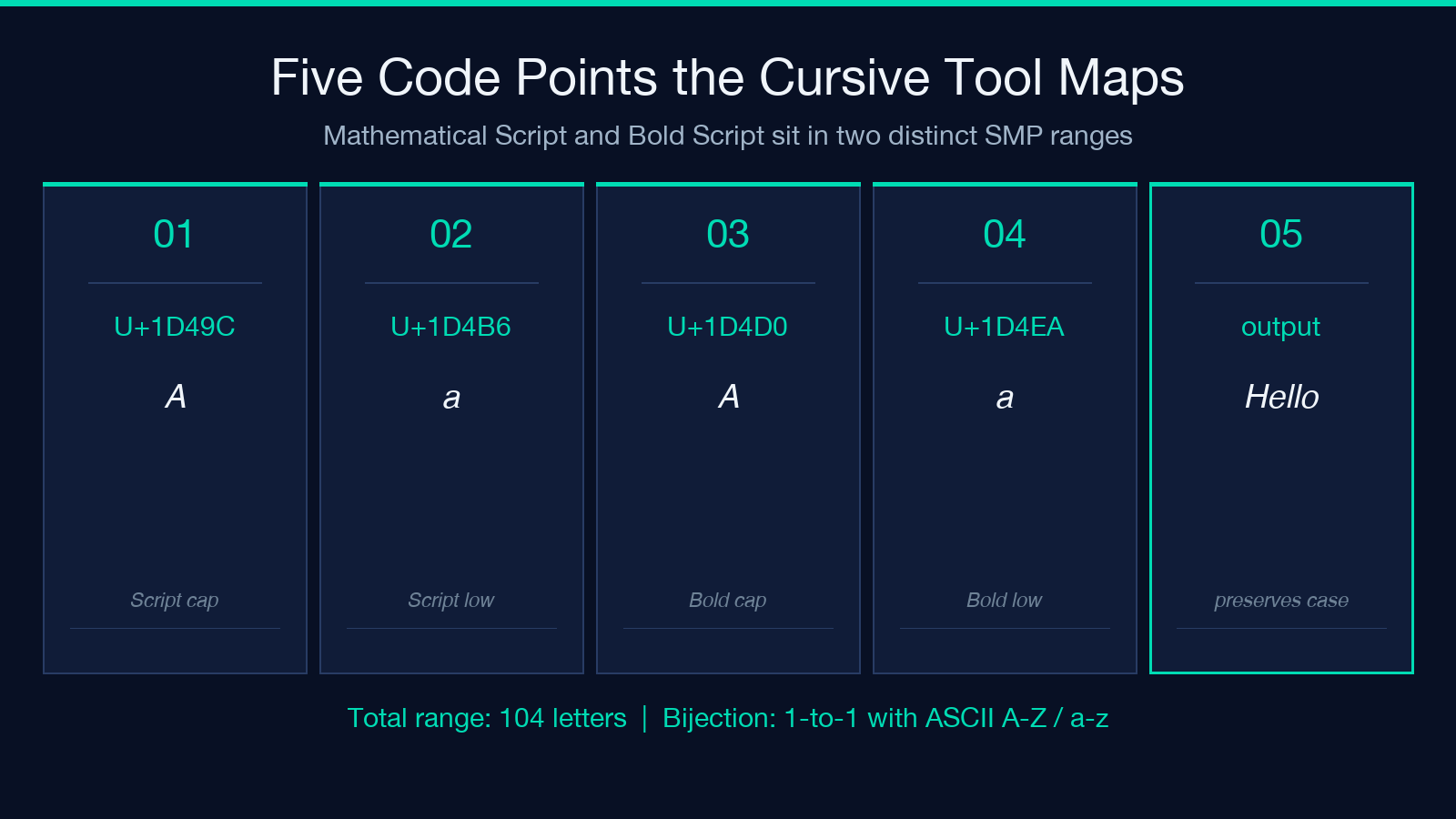
The conversion is per-character substitution: H → ℋ (U+210B), e → 𝑒 (U+1D442), l → 𝑙 (U+1D459), l → 𝑙, o → 𝑜 (U+1D45C). The mapping table is baked into the tool, so the substitution is deterministic and reversible — paste the cursive output back into a reverse-mapping script and you get the original ASCII. There is no hashing, no language model, no fanciness; the “AI” in the category column is purely the typography domain, not a learned model.
The reason this matters in practice: every downstream system that handles your text — Slack, Discord, GitHub, Twitter/X bio, Notion page, Markdown README — already knows how to render those code points because they’re part of the BMP / SMP and shipped in virtually every default font on macOS, Windows 11, iOS, and Android 10+. You don’t embed a stylesheet, you don’t upload a font, you don’t trust the recipient’s browser to support @font-face over an external CDN.
Picking Script versus Bold Script
The two styles aren’t interchangeable — they trade legibility for elegance. Script is the signature look; the lowercase letters have the swooping single-storey a, g, and the descender on y that mimics real penmanship. Bold Script is the legible look; the same single-storey shapes but with thicker strokes that survive at small font sizes and on lower-DPI screens.
Rule of thumb from real usage:
- Profile bios, signoffs, headers — Script. The reader is scanning for tone, not reading for content.
- Body text where the reader might actually parse a word — Bold Script. The thicker strokes keep
clanddfrom fusing at 14px. - Long sentences in either style — break them up. Five-word phrases render fine; fifty-word paragraphs in cursive are exhausting regardless of the font weight.
If you don’t want to choose, drop the input through the Fancy Text Generator which produces both Script and Bold Script in one pass alongside small caps, double-struck, fraktur, and a half-dozen other Unicode decorative styles.
What survives copy-paste, what doesn’t
The good news: the Unicode code points are universally copy-pasteable. They are characters in the SMP, not glyphs in a private font. The bad news: a small number of legacy systems strip non-BMP characters silently or substitute them with ? before display. The known offenders:
Older SMS gateways (pre-RCS) drop everything above U+FFFF. Script lives at U+1D49C and up, so SMS sees only the fallback. Some terminal emulators without proper fontconfig fall back to a ? glyph for the script range. iTerm2, Alacritty, WezTerm, and Windows Terminal all render correctly with a default font; some embedded serial consoles do not. Database columns declared VARCHAR(255) with latin1 collation truncate or reject. Modern utf8mb4 (MySQL) or utf8 (Postgres) handle the SMP cleanly. Email clients with extreme MIME-stripping modes (rare today, mostly legacy Lotus Notes) can demote the code points to ?. Modern Outlook, Gmail web, Apple Mail all preserve them.
The verification trick that catches 99% of these: paste your cursive output into a hex editor or run python -c "print([hex(ord(c)) for c in 'ℋello'])". If you see 0x210b 0x1d442 0x1d459 0x1d459 0x1d45c, the output is intact at the byte level regardless of how any given renderer paints it.
Reversing the conversion
Every Script character maps back to exactly one ASCII letter — the mapping is a bijection on the supported character set (26 uppercase + 26 lowercase). A small Python snippet recovers the original string from a pasted block:
SCRIPT_MAP = {0x1D49C + i: chr(ord('A') + i) for i in range(26)}
SCRIPT_MAP.update({0x1D4B6 + i: chr(ord('a') + i) for i in range(26)})

def from_script(s):
    return ''.join(SCRIPT_MAP.get(ord(c), c) for c in s)

print(from_script('ℋello'))   # Hello
The same trick works for Bold Script with offset 0x1D4D0 / 0x1D4EA. This is useful when you receive a cursive-looking signature in a customer-support email and need to grep it against your user database — you don’t need OCR, you need a one-line decode.
How it compares to a CSS webfont
If you control the rendering environment (your own blog, your SaaS dashboard), a CSS webfont looks better than Script Unicode — sharper kerning, ligatures, italic stress. The Unicode approach wins when you don’t control the renderer:
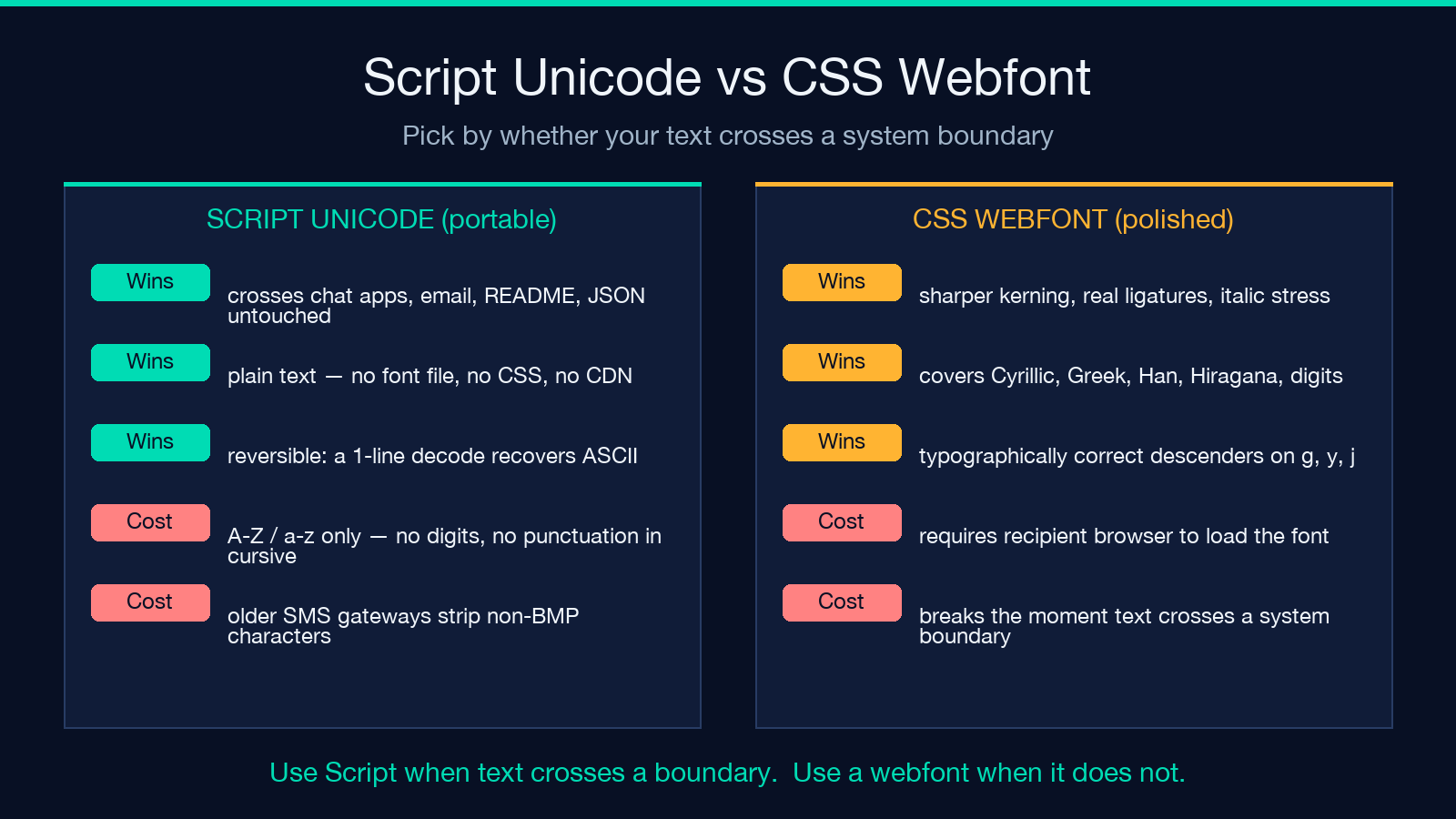
The text will appear in a recipient’s chat app on their phone with their default font. The text will appear in a copy-pasted tweet, an email forwarded three times, a screenshot of a README on GitHub. * The text will appear in plaintext contexts — terminal logs, JSON payloads, database fields — without a font fallback dance.
Treat Script Unicode as the portable cursive. Treat a webfont as the polished cursive. The right choice depends on whether your text crosses a system boundary.
If you want a complementary styler for an entirely different look — boxed characters for status messages — try the Bubble Text tool which wraps characters in ⓐⓑⓒ enclosed glyphs. For italic/bold mixed combinations without the cursive baseline, the Bold & Italic Text tool covers the Mathematical Alphanumeric Symbols italic ranges (U+1D608 onward).
A short correctness checklist before you ship
Three checks catch the embarrassing “looks fine on my machine” cases before they leave the building.
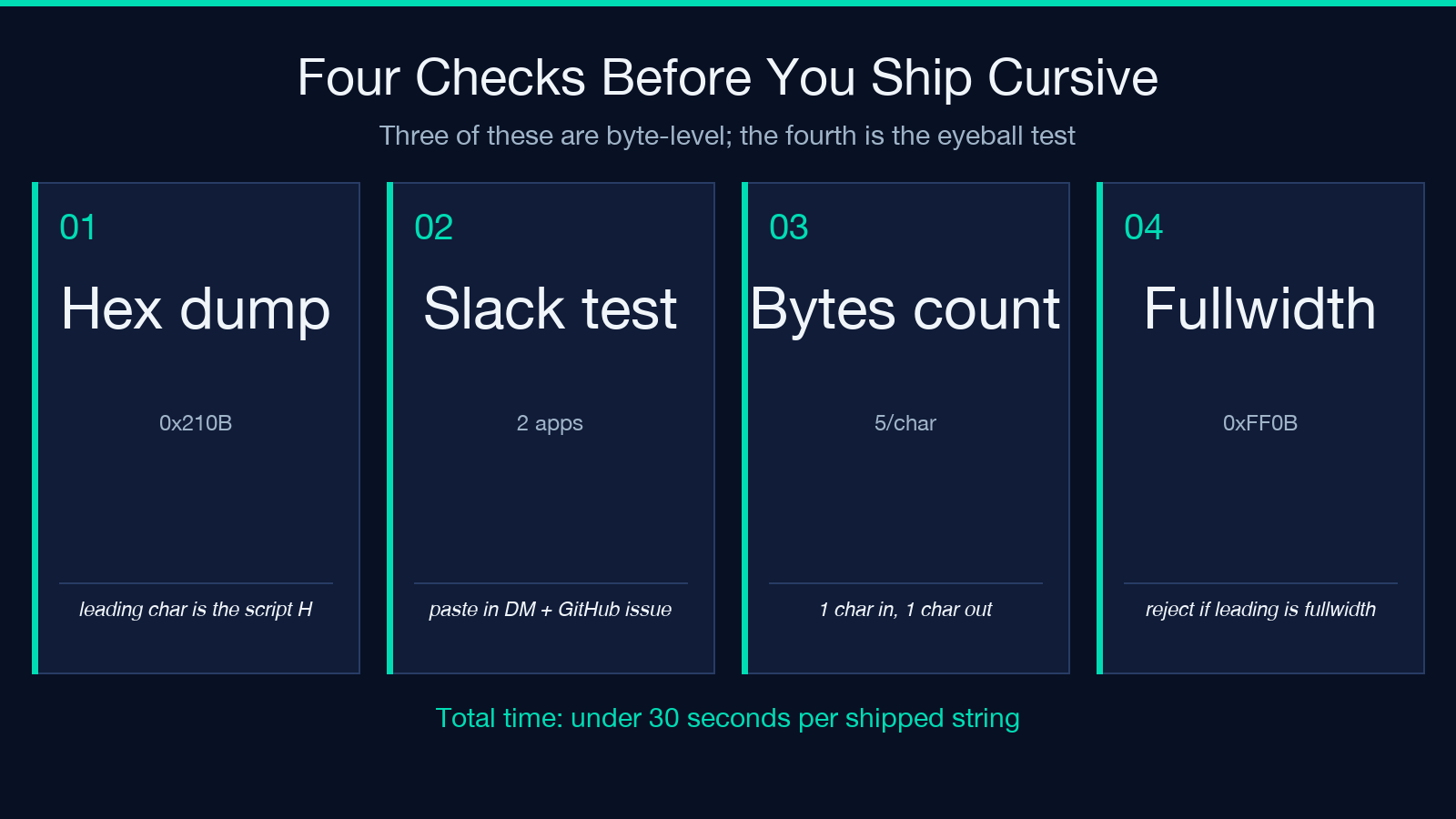
- Hex dump the output. Confirm the leading character is
0x210b(ℋ) not0xff0b(fullwidth plus) — copy-paste from some rich-text editors silently maps to fullwidth forms. - Test paste in two destinations that matter. A Slack DM and a GitHub issue comment. Both render correctly means ~95% of your downstream readers will see the cursive glyphs.
- Check character count. The script version is the same length as the input (1 char → 1 char), but if you pipe through a markdown converter that escapes non-ASCII, the result doubles in bytes. Track byte count, not character count, when posting to APIs.
For a side-by-side compare-and-contrast on different Unicode decorative families (small caps, fraktur, double-struck, monospace), the Fancy Text Generator emits every variant in one block so you can eyeball which family reads cleanest at your target font size.
Where this stops working
Two walls you’ll hit eventually:
Non-Latin scripts. The Mathematical Script range covers only A–Z / a–z. Cyrillic, Greek, Han, Hiragana — none of these have script-style equivalents in the SMP. You need a real webfont for those. Numbers and punctuation. Script capital maps letters only. Numbers render in the default font alongside the script letters, which produces the “𝒞𝓱𝓻𝒾𝓈𝓉𝓂𝒶𝓈 2” jarring-mix effect. Some platforms offer small-caps Unicode for digits, but the cursive baseline has no numeric counterpart. Workaround: spell out numbers, or accept the typographic mismatch.
Both walls are Unicode-table limitations, not tool bugs. The Cursive Text tool is doing exactly what its source-of-truth code-point map says it should.
Closing
The Cursive Text tool at Elysia Tools is the simplest way to add signature-style typography to a profile bio, an email signoff, or a README header without touching CSS or shipping a font file. Paste ASCII, pick a style, copy the result, ship it. For related typographic work the Bold & Italic Text, Bubble Text, Underline Text, and Fancy Text Generator tools cover the rest of the decorative-Unicode family. Explore more tools at elysiatools.com.
