
When your SD-WAN starts dropping the first HTTPS request to a new SaaS endpoint, the culprit is almost never the firewall — it’s a tunnel you forgot you stacked.
A standard Ethernet MTU is 1500 bytes. TCP inside that link assumes MSS = 1460. Stack one tunnel on top, and the math stops working: the inner TCP still believes it has 1460 to play with, but the outer frame is already bigger than the path MTU. The packet gets fragmented in the best case, or dropped silently in the worst case when DF is set. Path-MTU black holes are the single most common cause of “weird, intermittent” connectivity on SD-WAN, k8s CNI overlays, and IPSec VPNs — and the only fast way to diagnose them is to subtract the headers in order, exactly the way the encapsulating host does. The MTU / MSS Path Calculator walks that subtraction for you and tells you not only the effective MSS but the exact DF ping probe size to verify the path.
The headers your tunnel actually adds
Every encapsulation layer in your path consumes bytes from the interface MTU. The trick is the order: subtract outermost first, because that’s how the wire sees the packet. A misordered subtraction — subtracting WireGuard before the outer IP — gives you a wrong MSS and a worse diagnostic.
The canonical layer set is: VLAN 802.1Q (4 B), Q-in-Q (8 B), PPPoE (8 B), GRE (4 B minimum, +4 with Checksum/Key/Sequence), VXLAN (8 B plus the encapsulating host’s outer IP+UDP), Geneve (8 B base, TLVs not included), WireGuard (80 B over IPv4, 100 B over IPv6 with the Noise_IK transport), and IPSec ESP (≈55 B transport-mode AES-GCM, ≈75 B tunnel-mode). None of these come from a guess — the values are pulled straight from the RFCs and the reference implementations of the protocols. If your stack uses a non-standard cipher or carries extra TLVs, the tool exposes a customOverhead field you can add on top.
The non-obvious one is WireGuard’s IPv4-vs-IPv6 split: 80 B on IPv4 (32 outer IP + 8 outer UDP + 32 WG data msg + 8 poly1305 tag) versus 100 B on IPv6 (60 outer IP instead of 32). Many engineers budget a flat 80 B for both and lose 20 B per packet on IPv6 paths — a recurring tax that compounds when the underlay is also doing v6/v4 translation. If you’re sizing a path that crosses both protocol families, the IPv4 to IPv6 converter is a quick way to confirm address families before you commit to a tunnel MTU.
What “effective MSS” really means
The number most engineers ask for — and the one that decides whether TCP fast-retransmit triggers or stalls — is the effective MSS. It’s not the interface MTU, not the path MTU, and not the wire MTU; it’s the inner-TCP payload size after the entire stack.
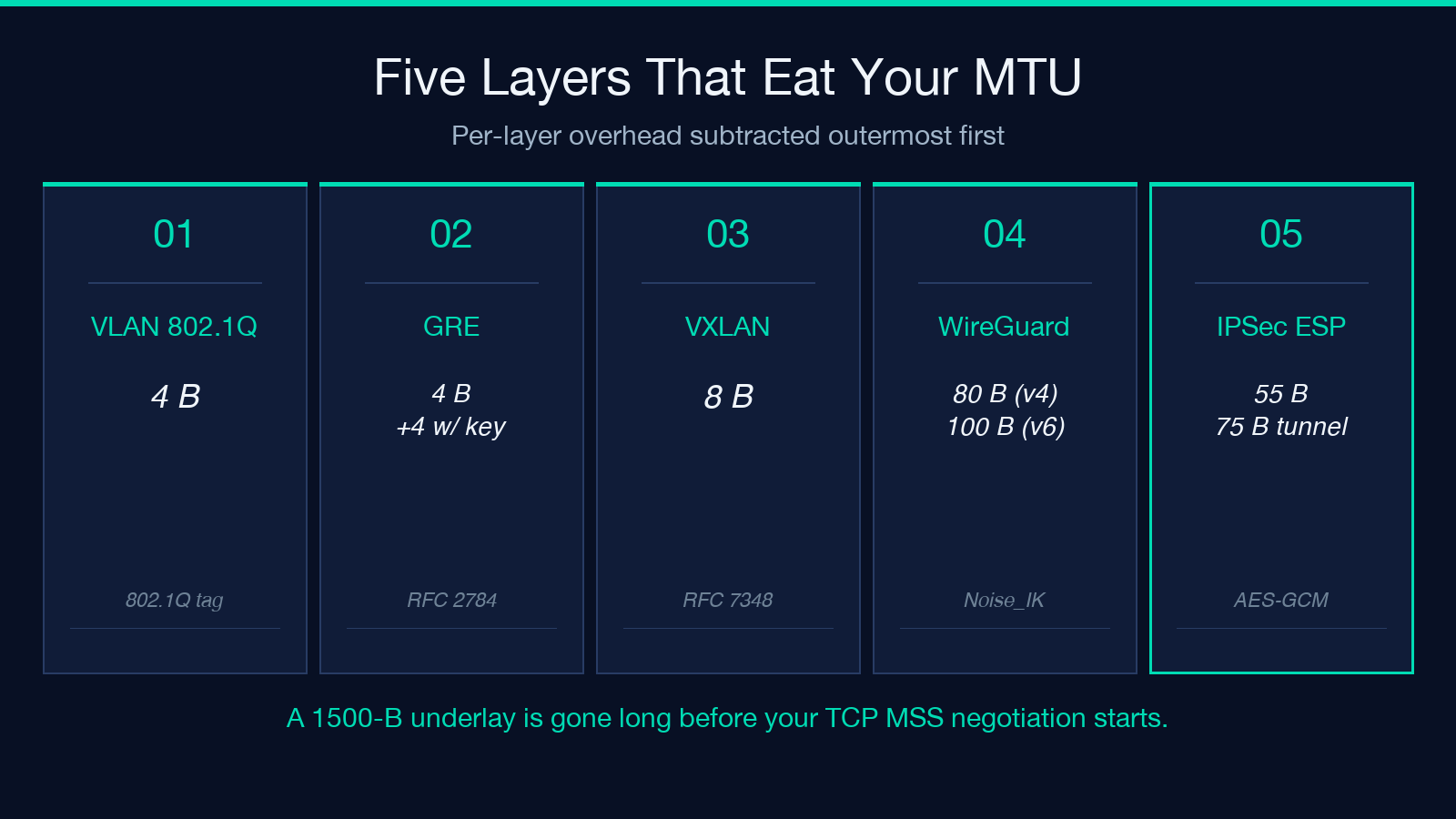
The recipe is straightforward: start from the interface MTU, subtract each layer in order from outer to inner, subtract the IP header (20 B IPv4 or 40 B IPv6), subtract the TCP header (20 B default; up to 60 B with options like timestamps or SACK). What’s left is the effective MSS — and every TCP socket opened across that path negotiates its segment size down to this number during the three-way handshake.
The threshold to remember is 1360. Below 1360, TCP performance degrades on long-fat pipes (LFNs) because the receive window fills before the next ACK arrives, and PMTUD is more likely to fail because ICMP “datagram too big” replies get filtered by intermediate firewalls. The calculator surfaces a warning when the effective MSS dips below 1360, and it’s saved me more than once from chasing “the application is slow” tickets that turned out to be a VXLAN-over-WireGuard stack eating 88 bytes per packet.
Stacks you’ll actually see in the wild
Three stacks account for most of the broken-path tickets a network engineer will see this year. None of them are exotic; all three are common enough to memorize.
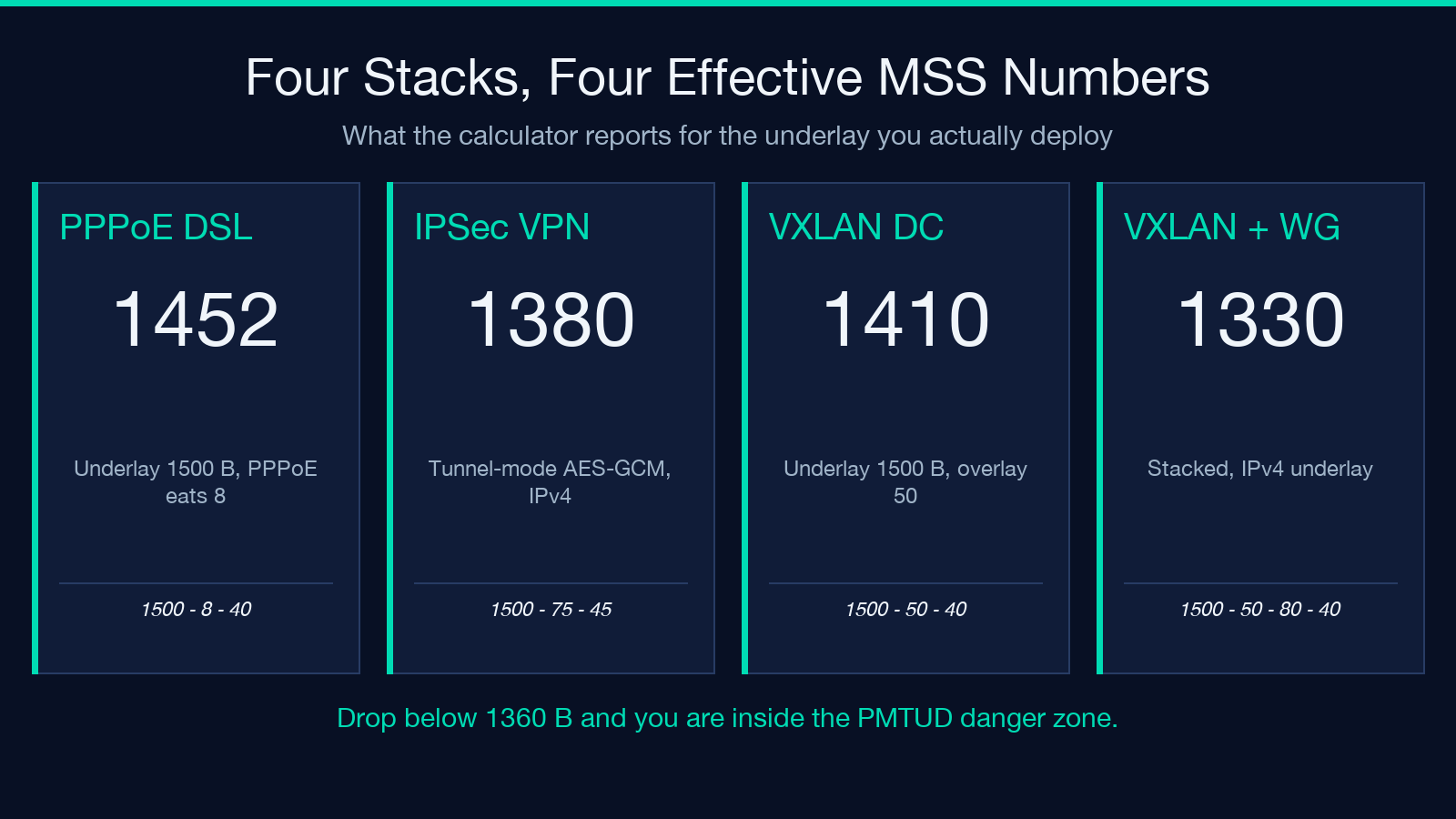
PPPoE DSL. Physical link carries 1500 B; PPPoE steals 8, leaving an effective MTU of 1492 and a TCP MSS of 1452. If you’ve ever had a website work fine over LTE and break on a DSL line, this is the difference — many remote endpoints do not send ICMP “datagram too big” back through the PPPoE tunnel, and PMTUD black-holes. The fix is to clamp MSS at 1452 on the customer-premises equipment.
VXLAN over a 1500-B underlay. VXLAN itself is 8 B, but the encapsulating host adds an outer UDP (8 B) and an outer IP (20 B IPv4), for 50 B total. Effective MTU on the overlay becomes 1450; effective MSS on the inner TCP becomes 1410. If you don’t set the overlay MTU explicitly, kernel defaults usually push 1500 B down the VXLAN interface and the underlay MTU rejects them.
VXLAN inside WireGuard, on a k8s CNI. This is the layered-stack case the calculator is best at. With VXLAN (+50 B for outer IP+UDP+VXLAN) inside WireGuard (+80 B for IPv4), the underlay 1500 B becomes 1500 − 50 − 80 = 1370 B effective MTU. Effective MSS drops to 1330 — already past the 1360-B “watch out” line for an LFN. You’ll see throughput collapse the moment a single TCP flow crosses 100 ms RTT. If you’re migrating a non-Kubernetes WireGuard deployment into a CNI context, the WireGuard/OpenVPN to Clash and sing-box Config Bridge makes the config translation auditable before you commit it to a cluster.
The DF ping probe and why exact size matters
PMTUD is the protocol path that should detect all of this in real time. It works when ICMP “datagram too big” replies make it back to the sender. It fails when those replies are filtered, rate-limited, or generated by a middlebox that doesn’t know the encapsulation stack. In those failure modes, the only reliable diagnostic is a Don’t-Fragment ping that walks the size down from the interface MTU until the packet goes through.
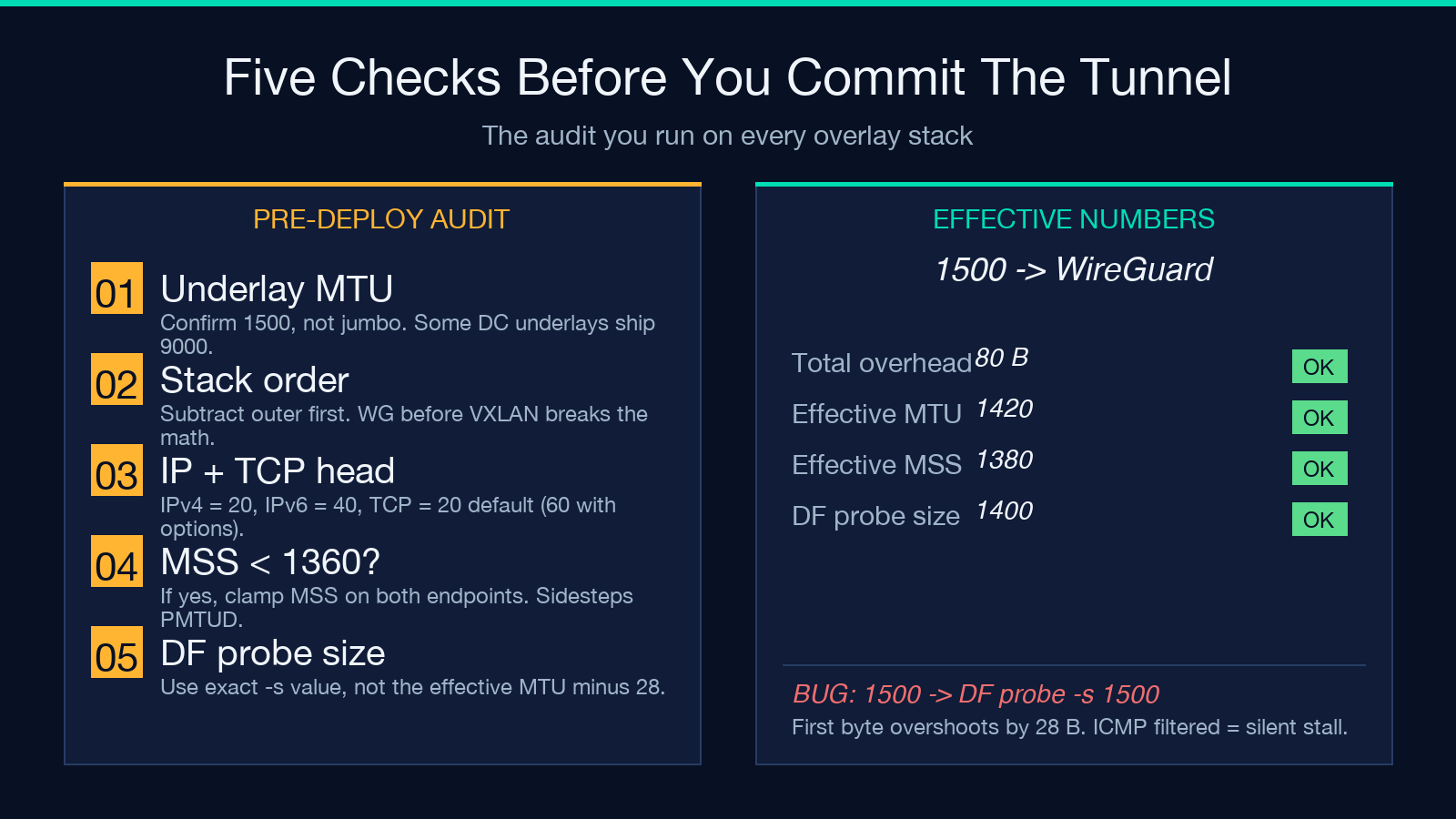
The exact probe size matters because you want to find the smallest failing packet, not just “any” failing packet. The Linux recipe is ping -M do -s <size> <host> — the -M do flag sets DF, the -s <size> is the payload size (not including IP + ICMP headers). On a 1500-B MTU link, you start at -s 1472 (1472 payload + 20 IP + 8 ICMP = 1500) and walk down by 2 until the ping succeeds. On Windows the equivalent is ping -f -l <size> where -l is the payload size.
The calculator reports the exact probe size for every stack it computes. That’s the value you paste into the ping command, not the effective MTU. A common audit-cycle error is to ping with the effective MTU as the -s argument, which is 28 B too small and produces a false-positive “path MTU = 1430” diagnosis.
WireGuard interface MTU: the 80-B / 100-B rule
WireGuard has a confusingly named MTU knob — the MTU you set on the wg0 interface is the inner MTU, not the outer. Setting it to 1500 produces 1580-B outer frames on IPv4 and 1600-B on IPv6, both of which exceed the underlay MTU and trigger fragmentation.
The rule is clean: set the WireGuard interface MTU to outer MTU − 80 for IPv4 transports or outer MTU − 100 for IPv6. On a 1500-B underlay, that’s MTU = 1420 (IPv4) or MTU = 1400 (IPv6). Some references cite 1380 for IPv6 to leave extra headroom for variable TLVs and the poly1305 tag padding — that’s defensible if your peer uses a non-default cipher suite, but 1400 is the right starting point for the common Noise_IK transport.
If you skip this step, you’ll see two symptoms. First, every large scp or rsync stalls every ~64 KB with a retransmit. Second, your wg show interface counters show a steady drip of “sendmsg: message too long” errors that you can only catch by reading dmesg. Both are double-fragmentation — the inner IP gets fragmented to fit WireGuard, and the outer IP gets fragmented to fit the underlay.
IPSec transport vs tunnel mode: the 20-B difference
IPSec ESP has two modes that look similar in a config file but consume different amounts of overhead. Transport mode encrypts the payload of the original IP packet and adds ESP headers in place — about 55 B for AES-GCM (SPI 4 + Seq 4 + IV 8 + 16-byte ICV + 2-byte trailer, plus padding to the cipher block size). Tunnel mode wraps the entire original IP packet inside a new outer IP packet — about 75 B total, with the +20 B going to the new outer IP header.
The rule of thumb is: use transport mode when both endpoints are the encrypting peers (host-to-host VPN, no NAT), use tunnel mode when you’re bridging two networks across a gateway (site-to-site VPN, branch office). Mixing them up is a classic configuration error — a transport-mode policy deployed at a gateway won’t route the inner packet back to its origin subnet because there’s no outer IP header to consult.
When the calculator tells you MSS < 1360
The calculator emits a warning whenever the effective MSS drops below 1360. That’s not a hard fail, but it’s a hard recommendation to clamp the MSS on both endpoints using iptables’ TCPMSS target, the nftables equivalent, or the application’s tcp_mss knob. Clamping tells the inner TCP “negotiate MSS at this value even if PMTUD says you can have more” — and it sidesteps the entire PMTUD black-hole class.
The Linux iptables recipe is:
iptables -t mangle -A FORWARD -p tcp --tcp-flags SYN,RST SYN -j TCPMSS --set-mss 1360Or for nftables:
nft add rule ip mangle forward tcp flags syn tcp option maxseg size set 1360The value you clamp to is the calculator’s reported effective MSS, not the path MTU, not the interface MTU. Setting it to 1460 (the standard TCP MSS for a non-encapsulated path) when the effective MSS is 1330 is exactly the bug that produces the “wireless is fine, VPN is slow” ticket.
Why this matters more in 2026 than in 2016
Two trends have made the MTU story worse. First, the universal adoption of WireGuard for site-to-site and remote-access VPNs added a flat 80–100 B to every path that didn’t have it before. Second, the rise of k8s CNI overlays (Calico with VXLAN, Cilium with VXLAN or Geneve, Flannel) means every pod-to-pod flow in a cluster now crosses at least one encapsulation boundary that didn’t exist five years ago. The combination — WireGuard for the edge, VXLAN inside the cluster — is the layered stack where PMTUD failures are most common, and the calculator’s specific job is to make that stack legible before you deploy it.
If you only have time to memorize one number, make it the calculator’s reported effective MSS for your production VPN topology. It is the answer to the question “what’s the largest TCP segment my application can actually send without fragmenting or stalling” — and getting that number right is the difference between a service that works on the first deploy and a service that gets a Sev-2 ticket on day three.
For engineers who need to map an arbitrary byte budget back to a real IP/TCP context (a common step when validating that a clamp value is consistent across the stack), the IPv4 to IPv6 converter and the broader set of network utilities on Elysia Tools cover the address-side checks that usually come right after the MTU pass.
