
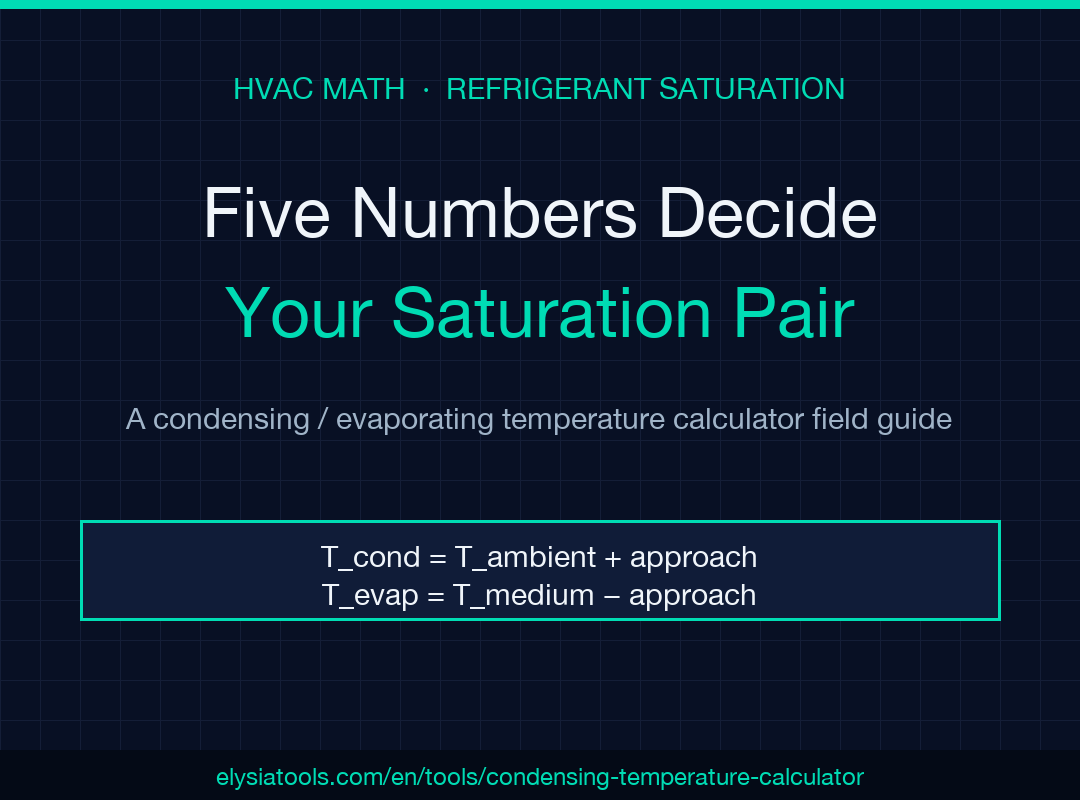
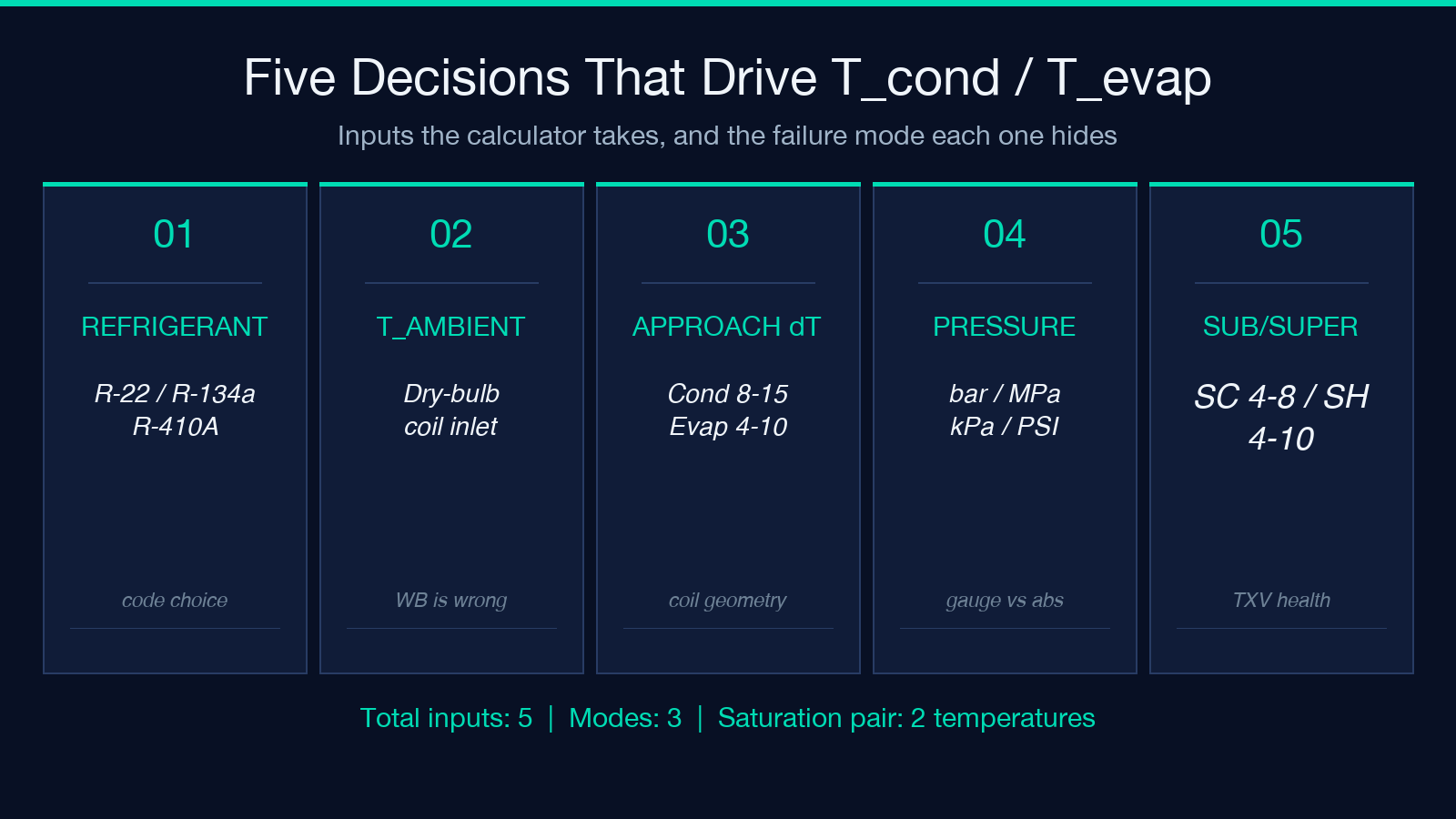
Five numbers decide whether your refrigeration circuit holds its setpoint or chases it. The condensing / evaporating temperature calculator is the kind of small math utility that looks trivial on paper — T_cond = T_ambient + approach ΔT, T_evap = T_medium − approach ΔT, P_sat inverted through Antoine — but in practice each of those five inputs (ambient dry-bulb, condenser approach, evaporator approach, refrigerant choice, and the unit grammar you typed) carries a different failure mode. A 2 °C ambient drift, a refrigerant code typo between R-22 and R-410A, or a bar/MPa/PSI mix can push your predicted saturation temperature by 10 °C or more, and every downstream sizing decision (compressor selection, TXV bulb charge, liquid-line pressure drop, defrost interval) inherits that error. This guide walks the five decision points that decide whether the calculator gives you a clean saturation pair (T_cond ≈ 38 °C, T_evap ≈ 4 °C) or a number you wire into a system that quietly under-performs for the next ten years.
Try the tool first at the Condensing / Evaporating Temperature Calculator — five inputs, three modes, one numeric output that becomes the spine of every HVAC heat-load calculation that follows.
What the Two Temperatures Actually Represent
T_cond is the saturation temperature corresponding to the high-side refrigerant pressure inside the condenser coil; below it the refrigerant condenses, above it the coil is superheating the vapor instead of liquefying it. T_evap is the saturation temperature corresponding to the low-side pressure inside the evaporator; below it the refrigerant is boiling off, above it the coil is just sensible-cooling the air without phase change. Both numbers are target states, not measured properties — they are what the system should be doing at the refrigerant’s saturation curve, derived from how hard the coil is being asked to push heat across its boundary layer.
The calculator returns these in three operating modes that correspond to three different things you might already know on site: the coil approach (you measured air-on / air-off and refrigerant-side temperatures), the measured saturated pressures (you have gauge readings on the high and low side and need to look up the corresponding saturation temperatures for a known refrigerant), or the subcooling / superheat (you have a thermometer on the liquid line and the suction line and want to back out the saturation pair). Each mode is internally consistent but the inputs come from different instruments — picking the right mode for what you actually measured is the first decision.
The Coil Approach Mode — Where Most Field Mistakes Start
Approach mode is the deceptively simple case: T_cond = T_ambient + condenser approach ΔT, T_evap = T_medium − evaporator approach ΔT. The two ΔT values represent the temperature difference between the refrigerant and the secondary fluid (air on the condenser side, air or water on the evaporator side) at the coil boundary. Industry rule-of-thumb values sit at 8-15 °C condenser approach for air-cooled condensers and 4-10 °C evaporator approach for DX evaporators, but the right number depends on the specific coil face velocity, fin spacing, and ambient conditions.
The most common field mistake is treating the ambient dry-bulb as if it were the wet-bulb on the condenser side. For an air-cooled condenser rejecting to outdoor air, the relevant ambient is the dry-bulb at the coil inlet; using a relative-humidity-derived wet-bulb instead will under-predict T_cond by 1-3 °C and quietly starve the high side of refrigerant subcooling margin. On the evaporator side, the symmetric mistake is using the leaving-air wet-bulb as T_medium instead of the entering-air dry-bulb — wet-bulb readings are appropriate for adiabatic saturation analysis but not for the sensible approach calculation the tool performs. The calculator’s coil-approach path is deterministic once the ambient and ΔT are pinned; the failure modes are upstream of the math.
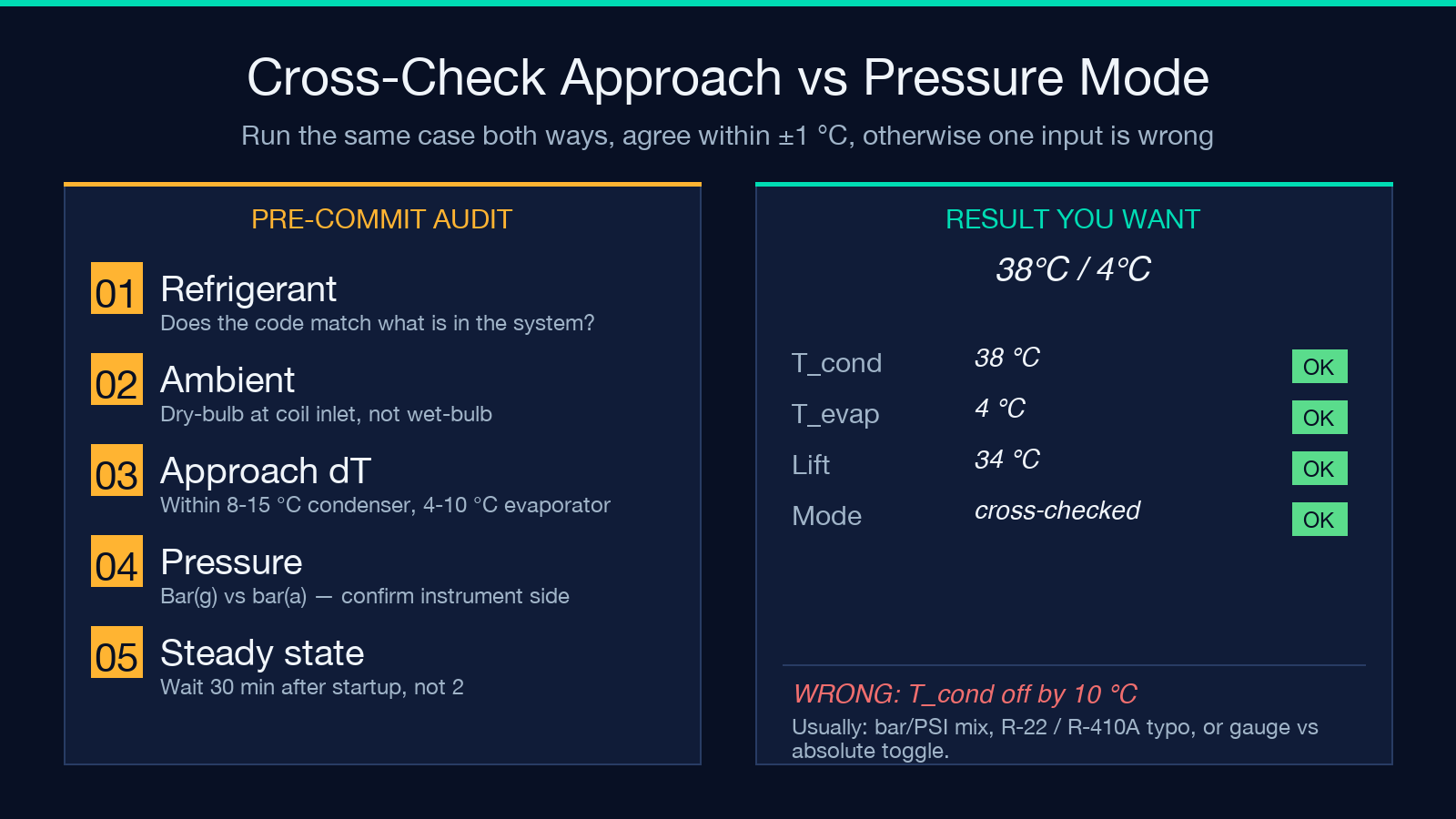
If you want to cross-validate approach-mode results against a second method, run the same case through the pressure-inversion mode and check that the two T_cond values agree to within ±1 °C — if they don’t, one of your inputs is off by a refrigerant code, a unit, or a sign.
The Pressure Inversion Mode — Antoine Fits and Refrigerant Choice
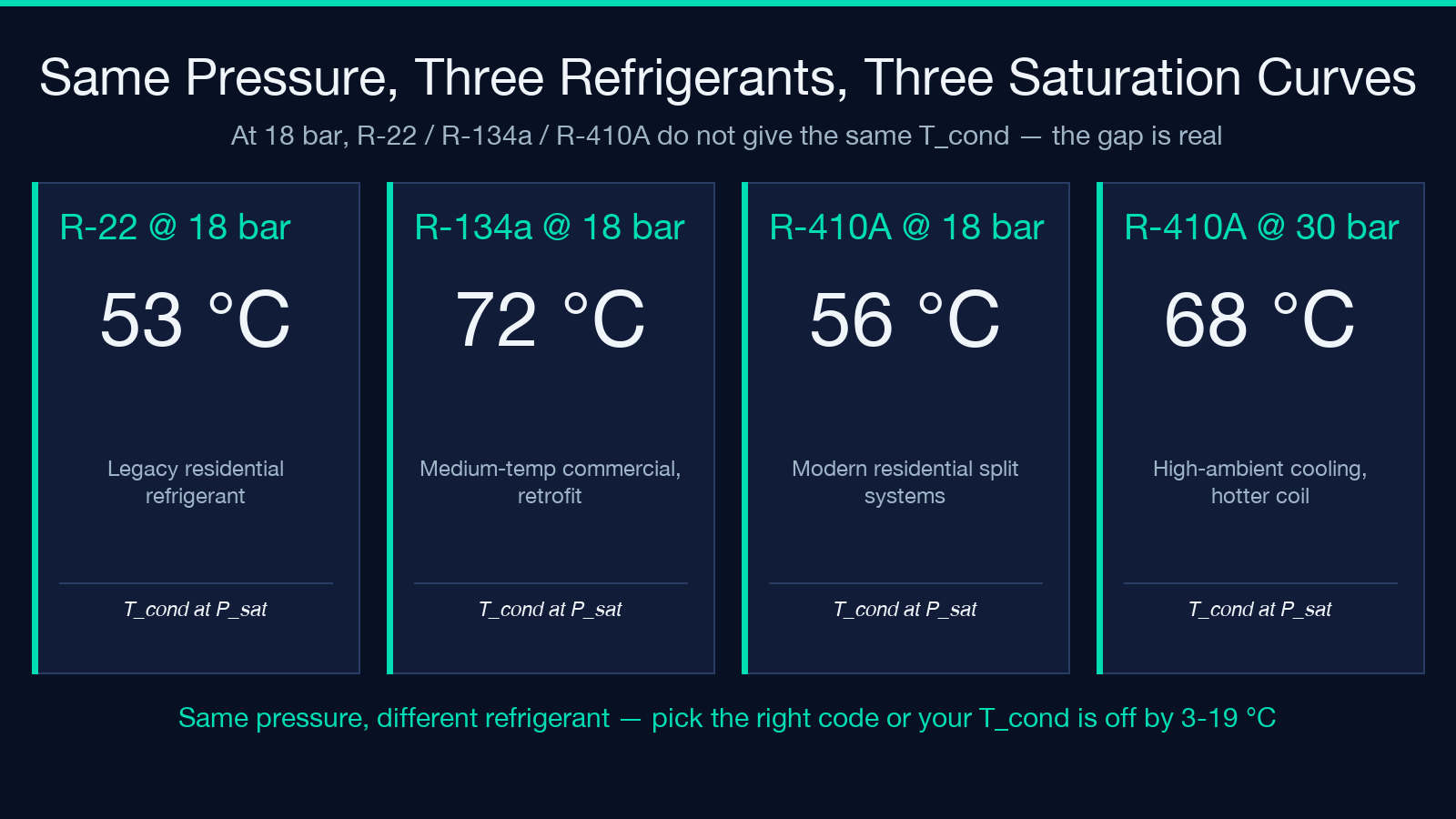
Pressure mode inverts P_sat(T) for a known refrigerant using a least-squares Antoine fit. Given a high-side gauge reading in bar/MPa/kPa/PSI and a refrigerant code (R-22, R-134a, or R-410A), the tool returns the saturation temperature at that pressure; do the same on the low side and you have your T_cond / T_evap pair. The refrigerant code matters more than most field engineers realize: at 18 bar, R-22 saturates around 53 °C and R-410A around 56 °C — a 3 °C difference for the same pressure reading because the two refrigerants have different critical points and different saturation curves in that region.
Gauge vs absolute pressure is the other silent killer in pressure mode. The tool defaults to gauge pressure with an atmospheric offset of 1.01325 bar; if you typed a value you measured with a manifold gauge set, that’s correct. If you typed a value from a transducer that already outputs absolute pressure, your T_cond will come out 1-3 °C low and your T_evap will come out several degrees off because the low-side pressure in absolute terms is much closer to atmospheric. The calculator exposes both unit modes explicitly so you can verify before reading the result — read the displayed unit (bar(g) vs bar(a)) and confirm it matches what your instrument actually reports.
The Subcooling and Superheat Mode — Reading the Liquid and Suction Lines
When you have a clamp thermometer or a surface thermocouple but no pressure gauge, the subcooling / superheat mode is the path. T_cond = T_liquid − SC, where T_liquid is the temperature of the refrigerant in the liquid line at the condenser outlet and SC is the subcooling (typically 4-8 °C for a properly charged system); T_evap = T_suction − SH, where T_suction is the suction-line temperature at the evaporator outlet and SH is the superheat (typically 4-10 °C for a TXV system, higher for a fixed-orifice system). This mode is what service technicians use when they don’t want to break into the refrigerant circuit with gauges.
The subtlety here is that subcooling and superheat both have a target range, not a single value. A system showing 3 °C subcooling may be undercharged; a system showing 12 °C subcooling may have a TXV overfeeding the evaporator. The calculator returns the saturation pair from your measured subcooling/superheat values, but it doesn’t tell you whether those values are healthy — that judgement call stays with the technician who knows whether the system has been recently topped off, whether the condenser coil is clean, and whether the load has been stable for the last 30 minutes. Use the calculator to read the saturation pair; use your eye and your service history to interpret it.
Unit Grammar — The Hidden Source of 10 °C Errors
The tool accepts temperature in °C, K, or °F and pressure in bar, MPa, kPa, or PSI, with explicit gauge vs absolute toggle. Every input has a unit label next to it. This sounds like a UX nicety but it is actually the most common source of field errors: a technician typing 18 when they meant 18 PSI (absolute) and the calculator defaulting to 18 bar (gauge) gets T_cond ≈ 200 °C instead of 38 °C, a 162 °C error that would have been obvious if the unit label had been read.
The same issue applies to temperature: the tool reports results in °C, but if you typed 80 °F and forgot to switch the unit, the calculator reads it as 80 °C and inverts the pressure curve accordingly. The defensive pattern is to type the value in the unit you measured it, then read the result in the unit you need to report — never convert in your head before typing. The calculator does the conversion, and you avoid a class of sign-and-magnitude errors that no automated audit will catch because the input still parses as a valid number.
Reading the Result — Three Numbers You Get, Three You Need
The tool returns three primary numbers: T_cond, T_evap, and the implied lift ΔT_lift = T_cond − T_evap (the thermodynamic lift the compressor must work against). It also reports the saturation pressures at those temperatures and the refrigerant’s critical temperature as a sanity check (you should never see T_cond > T_crit for a subcritical cycle). Three numbers you need downstream that the tool does not give you directly: the compressor discharge temperature (which depends on T_cond plus the compression ratio and the polytropic exponent), the actual refrigerant mass flow rate (which depends on the compressor’s volumetric efficiency at the operating pressure ratio), and the required condenser fan / pump power (which is a heat-transfer problem in its own right).
The right way to use the calculator is as the first step in a sizing chain, not the last. Take T_cond and T_evap, compute the lift, look up the compressor map, compute the mass flow, then size the condenser and evaporator fans for the heat rejection and absorption rates implied by the duty. Anyone who treats the tool as a single-shot answer and wires those two numbers into a compressor selection curve is missing the system-level picture that the calculator is designed to feed.
Verifying Against a Second Method — The Cross-Check
The cheapest sanity check on the calculator’s output is to compute the same T_cond two different ways. If you have approach-mode inputs (T_ambient + ΔT) and you also have a gauge reading on the high side, run both modes and compare: the two T_cond values should agree to within ±1 °C. If they don’t agree, the disagreement localizes the error — bar vs PSI confusion, R-22 vs R-410A typo, gauge vs absolute mis-toggle, or an approach ΔT that doesn’t match the coil’s actual thermal performance. The cross-check costs one extra minute and routinely catches the kinds of input errors that take a service call to find otherwise.
A second sanity check is the lift ratio: for a typical R-410A residential split system, T_cond ≈ 35-45 °C and T_evap ≈ 0-7 °C, giving a lift of roughly 30-45 °C and a compression ratio around 2.5-3.5. If your result lands outside that envelope, something is off — either the inputs reflect an unusual duty (low-ambient cooling, high-temperature refrigeration, a heat pump in heating mode) or one of the five decisions above was mis-typed. The envelope is not a hard limit, but it is a useful tripwire.
When to Trust the Calculator, When to Walk Away
The calculator is reliable when the five decisions are honest: the refrigerant code matches what’s in the system, the unit grammar matches the instrument reading, the ambient temperature is the dry-bulb at the coil inlet, the gauge reading is in the same reference frame (gauge or absolute) as the tool’s default, and the subcooling/superheat measurement is at thermal steady state (after the system has been running long enough for the liquid and suction lines to stabilize). It is unreliable when one of those decisions has been glossed — most commonly the refrigerant code (when someone services an R-410A system with the same R-22 gauge readings), the unit (when someone mixes bar and PSI), or the steady-state assumption (when someone measures subcooling two minutes after startup and the liquid line is still moving).
The right discipline is to treat the calculator as a precise tool fed by imprecise inputs, and to budget one verification step (the cross-check above, or a manual saturation-table lookup) for every production decision that depends on the output. For preliminary sizing and educational use the calculator alone is fine; for commissioning a new system or diagnosing a chronic performance problem, the cross-check turns the calculator from a guess into a measurement.
The full calculator with all three operating modes is at Elysia Tools; for related refrigerant and HVAC tools browse the Math & Numbers category. The Antoine coefficients behind the pressure-inversion mode are tabulated in the NIST REFPROP database and the ASHRAE Handbook of Fundamentals; if you need a refrigerant outside the three the tool ships with, those references will let you reproduce the same math with a different saturation curve.
