
That single invisible character at the start of your CSV is a UTF-8 BOM, and Excel will happily hide it from you while Python, Node, and your JSON parser trip over it. When a downstream tool reads your file expecting clean UTF-8, the leading EF BB BF sequence can quietly break header detection, mis-align column names by one byte, or survive to corrupt the first JSON key in an API payload. The fix is mechanical, but only if you know which BOM you have and where it lives. This field guide walks through how the four BOM flavors show up in real files, the four detection rules the BOM Character Remover uses, and the three-step audit that catches the leftover bytes your editor never showed you.
What a BOM Actually Is
A Byte Order Mark is a 2-to-4 byte signature at the very start of a text file that tells the reader two things: which Unicode encoding the file uses, and in the case of UTF-16 and UTF-32, which byte order (big-endian vs little-endian) the multi-byte characters are stored in. The four BOMs you will see in practice:
- UTF-8 BOM —
EF BB BF(3 bytes). Optional in the UTF-8 standard; never required for decoding, but many Windows tools still prepend it. - UTF-16 LE BOM —
FF FE(2 bytes). Indicates little-endian UTF-16. - UTF-16 BE BOM —
FE FF(2 bytes). Indicates big-endian UTF-16. - UTF-32 LE/BE BOM —
FF FE 00 00or00 00 FE FF(4 bytes). Rare in CSV/JSON but shows up in legacy database exports.
The trap is that the UTF-8 BOM is invisible in most editors, terminal viewers, and even head -c output when you are not looking for it byte-by-byte. Excel happily opens a UTF-8-BOM-prefixed CSV, ignores the leading bytes, and saves it back the same way; every other parser your team uses sees \ufeffProduct as the first column name.
Where the BOM Comes From
Three origin stories account for almost every BOM-prefixed file that lands in your pipeline:
- Windows Notepad save-as-UTF-8 — Notepad on Windows 10 and 11 defaults to UTF-8 with BOM for plain-text saves. If your authors use Notepad, every
.txt,.csv, and.mdfile they produce will carry the 3-byte prefix unless they explicitly switch encoding in the Save dialog. - Excel CSV export — Excel exports UTF-16-BE-prefixed CSV by default on most Windows installations, even when the source spreadsheet is plain ASCII. This is the most common cause of “Excel file works, Python pandas breaks” failures.
- Legacy database exports — SQL Server’s
bcpand some MySQLSELECT ... INTO OUTFILEconfigurations prepend a UTF-8 BOM on UTF-8 dumps. The bytes survive every subsequentcat,grep, andawkpass.
Detection without a hex viewer is the missing step. Most engineers discover the BOM only when a downstream tool errors out, then patch the file in place without checking whether the source pipeline is still emitting BOMs on every save. The proper fix is detection at the source, not surgery on every output.
The Four Detection Rules
The BOM Character Remover detects each BOM by inspecting the first 2, 3, or 4 bytes of the file in raw binary mode — head -c 4 | xxd is the manual equivalent. For each BOM flavor the tool records:
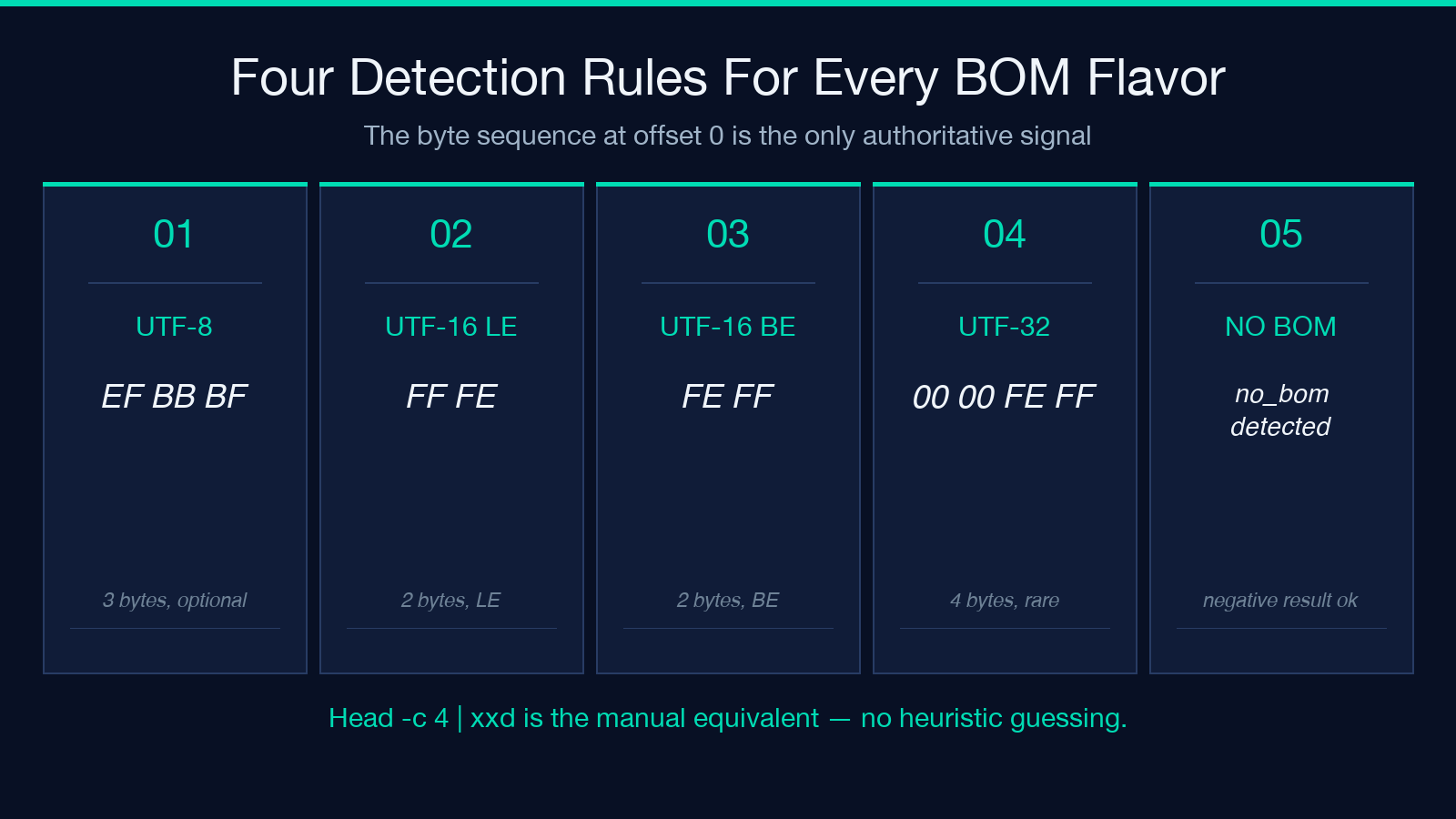
- The detected encoding (UTF-8 / UTF-16 LE / UTF-16 BE / UTF-32 LE / UTF-32 BE)
- The byte sequence, in hex, with offsets
- A “BOM present at offset 0” flag with byte count
When the file has no BOM, the tool reports no_bom_detected with an empty hex dump and a zero-byte count. This negative result is just as useful as a positive one — it lets you confirm a file is clean UTF-8 before it enters a strict pipeline. The detection logic is byte-exact, not heuristic: it does not try to infer the encoding from content, only from the leading byte sequence. This is the right trade-off for the BOM-removal use case because the BOM is by definition the first thing in the file.
The Four Removal Modes
Once a BOM is detected, four removal modes cover every realistic workflow:
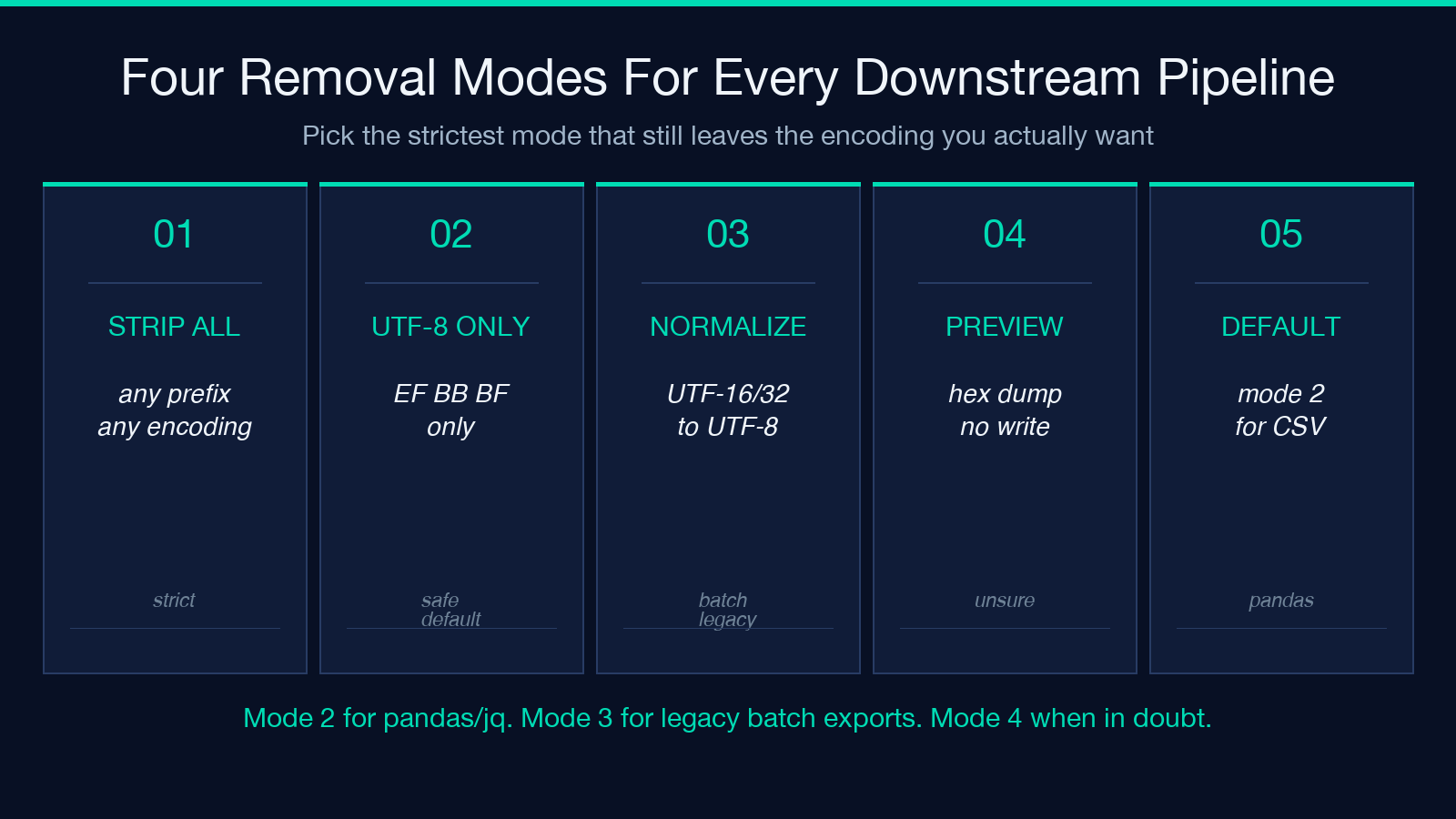
- Strip all BOMs — removes every leading BOM regardless of encoding. Use this when downstream tools strictly forbid any prefix and you do not care which encoding the file is actually in.
- Strip UTF-8 only — removes only
EF BB BF. Keeps the file UTF-8 if it already was; does not touch UTF-16 or UTF-32 files. This is the safe default for Excel-exported CSVs destined for pandas or jq. - Normalize to UTF-8 (no BOM) — strips the BOM AND transcodes UTF-16/UTF-32 content to UTF-8 in one pass. Use this when you need to standardize an entire batch of legacy exports.
- Preview-only mode — leaves the file untouched but renders a hex dump of the first 16 bytes with annotations showing which bytes are the BOM, which are content, and where the first printable character starts. Use this when you are not sure whether the bytes are a BOM or just legacy control characters.
Each mode preserves the file’s non-BOM content byte-for-byte. There is no transcoding unless you explicitly pick the normalize mode. For a CSV headed into pandas or for a JSON file headed into a strict parser, mode 2 is usually the right answer; for a batch of mixed legacy files that all need to land in the same S3 prefix, mode 3 saves you a second tool.
The Three-Step Audit That Catches Leftover Bytes
A single BOM strip is not enough. After running the BOM Character Remover on a file, run this three-step audit to confirm the cleanup is actually clean and the source pipeline is not silently re-emitting BOMs:
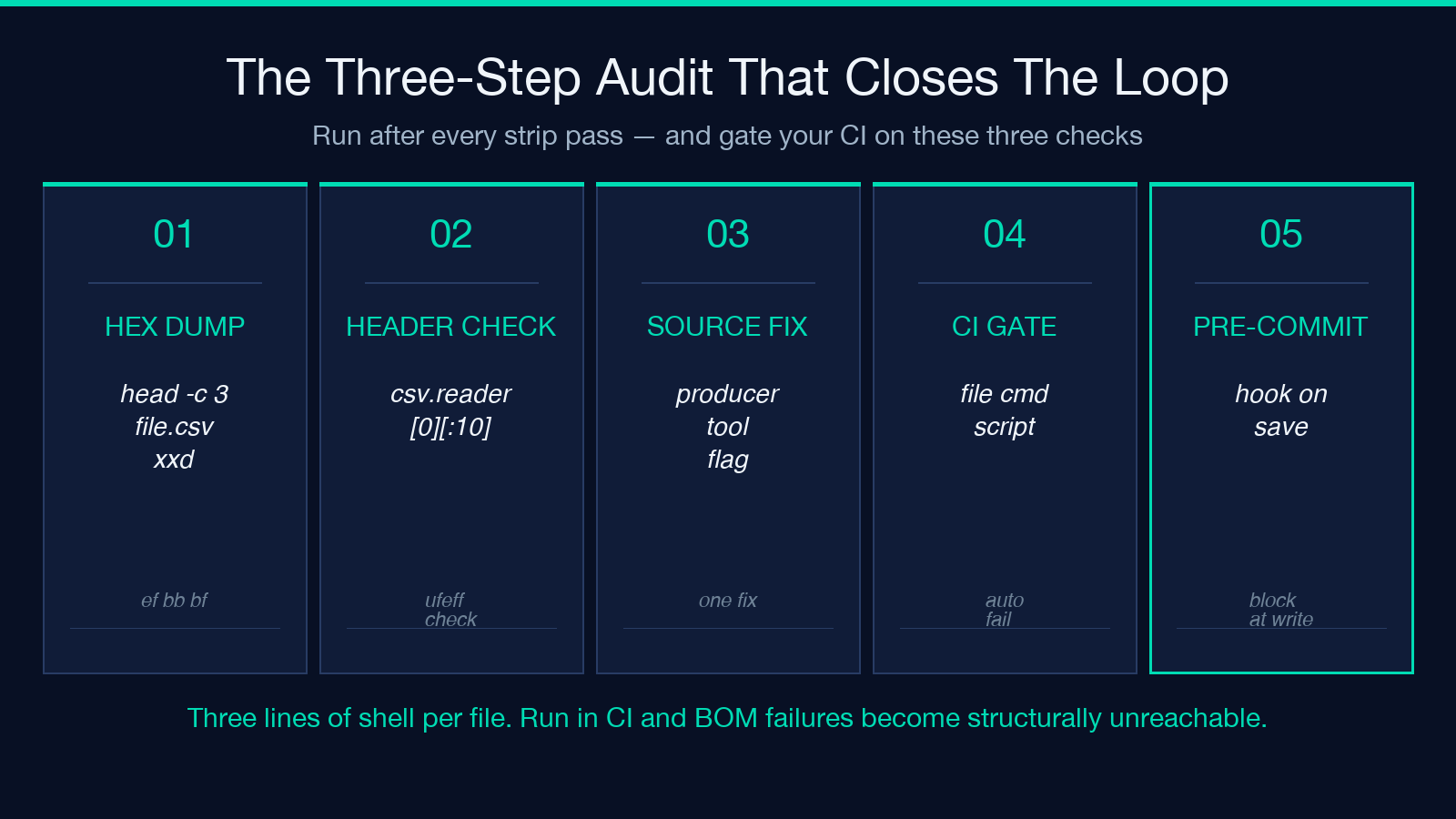
- Hex dump the first 16 bytes —
head -c 16 file.csv | xxd. The first three bytes must NOT beef bb bf. If they are, the file was not actually overwritten, or the BOM was reintroduced by a tool in your chain. - Print the first character of column headers — in Python:
next(csv.reader(open('file.csv')))and inspect the first element. It must NOT start with\ufeff. If pandas is your downstream,pd.read_csv('file.csv').columns[0]should also be clean. - Spot-check the source pipeline — open the file in Notepad, click Save As, and note the encoding dropdown. If it says “UTF-8 (with BOM)”, switch it to “UTF-8 (without BOM)” for the next save, or script the source tool to write BOM-free output. The strip is a one-time fix; the source fix is permanent.
For batch jobs, automate steps 1 and 2 in a CI gate. The hex dump check is one head -c 3 file.csv | od -An -tx1 | tr -d ' \n' comparison against the literal string efbbbf; the column-header check is one csv.reader line. Both run in microseconds. Pair them with the BOM Character Remover in your pre-commit hook and the BOM class of failures becomes structurally unreachable.
Common Pipelines That Re-Introduce the BOM
Even after a clean strip, five upstream tools silently re-add the BOM on the next write:
- Windows Notepad — every save. Switch to Notepad++, VS Code, or
Set-Content -Encoding utf8NoBOMin PowerShell. - Excel on Windows — CSV export. Use “CSV UTF-8 (Comma delimited)” from Excel 365’s Save As menu; legacy “CSV (Comma delimited)” writes UTF-16 BE.
Add-Content/Set-Contentin PowerShell without the-Encoding utf8NoBOMflag.iconv -t UTF-8without the explicit--byte-substitueor BOM-strip flags (iconv does not strip on its own; you needdos2unixor a sed pass).- Some database exports, including MySQL Workbench’s “Export to Self-Contained SQL File” and certain PostgreSQL
pg_dumpconfigurations on Windows.
If your audit step 3 reveals one of these as the source, fix it once at the producer and you stop needing the BOM Character Remover on every downstream read. The tool is the right defense when you cannot change the source; the right fix is to remove the producer.
When NOT to Strip the BOM
There are three cases where the BOM should stay in the file:
- UTF-16 / UTF-32 files consumed by Windows-only tools — Excel, Notepad, and the Windows scripting host rely on the BOM to determine byte order. Stripping it can flip every CJK character to mojibake.
- HTML pages served as
text/html— the HTML5 spec recommends that HTML served as UTF-8 omit the BOM because the<meta charset>tag already declares encoding, but a BOM before<!DOCTYPE html>is still legal HTML5 and some legacy CMS templates require it. - XML files consumed by strict parsers — the XML 1.0 specification requires the BOM to be stripped by the parser, but several older SAX parsers (notably
libxml2before 2.9) refuse to parse a UTF-16 file without the BOM.
In each of these cases, the BOM is load-bearing. Stripping it produces a broken file. Always check the downstream consumer’s encoding requirements before running any strip pass. If you are unsure, the preview-only mode shows you the bytes without modifying the file.
How to Verify the Cleanup Worked
Confirmation takes three lines of shell, no special tools required. From the directory holding your cleaned file:
head -c 3 file.csv | xxd— must not containefbbbfanywhere in the first row of output.file file.csv— should reportUTF-8 Unicode textrather thanUTF-8 Unicode (with BOM) text.python3 -c "import csv; print(next(csv.reader(open('file.csv')))[0][:10])"— the first 10 characters of the first row should be your actual first header, with no leading\ufeff.
If all three pass, the strip succeeded and the file is ready for downstream consumption. If any of them fail, re-run the BOM Character Remover in mode 2 (strip UTF-8 only) and check whether your producer tool re-added the BOM between the strip and the verify.
For batch files, replace file.csv with a for f in *.csv; do ...; done loop and pipe the three checks into a single pass/fail per file. For CI, encode the same loop in your test runner and fail the build on any file that reports UTF-8 Unicode (with BOM) text from the file command. The goal is to make a BOM-prefixed file structurally impossible to ship, not just easy to fix after the fact.
For a hands-on test with realistic input files, the Txt Samples collection at Elysia Tools includes a UTF-8-with-BOM variant you can use to verify the strip-and-audit flow end-to-end before you wire it into your own pipeline. The full BOM-removal plus audit loop, including the hex-dump comparison and the column-header sanity check, runs in under a second per file and catches the BOM class of failures permanently.
Explore more tools at elysiatools.com.
