
Closing first: the Thermal Comfort PMV-PPD (ISO 7730 / Fanger) calculator on Elysia Tools is not a thermostat read-out. PMV is the output of a coupled seven-input model. Its intermediate variable — the clothing surface temperature Tcl — has to be solved iteratively before PMV even exists. PPD is the closed-form dissatisfaction rate the standard pairs with it. The eight H2s below walk through the Fanger heat balance, the iterative Tcl loop, the seven ASHRAE sensation bands, the six input knobs that change which side of neutral you land on, the metabolic rate scale, the clothing insulation scale, the humidity and radiant-asymmetry caveats, and the validation recipe.
A 22 °C office is not a comfort verdict. It is one of seven inputs into Fanger’s heat balance, and the other six can flip the result from “Neutral” to “Slightly cool” without touching the thermostat. Two teams in the same building can sit in 22 °C rooms and disagree about whether the room is fine.
Why PMV Is a Heat Balance Disguised as a Single Number
PMV lives on a seven-point scale: −3 cold, −2 cool, −1 slightly cool, 0 neutral, +1 slightly warm, +2 warm, +3 hot. PPD is its companion, the percentage of a hypothetical occupant population that would vote for any of the six non-neutral categories. Both numbers come from solving Fanger’s steady-state heat balance for the human body. Heat produced internally (metabolic rate M minus external work W) must equal heat lost through clothing, evaporation from the skin, and respiration.
The reason “just set the room to 22 °C” fails is that air temperature is one of seven inputs. Mean radiant temperature Tr, air velocity v_ar, relative humidity φ, metabolic rate M, clothing insulation Icl, and external work W all enter. The same 22 °C office at 0.1 m/s, 50% RH, Tr=22 °C, M=1.2 met, Icl=1.0 clo gives PMV≈−0.025 (Neutral) and PPD≈5.01%. Drop to M=1.0 met, Icl=0.5 clo, v=0.15 m/s, and PMV falls to −0.877 (Slightly cool) with PPD≈21.23%. Same Ta. Same room. Half the floor votes cold.
The Seven Inputs and Which Ones Actually Move the Needle
Air temperature Ta and mean radiant temperature Tr are the headline numbers. In modern low-velocity offices, the radiant asymmetry of a single-side glazed facade can dominate local sensation even when both Ta and Tr average the same.
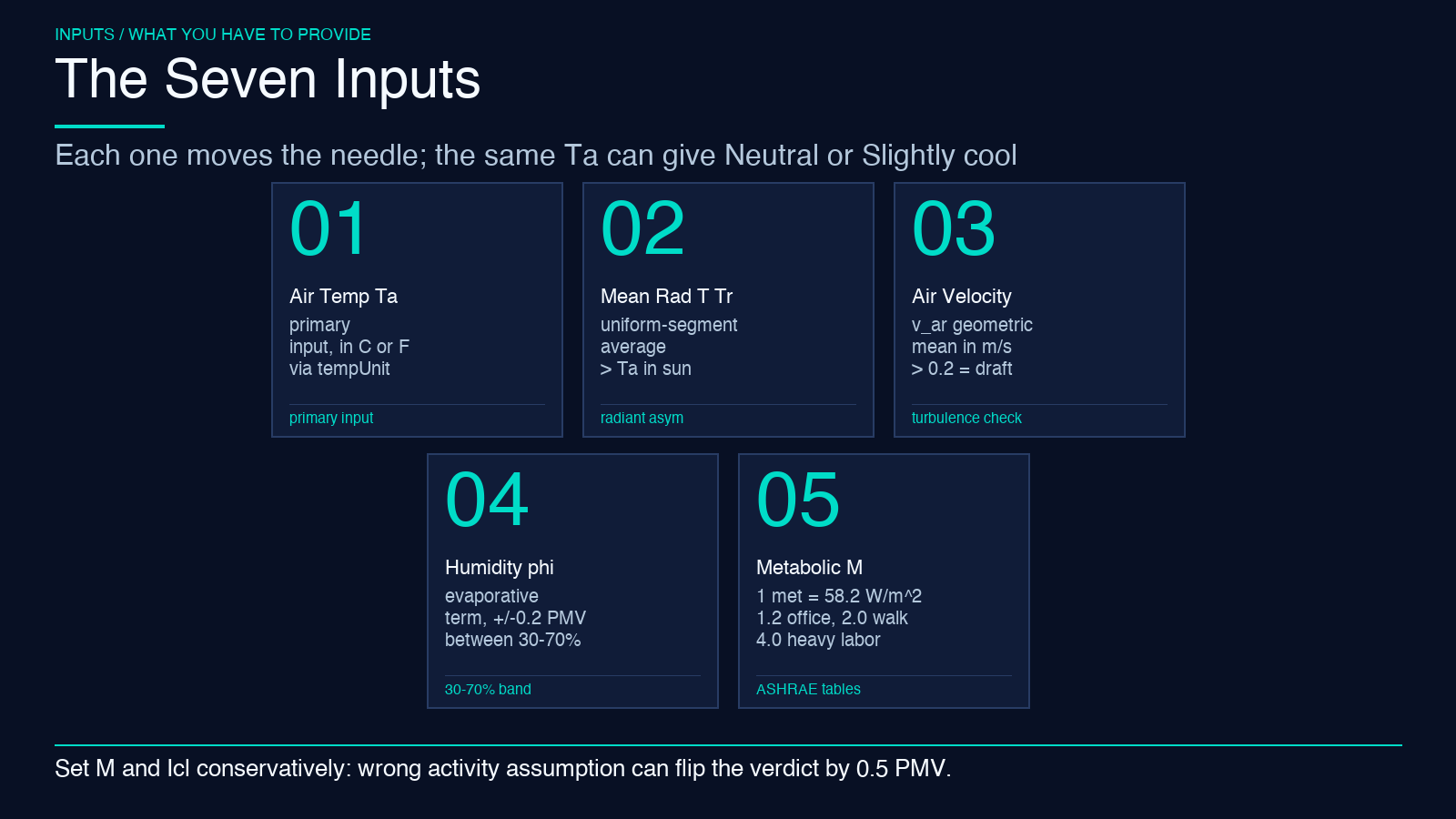
Relative humidity φ enters only through the evaporative heat loss term and the latent heat of vaporization. Between 30% and 70% RH, PMV shifts by less than 0.2. Outside that band — especially above 70% in a warm room — evaporative cooling degrades sharply and PMV rises.
Air velocity v_ar is the asymmetric dial. The standard treats v_ar as the geometric mean of body-relative air speed and operative air movement. 0.1 m/s is “still”. 0.2 m/s is “acceptable indoor”. 0.5 m/s in a warm room is the threshold where most occupants cross from “warm” to “slightly warm”.
Metabolic rate M is the most counter-intuitive input for non-specialists. The met scale is not linear with kcal/h. 1 met is defined as 58.2 W/m² of body-surface-area heat production — the resting rate of a seated, quiet adult. Office work is 1.2 met. Walking is around 2.0. Light cleaning is 2.5. Heavy labor is 4.0+.
Clothing insulation Icl uses the clo unit: 1 clo = 0.155 m²·K/W, the insulation of a typical business suit. Summer indoor clothing is 0.5 clo. Winter indoor is 1.0. Heavy winter outdoor is 1.5–2.0.
The Iterative Tcl Loop: Where Most Hand-Coded PMV Breaks
The clothing surface temperature Tcl is not an input. It is the output of an inner iteration that depends on PMV. Fanger’s equations couple Tcl to the convective heat transfer coefficient hc, which itself depends on Tcl:
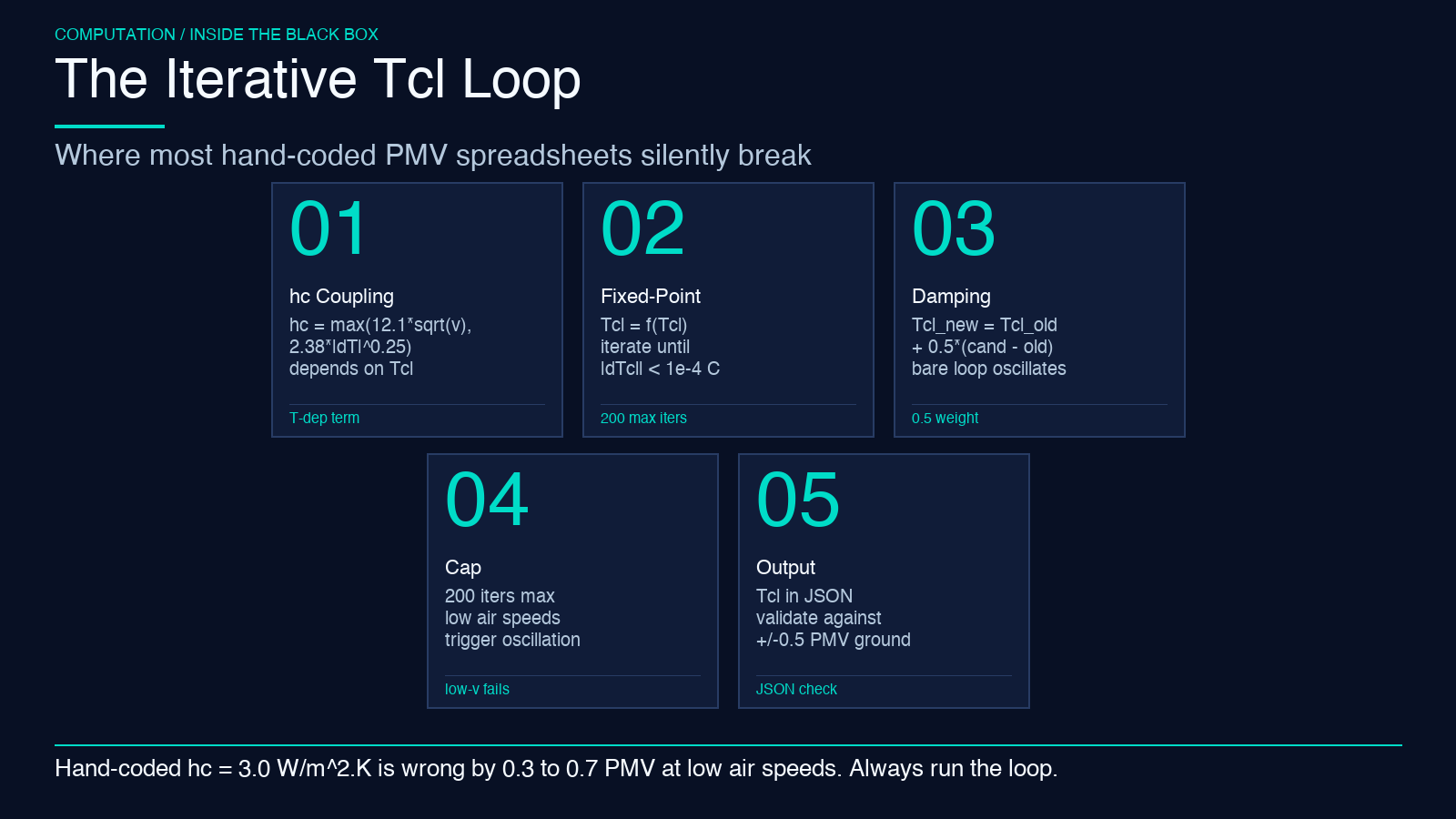
hc = max(12.1 sqrt(v_ar), 2.38 abs(Tcl - Ta)**0.25)
So you have a fixed-point loop. Start with Tcl ≈ Ta + a few degrees. Compute hc. Compute the clothing surface heat balance. Update Tcl. Iterate until |Tcl_new − Tcl_old| < 0.001 °C.
This is where most hand-coded PMV spreadsheets fail. They compute hc once with v_ar and forget the temperature-dependent term. They fix hc at 3.0 W/m²·K regardless of v_ar. They report PMV values that look reasonable but are off by 0.3–0.7 from the standard.
A correct implementation uses damped iteration: Tcl_new = Tcl_old + 0.5 * (Tcl_candidate − Tcl_old). The bare loop oscillates at low air speeds. The Elysia Tools PMV calculator runs the damped loop with a 1e-4 °C convergence threshold and a 200-iteration cap. The Tcl value lands in the output JSON.
The Seven ASHRAE Sensation Bands and the PPD Companion
The seven-point PMV scale maps to seven ASHRAE labels:
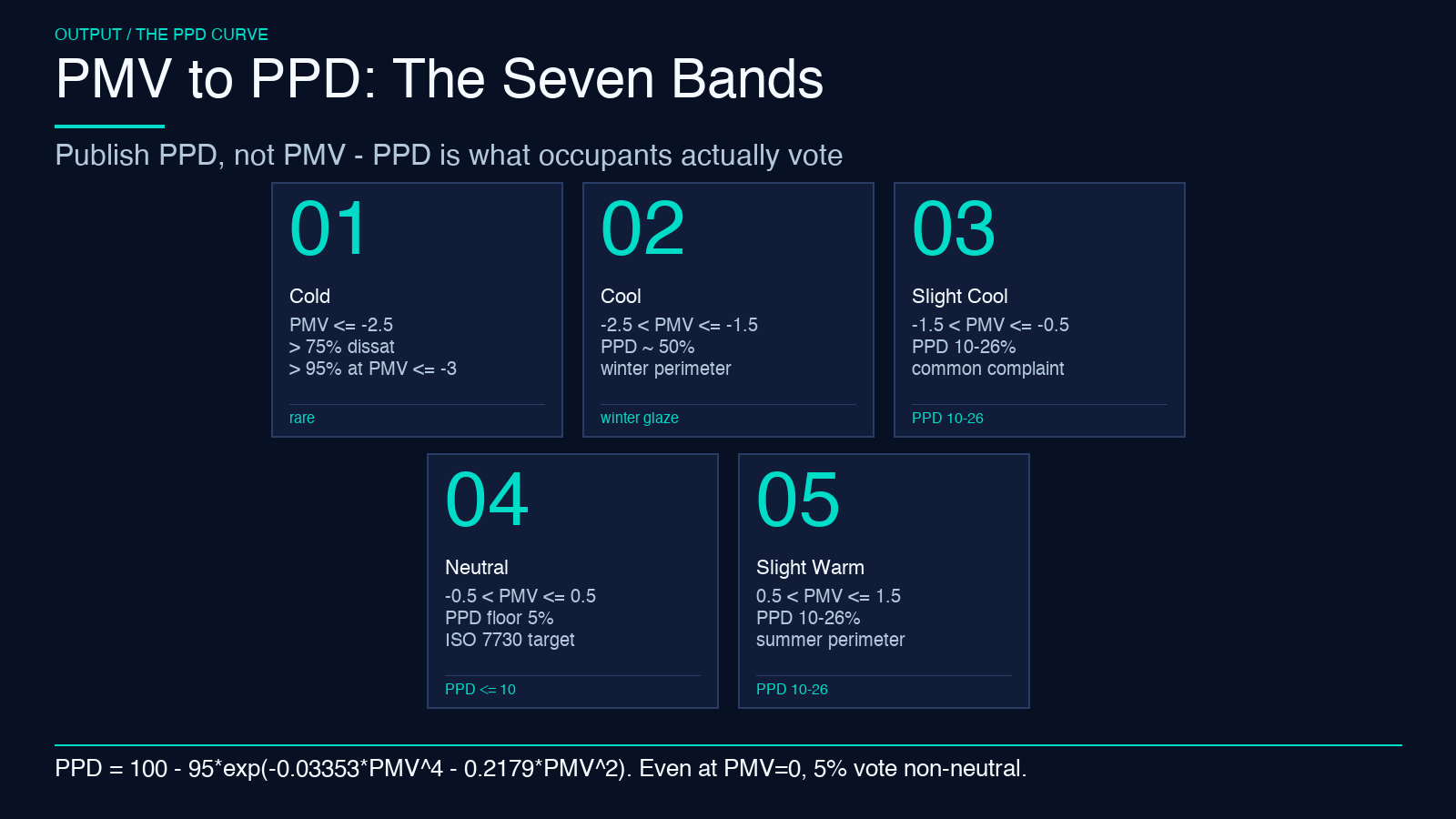
– Cold: PMV ≤ −2.5 – Cool: −2.5 < PMV ≤ −1.5 – Slightly cool: −1.5 < PMV ≤ −0.5 – Neutral: −0.5 < PMV ≤ 0.5 – Slightly warm: 0.5 < PMV ≤ 1.5 – Warm: 1.5 < PMV ≤ 2.5 – Hot: PMV > 2.5
These bands map directly to the PPD function:
PPD = 100 − 95 * exp(−0.03353 * PMV**4 − 0.2179 * PMV**2)
A PMV of exactly 0 gives PPD = 100 − 95 = 5%. That is the irreducible floor — even a “perfectly neutral” room will have 5% of occupants voting cold or warm because of biological variance. PMV of ±0.5 gives PPD ≈ 10%. ±1.0 gives PPD ≈ 26%. ±2.0 gives PPD ≈ 75%.
ISO 7730 recommends |PMV| < 0.5 for category A indoor environments, which corresponds to PPD ≤ 10%. That means 90% of occupants should feel neutral.
This is why PPD is the right metric to publish to a building dashboard rather than PMV. A room with PMV = −0.4 (technically Neutral) still has PPD ≈ 7%. A fleet of “neutral” rooms averaged across a floor often shows 12–18% dissatisfaction that no single-room PMV reading reveals.
Metabolic Rate and Clothing: The Two Knobs That Override Everything Else
If you have to choose one input to set conservatively, set metabolic rate. Under-estimating M (treating a room as “office” when the occupants are actually doing light industrial work) makes the room read warmer than it is. You crank cooling you do not need. Over-estimating M (using 2.0 met for what is actually 1.2 met) makes the room read cooler than it is. You ship a cold floor.
ASHRAE 55 publishes tables for 30+ activities. Seated office is 1.2. Standing office is 1.4. Walking on level ground is 2.0. Light bench work is 2.0. Each step matters.
Clothing insulation is the seasonal dial. ASHRAE 55 publishes a checklist: summer indoor 0.5 clo, winter indoor 1.0 clo. If you model summer indoor as 1.0 clo you over-insulate the occupants. The room reads warmer than it actually is. Cooling runs unnecessarily. Reverse for winter. The operational rule is to update the clo input seasonally, and to set it dynamically based on observed occupant clothing when occupancy sensors are available.
Humidity, Radiant Asymmetry, and the Hidden Caveats
The standard PMV equation does not handle radiant asymmetry. It assumes uniform Tr, and the calculator’s Tr input is the mean radiant temperature averaged across body segments. A single-side glazed facade with 18 °C glass and 22 °C interior wall gives a local PMV at the window seat noticeably cooler than the PMV computed with the area-weighted Tr=20 °C average.
The corrective is either (a) compute PMV at each seat location with a local Tr, or (b) accept the standard PMV as a whole-room average and add a separate local-discomfort assessment.
Humidity enters through the evaporative heat loss from skin, which uses the Lewis relation and the difference between skin saturation vapor pressure and ambient vapor pressure. At 50% RH and 22 °C the evaporative term is roughly 12–15% of total heat loss. At 80% RH and 26 °C it drops below 5%.
This is why a warm humid day feels stickier than a warm dry day at the same PMV. The PMV number is the same. The body’s ability to dump heat by sweating is degraded. Subjective sensation is worse than the PMV predicts. The Elysia Tools PMV calculator outputs both PMV and PPD. It does not flag the high-RH-underestimate. Rule of thumb: when φ > 70% and PMV > 0.5, treat the actual sensation as one band warmer than the label.
Local Discomfort: Draft, Floor Temp, and Vertical Air Temp Difference
PMV is a whole-body, steady-state index. It does not capture draft sensation, vertical air temperature difference, or warm/cool floor sensation. ISO 7730 publishes separate local discomfort criteria:
- Air speed > 0.2 m/s in the occupied zone with high turbulence: dissatisfaction rates PMV cannot predict.
- Vertical air temperature difference > 3 K between head (1.1 m) and ankles (0.1 m): dissatisfaction > 5%.
- Radiant asymmetry from a cold window > 10 °C: dissatisfaction > 5%.
- Warm or cool floor > 26 °C or < 19 °C: dissatisfaction > 10%.
In practice, a room with a “good” whole-room PMV of −0.1 can still have 15% occupant dissatisfaction if the supply diffuser blows cold air at ankle level, or if the perimeter glazing drops the local Tr 8 °C below the interior. The PMV calculator gives you the thermal-comfort anchor. The local-discomfort checks are a separate step.
What to Verify Before You Publish a Comfort Verdict to a Building Dashboard
The PMV/PPD calculator is a steady-state model. It assumes occupants have been in the room long enough to reach thermal steady state (30–60 minutes), it assumes uniform Tr across body segments, and it does not capture transient effects.
Before you publish a verdict — or wire PMV into an automated HVAC control loop — verify five things:
- The M and Icl inputs match the actual occupant activity and clothing for the time of day and season.
- The Tr input is the area-weighted mean radiant temperature, not just the air temperature.
- The v_ar input is the relative air speed at the occupied zone (0.1 m above floor, 0.6 m for seated, 1.1 m for standing).
- The room has been at near-steady-state HVAC operation for at least 30 minutes.
- Local-discomfort checks (draft, vertical ΔT, radiant asymmetry, floor temp) pass alongside the whole-room PMV/PPD verdict.
The Thermal Comfort PMV-PPD calculator on Elysia Tools accepts the seven inputs in either Celsius or Fahrenheit (via the tempUnit selector), lets you pick the decimal precision of the output, and returns a structured JSON with both PMV and PPD plus the intermediate Tcl. Pair it with the psychrometric properties calculator for the humidity side of the heat balance, and you have a complete input pipeline for Fanger-class thermal comfort modelling without leaving the browser.
