
Drag is not one number, it is a regime. The same sphere at the same speed pulls ~20 N through tap water and ~115 N through room-temperature air, and doubling the speed does not double the force, it quadruples it. Whether your number is right depends on which fluid, which reference area, and which drag-coefficient regime you are standing in, and getting any one of those three wrong silently turns a clean calculation into a clean lie. The drag force calculator packages the canonical F_D = ½·ρ·v²·C_D·A formula, a built-in high-Reynolds shape library, and the optional Reynolds-number and power-dissipation paths into one tab so the regime choice is explicit instead of hidden.
The Drag Equation Is Four Numbers, Not One
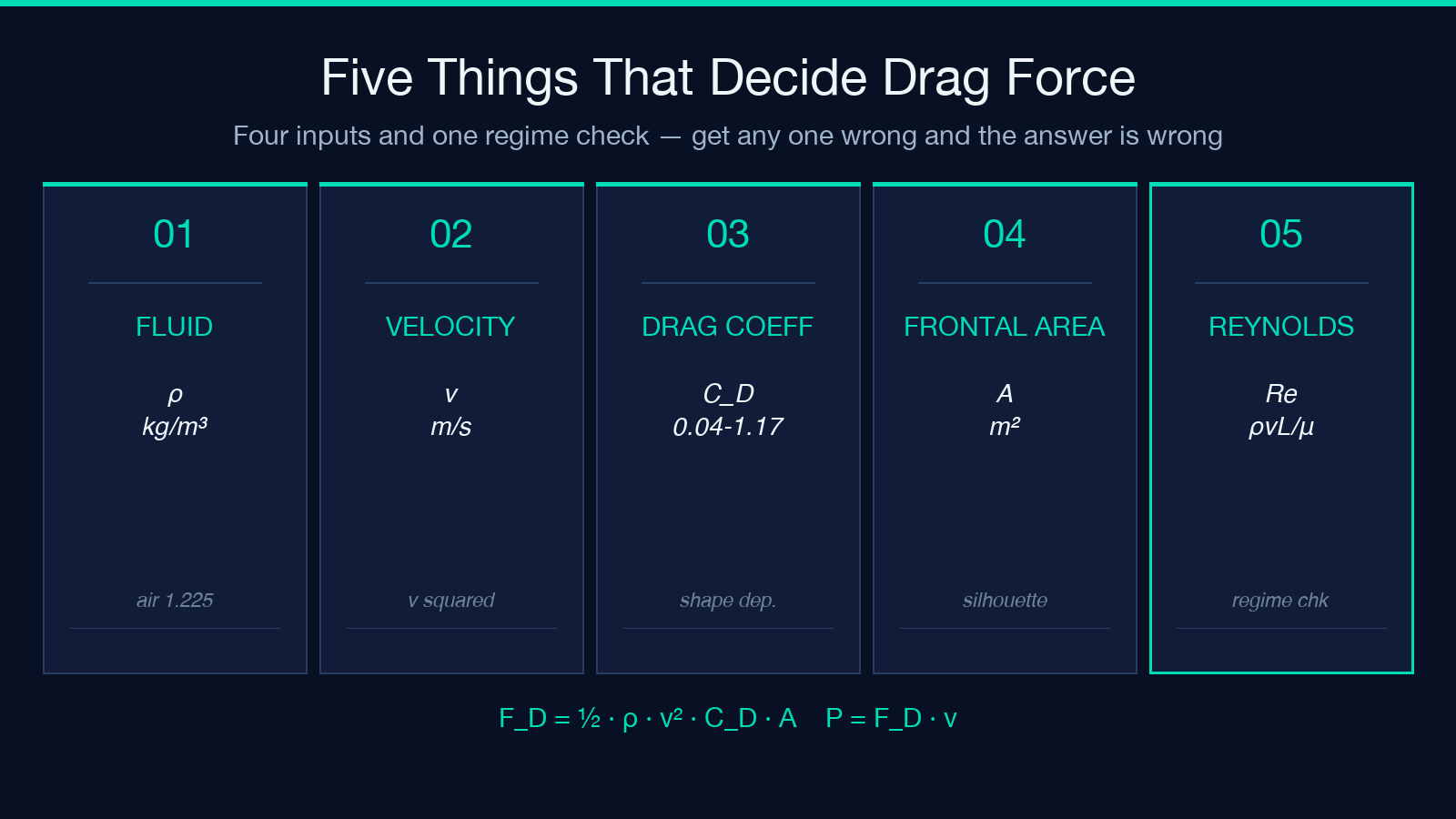
Most readers treat F_D = ½·ρ·v²·C_D·A as one equation. It is actually four independent choices stacked on top of each other, and a wrong choice in any slot silently changes the answer without raising an error. The four slots are:
- Fluid density (ρ) — kg/m³ for SI, g/cm³ for water-scale problems, or the standard
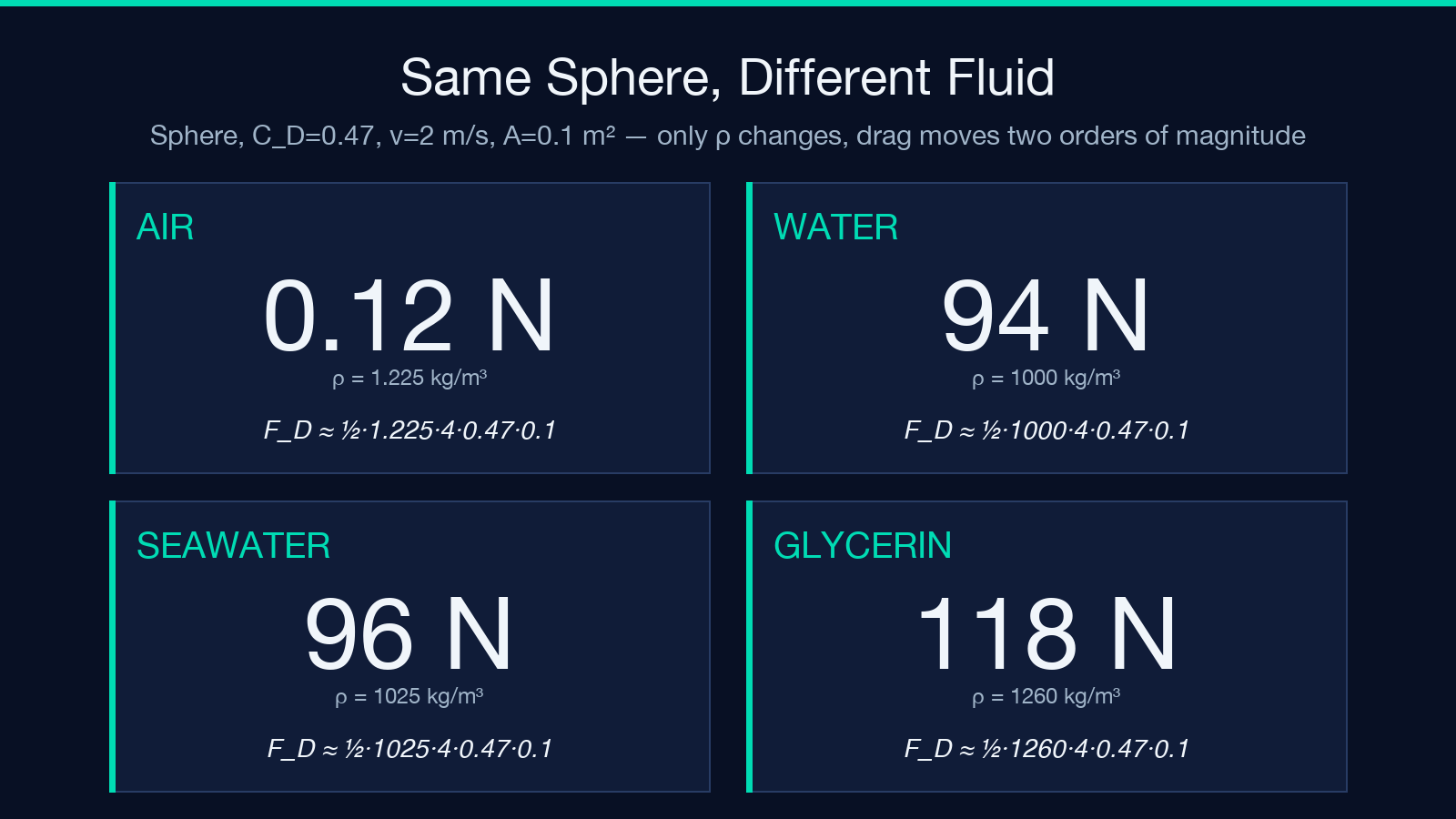
1.225 kg/m³for sea-level air. Using water density (1000 kg/m³) instead of air density makes the same moving object look ~817× heavier in drag. - Free-stream velocity (v) — m/s or km/h. The velocity enters the formula as
v², so a 2× speed change yields 4× force, not 2×. This is the single most common silent error in drag calculations. - Drag coefficient (C_D) — dimensionless, shape- and Reynolds-dependent. The classic high-Re textbook values are sphere
0.47, hemisphere0.42, long cylinder0.81, flat plate1.17, cube1.05, streamlined airfoil0.04, ellipsoid0.07, cone0.50. Picking the wrong shape bucket — say using0.47for a cube — understates the drag by ~55%. - Reference area (A) — frontal projected area in m². This is NOT surface area and NOT wetted area for bluff bodies; for a car it is the front silhouette, for a sphere it is the great-circle cross-section. Substituting total surface area inflates the answer by a factor that depends entirely on the shape.
A sphere of frontal area 1 m² moving at 20 m/s through sea-level air gives F_D = ½ × 1.225 × 400 × 0.47 × 1 ≈ 115.15 N. Through water at the same speed, the same sphere gives F_D ≈ 94,000 N — same shape, same velocity, same area, but ~817× more drag because of the density swap. The formula does not change; the regime does.
Why the Drag Coefficient Lives in a Library, Not a Lookup Table
The drag coefficient is the most-misused number in fluid mechanics because it is dimensionless, regime-dependent, and shape-dependent all at once. A sphere in creeping flow (Re < 1) has C_D ≈ 24/Re; in the Newton plateau (Re 10³–10⁵) it sits at 0.47; in the drag-crisis regime (Re > 2×10⁵) it can drop to 0.1 as the boundary layer transitions to turbulent. Picking one number across all three regimes is wrong, but it is also what most hand calculations do.
The drag calculator’s built-in library supplies the Newton-plateau values — the regime where most engineering drag problems actually live. The canonical eight are:
| Shape | C_D |
|---|---|
| Streamlined airfoil | 0.04 |
| Long streamlined ellipsoid | 0.07 |
| Hemisphere | 0.42 |
| Sphere | 0.47 |
| Cone | 0.50 |
| Long cylinder (end-on) | 0.81 |
| Cube (face-on) | 1.05 |
| Disk / flat plate | 1.17 |
A streamlined ellipsoid pulls ~6.7× less drag than a cube at the same velocity and frontal area. For a bicycle commuter, that ratio is the difference between a sustainable 25 km/h commute and a 12 km/h grind. For a wind-turbine blade, it is the difference between rated power output and a stalled rotor. The Custom slot is for cases outside the library — a non-standard fuselage cross-section, a perforated fairing, a wing with deployed flaps — where the C_D has been measured in a wind tunnel or CFD run.
Reference Area Is Where Most Engineering Errors Hide
Reference area is the single most-misreported input in real-world drag work. Three definitions exist, and the choice of which to use is shape-dependent:
- Frontal projected area — the silhouette area facing the flow. This is the canonical A for cars, bicycles, buildings, and all bluff bodies.
- Planform area — the area of the wing as seen from above. This is the canonical A for aircraft wings.
- Wetted area — the total surface area in contact with the fluid. Used for very streamlined bodies (finned missiles, ship hulls) where skin friction dominates.
Mixing them silently swaps a 1.0 m² car cross-section for a 4.5 m² planform — a 4.5× error. The calculator assumes frontal projected area for the library shapes, which matches the canonical high-Re drag-coefficient sources (Hoerner’s Fluid-Dynamic Drag, White’s Fluid Mechanics). For aircraft-lift problems you would need a different convention; for car-aero, parachute-design, and most civil-engineering drag work, the frontal convention is right.
Reynolds Number Is the Regime Check, Not an Optional Add-On
The drag coefficient only stays at 0.47 for a sphere while Re is in the Newton plateau. Outside that band, C_D changes — sometimes by an order of magnitude. The Reynolds number Re = ρ·v·L/μ is the regime indicator: it tells you whether the formula’s C_D value is even applicable. Without it, you are guessing.
For a 0.5 m sphere in water (μ = 10⁻³ Pa·s, ρ = 1000 kg/m³) at 2 m/s, Re = 1000 × 2 × 0.5 / 0.001 = 10⁶. Well inside the Newton plateau — C_D = 0.47 is correct. The same sphere at 0.02 m/s gives Re = 10⁴, which is borderline; the C_D starts to climb. At 0.002 m/s, Re = 10³, where Stokes drag (F_D = 3πμvd) is the right equation, not the drag-coefficient formula at all.
The calculator computes Re automatically when both dynamic viscosity (μ) and a characteristic length (L) are supplied, and it returns Re = null when either is missing — making the regime gap visible instead of hidden. A drag answer without a Reynolds number is a guess. A drag answer with Re ≈ 10⁶ and a Newton-plateau C_D is a measurement.
Power Dissipated by Drag Is the Number That Matters for Energy Budgets
Force alone is rarely the number an engineer cares about. Power dissipated by drag P = F_D·v (in watts) is what determines how hard a propulsion system has to work, how much energy a parasitic load consumes, or how much heat a flow must shed. For the same 1 m² sphere at 20 m/s in air, F_D = 115.15 N and P = 115.15 × 20 = 2303 W — about a 3-horsepower continuous pull to maintain velocity against drag alone.
This is where the density choice becomes operationally important: the water case at the same speed and shape is F_D ≈ 94,000 N and P ≈ 1.88 MW — a power level no bicycle, drone, or swimmer ever approaches, which is exactly why submarines use much slower cruise speeds than aircraft. The drag-force number tells you what the fluid is doing; the power number tells you what the propulsion system has to do about it.
For a cyclist at 8 m/s (29 km/h) on an upright bike (C_D·A ≈ 0.5 m²), F_D ≈ 16 N and P ≈ 128 W — roughly the sustainable threshold for an untrained rider. Drop into a tucked racing position and C_D·A falls by ~30%, cutting the drag power requirement by a third at the same speed. This is the entire aerodynamic case for time-trial posture, recumbents, and drafting.
Unit Conversions Make or Break the Plug-In Calculation
The drag formula is unit-clean, but the inputs are dimensionally messy. Real-world inputs arrive in mixed units: density in kg/m³ for SI or g/cm³ for water work, velocity in m/s for physics or km/h for cycling and automotive, area in m² for large bodies or cm² for small models. The calculator accepts each input in its native unit and converts internally, which is the only safe way to plug numbers in.
A 50 km/h cyclist ride is v = 13.89 m/s, not v = 50. A small wind-tunnel model with 5 cm² frontal area is A = 0.0005 m², not A = 5. A 1.2 g/cm³ brine is ρ = 1200 kg/m³, not ρ = 1.2. The v² term is the most unforgiving: a unit-conversion mistake in velocity does not cancel, it squares. 50² = 2500 vs 13.89² ≈ 193, a 13× error before any other consideration. The calculator’s unit-aware input is the right defense; manual unit juggling is the most common source of three-significant-figure errors in engineering drag calculations.
Common Failure Modes and How to Catch Them
Five patterns account for most wrong drag calculations. All five are visible in the calculator output if you know what to look for:
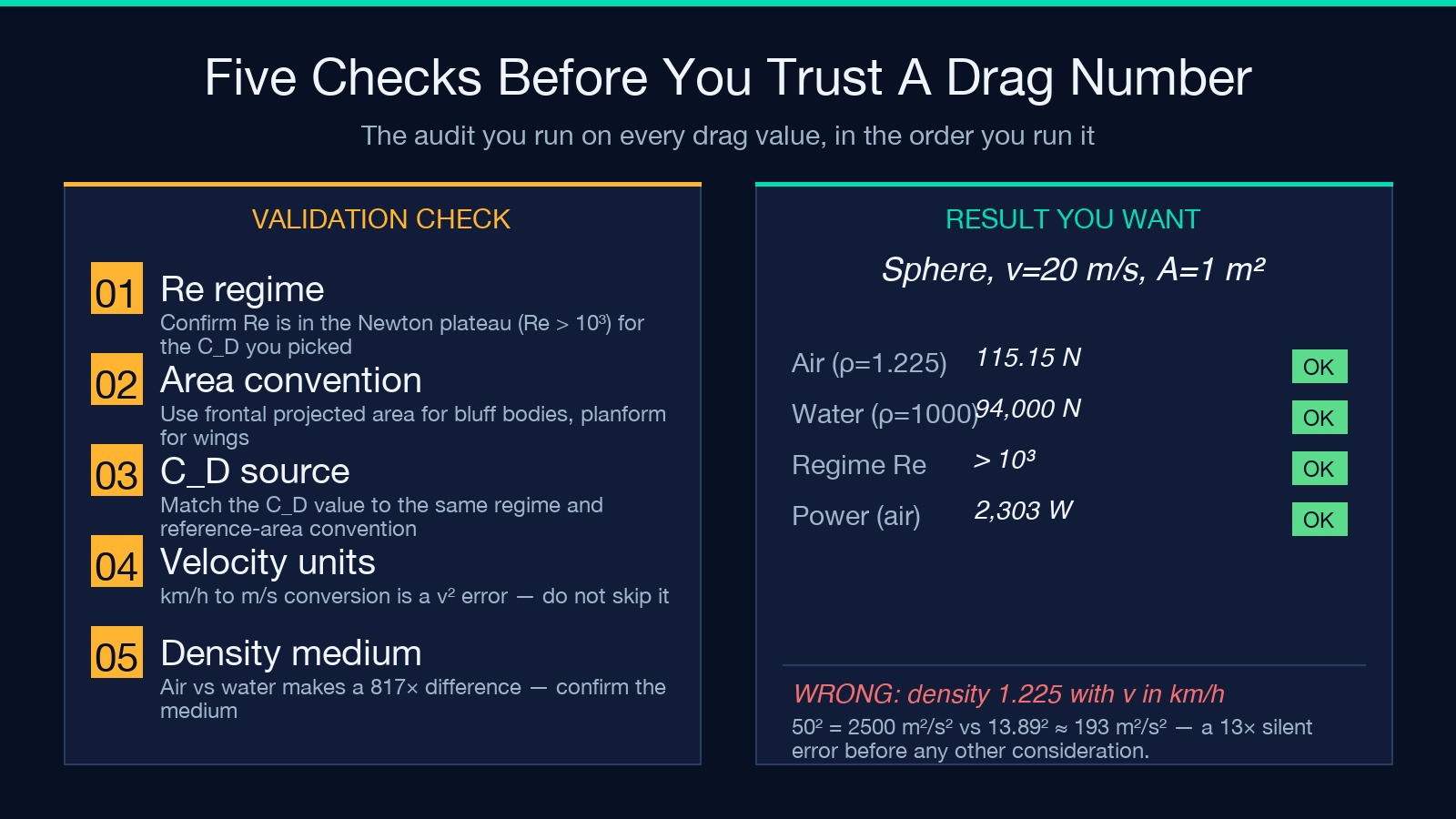
- Wrong C_D for the regime —
0.47for a sphere only atRe > 10³. Outside that range, the answer is wrong by a factor of 2-10. Defense: always compute Re and confirm the regime. - Wrong reference area — using total surface area, planform area, or wetted area instead of frontal projected area. Defense: confirm the convention matches the C_D source.
- Velocity unit mismatch —
50instead of13.89becausekm/hwas treated asm/s. Defense: use unit-aware input; the calculator converts. - Density unit mismatch —
1instead of1000becauseg/cm³was treated askg/m³. Defense: same — let the calculator handle unit conversion. - Density for the wrong fluid — air density (
1.225 kg/m³) used for a marine problem, or water density used for an aerospace problem. Defense: always confirm the medium.
The calculator returns the canonical result with the inputs it was given — if you supplied air density for a swimming calculation, you got an aerodynamic answer. The Re number is the diagnostic: Re ≈ 10⁶ is the typical band for water-flow problems, Re ≈ 10⁵ for air-flow problems at typical scale. A drag answer with Re = 10¹² is in a regime where the C_D library does not apply; an answer with Re = 10¹ is in a Stokes-drag regime where the formula does not apply.
Where the Drag Force Calculator Fits in a Workflow
The tool is built for plug-in engineering checks, not textbook exploration. The canonical use pattern is:
1. Pull ρ for the working fluid from a property table (or use 1.225 kg/m³ for sea-level air, 1000 kg/m³ for water). 2. Pick a C_D from the library that matches the shape; switch to Custom if the geometry is non-standard. 3. Plug in velocity in its native unit (m/s or km/h). 4. Plug in frontal area in its native unit. 5. Add μ and L when you need the Reynolds check; skip them when the regime is known. 6. Read off F_D, Re, and P from the structured JSON output.
The result block is plain JSON, so it composes directly into a spreadsheet, a Jupyter notebook, or a downstream calculator that needs drag as an input. For drag-limited speed (terminal velocity, parachute descent, swimmer top speed), the calculator pairs naturally with an iterative solver: feed the drag back into the velocity term and converge.
The shape library covers the eight most-encountered engineering bodies. For anything outside that set — a wing cross-section, a fuselage profile, a perforated fairing — the Custom C_D slot accepts any measured or simulated value. For regime-sensitive problems (creeping flow, drag crisis, transonic), the calculator flags the regime through the returned Re and leaves the formula extension to you.
Drag force is one of the oldest calculations in engineering and one of the easiest to get wrong silently. The right answer requires choosing the right fluid, the right shape bucket, the right reference area, and the right regime — all four, all the time. The calculator exposes all four choices, returns the regime check alongside the force, and gives you the power number so the energy budget is visible at the same time. Run the calculation; check the Reynolds number; if both numbers make sense, the answer is right. If either looks off, the regime assumption is wrong and the formula needs an extension — not the input values.
Explore the tool at Elysia Tools, browse related Math & Numbers tools, or open a worked sample to see the output format end-to-end.
