
A save file never tells you what it is. It tells you what it wrapped. I decompressed a 507-byte Minecraft fixture and got 1,544 bytes back — a 3.05× expansion — while the viewer’s header readout scores that same file at 7.602 bits of entropy per byte, which is what randomness looks like. The payload underneath scores 6.202. Yet neither number is wrong. They describe different layers, and only one of them is the layer you wanted.
The first bytes name the outermost layer, not the format
The inspector runs one test, recursively. A gzip stream begins 1f 8b. A zlib stream begins 78 followed by one of 01, 5e, 9c or da. Palworld saves carry the ASCII PlZ1 at offset 8. SQLite begins with the fifteen bytes SQLite format 3 — the NUL at offset 15 sits deliberately outside the comparison. Unreal Engine saves begin GVAS. ZIP archives begin PK followed by 03, 05 or 07. NBT begins with the single byte 0x0a, followed by a big-endian name length that has to be at most 512 and has to fit inside the file.
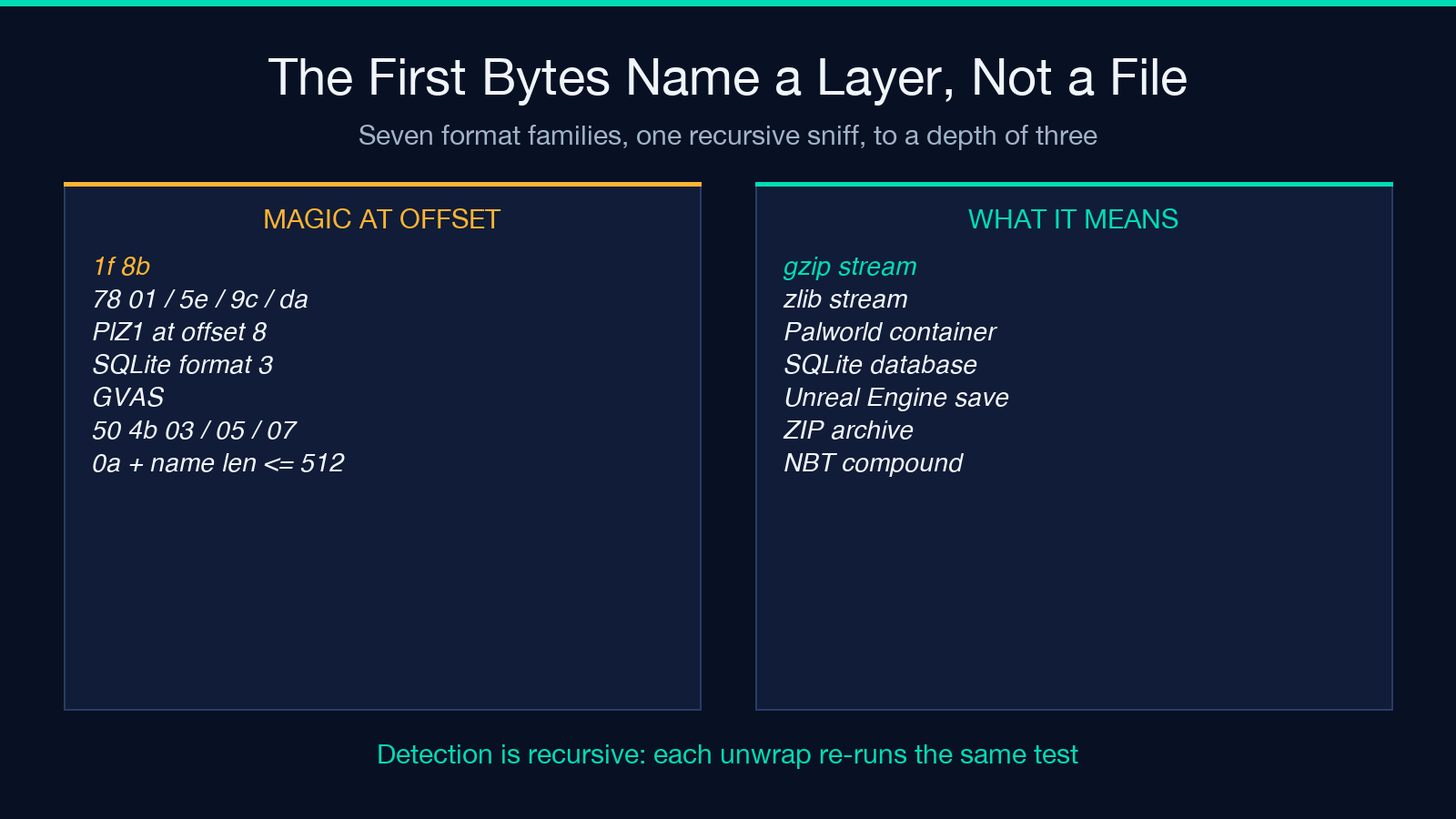
Whichever test fires first consumes the buffer and calls the function again on the decompressed result, up to a depth of three.
Palworld is the clearest case, because it is genuinely two formats. The public sample is 3,669 bytes: two little-endian int32 values (7,847 and 3,657), then PlZ1 at offset 8, then a zlib stream. Inflate that stream and the first four payload bytes read GVAS. The first int32 is not a checksum or a magic guard — 7,847 is exactly the decompressed length. The container shows its own size before it names its type, and the report labels one file with two true names: Palworld PlZ1 + zlib as the container, Unreal Engine GVAS save as the format.
A file extension changes nothing here. Three files in the sample set share the .sav extension and hold two different format families: 2 GVAS saves and 1 Palworld container. If you need to identify a file by its actual content before handing it to a parser, that is a separate job — the File Type Detector reads the same magic-number layer without attempting to decode anything.
NBT counts from the front. GVAS counts from the back.
Both formats are self-describing binaries with a root tag and a version field, and they disagree on which end of a multi-byte integer comes first.
For example, inside the Minecraft fixture the first byte is 0x0a — TAG_Compound — and bytes 1 and 2 are 00 05. Read big-endian, that is 5, and the next five bytes spell Level. Each NBT integer follows suit: the reader calls sixteen-bit, thirty-two-bit and sixty-four-bit big-endian accessors throughout.
The Unreal sample opens GVAS 02 00 00 00 0a 02 00 00. Read little-endian, those two fields are save-game version 2 and package version 522. Read the same eight bytes big-endian and you get 33,554,432 and 167,903,232. Both are plausible integers. Neither raises an exception. One of them describes Unreal Engine 4.27; the other describes nothing at all.
The header then changes its own length. When the save-game version equals 3, the parser reads an additional 64-bit package version, so each field after it shifts by eight bytes. This sample stores version 2, carries three custom versions, and ends its header at byte 109 of 2,503 — leaving 2,394 bytes of property data that a fixed-offset reader would begin eight bytes early on. That split is measurable per file: according to the layout, 109 bytes of header and 2,394 bytes of payload data.
A fixed-offset reader reduces the whole header to a guess about one version number. Endianness is not a constant in this domain. It is a per-family property, and the specification that told you the magic number did not tell you the byte order.
You cannot seek a save file, only walk it
NBT has no index. A list carries an item-type byte and a count, then its items back to back. A string is a two-byte length and that many UTF-8 bytes. A byte array is a four-byte count and raw bytes. A compound is a run of tag, name and payload records terminated by a zero byte. Not one of those records stores its own total byte length.
So the offset of item N depends on the sizes of items 0 through N-1. You cannot jump to the fiftieth entry of a list; you have to walk the first forty-nine.
The inspector builds five nodes as a preview and then hands the remainder to a dedicated skip walker. That walker exists because of the missing index, and its source comment states the intent plainly: “Skip remaining list items without building nodes.” It still has to read them, one stride at a time, to arrive at the right byte. The comment above that function is blunter, and it is the whole problem in one line: “Arrays and strings have variable length; compounds and nested lists need a structural walk.” That walker carries a stride per tag type: 1 byte for a byte tag, 8 for a long, a count followed by that many bytes for an array, a length prefix for a string. It recurses into nested lists and compounds to keep the read position honest. The tree you read is a preview. The offset the parser lands on is the whole file.
This is why naive save editors corrupt saves. They compute an offset from one version of a schema and write at it. The format offers no index to check the guess against, so the write lands somewhere plausible and breaks the load.
Entropy measures the wrapper, not the payload
The report object is constructed with its entropy field filled from the original buffer, and that construction happens before the recursion that performs decompression. Nothing rebuilds the value afterwards. On any wrapped save, the number you see describes the compressor.
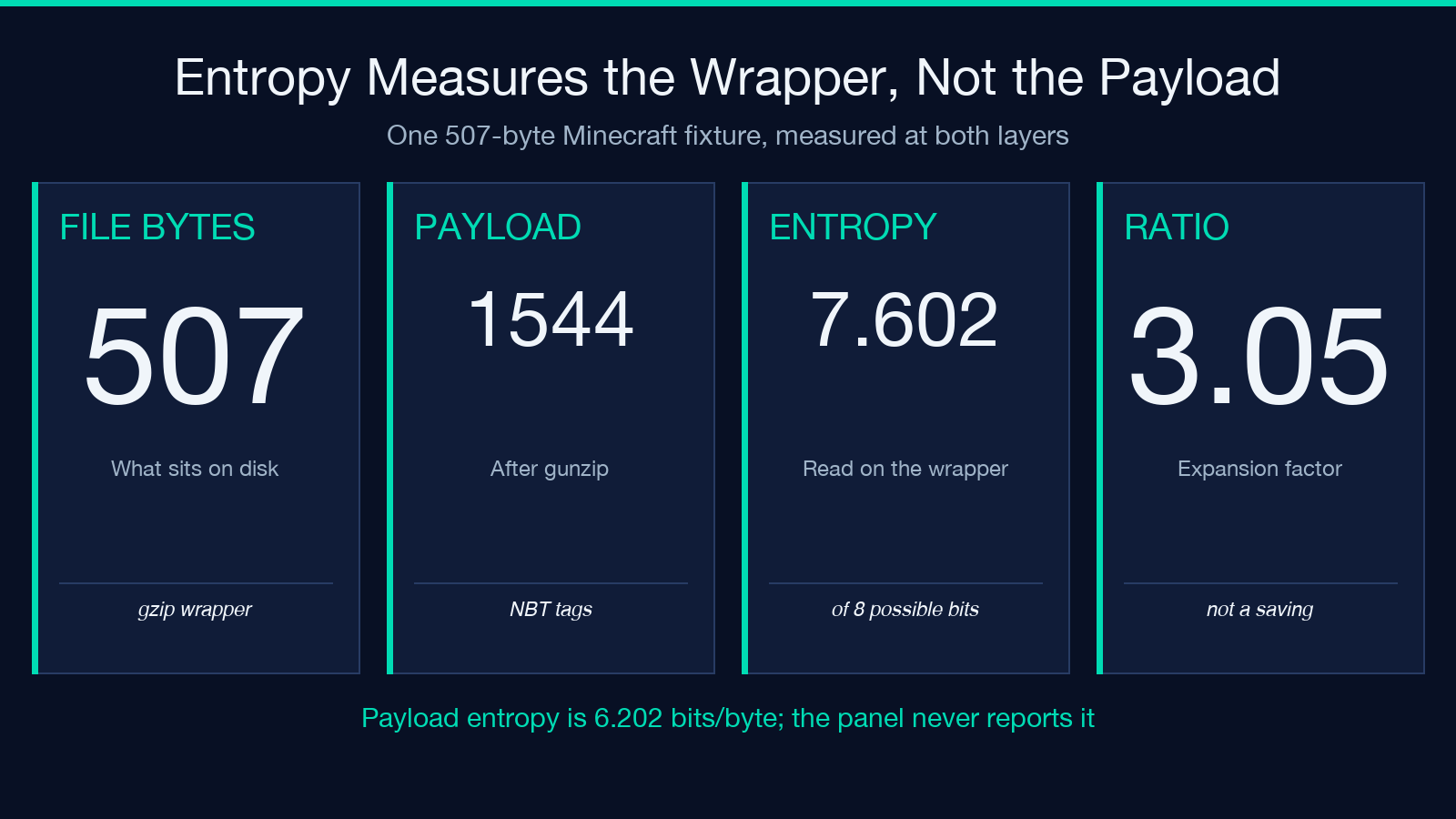
Measured both ways on one file: wrapped, 7.602 bits per byte; unwrapped, 6.202. Both readings are correct. The wrapped value sits near the ceiling at 7.602 of 8 possible bits, because that is precisely what deflate output looks like — near-uniform, near-random, and uninformative. If you were using entropy as a test for “is this compressed or encrypted”, the answer comes back yes, which you already knew from the 1f 8b two bytes above it.
Entropy earns its place in exactly one branch: the fallback, where nothing matched a magic number and there is no wrapper to measure. There, a high reading combined with an empty strings scan is a real answer — the file is packed or encrypted and no amount of tree rendering will help. If you want that measurement on its own terms, the Entropy Calculator reports it for a buffer you choose, not for a wrapper the tool chose.
Where parsing stops is not where rendering stops
Two independent ceilings govern the tree, and they are different numbers.
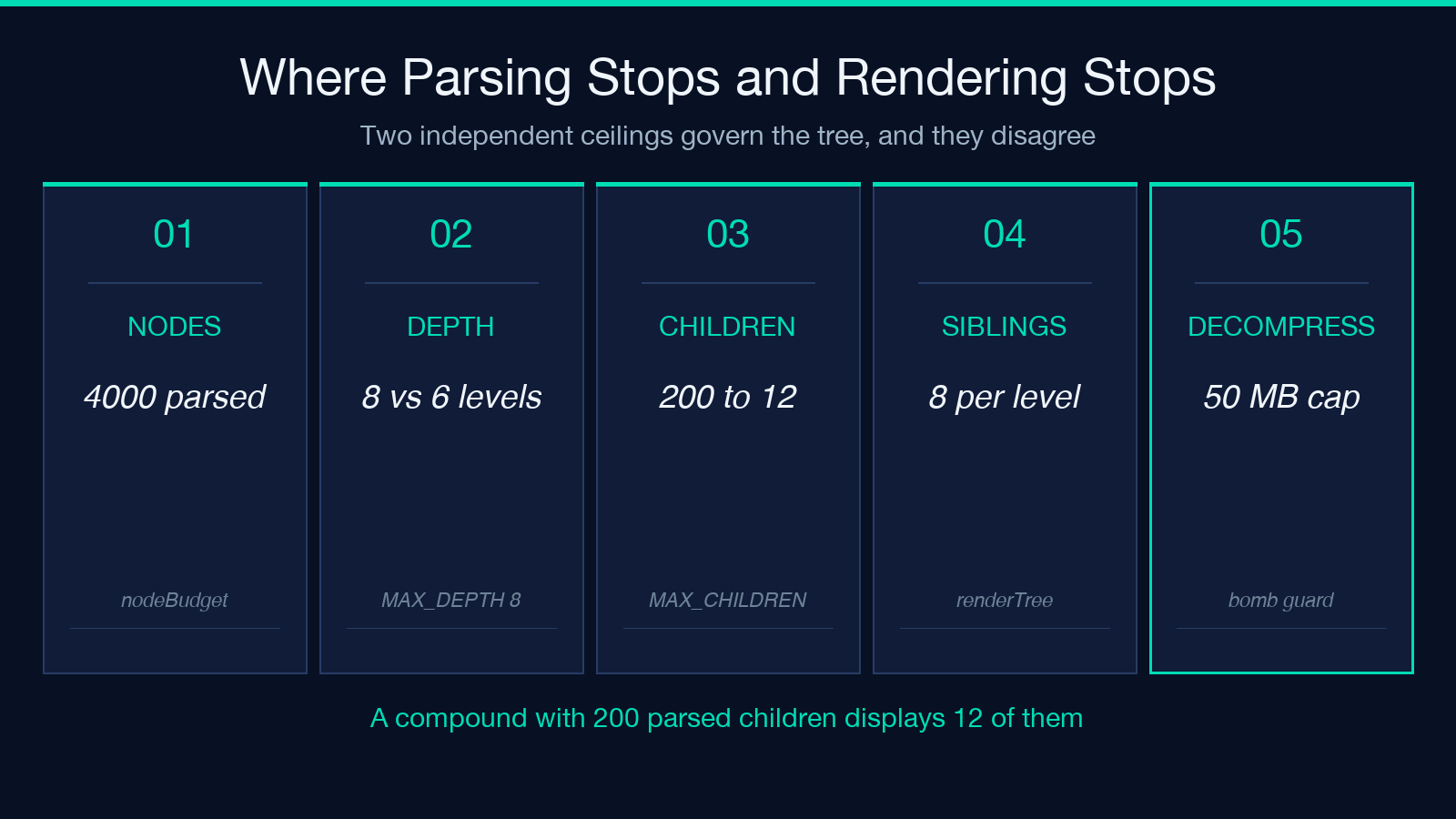
Parsing allows up to 4,000 nodes, a depth cap of 8, at most 200 children per compound, and a 50-megabyte decompression ceiling that removes the decompression-bomb risk entirely. Rendering is a separate negotiation: 12 siblings at the top level, 8 below it, and a hard stop at depth 6. Rendering allows none of that: the tree renderer returns nothing below depth 6, prints twelve siblings at the top level and eight at each level beneath it, and appends a grey line reading “… N more siblings” whenever it hides children.
A compound that parsed 200 children therefore displays twelve of them. The ratio is the problem: 200 parsed against 12 rendered, with one grey line covering the other 188. The panel’s node count reports nodes that were built, which is a parse number, not a display number — and the hidden siblings collapse into a single line, not a count of what was parsed against what was kept.
This makes one common complaint ambiguous. “The tree does not contain my field” could mean the field sits deeper than depth 6, or past sibling twelve, or beyond the node budget. Those are three different diagnoses, and each one forces a different fix; the report does not distinguish them.
The key-fields panel is a regex with a favorite word
The progress panel is not a schema. It is a single case-insensitive substring match against eighteen tokens — name, player, level, xp, exp, gold, money, coin, health, hp, seed, version, time, slot, act, floor, score, save — and it stops after twenty hits.
Substring matching without anchoring has consequences. The token name matches displayName, worldName and nameTag, plus any attribute called name. Three near-hits from one token: 3 wasted slots in a 20-slot budget. The token time matches lifetime, runtime and timeStamp; I observed all three inside one Unreal header. Since collection runs in document order and stops at twenty, a save whose first twenty matching keys belong to the name family fills the panel before gold is ever reached. The field you wanted is absent not because the parser failed but because the quota ran out in the order the file was written.
I can verify that ordering behavior from the source, and I did. What I have not done is measure a false-positive rate across real saves — I have seven fixtures and most of them are curated, so any rate I quoted would describe my sample, not your save. Treat the regex as unordered and substring-based, which means the panel’s precision is a property of your save’s key names, not a property of the tool.
The report is honest about four things and silent about two
Four places where the readout tells you exactly what it is doing:
It never writes. The SQLite path opens with the read-only option set, and no code path in the inspector mutates a buffer. The tool reads one copy in memory and renders.
Its fingerprint is truncated, and you can see it. The SHA-256 is cut to sixteen hex characters — 64 bits — and printed with a trailing ellipsis. That is an identity tag for spotting the same file twice, not an integrity check, and the truncation is visible, not hidden behind the word digest.
Its ratio is an expansion, not a saving. The field divides the decompressed length by the file length and the interface renders the result as “3.05× compressed”. The payload is 3.05 times the file. The file was not reduced to a third.
Its fallback still shows evidence. Anything unrecognised gets a hex dump of the first 256 bytes and a printable-strings scan, so the worst case is a view of the bytes, not a shrug.
Two places where it stays quiet:
The NBT sniff is shallow. It checks one byte against 0x0a and a plausible name length in the two bytes after it. A binary that starts with a newline character and carries small bytes at offsets 1 and 2 passes the sniff, then throws inside the real parser — which is why a warnings line can read “NBT parse failed” about a file the format label never called NBT.
The SQLite tree arrives on a second pass. The synchronous inspector can only label the format, because the database handle needs a real path on disk. An asynchronous follow-up fills the table tree. When that follow-up fails, the label still reads “SQLite database” with a file size and a hash, and an empty tree underneath it — a correct label sitting above an empty answer.
There is a third silence I can demonstrate, not infer, and it is the one case where the tool’s own documentation is the thing that is wrong. The documented description of the Minecraft test fixture says it exercises all twelve NBT tag types. I walked the fixture myself and found ten: byte, short, int, long, float, double, byte array, string, list and compound. TAG_Int_Array and TAG_Long_Array never appear in it. The parser handles all twelve; this particular file does not exercise all twelve. The file proves the document wrong, and the file is the one that is right. That gap between “supported” and “demonstrated” is the quietest kind of error in a format report, and the only way I found it was by decoding the file a second time in a different language.
Read the warnings panel before the tree
The warnings array is the one place the inspector admits uncertainty, and five channels create entries in it: trailing bytes left after the NBT payload, a gzip stream that fails to inflate, a custom-version table longer than the file that contains it, an NBT parse that threw, and a SQLite read that failed. Five channels, and all of them report something the rest of the report cannot.
That forces an unusual reading order. The tree is the satisfying part: collapsible, colour-coded, obviously an answer. The warnings panel is two lines of amber text at the bottom. But the tree renders what the parser managed to bound, and the warnings panel is the only section that reports what the parser gave up on.
The full readout for these fixtures is at the Game Save Viewer, and its reports cost nothing to produce because nothing is uploaded for execution — the buffer is parsed and rendered. Explore more tools at elysiatools.com.
I began this piece thinking the format was the interesting question. It is not. Format is one thing a save file volunteers; the rest is a walk. What it withholds is the layer count, and how much structure the parser and renderer each agreed to drop. So when you open a save you have already lost, read the warnings panel first. Why? It is the only section that admits what did not fit, and the only one that says whether the answer you wanted was in the file at all.
本文有中文版:你的存档文件是个外壳,不是格式:NBT 与 GVAS
