
The Hidden Serial Number in Your PDF That Tells You Exactly Who Leaked It
You sent the same quarterly report to twelve recipients. Three weeks later it shows up on a blog you have never heard of. Now you have a leak you cannot trace, an inbox full of awkward questions, and no way to prove who forwarded it. The PDF you sent was supposed to be a single document. In practice, it was twelve different documents that looked identical.
The fix is not legal threats or NDAs that everyone ignores. The fix is to give every copy its own invisible serial number before it leaves your desk, so the next time a copy escapes you can read the serial back out of it and know exactly which recipient leaked it. That is what PDF Usage Tracking ID does, and the workflow it unlocks is simpler than the leak it solves.
Why a watermark is not enough
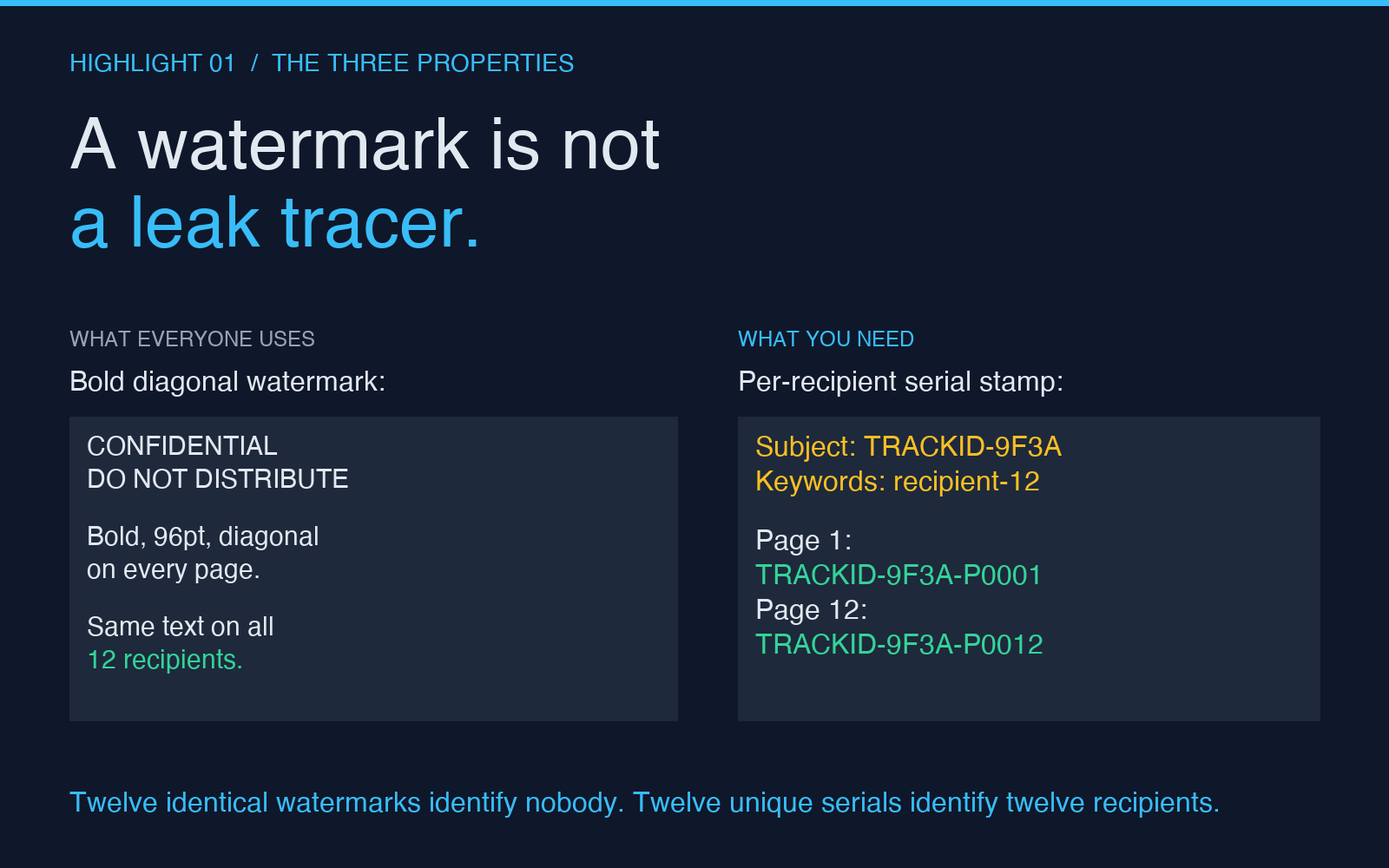
Most people who try to solve this reach for a watermark. A bold “CONFIDENTIAL — DO NOT DISTRIBUTE” stamped diagonally across every page looks serious. It is also useless for forensics. Every copy of the PDF carries the same watermark, so when a leak shows up you can only confirm what you already knew: someone who got a copy leaked a copy. You still cannot tell which one.
Real leak tracing needs three properties that a watermark does not provide.
Per-recipient uniqueness. Each distributed copy must carry a different identifier, tied to the person who received it. The identifier does not have to be obvious to a casual reader, but it has to be extractable from any leaked file you recover.
Reader invisibility. A visible “John Doe copy” banner solves the uniqueness problem but creates a new one. Recipients who see their name stamped on a confidential document forward it less often, take screenshots instead, and complain to your legal team. A near-invisible overlay — text in a color close to the page background, placed in a corner that nobody reads — gives you the traceability without the friction.
Persistence. A leak tracer that depends on a server, a watermark service, or a tracking pixel is not a leak tracer. It is a single point of failure that breaks the moment the recipient opens the PDF offline. The identifier has to live inside the PDF itself: in the metadata, in the page content, in a stamp that survives copy-paste, screenshot, and re-export through a printer.
The PDF Usage Tracking ID tool hits all three. You feed it one source PDF plus a recipient identifier (or let it generate a UUID or timestamp hash) and it produces a stamped copy where every page carries a corner serial and the document metadata carries the same ID. The stamped text is light gray on light backgrounds, positioned at a small inset, and visually almost identical to the original page. But every page also carries a per-page serial like TRACKID-P0007, so if a leaker photocopies page 12 of a 30-page deck you can still narrow the leak to the recipient whose page-12 serial matches.
What the stamped PDF actually contains
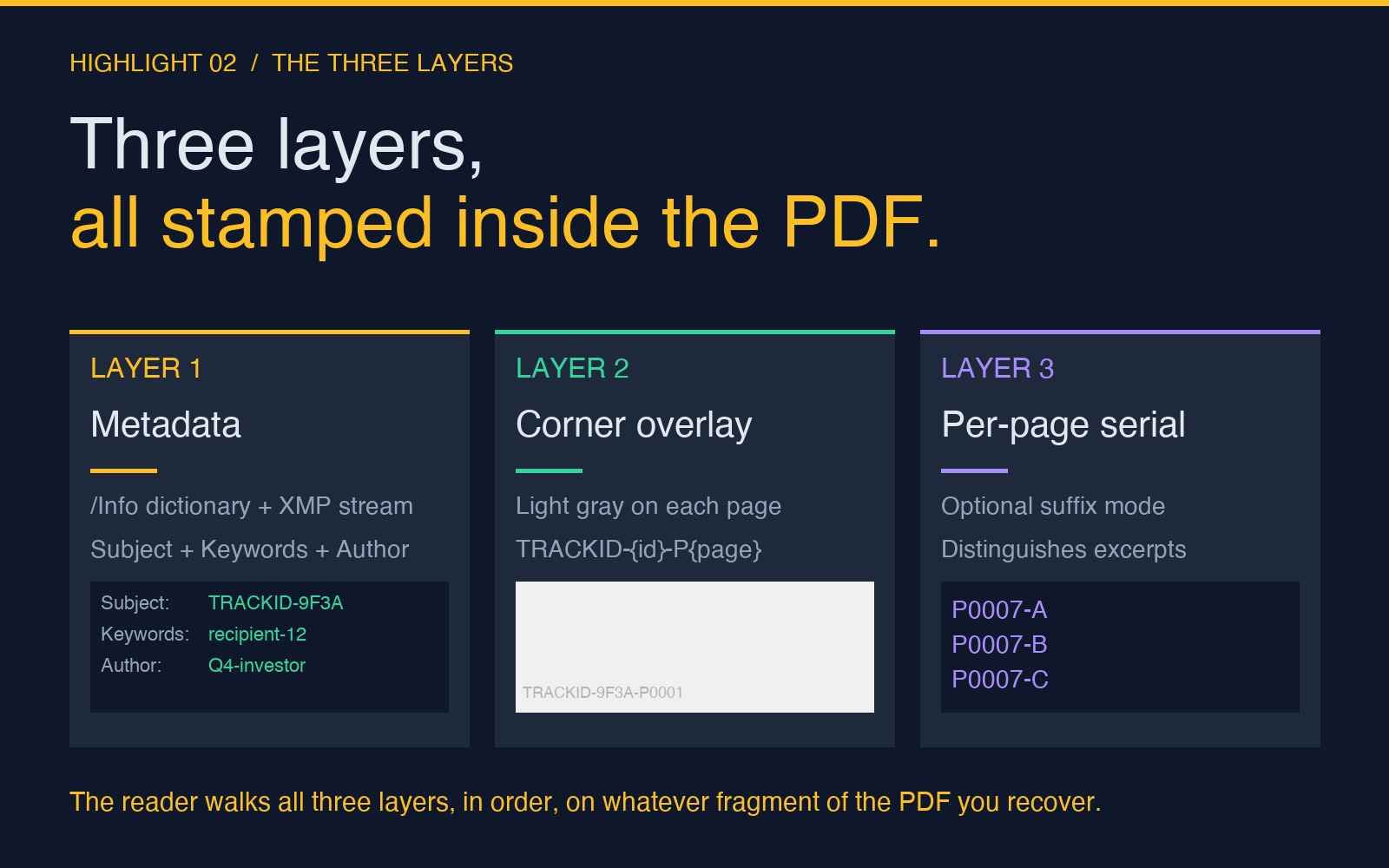
Three layers work together, and they are easy to underestimate if you only think about the visible overlay.
Layer 1: Metadata stamp. The PDF’s /Info dictionary gets a Subject, Keywords, and Author field populated with your tracking ID. Most PDF readers do not show these fields by default, but they survive every common leak vector: copy-paste, screenshot, re-export, even print-to-PDF. Any tool that can read PDF metadata — including the reader companion — can recover the ID without opening the document.
Layer 2: Per-page corner overlay. Each page gets a small text fragment in one of the four corners, in a light gray that blends into most page backgrounds. The text is something like TRACKID-{your-id}-P{page-number}, so the overlay is per-recipient AND per-page. If you suspect a leaker passed only a single excerpt, you can match the page number in the leaked content against the per-page serials and identify the recipient without ambiguity.
Layer 3: Optional per-page serial suffix. Beyond the shared ID, you can enable a unique-per-page suffix so that each page of the same recipient’s copy also has its own distinguishable token. This is the option that defeats the “I only forwarded one chapter” defense — if the leaked chapter contains a page with serial P0017-A, the recipient’s copy is the one and only source.
You can extract all three layers with the matching PDF Usage Tracking ID Reader. It returns a JSON object with the global tracking ID, per-page serials, and the metadata fields it found. The reader walks the page content stream in order, so even if a leaker crops, splits, or rearranges pages, the page-level serial is recoverable from whatever fragment you can get back.
The workflow in practice
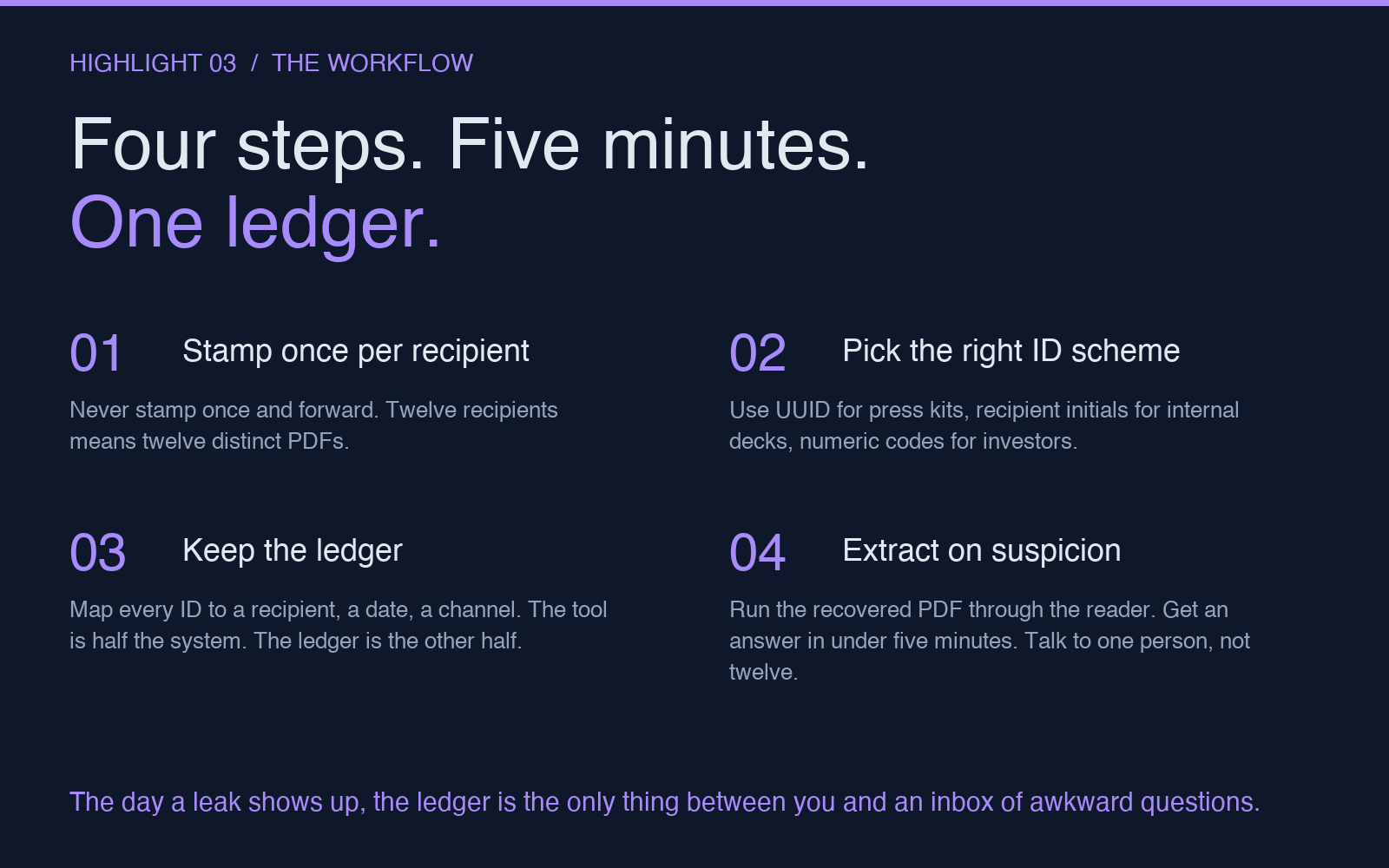
The hardest part is not the stamping. It is the discipline of stamping every copy before it goes out. Here is the workflow that survives real-world friction.
1. Decide the identifier scheme. For internal circulation, use recipient-{initials}-{date}. For investor updates, use a numeric code from a private ledger. For press kits, use a UUID. The PDF Usage Tracking ID tool supports all three modes — UUID generation, timestamp hash, and custom string — and you can mix and match per batch.
2. Stamp once per recipient, not once per file. If you are sending the same deck to twelve investors, generate twelve copies of the PDF with twelve different IDs in one batch. Do not stamp the file once and then forward the stamped copy. The whole point is per-recipient uniqueness.
3. Keep the ledger. The stamping tool is half the system. The other half is a private spreadsheet that maps each ID to the recipient, the date sent, the channel, and the document version. The day a leak shows up, that ledger is the only thing that lets you do the lookup in under a minute. A tool that produces a perfect serial with no record of who it went to is no better than the watermark you started with.
4. Extract on suspicion, not in panic. When you find a leaked file, run it through the PDF Usage Tracking ID Reader immediately. The reader returns the global ID and every per-page serial it found. Cross-reference against your ledger. You have an answer in under five minutes, and you can have a serious conversation with the right person instead of an awkward one with twelve.
Where this approach breaks (and what to do about it)
Forensic watermarking only works if you control the distribution. As soon as a recipient forwards a copy to someone outside the original list, the second recipient is untraceable — but the first recipient still is. The leak trace points to the person whose copy left the original list, not the person who actually posted it online. In a court setting this is sometimes enough; in a corporate setting it is usually enough to identify the source of a leak within a single hop.
The other weak point is deliberate tampering. A motivated leaker can open the PDF in a text editor, find the metadata fields, and remove them. The page-corner overlay is harder to remove because it is rendered as text in the page content stream, not as a separate annotation. The reader walks the content stream in order, so removing the overlay requires re-rendering the page from scratch. Most leakers do not bother, because most leakers think the PDF is just a PDF, not a tracked document.
If you are worried about a high-stakes adversary, combine tracking with redaction. The PDF Redaction Helper covers sensitive areas with solid black boxes before distribution, which makes any later attempt to strip the overlay more obviously destructive — a black rectangle where text used to be is a much louder signal than a missing metadata field.
The reader side: extracting what you stamped
The PDF Usage Tracking ID Reader is the half of the system you only use after something goes wrong, which is why most people forget to set it up. Set it up anyway. Bookmark the page. Keep the JSON output format in mind so your leak-response process can parse it without scrambling when the moment comes.
The reader looks for tracking signals in three places, in order.
1. PDF metadata (/Info dictionary and XMP stream): the global tracking ID. 2. Page content stream: per-page serials in the corner overlay text. 3. Document keywords and subject fields: backup copies of the ID for documents where the metadata was stripped but the keywords survived.
The output JSON has the structure you would expect — trackingId, pages: [{pageNumber, serial}], metadata: {subject, keywords, author} — and it is straightforward to pipe into a spreadsheet or a script. The detection is robust against partial leaks. Even if the recovered PDF is missing the first three pages, the reader reports which pages it found and which serials each one carries.
A small change with a disproportionate effect
Most leak response starts with a long, embarrassing email to a list of recipients: “Someone in this group shared this document. We would like to know who.” It is a question nobody answers. It is a question that poisons trust on both sides.
A tracking-stamped PDF lets you replace that email with a private message to one person. The next time a confidential PDF leaves your desk, it leaves as twelve different documents that look identical but are not. The next time a copy shows up somewhere it should not, you read the serial in under a minute and the conversation is with the one person who needs to have it.
If you distribute PDFs at all — investor updates, board decks, draft contracts, internal policies, press kits — start stamping today. The tool is at elysiatools.com/en/tools/pdf-usage-tracking-id, and the matching reader is at elysiatools.com/en/tools/pdf-usage-tracking-id-reader. Together they cost less than five minutes per batch and they replace every awkward leak conversation with a quiet one. Explore more tools at elysiatools.com/en/tools.