You wrote 0 0 * * *. It runs every day at midnight. You did not write 0 0 * * 1-5 thinking it would fire on Saturday; you wrote it knowing it would not. That is the simple case. The trouble starts the moment a tool, a library, or a runtime quietly decides your five fields mean something different from what you meant — or the moment you add a sixth field for a second value and the parser silently accepts it because it is expecting Quartz, not standard cron.
Cron expressions look small, almost too small to deserve a dedicated tool. They are five integers separated by spaces, or six, or seven, depending on who is parsing them. They sit in crontab -e files, in Kubernetes CronJob YAML, in GitHub Actions schedules, in Java @Scheduled annotations, in Quartz configuration XML, in Airflow DAGs, in Spring Boot properties. Each of those runtimes reads the same string slightly differently. The Cron Expression Visualizer is built for exactly this gap: you paste the string, pick the format, and the tool returns the next ten fire times on a timeline plus a grouped calendar view, so you can see — before the job runs in production — whether what you meant is what you wrote.
The five fields you typed — and the sixth Quartz quietly added
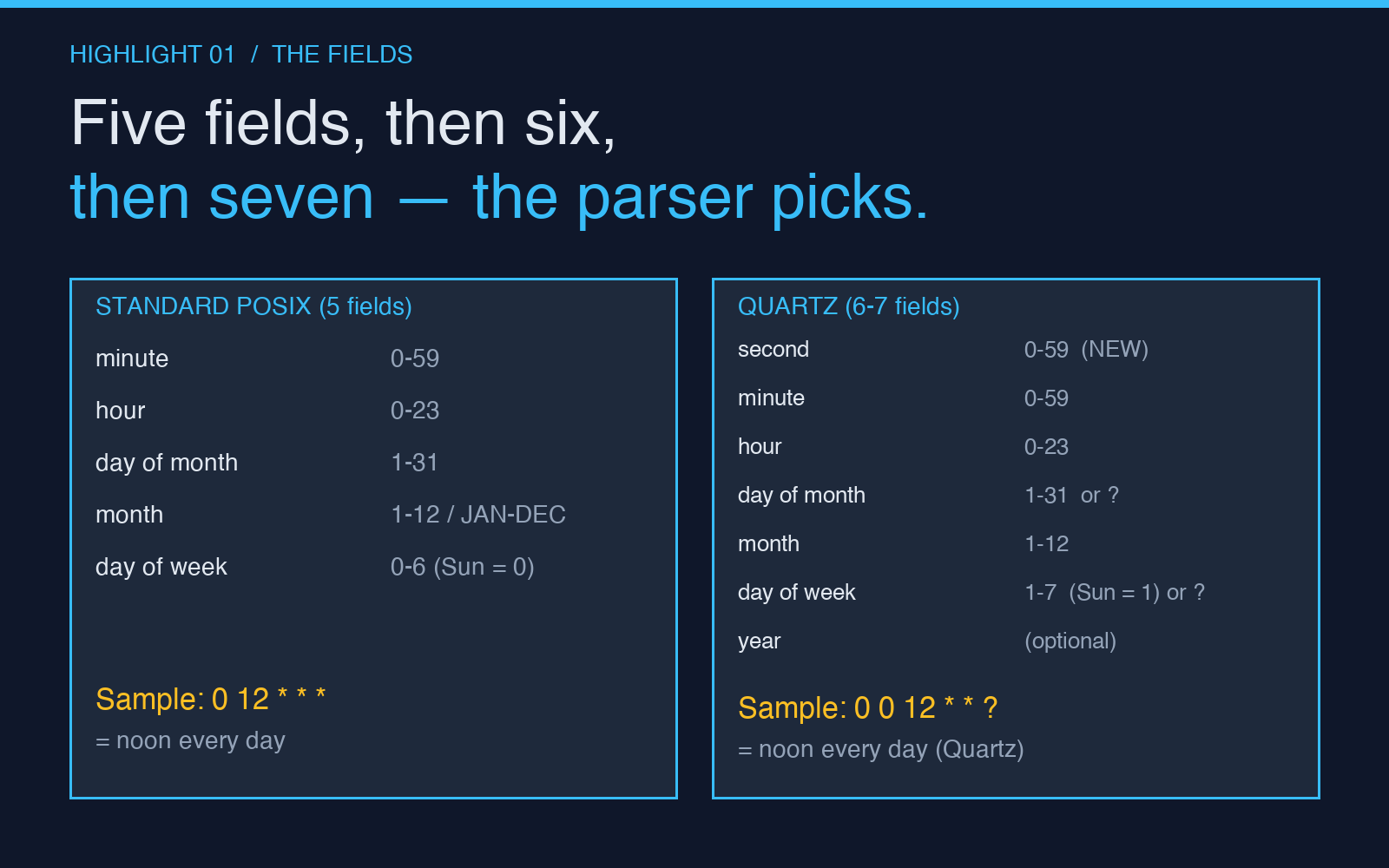
Standard POSIX cron reads exactly five fields, in this order:
minute— 0–59hour— 0–23 (24-hour clock, no AM/PM)day of month— 1–31month— 1–12 orJAN–DECday of week— 0–6 (Sunday is 0 in POSIX, Sunday is 7 in some parsers, and Quartz uses 1–7 with Sunday as 1)
Quartz, the Java scheduling library, reads six or seven fields, with the seconds field prepended:
second— 0–59 (Quartz only)minute— 0–59hour— 0–23day of month— 1–31month— 1–12 (Quartz also acceptsJAN–DEC)day of week— 1–7 (1 = Sunday, 7 = Saturday — same as POSIX but shifted)- (optional)
year— e.g.2026
This is the bug class that fires in production once every two years and takes a Friday afternoon to find. You write 0 0 12 * * * in a Spring Boot @Scheduled annotation, expecting “every day at noon.” Quartz reads six fields, sees 0 0 12 * * * as second=0 minute=0 hour=12 day-of-month=* month=* day-of-week=*, and the job never fires because day-of-week and day-of-month cannot both be * in standard cron semantics — most parsers require ? in one of them. The string is technically invalid; Quartz rejects it. Standard cron, given the same five trailing fields 0 12 * * *, would have fired every day at noon. The leading 0 was supposed to be minutes. The rest of the team spent an hour reading the wrong documentation.
The three off-by-one patterns that turn a daily job into a surprise
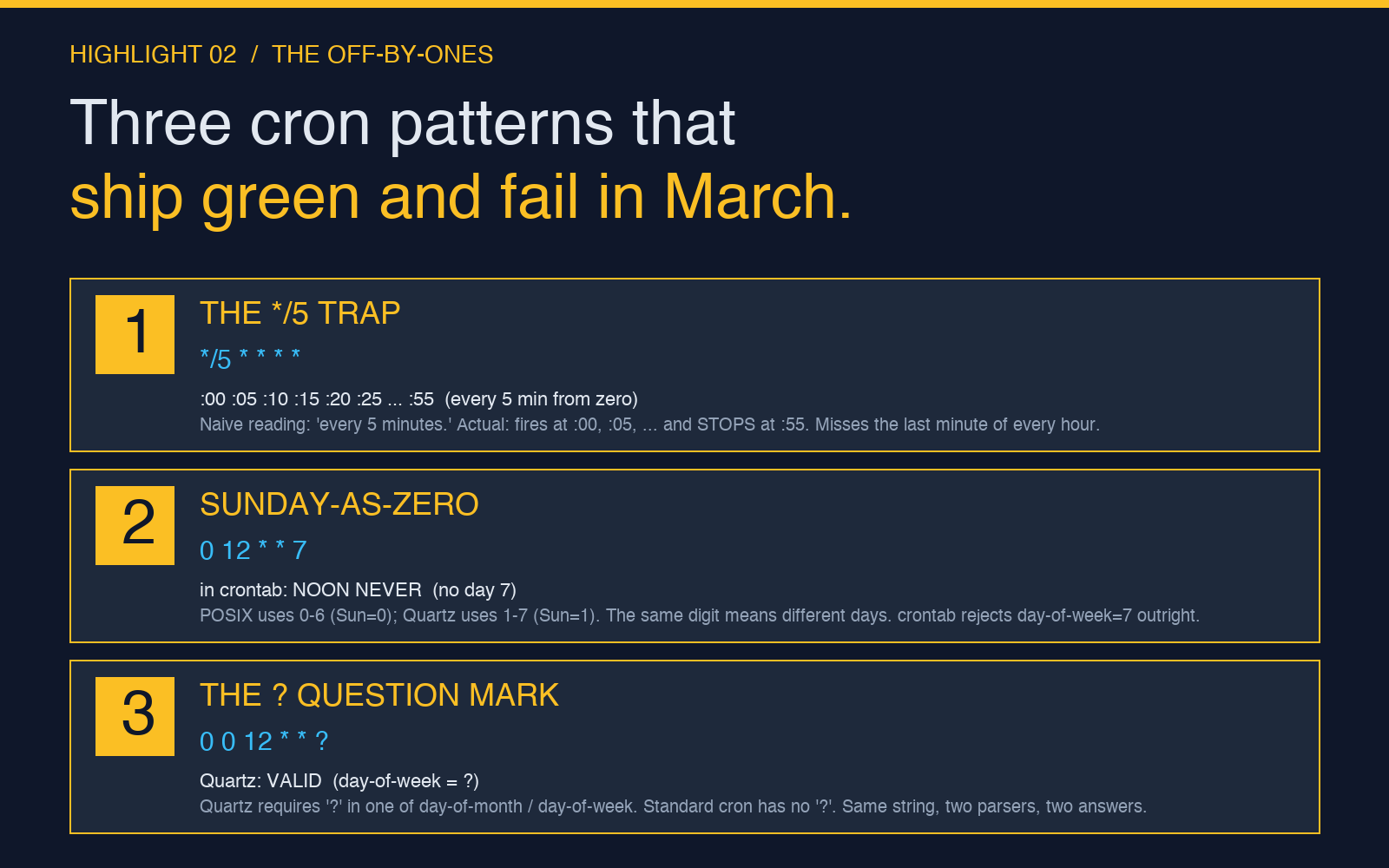
Cron’s silent off-by-one bugs are the kind of thing that ships in code review, runs for a year, and only surfaces when someone notices the report ran twice on a Sunday. Three patterns account for most of them:
- The
*/5minute trap.*/5 * * * *fires at :00, :05, :10, …, :55. People read it as “every five minutes starting from minute zero” — which it is. They then assume0 */2 * * *means “every two hours at minute zero,” which is true, but the same intuition applied to0 0 */2 * *does not produce “every other day” in every parser. In Quartz,*/2on the day-of-month field means “day 1, 3, 5, …,” not “every other day from today.” Use@Scheduled(cron = "0 0 0 */2 * *")in Java if you actually want every other day; Quartz will tell youday-of-month=1,3,5,...,31via the visualizer. - The Sunday-as-zero trap. POSIX cron, Vixie cron, and most Linux distributions use
0–6with Sunday as0. Quartz uses1–7with Sunday as1. Cron4j (another Java library) accepts0–7with both 0 and 7 meaning Sunday. So0 12 * * 7in crontab means “never” (Sunday would need to be 0); the same string in Cron4j means “noon on Sundays.” You can write0 12 * * 0everywhere to be safe, but the visualizer will surface the discrepancy the moment you change parsers. - The
?question mark. Quartz requires?in exactly one ofday-of-monthorday-of-weekwhen the other is specified. Standard cron has no such requirement; you can leave both as*. So0 0 12 * * ?is valid Quartz, invalid standard;0 0 12 * *is valid standard, invalid Quartz. Most editors accept both because they do not validate; the bug surfaces only when the runtime rejects the string at boot.
The visualizer puts these side by side. Paste the same string with cronFormat set to auto, then to standard, then to quartz, and the next-occurrence list changes in ways that are easy to predict once you see them and impossible to predict from the documentation alone.

Quartz vs standard cron — the same string, two different runtimes
If your team writes both POSIX crontab entries and Spring Boot @Scheduled jobs, the visualizer’s grouped calendar view is the fastest way to spot the cases where the two schedules drift. A useful pattern:
- Pick a job that is duplicated across systems — say, a nightly aggregation that runs in a crontab on the legacy host and as a Quartz job on the new service.
- Run both expressions through the visualizer with
occurrencesset to 20. - Diff the two lists. The first divergence is the day the legacy host fires but the new service does not, or vice versa.
This catches the Sunday-as-zero trap, the missing ?, and the case where someone wrote 0 0 0 * * * in Quartz expecting “midnight every day” but the parser read it as “minute=0 hour=0 day-of-month=0” and rejected the string.
The two fields you should never leave as *
If you are writing a job that should run once per day, day-of-month and day-of-week cannot both be wildcards in Quartz semantics. Pick one, set the other to ?. If you are writing a job that should run once per week, set day-of-month to ? and day-of-week to the day number. The visualizer’s calendar view will show the firing pattern as a column of dates, which is the clearest way to verify that your weekly job runs on the right weekday — especially after a daylight saving transition, when the cron daemon and the JVM can disagree by an hour for two weeks in March and November.
The other field that is easy to over-constrain is month. 0 0 1 1 * fires at midnight on January 1st; it does not fire at midnight on February 1st. If the job is supposed to be monthly, write 0 0 1 * *. If it is supposed to be the first of every other month, write 0 0 1 */2 * and confirm via the visualizer that the next fire dates land on 1 January, 1 March, 1 May, … — and not on 1 February, 1 March, 1 April, … which is what a naive reading of “every other month” sometimes produces.
What the visualizer tells you that the parser error message will not
A cron parser that rejects your string returns one line of error text. The error tells you the parser found a problem; it does not tell you which other parser would have accepted the same string, or what the next ten fire times would have been. The visualizer fills that gap by computing the fire list across all three formats in a single paste. For jobs that have to run on a specific date — compliance reports, billing windows, weekly digests — the difference between “fires on the first of every month” and “fires on the first weekday of every month” is a forty-character string change that the visualizer will surface in five seconds.
If your workflow is anything like the typical Operations team’s — a mix of crontab entries on Linux hosts, Quartz jobs in Spring services, and GitHub Actions schedules in the CI pipeline — then the visualizer’s format selector is the part you reach for first. The auto setting detects whether the string has five, six, or seven fields and routes accordingly; the standard and quartz settings force a specific parser. When in doubt, paste the string with all three settings and read the three fire lists; the one that matches your team’s actual schedule is the one to keep.
For the days when you also need to test the regular expressions sitting in the same scripts, the Regex Replace Previewer sits one click away and lets you see a substitution’s diff before the script runs. For the days when a cron job fans out into a webhook, the Webhook Debugger and Relay will capture the first three requests so you can verify the body and the headers without instrumenting the receiver. And for the days when the schedule depends on a date range you actually need to read in plain English, the ICS Calendar Recurrence Rule Expander handles the RRULE half of calendar-land with the same plain-English approach.
The Cron Expression Visualizer is one of those tools that looks small until you have spent an afternoon chasing a bug that turned out to be a missing ?, then it looks essential. Paste the string, pick the format, read the calendar. The fix is usually faster than you think.
Explore more tools at elysiatools.com.