Every subnet on the planet is described by a single line of text — 192.168.1.0/24 — and yet the engineers who paste that line into a firewall rule almost never know what it actually says. The /24 at the end is doing all the work. It tells the kernel how many of the leading bits identify the network, how many are available for hosts, where the broadcast address lives, and whether your security group is letting in two hundred and fifty-four machines or sixty-five thousand. Get that number wrong by one and you ship a rule that is either too tight to function or wide open to a subnet you never intended to expose.
This is the part of the job that the CIDR Calculator was built to take off your plate. You paste the notation in, and within the same breath you get back the network address, the netmask, the broadcast, the first and last usable host, the total host count, and the binary breakdown that explains why each of those numbers came out the way it did. It handles IPv4 and IPv6 with the same input box, and it treats both the slash-prefix form /24 and the legacy dotted mask 255.255.255.0 as equivalent inputs. The point of the tool is not to replace the mental math, but to verify it — to let you paste a value you are about to commit to a Terraform module and confirm in two seconds that the resulting subnet contains the hosts you actually meant it to contain.
The slash number is doing five things at once
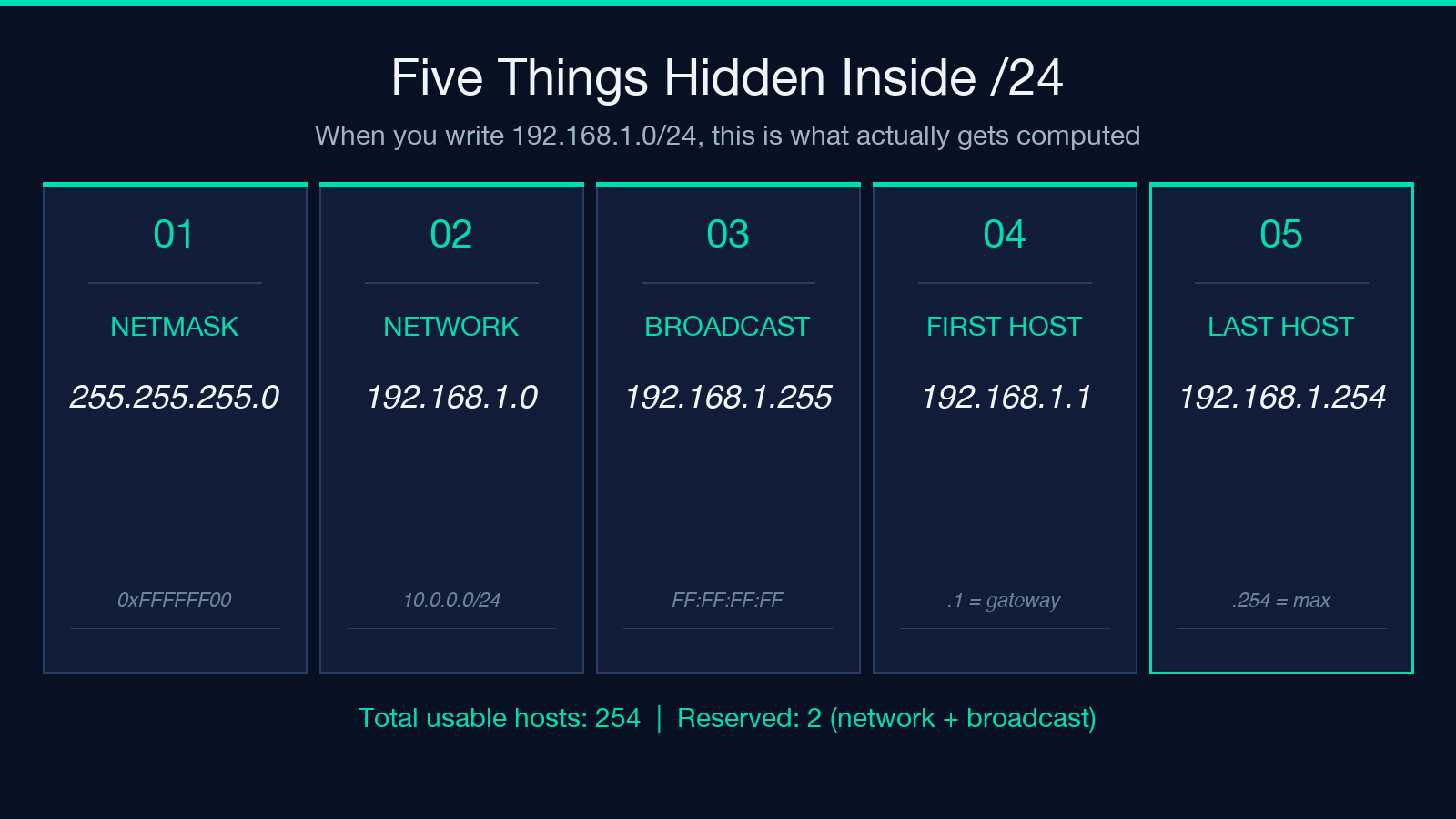
When you write 10.0.0.0/16, the /16 is not a parameter — it is a description of an entire binary layout. It tells the operating system that the first sixteen bits of any address in this block identify the network, and the remaining sixteen bits are available for individual hosts. From that single number you can derive everything else:
- The netmask:
255.255.0.0— the network bits set to 1, the host bits set to 0. - The network address:
10.0.0.0— every host bit cleared, the canonical name of the subnet. - The broadcast address:
10.0.255.255— every host bit set, the address that reaches every machine on the subnet at once. - The first usable host:
10.0.0.1— one past the network address. - The last usable host:
10.0.254.255— one before the broadcast. - The total usable hosts: 65,534 — two to the power of the host bits, minus the two reserved addresses.
Most engineers know the network address and the host count. Far fewer can correctly derive the broadcast address from a slash notation without thinking, and that is exactly the gap that gets you in trouble when a firewall rule rejects traffic at the network boundary or when a DHCP scope starts at the wrong address. The CIDR Calculator prints all five values alongside each other so you can read them off as a single block instead of reconstructing them in your head.
The four boundaries you need to know before you commit
The slash notation is a contract about four specific addresses, and a routing rule that disagrees with any one of them silently misroutes traffic. The first two are the ones most people already know — the network address and the broadcast — but the other two are where the real audit work happens.
The network address itself is a useful host
In a /30 subnet — the smallest block you can carve that still has any usable hosts — the network address, the first usable host, and the broadcast are six addresses apart, and the two usable hosts sit between them. Engineers who learned subnetting from older textbooks sometimes assume the network address is unusable, but on point-to-point links (a router-to-router connection, a VPC peering attachment, a VPN tunnel) the network address is treated as a valid host. AWS assigns it. Cisco assigns it. The Linux kernel treats it as valid when you bring up the interface. Treat it as reserved for routing protocol traffic and leave it alone — but do not assume it is free.
The broadcast address lives one past the last host
For 192.168.1.0/24, the broadcast is 192.168.1.255. Every device on the subnet listens to it, and any packet sent there is delivered to all of them. This is the address a ping -b targets and the address DHCP uses for discovery. If your firewall blocks inbound traffic to the broadcast address, you have just disabled DHCP fallback and ARP resolution for that subnet. If your firewall allows it from outside, you have just given an attacker a one-packet way to enumerate every host on your LAN.
The gateway has to be inside the subnet
If your subnet is 10.0.0.0/24, your gateway cannot be 10.0.1.1 — it has to be an address inside the same broadcast domain, which means the first three octets have to match. The most common mistake here is configuring a VPC route table to point at a gateway that is technically reachable but lives one subnet over, and then spending three hours wondering why the instance boots without a default route. The fix is mechanical: the gateway address must have the same network bits as every other host in the subnet.
The slash boundary itself is a permission boundary
If you grant 10.0.0.0/8 to a third-party integration, you have just given them access to sixteen million addresses — most of which your security team has not audited. If you narrow it to 10.0.5.0/24, you have given them access to two hundred and fifty-four addresses, every one of which you can list in a spreadsheet. Every slash boundary is a permission boundary, and the narrower the better. The CIDR Calculator shows you the host count alongside the slash so you can answer the question “how many machines is this rule actually exposing” before the rule goes into production.
IPv6 looks the same but is not
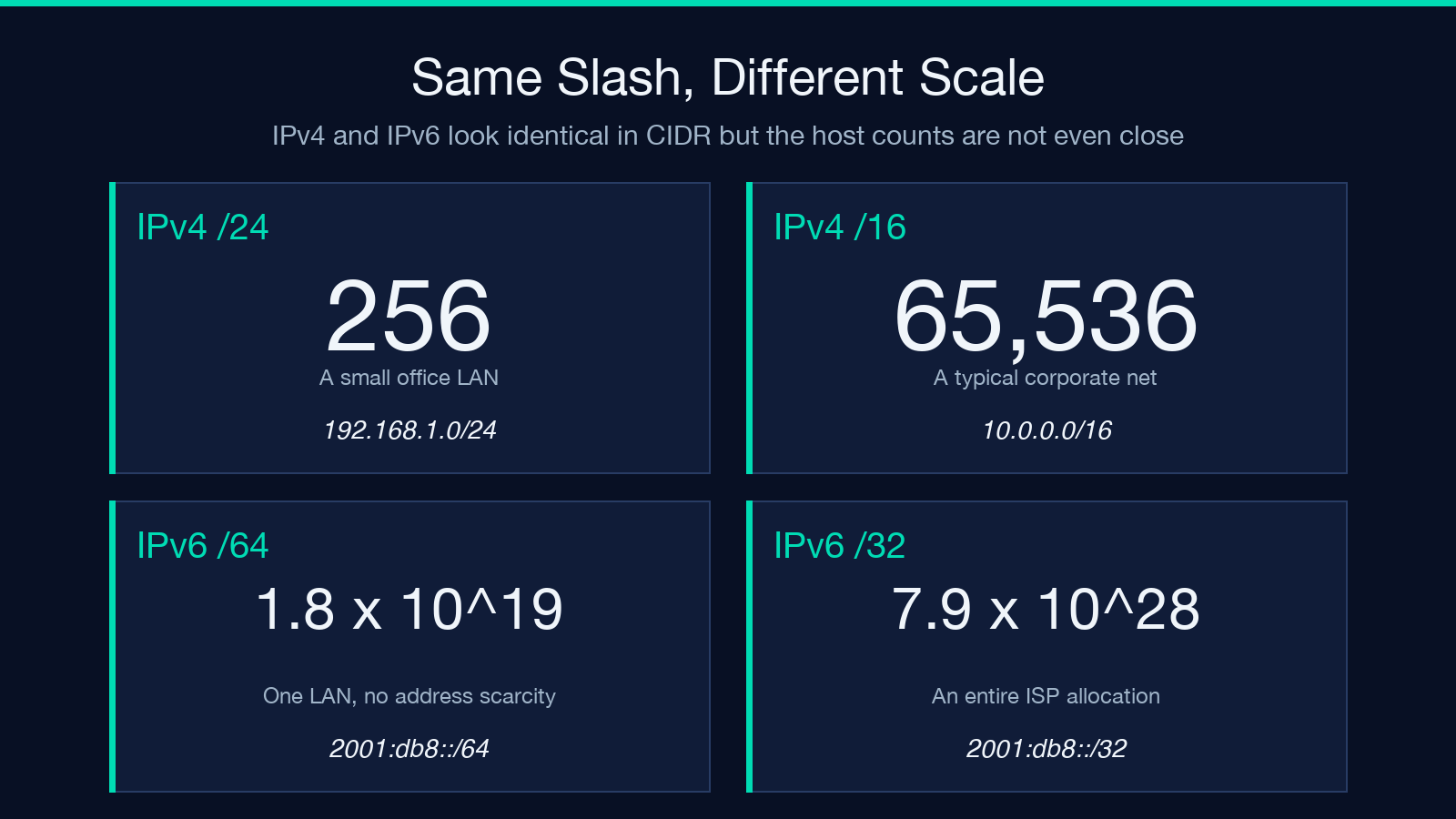
CIDR notation is the same syntax for IPv6, but the magnitudes are wildly different. A /64 IPv6 prefix is the standard subnet size for a single LAN — it contains eighteen quintillion host addresses, which is so many that nobody ever runs out. The IPv6 designers did this deliberately: they wanted to remove the address-conservation pressure that forces engineers to carve tiny IPv4 subnets, so every device gets a /64 by default and subnetting becomes something you do for organizational reasons, not address exhaustion reasons.
This has consequences for security rules. A firewall rule on 2001:db8::/32 is not analogous to 10.0.0.0/16 — it is analogous to 0.0.0.0/0, because there is nothing past /32 for an organization to claim. When you allow an IPv6 prefix, you need to think in terms of the allocation policy that governs it, not the host count. The CIDR Calculator handles both address families the same way — you paste 2001:db8::/32, it prints the network, the range, and the host count — but the host count is so large you should treat it as a permission category rather than a count.
What to actually check before you commit a CIDR
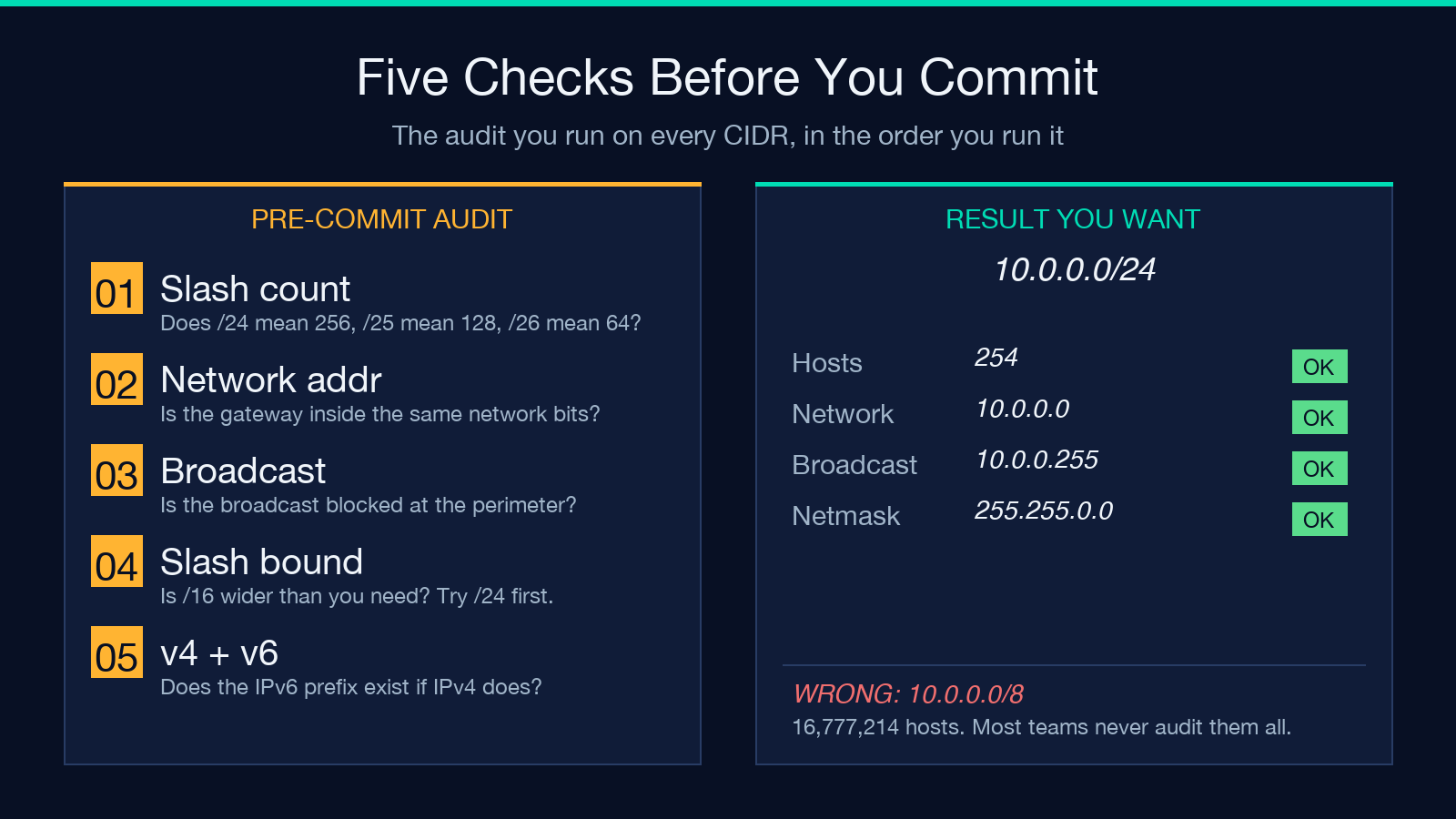
If you are about to put a CIDR into a Terraform module, a Kubernetes NetworkPolicy, an AWS security group, or a Cisco ACL, the audit is the same five-step routine. None of these steps require a calculator, but the calculator is what makes them fast enough to do every time instead of only when something is already broken:
- Does the slash number match the subnet you are describing?
/24means 256 addresses,/25means 128,/26means 64. Get this wrong and every step below is wrong. - Are the network address and the gateway both inside the subnet? If the network address is
10.0.5.0and the gateway is10.0.6.1, the routing will not work. - Is the broadcast address blocked at the perimeter? Inbound broadcasts should never reach an internal subnet from outside.
- Is the slash boundary narrower than you need?
/16is almost never what you want./24is usually enough./28is usually overkill unless you are partitioning a small VPC. - Does the IPv4 and IPv6 version both exist if both are supported? A rule that allows
10.0.0.0/24but not its IPv6 equivalent2001:db8:1234::/48is a half-rule.
That last step is the one most teams skip and regret. IPv4 and IPv6 are not redundant — they are parallel — and a security policy that only covers one is a security policy with a hole. The calculator’s ability to take either form as input is what makes that step fast: paste the IPv4, get the breakdown, paste the IPv6, get the breakdown, compare them side by side.
When the CIDR notation is not enough
There are two situations where CIDR notation alone does not tell the whole story, and where the tool earns its keep as a verification step rather than a calculation step.
The first is CIDR aggregation — when you have a list of smaller subnets and need to combine them into a single routing prefix. A list of eight /24 subnets can usually be summarized as one /21, but only if they are contiguous. The calculator does not aggregate for you, but it gives you the host count of each block so you can spot the gaps manually: if the combined host count of your eight blocks is smaller than the host count of the proposed /21, you have a hole somewhere and the aggregation will not work.
The second is legacy netmask notation — when you inherit a config file full of 255.255.255.0 lines instead of /24. The two are equivalent, but only on the IPv4 side, and only when the netmask is a contiguous block of 1s followed by a contiguous block of 0s. A netmask of 255.0.255.0 is technically valid as a four-byte value but is not a valid CIDR mask — the calculator will tell you so immediately rather than letting you commit a malformed rule.
Closing thought
A CIDR is not a parameter. It is a description of an entire address space, and committing one to production is committing every host inside that space to whatever policy the CIDR is bound to. The right time to verify a CIDR is before you commit it, not after the on-call engineer has spent forty-five minutes wondering why a subnet is unreachable. A two-second paste into the CIDR Calculator catches the five classes of mistake that account for most production network incidents: wrong slash number, mismatched gateway, exposed broadcast, oversized range, and IPv4-only policies on dual-stack networks. Run the audit before the commit, not after the incident.
Explore more network tools at elysiatools.com.