
Lead (close-first, ~80 words)
If you have ever pasted a Math.random() token into a JWT secret, a session cookie, or an API key field, this guide is for you. The Secure Random Generator replaces guessable pseudo-random strings with cryptographic material from your operating system’s CSPRNG, measured in entropy bits rather than character count. One input field — the entropy you need — gives you the same key in hex, base64, and base64url, with no chance of guessing and no modulo bias. The rest of this article walks through when to use it, why entropy beats length, and how to wire it into your day-to-day secrets.
What the Secure Random Generator actually does
The tool is a thin, deliberate wrapper around Node’s crypto.randomBytes() and crypto.randomInt() — the same primitives your TLS library, your JWT signer, and your SSH key generator already use. Instead of asking “how many characters do I want?”, it asks “how much entropy do I want?” — the security strength in bits, default 256, step 8, range 32 to 512.
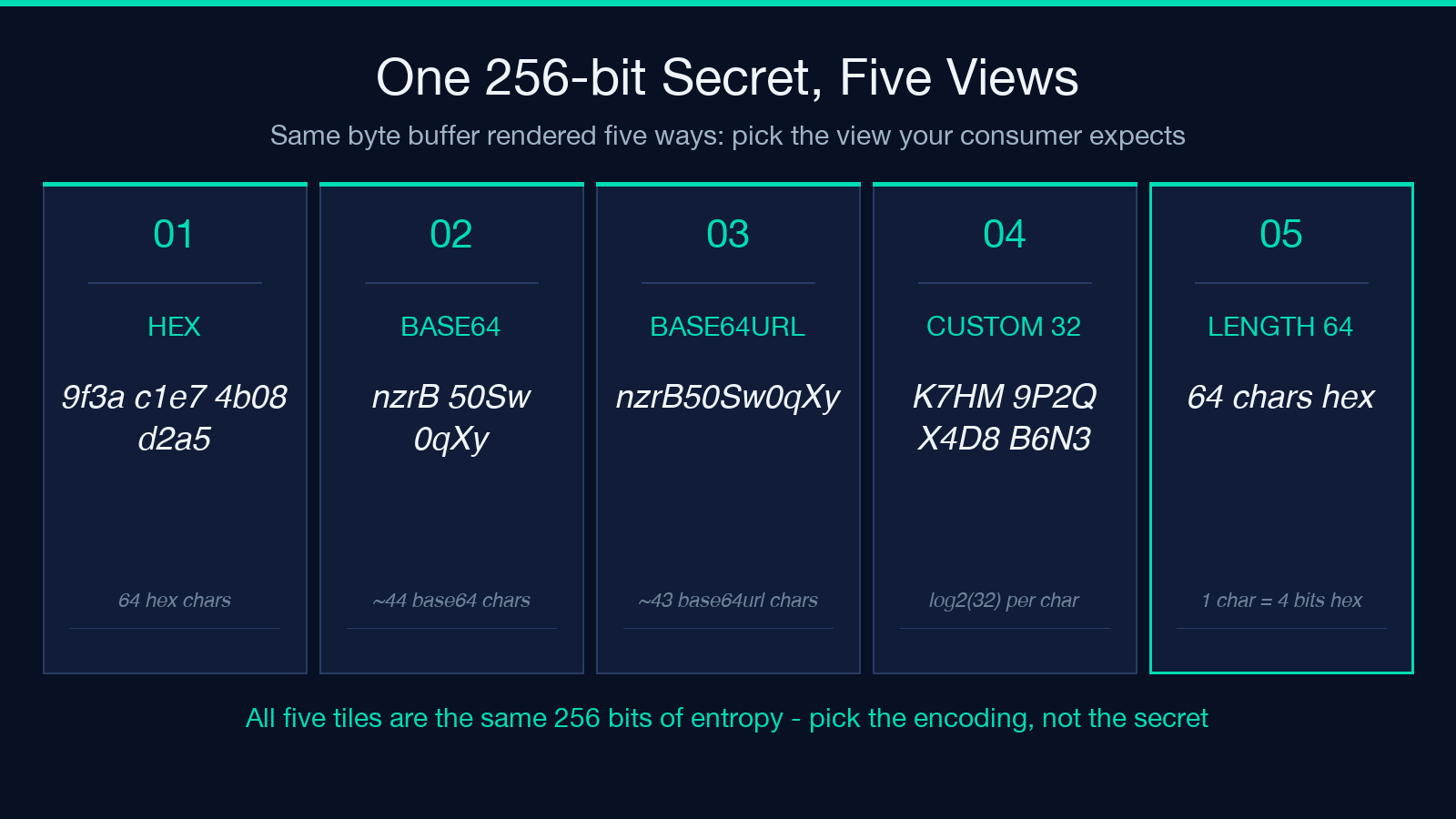
That one input drives everything else. The byte count is derived as bytes = ceil(entropyBits / 8). The same byte buffer is then rendered in three encodings side by side — hex (64 chars for a 256-bit key), base64 (about 44 chars), and base64url (about 43 chars) — so you can copy whichever format your downstream system expects without rerunning the tool.
A second branch handles custom alphabets: pass an alphabet like abcdefghijkmnpqrstuvwxyz23456789 and a length, and the tool samples crypto.randomInt(alphabetSize) per character. Because Node’s CSPRNG does internal rejection sampling, there is no modulo bias — a common bug in hand-rolled random-string code where Math.floor(Math.random() * n) skews toward smaller values. Explore the tool at Elysia Tools.
Why entropy, not length, is the right mental model
Most “password generator” tools ask for length because their internal source is non-uniform — Math.random() over a 62-symbol alphabet roughly approximates uniform distribution, so length is the only knob they expose. Length is a proxy for entropy, and a leaky one: an 8-character password from a 26-letter lowercase alphabet carries only 8 log2(26) = 37.6 bits of entropy, while an 8-character string from a 94-symbol keyboard set carries 8 log2(94) = 52.4 bits. Same length, very different security.
The Secure Random Generator inverts the relationship. You declare the security you need in bits, and the tool tells you how many characters that translates to in your chosen encoding or alphabet. For a 256-bit secret — the right size for an HMAC-SHA256 signing key, an AES-256 data key, or a JWT HS256 secret — you get exactly 256 bits of entropy regardless of representation.
This matters in three concrete places:
- JWT signing secrets — libraries that validate
alg: HS256expect exactly the entropy you claim; a 256-bit HS256 secret is the floor, not the ceiling. - API key generation — opaque tokens are commonly specified by entropy (e.g. “256 bits of randomness”), not by character count.
- Session cookie signing — the
cookie-secretforcookie-session, thesecretforexpress-session, and similar fields all want a high-entropy key, not a memorable string.
For comparison and cross-linking, the Hash Generator and the JWT Generator are the natural next tools in this workflow: hash a payload with a key generated here, or sign a JWT with the HS256 secret you just produced.
Byte encoding vs custom alphabet — the two output branches
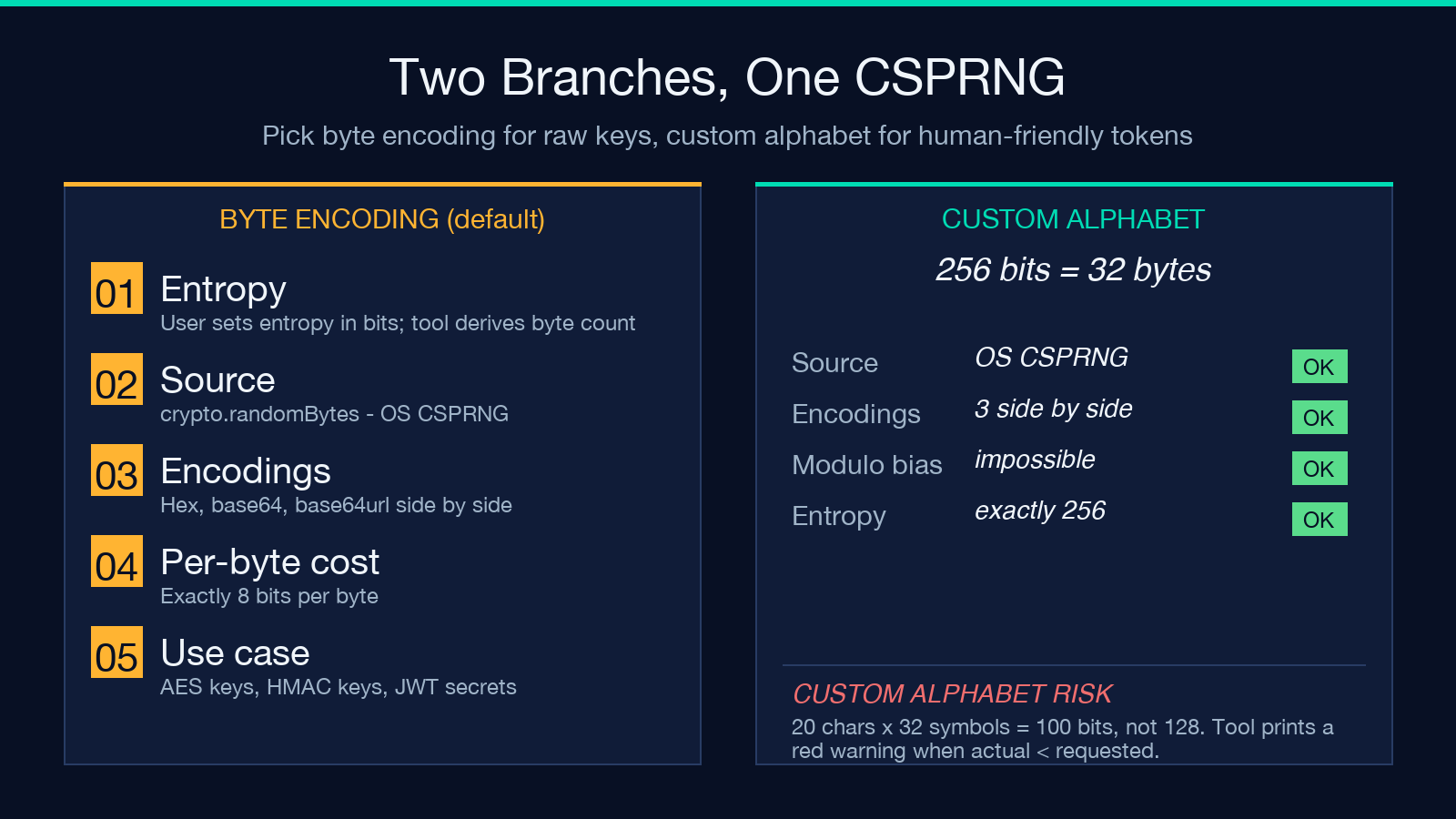
The tool has two output modes selected by whether you fill the Custom Alphabet field.
Byte encoding (the default — leave Custom Alphabet empty) generates ceil(entropyBits / 8) random bytes from crypto.randomBytes() and emits the same byte buffer in three encodings side by side. Each byte contributes exactly 8 bits of entropy, so the delivered entropy is always equal to the requested entropy. This is the right branch for any key, token, or secret that will be stored verbatim — the format mismatch between your generation step and your consumer is solved by picking the right column.
Custom alphabet (fill Custom Alphabet) samples crypto.randomInt(alphabetSize) per character. The actual entropy is length log2(alphabetSize) — which may be less than the entropy you requested. The tool computes this for you and prints a red warning when the actual entropy falls below the request: a 32-symbol alphabet at 10 characters is 50 bits, not 256, no matter what you typed into the entropy field. The warning is not cosmetic — short custom-alphabet strings can be far weaker than they look.
A practical worked example. Suppose you want an API key formatted like the AWS-style AKIA-prefixed keys, 20 characters from a 32-symbol alphabet that excludes confusing characters (0/O, 1/I/l). You set entropy to 128, alphabet to ABCDEFGHJKMNPQRSTUVWXYZ23456789, and length to 20. The tool produces a string, but its real entropy is 20 * log2(32) = 100 bits — and a red badge tells you the actual security is 28 bits below what you asked for. The fix is to bump the length or the alphabet size until the warning disappears. You can try this exact scenario at the Elysia Tools tool page.
Three encodings, one secret — and which to pick
The byte-encoding branch renders the same material in hex, base64, and base64url simultaneously. The point is not decoration — different systems expect different representations, and re-running with different format flags is error-prone.
Hex (the default) is two characters per byte, lowercase, no padding. A 256-bit key is exactly 64 hex chars. Most configuration files, environment variables, and Kubernetes secrets are happiest in hex because hex is human-readable and round-trips through any text format without escaping.
Base64 is the most compact of the three (roughly 4 chars per 3 bytes). It uses +, /, and = for padding, which makes it awkward inside URLs, JSON, or shell variables. Pick base64 when you are feeding a binary consumer like a binary file, a database BLOB column, or a PEM-encoded private key.
Base64url is the URL-safe cousin: it swaps + for - and / for _, and drops the padding. JWT signing secrets, OIDC client secrets, and any value that has to survive a URL, cookie header, or filename without escaping are best in base64url.
The three encodings are not three different secrets — they are three views of the same byte buffer. Pick the view your consumer expects, not the view you find most readable.
What CSPRNG really means (and why Math.random() fails)
A cryptographic pseudo-random number generator (CSPRNG) has two properties that distinguish it from the general-purpose Math.random() you find in browsers and runtimes:
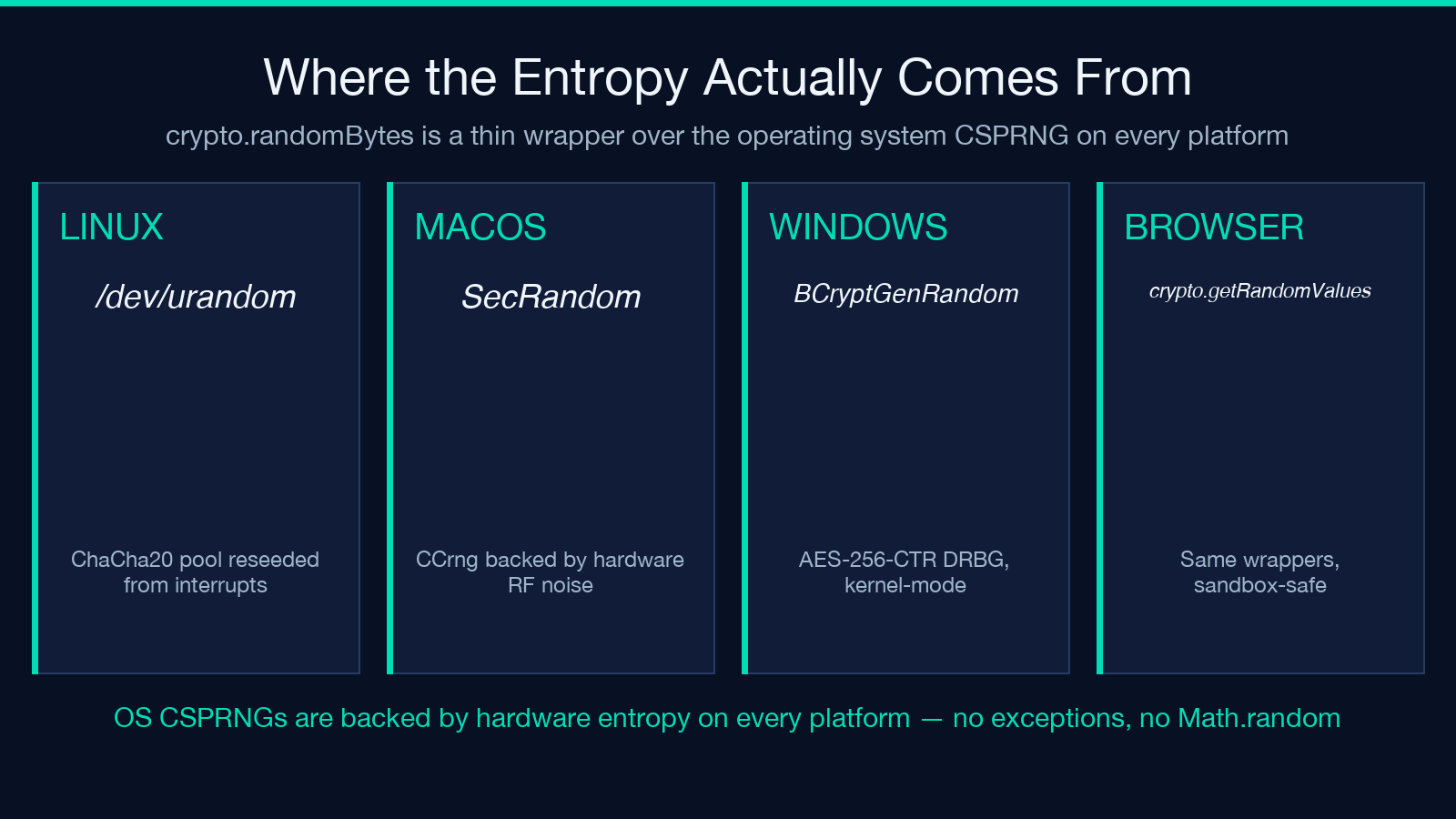
Unpredictability — given any amount of prior output, an attacker cannot feasibly compute the next bit. Math.random() in V8 uses xorshift128+, which is fast and uniform but not cryptographically secure; given a few hundred consecutive outputs, the internal state can be recovered and the sequence predicted. Backtracking resistance — even with full knowledge of the current state, an attacker cannot recover previously-generated outputs. The OS CSPRNG that backs crypto.randomBytes() — /dev/urandom on Linux, BCryptGenRandom on Windows, SecRandomCopyBytes on macOS — is reseeded from hardware entropy (interrupt timing, disk seek variance, RF noise on some platforms) and is designed for unpredictability against adversaries with significant compute.
crypto.randomBytes() on Node, crypto.getRandomValues() in the browser, secrets.token_bytes() in Python, java.security.SecureRandom in the JVM, and SystemRandomNumberGenerator in .NET are all thin wrappers around the same OS primitive. The Secure Random Generator is the same wrapper with the input validated, the entropy counted, and the output rendered in the formats you actually need.
The cardinal rule: if the value an attacker must not guess is on the line, do not use Math.random(). There is no scenario where the performance difference — nanoseconds per call — outweighs the security loss.
Common mistakes when generating secrets by hand
Even developers who know CSPRNGs exist produce weak secrets in practice. Five patterns come up repeatedly.
Math.floor(Math.random() n) for indices into an alphabet — produces modulo bias unless n divides a power of two. For arbitrary alphabet sizes the fix is rejection sampling, which crypto.randomInt() already does internally. No hand-rolled loops needed. new Date().getTime() or Date.now() as a “random” component — fully predictable to anyone who knows roughly when the secret was generated. Always mix a CSPRNG output with a timestamp; never use a timestamp alone. Concatenating user inputs (“username + Math.random()”) — the entropy of the resulting secret is bounded by the entropy of the user input, not by the random suffix. If the username is publicly known, the secret is effectively the random suffix alone. Re-using the same secret across services — a single leak compromises every service. Generate a fresh value per consumer; the entropy budget is cheap. Logging the secret “for debugging” — the moment a secret hits a log file, treat it as compromised. The Secure Random Generator does not log its own output; your code must not either.
For the inverse operation — deriving a key from a passphrase you can actually remember — look at the PBKDF2 / scrypt / argon2 category on Elysia Tools; the right tool depends on whether you need to authenticate a stored hash or stretch a low-entropy passphrase into a high-entropy key.
Putting it into a real workflow
A practical end-to-end use case. You are deploying a Node service that signs its own session cookies with HMAC-SHA256. You need a 256-bit secret, you want it in base64url because it will live in a Kubernetes Secret manifest that you copy-paste from a terminal, and you want it now.
1. Open the Secure Random Generator. Set Entropy (bits) to 256. Leave Custom Alphabet empty. Leave Count at 1. 2. Copy the base64url value from the rendered card. 3. Paste it into your Kubernetes Secret under stringData.SESSION_SECRET, or your .env file as SESSION_SECRET=, or your vault backend. 4. Restart the service. The first session cookie it signs is now backed by 256 bits of CSPRNG entropy — no chance of guessing, no modulo bias, no Math.random() anywhere in the chain.
That is the whole workflow. The tool gives you the entropy you asked for, in the format your consumer expects, with no extra ceremony. For a different deployment — say, a CI runner that needs an API key per environment — change Count to however many keys you need; each row is independent.
For more secrets-related tooling, the Security category on Elysia Tools collects every generator, inspector, and decoder in the same family — the JWT Inspector & Verifier is the natural next stop if you want to confirm a token was actually signed with the secret you just generated. Explore more tools at elysiatools.com.
