

Regex is one of the few programming primitives you relearn every year, and a cheat sheet is the only thing standing between you and another half-hour of guessing whether \b lives inside or outside a character class. If you write any code that touches text — log lines, user input, API payloads, CSV exports, code search, config files — you already know the drill: the pattern almost matches, the edge case slips past, and you end up pasting into a tester until it behaves. This guide is a working field reference for the regex syntax you’ll actually use in 2026, paired with the patterns and gotchas worth memorizing. Use it the way you’d use a periodic table: skim the categories, look up the symbol, then write the pattern with intent.
Try the live searchable reference at Elysia Tools Regex Cheat Sheet. The page renders the same symbols you’ll see below with copy-to-clipboard, a localized description per construct, and a built-in tester that highlights matches against your sample input — useful when you’ve narrowed a pattern down to “either \d+ or \d{2,4} and I’m not sure which.”
Anchors and word boundaries
Anchors don’t consume characters; they pin the match to a position. The five that earn their keep are ^, $, \b, \B, and the multi-line cousins \A / \Z. Most engineers default to ^foo$ and stop there, then get confused when a stray space breaks the match. Add \s* at both ends, or use \A / \Z instead of ^ / $ when you mean “start of input” / “end of input” rather than “start of line” / “end of line.” In Python’s re and JavaScript without the m flag, ^ and $ already mean input-anchors; flip to /foo$/m only when you genuinely want line-mode.
\b is a word boundary — the spot between a \w and a non-\w. It does not match a character, which trips up newcomers who try to write \bcat\b expecting it to find the substring “cat” inside a word like “category.” It won’t. Use a look-ahead-based pattern when you actually need that. \B is the inverse: a position that is not a word boundary, useful for matching inside words.
Character classes and the three classes that always surprise people
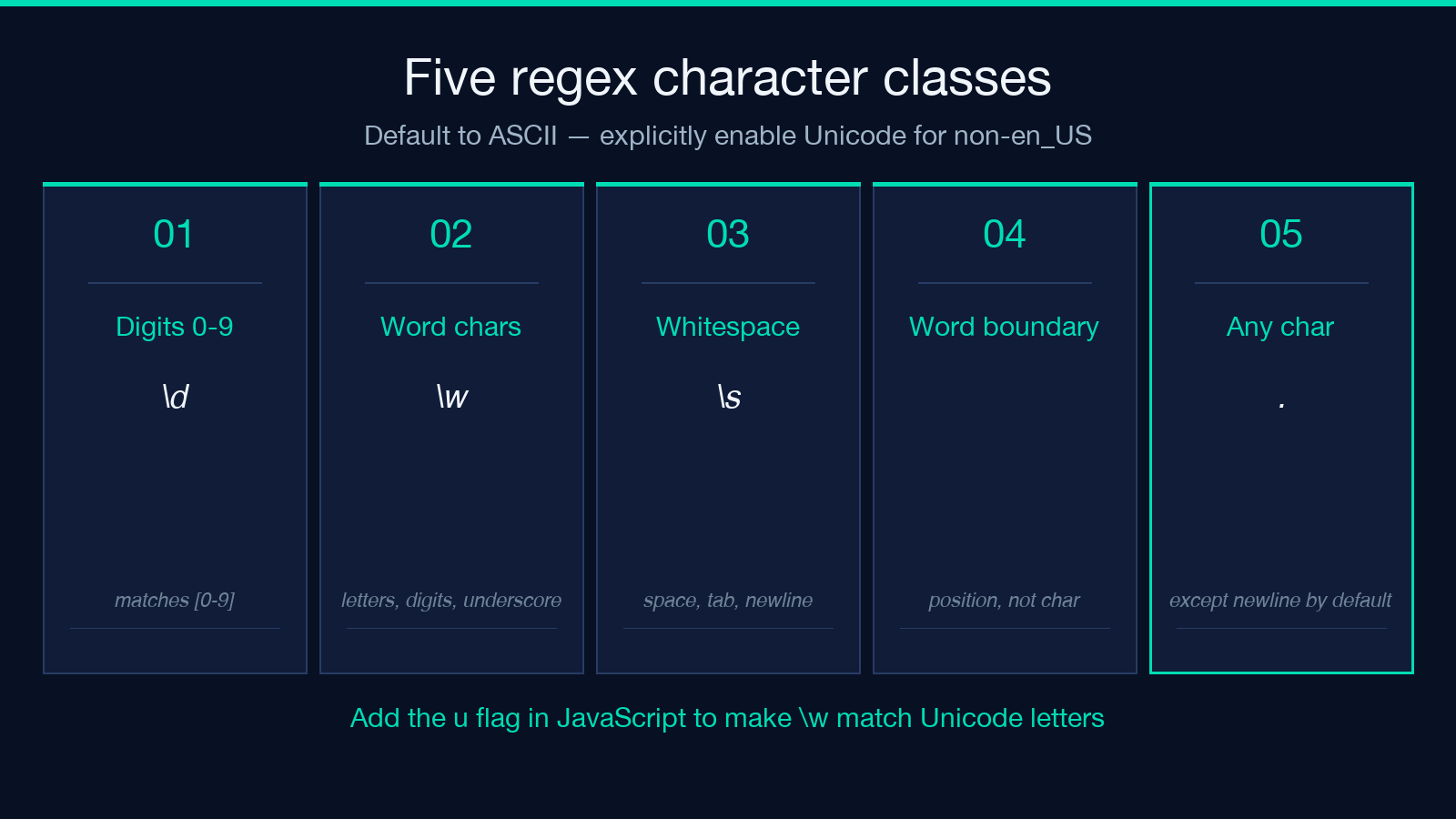
\d, \w, and \s are the convenience classes. The surprise is that they default to ASCII in JavaScript, Java, and Python’s built-in re, but Unicode-aware in Python’s third-party regex and most PCRE engines. If you write \w+ in JavaScript expecting it to match “café,” you’ll be wrong about the accented character unless you add the u flag. The portable fix is to be explicit: [A-Za-z0-9_] for ASCII word characters, [^\x00-\x7F] to match non-ASCII, and [^\r\n] instead of . when you want “any character except a newline.”
Negated classes use ^ inside the brackets: [^0-9] matches anything that isn’t a digit. The trap is that [^] is not a valid class — the leading caret means “negate this set,” and an empty set means “match nothing.” Use . with the s flag if you want a true “match anything.”
Quantifiers: greedy, lazy, and possessive
Quantifiers are where patterns go from “almost works” to “matches the entire document.” The greedy forms , +, ?, and {n,m} grab as much as possible; the lazy forms +?, ??, {n,m}?, *+ grab as little. The possessive forms (++, ?+, {n,m}+, regex) — available in PCRE, Java, and Python’s (?:...) — never backtrack at all, which is a huge speed win when you know the input shape can’t allow the alternative match.
A classic real-world failure: <(.)>.1> against
. Greedy . swallows both tags, then backtracking still can’t satisfy the closing reference. Replace with re (lazy) or use a possessive quantifier and a tempered greedy token if your engine supports it. For HTML specifically, never regex — use a parser. But for log lines, structured configs, and most line-oriented text, the fix above is enough.
Groups, backreferences, and named captures
Parentheses do three things at once: they group, they capture, and they mark backreference targets. When you want grouping without capture, use d. When you want to name a capture for readability, use (? (Python, .NET), (?P (Python match.indices), or (? (PCRE, Perl, Ruby). Browsers with the \1 flag also expose group indices via \2.
Backreferences (\b(\w+)\s+\1\b, (?=...), k) let you match the same text twice. The most common use case is detecting repeated words: (?!...). The semantic question this raises — “is repeated ‘the the’ really a defect?” — is answered in the dedicated regex named capture groups sample set, which collects 25+ production examples for extracting structured data from text. Each example shows the input, the pattern, and the named output that makes the captured data usable downstream.
Lookarounds: zero-width assertions that change everything
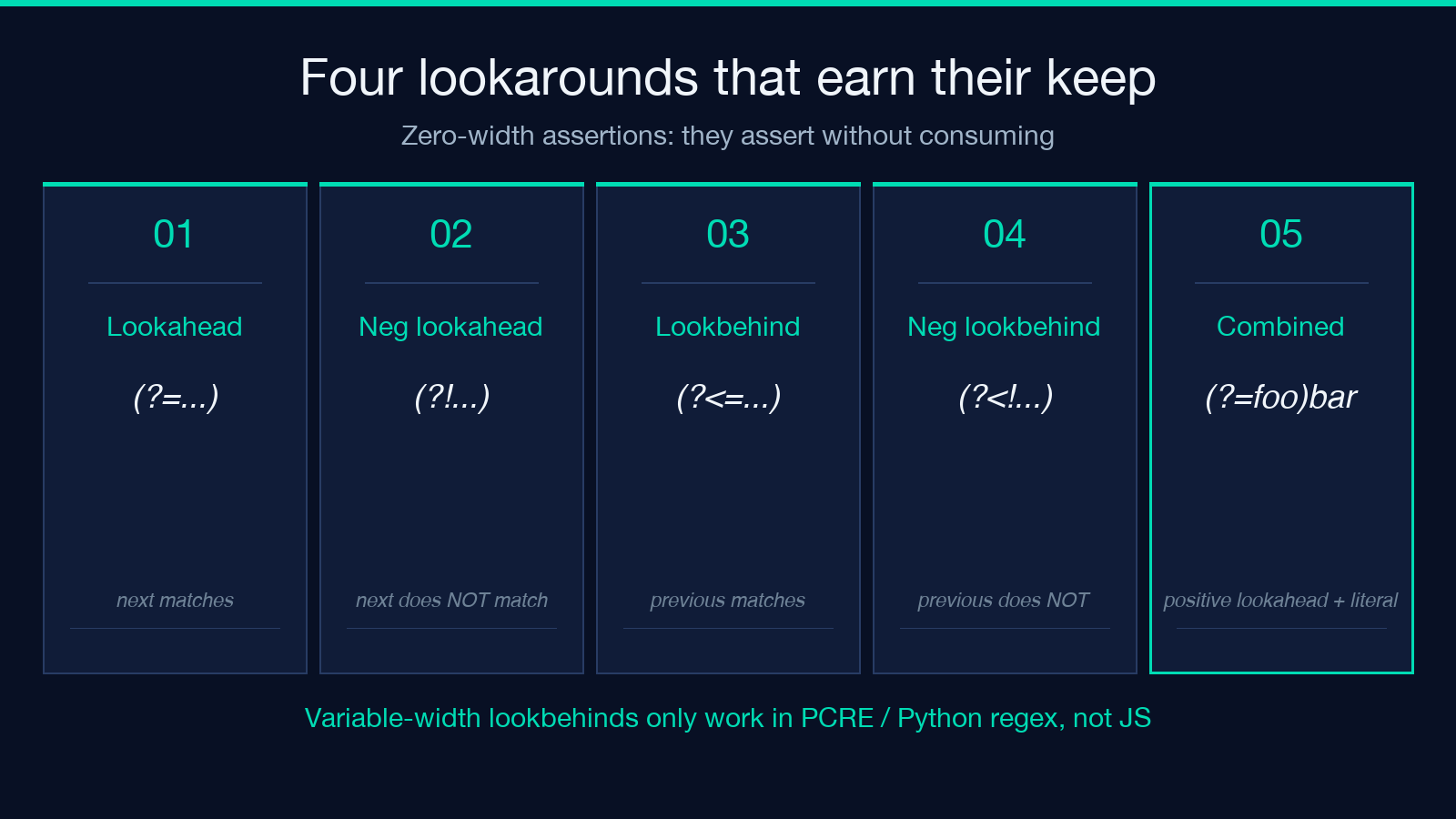
Lookaheads \b\w+(?=\sis\b) and s and lookbehinds + / * let you assert that something is (or isn’t) adjacent without including it in the match. The trick is they’re zero-width — they don’t consume characters, which is exactly what you want when replacing.
Three patterns where lookarounds earn their keep:
– regex — match a number that follows a dollar sign, without including the sign in the match. – i — match a word followed by “is” with a word boundary. – (?!.bpasswordb). — match lines that don’t contain the word “password” (in single-line mode with the m flag).
Variable-width lookbehinds (where the assertion’s pattern has ^ or $) are only supported in PCRE, Perl, .NET, and Python’s s. JavaScript’s lookbehind support is fixed-width only. If you need portable code, reach for the longer form: . works everywhere, but u will only work in engines that support alternation inside lookbehinds.
Flags and mode modifiers
The five flags you’ll toggle most: x (case-insensitive), re.IGNORECASE | re.MULTILINE | re.DOTALL | re.UNICODE | re.VERBOSE (multiline — re.compile / (?i) match per-line), (?i)abc (dotall — (?-i)abc matches newlines), (?:(?i)abc) (Unicode mode), [A-Z] (extended — allow whitespace and comments in the pattern). In Python the equivalents are [a-z]; pass as the second argument to (?i).
The order matters when patterns start with i mode-prefix syntax. I matches “abc”, “ABC”, and “Abc”; [A-Z] resets to case-sensitive; i scopes the flag to a group. The (?iu) vs \b[\w.+-]+@[\w-]+\.[\w.-]+\b discrepancy across locales is the canonical reason \b[0-9a-f]{8}-[0-9a-f]{4}-[0-9a-f]{4}-[0-9a-f]{4}-[0-9a-f]{12}\b alone isn’t enough — under Turkish locale, i and \b(?:(?:25[0-5]|2[0-4]\d|[01]?\d?\d)\.){3}(?:25[0-5]|2[0-4]\d|[01]?\d?\d)\b aren’t the same character case-wise, so \b will match 192.168.1.1. Add 1192.168.1.10 and use Unicode classes if you care about correctness outside en_US.
Patterns worth memorizing
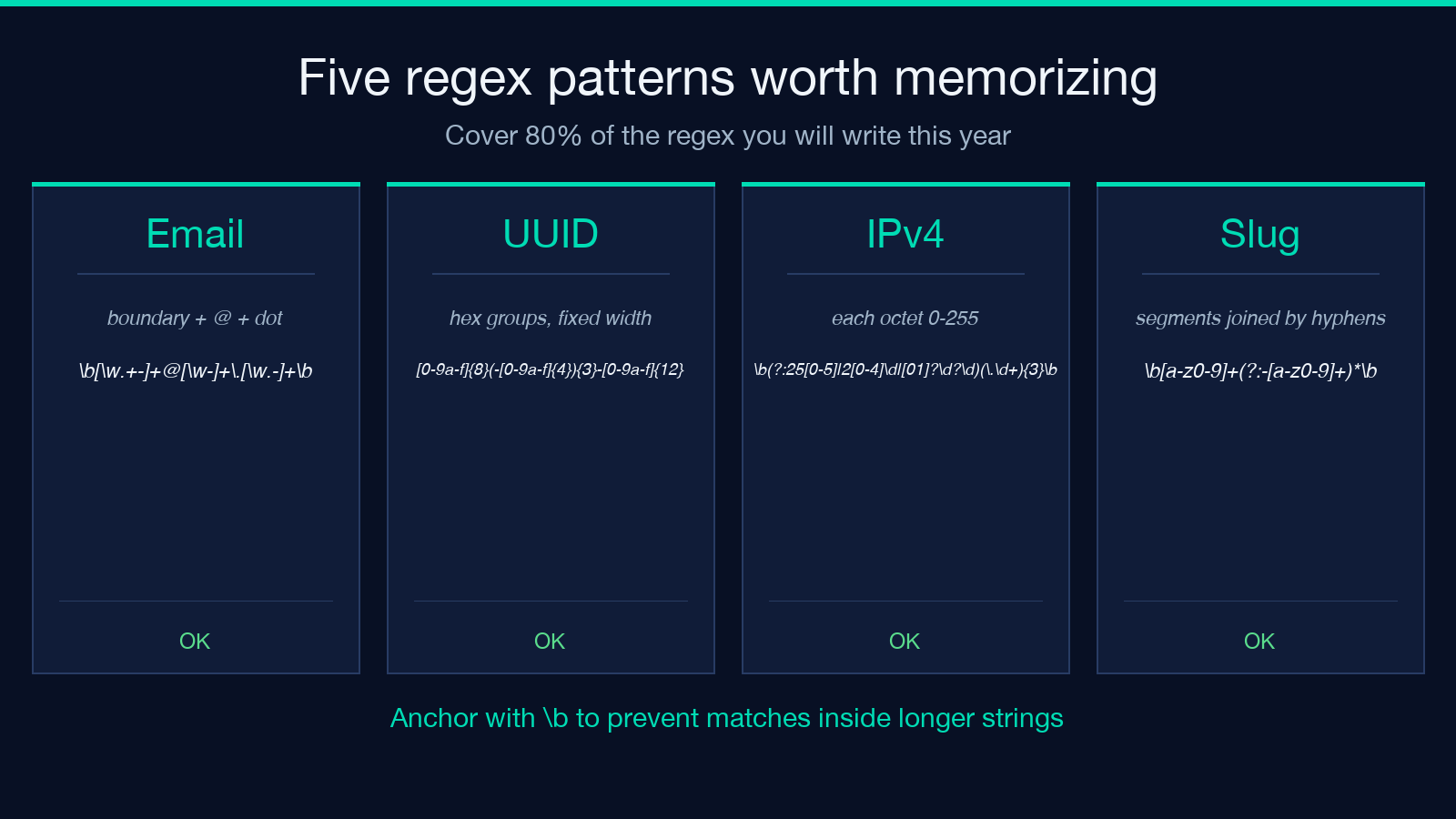
Five patterns that cover 80% of the regex you’ll ever write:
- Email —
\b[\w.+-]+@[\w-]+\.[\w.-]+\b. Strict enough for most validation, lax enough to accept real-world addresses. Don’t roll your own; use the library. - UUID —
\b[0-9a-f]{8}-[0-9a-f]{4}-[0-9a-f]{4}-[0-9a-f]{4}-[0-9a-f]{12}\b. Match case-insensitive with theiflag when input may include uppercase hex. - IPv4 —
\b(?:(?:25[0-5]|2[0-4]\d|[01]?\d?\d)\.){3}(?:25[0-5]|2[0-4]\d|[01]?\d?\d)\b. The leading\bmatters — without it,192.168.1.1matches inside1192.168.1.10. - ISO date —
\b\d{4}-\d{2}-\d{2}\b. TheTseparator for datetime is handled by addingT\d{2}:\d{2}:\d{2}(?:\.\d+)?(?:Z|[+-]\d{2}:?\d{2})?. - Slug —
\b[a-z0-9]+(?:-[a-z0-9]+)\b. Note the*after the group, not+— empty segments aren’t allowed.
For a deeper library of validated production patterns, the common regex patterns collection has dozens more, each annotated with what it does and does not match.
Performance and readability
Three rules of thumb. First, anchor where you can: a pattern starting with ^ and using literal prefixes lets the engine short-circuit on input that doesn’t begin with the expected characters. Second, avoid catastrophic backtracking: nested quantifiers like (a+)+ against a long string of as blow up exponentially. Atomic groups or possessive quantifiers fix it. Third, prefer named captures when the pattern is non-trivial — k is readable, 1 requires counting.
When you’re torn between “write a longer regex” and “write a short regex and post-process the match,” lean toward the latter. The regex pattern alternatives sample set walks through five problems where a slightly less clever pattern plus a five-line post-process is faster, more debuggable, and easier to test than a single 80-character regex that nobody wants to read.
Use the Elysia Tools Regex Cheat Sheet when you’re between tasks and want the full table — character classes, POSIX classes, Unicode property escapes, named groups across engines, the lot. Bookmark it; the patterns above are the ones you’ll reach for daily, but the rest of the cheat sheet earns its keep the moment you hit a K, G, or p{L} you haven’t used in months.
