
The fastest way to settle whether three or more group means differ by more than random chance is one-way ANOVA, not a stack of pairwise t-tests, and the right tool is one that lays out the sums of squares, F statistic, and p-value side by side. When you have three fertilizer treatments, four production lines, or two teaching methods and a control, the temptation is to run t-tests between every pair. That trick inflates the false-positive rate by exactly the number of comparisons you run, and it ignores the structure of the whole experiment. One-way ANOVA tests the single null hypothesis “all group means are equal” in one shot, then partitions the total variance into a between-group piece and a within-group piece to see how much of the variation is real signal. The ANOVA Calculator accepts up to many labeled groups in one textarea, computes SSB, SSW, SST, degrees of freedom, mean squares, F, and p-value, and shows the per-group summary so you can audit the computation before you trust the headline number.
Why three t-tests are the wrong tool
Pairwise t-tests treat each comparison as an independent experiment. If you run three t-tests at the conventional alpha = 0.05 threshold, the family-wise error rate jumps to roughly 1 - (1 - 0.05)^3 = 0.143, or about 14 percent. Add a fourth group and you cross 18 percent. The published literature is full of “significant” findings that vanish under Bonferroni correction, and the correction is itself a Band-Aid that throws away power. ANOVA avoids the trap by testing the single joint null “all groups are equal” first, and only after that does it tell you which pairs to drill into. The whole framework is built around controlling one error rate, not twelve.
There is also a structural reason. ANOVA partitions the total sum of squares into a between-group piece (SSB, how far the group means sit from the grand mean) and a within-group piece (SSW, how far individual observations sit from their own group mean). If most of the variability is between groups, the treatments did something. If most of the variability is within groups, the noise floor is too high to see the signal. Pairwise t-tests throw this information away. They answer “did A beat B?” and skip the follow-up “and in the context of how much noise.” A single F statistic from the ratio MSB/MSW tells you both at once.
Reading the one-way ANOVA table
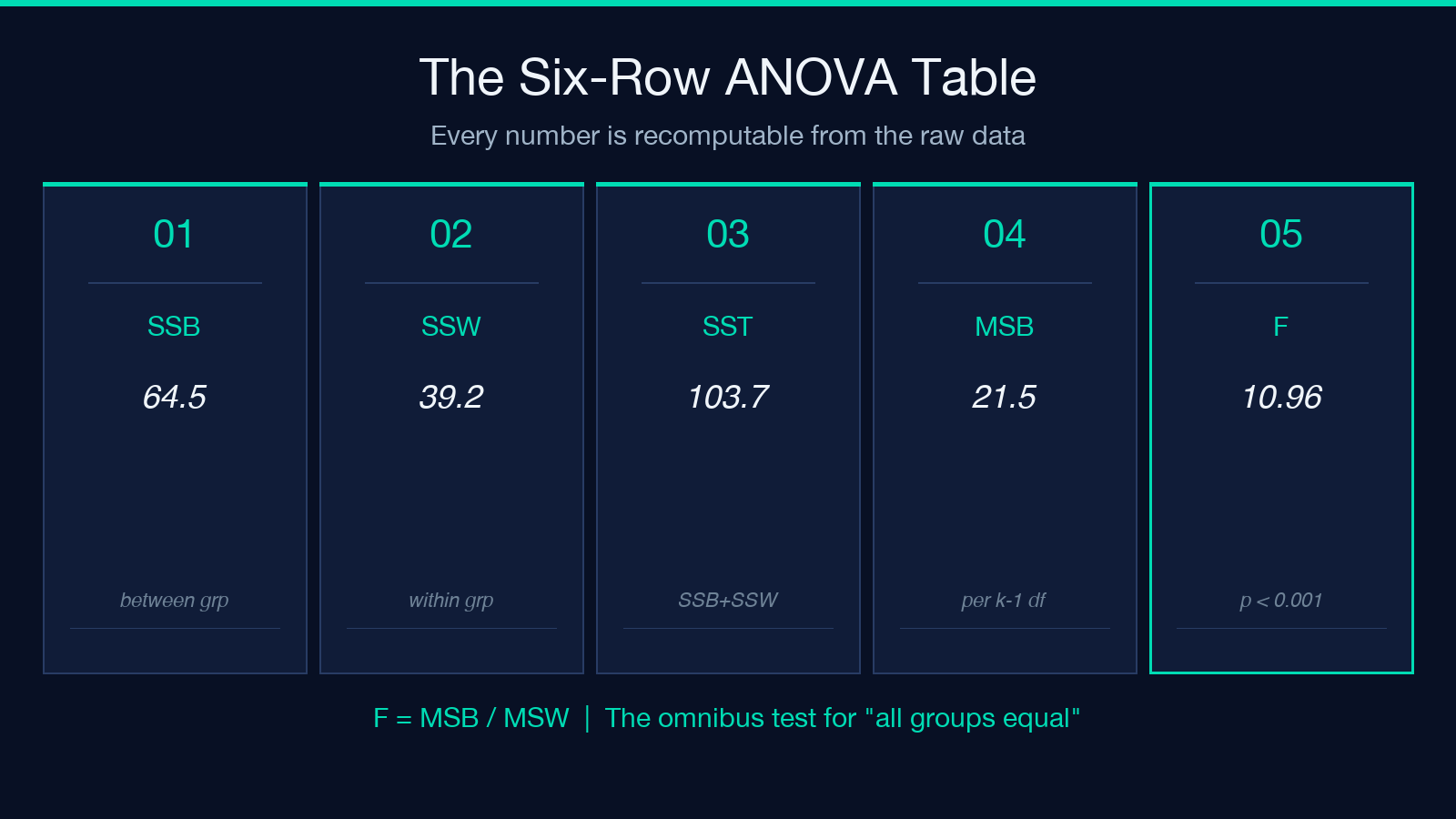
The classic ANOVA table has six rows: source of variation (between, within, total), sums of squares (SSB, SSW, SST), degrees of freedom (k-1, N-k, N-1), mean squares (MSB = SSB/(k-1), MSW = SSW/(N-k)), F = MSB/MSW, and the p-value attached to F under the F-distribution with k-1 and N-k degrees of freedom. The mechanics matter because every number is recomputable from the raw data, which is the strongest evidence the calculation is correct. The ANOVA Calculator produces all six rows plus the per-group mean, sample size, and standard deviation so you can verify the SSW piece by hand if you need to.
The two numbers that drive every decision are F and the p-value. F compares the between-group variance to the within-group variance. A small F (near 1) means the groups explain about as much variance as the noise inside the groups, so the null cannot be rejected. A large F (above 4 or so for typical k=3 and N=12) means the between-group variance overwhelms the within-group variance, and the p-value drops below 0.05. The p-value is the probability of seeing F at least this large if the null hypothesis were true, so p < 0.05 is the conventional “reject the null” signal. The right way to report it is the F distribution with the correct degrees of freedom, not a back-of-envelope z-test.
A worked example with three groups
A plant biologist runs a four-week growth trial with three fertilizer treatments and a control. Each treatment has six replicate plants, and the response variable is height in centimeters after four weeks. The control group averages 8.2 cm, treatment A averages 10.4 cm, treatment B averages 11.1 cm, and treatment C averages 12.6 cm. The within-group standard deviation is about 1.4 cm for each treatment. With k=4 groups and N=24 plants, the degrees of freedom are 3 and 20. The grand mean is (4*8.2 + 6*10.4 + 6*11.1 + 6*12.6) / 24 = 10.7 cm. SSB, after centering each group mean, comes out around 64.5. SSW, after summing squared deviations inside each group, comes out around 39.2. That gives MSB = 21.5, MSW = 1.96, F = 10.96, and p < 0.001. The F distribution with 3 and 20 degrees of freedom at F=10.96 is well past the 0.001 threshold, so the null “all four means are equal” is rejected.
Worth noticing: SSB + SSW = SST exactly. The calculation never loses mass. That identity is the basis for eta-squared (SSB / SST), a measure of effect size that tells you what fraction of the total variance is treatment-driven. In this example, eta-squared = 64.5 / 103.7 = 0.622, which is large by Cohen’s conventions (0.01 small, 0.06 medium, 0.14 large). The treatment is not just statistically significant, it is biologically meaningful. The ANOVA Calculator returns eta-squared alongside the F statistic so you can report effect size without rebuilding the table.
Assumptions you cannot skip
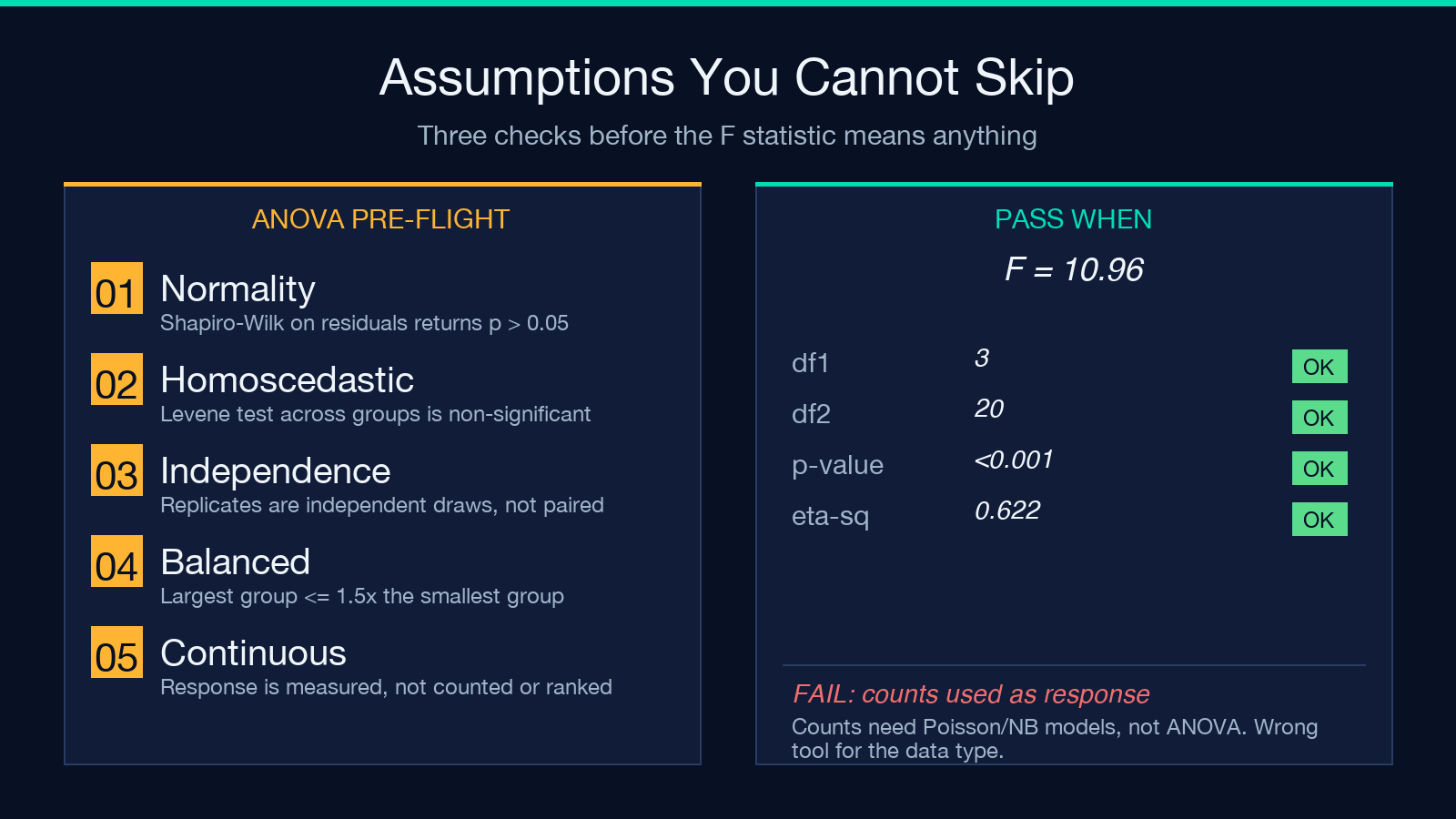
ANOVA is parametric. It assumes the residuals are normally distributed, the variances are roughly equal across groups (homoscedasticity), and the observations are independent. The independence assumption is structural: it depends on the experimental design, not the data. The normality and equal-variance assumptions can be checked. A Shapiro-Wilk test on the residuals is the standard normality check (p > 0.05 means the normality assumption is plausible). Levene’s test is the standard equal-variance check. If either fails, the Welch ANOVA variant is the right fallback because it does not assume equal variances.
The single most common Assumption-Violation-In-Real-Data is unequal sample sizes. ANOVA tolerates moderate imbalance (the largest group should not be more than 1.5x the smallest), but severe imbalance distorts the F distribution. The ANOVA Calculator accepts arbitrary group sizes and shows the size for each group, so imbalance is visible at a glance. If your groups are wildly different in size, that is a sign to either collect more data or switch to a regression-based approach that handles imbalance natively.
Post-hoc tests after a significant F
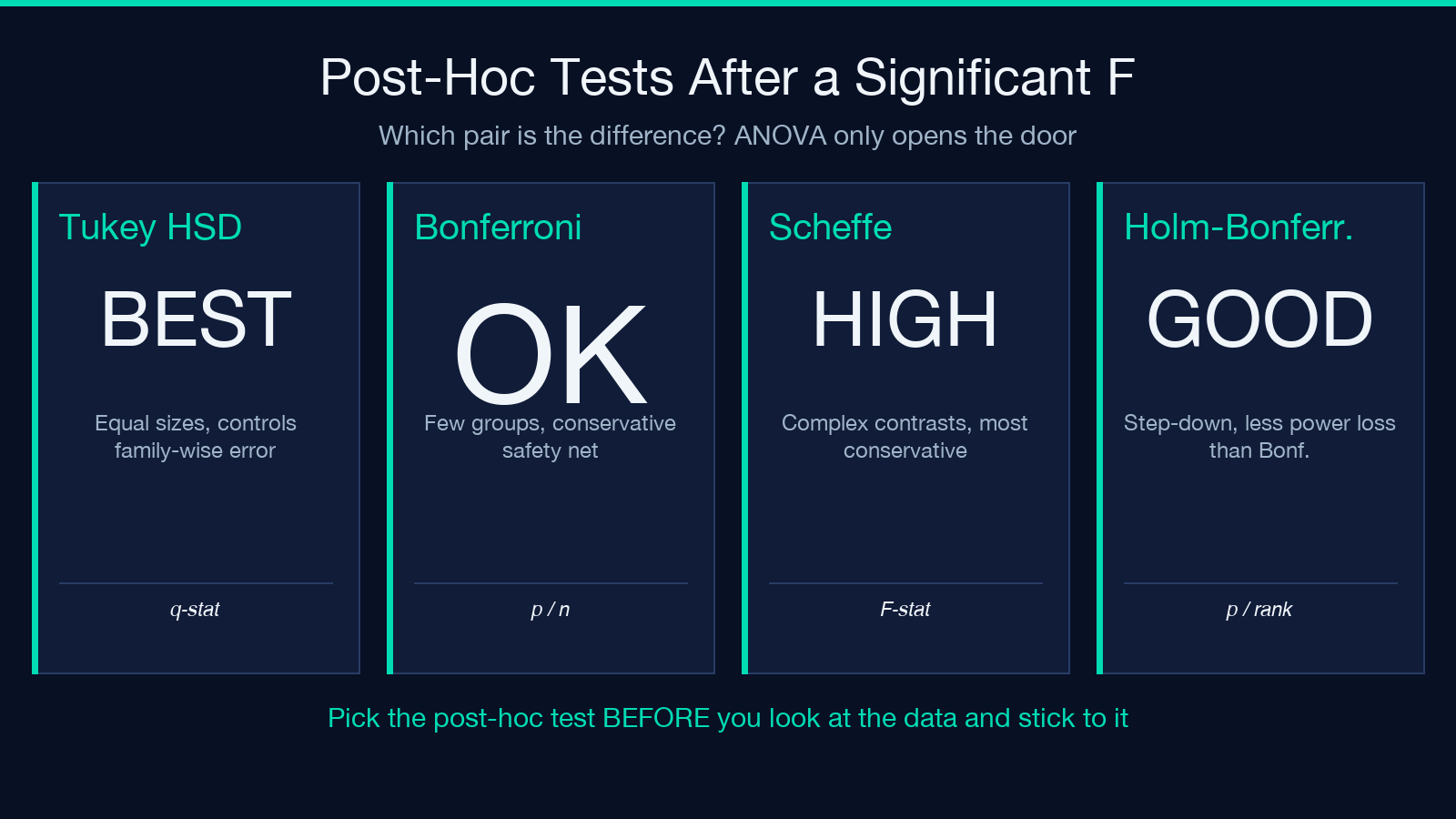
Rejecting the joint null is not the end of the story. Once you know at least one group mean differs, you have to find which pairs. Three post-hoc tests are common: Tukey’s HSD (Honestly Significant Difference), Bonferroni-corrected pairwise t-tests, and Scheffe’s test. Tukey’s is the standard for one-way ANOVA with equal sample sizes because it controls the family-wise error rate at the level you set. Bonferroni is conservative when you have many groups but is acceptable for small comparisons. Scheffe’s is the most conservative and is the right choice when you want to test complex contrasts, not just pairwise differences.
The honest move is to pick the post-hoc test before you look at the data, not after. Picking “Tukey” because the result is significant and “Bonferroni” because it would not be is a textbook p-hacking move. The textbook approach is to decide the post-hoc test when you design the experiment, write it into the methods section, and let the data fall where they fall. The ANOVA Calculator returns the F statistic and p-value with enough precision that you can run any of the three post-hoc tests by hand using the per-group means and standard deviations it reports.
Common pitfalls in ANOVA reporting
The first pitfall is reporting p > 0.05 as “no difference.” Failing to reject the null is not the same as proving the null. The test has power that depends on the sample size, the effect size, and the within-group variance. A small pilot study with high noise can easily return p = 0.18 and still have a real effect that the study was underpowered to detect. The right framing is “we did not find evidence of a difference at this sample size” rather than “the groups are equal.”
The second pitfall is treating ANOVA as a refinement of t-tests. It is not. ANOVA is the omnibus test that gates the post-hoc comparisons. Running a t-test first, then computing ANOVA, then running more t-tests is a multiple-comparisons mess. The order is ANOVA first, then post-hoc. If the omnibus F is not significant, stop. If it is, run the planned post-hoc test.
The third pitfall is using ANOVA on data that does not meet the assumptions. Binomial proportions, count data with small means, or ranked data all need different tests (logistic regression, Poisson regression, Kruskal-Wallis). ANOVA on the wrong data type produces a number that looks credible but is meaningless. The ANOVA Calculator assumes continuous response data; if your data is counts or ranks, the right move is to transform the data or pick a different test entirely.
What the tool does with your data
Paste your group data in the textarea with one group per line and a colon-separated label, like Control: 8, 9, 6, 7. The tool parses each line, extracts the numeric observations, computes the per-group mean and standard deviation, then runs the full ANOVA computation. The result card shows the six-row ANOVA table, the F statistic with its degrees of freedom, the p-value to your chosen decimal precision, and the eta-squared effect size. The per-group summary above the table means you can audit the SSW component by hand if anything looks off. The whole calculation runs in the browser, so the data never leaves your machine, which matters when the analysis is on a confidential dataset or a clinical trial.
Two display options matter in practice. The decimal precision control lets you format the F statistic and p-value to 4 or 5 decimals when you are citing exact values in a paper, and to 2 decimals when you are presenting to a non-statistical audience. The tool also surfaces the raw observation count per group, which makes it easy to spot a typo that loaded a row with the wrong number of data points. Both are small quality-of-life features that catch the kinds of errors that show up in real analyses.
Limits and when to reach for a different test
Three limits are worth knowing. First, ANOVA only handles one categorical factor. If you have two factors (fertilizer type AND watering frequency), the right test is two-way ANOVA with an interaction term, and the ANOVA Calculator is the wrong tool for that. Second, the tool assumes independent observations. Repeated-measures designs (the same plants measured weekly) need a repeated-measures ANOVA, which handles the within-subject correlation. Third, the tool is for continuous response data. If your response is a binary outcome (germinated/not germinated), use logistic regression. If your response is a count with small means, use a Poisson or negative binomial model. ANOVA is the right answer for the right kind of data, and the right answer for the wrong kind of data is a different test entirely.
The honest summary: one-way ANOVA is the workhorse test for “do three or more groups differ” with continuous response data, and the ANOVA Calculator handles the full computation in one pass. Verify the assumptions (normality, homoscedasticity, independence), reject the omnibus null if the p-value is small, then run your planned post-hoc test on the pairs you care about. Report the F statistic with degrees of freedom, the p-value, and an effect size. Skip the pairwise-t-test pile, skip the post-hoc shopping, and skip the assumptions. Explore more tools at elysiatools.com.
