
A 2 KB SVG logo does not deserve a separate HTTP request. Every Data URI Generator round-trip trades bytes-on-the-wire for bytes-in-the-document, and the break-even line lives where every frontend team eventually rediscovers it. This field guide walks the three rules that decide when inlining pays off, the five pitfalls that quietly break the deal, and the audit pass that catches them before the CSS ships.
The Elysia Tools Data URI Generator takes any file — PNG, JPEG, GIF, WebP, AVIF, BMP, SVG, ICO, TIFF, MP3, WAV, OGG, FLAC, MP4, WebM, WOFF, WOFF2, TTF, OTF — and emits a data: URI in either Base64 or percent-encoded form. The output is plain text that drops straight into a background-image, a <img src>, a CSS @font-face, or a Markdown badge. But “the file converted” is not the same as “the file should be inlined.” The rest of this guide is the second question.
The break-even rule that decides inlining
A Data URI is always bigger than the binary it represents — Base64 inflates by ~33 percent, percent-encoding inflates by ~3x for binary bytes. The HTTP request you save is one round-trip plus TCP slow-start on a cold connection. The cost you pay is blocking the parser, blocking paint, and losing cacheability.
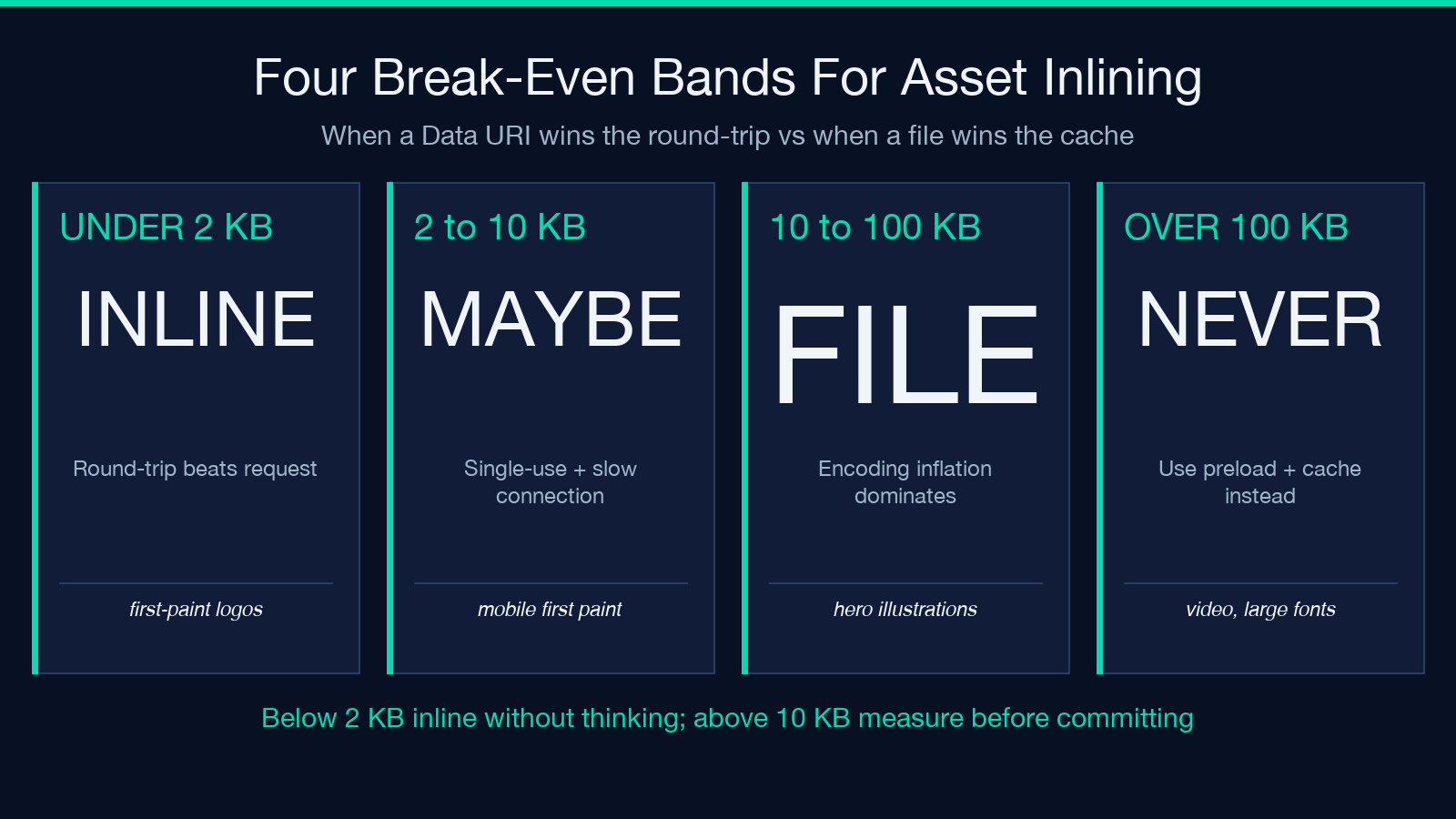
The rule of thumb that holds up in production:
- Inlines under 2 KB — save the request, save a DNS lookup if the asset is on a third-party CDN, and the size penalty is invisible to the layout.
- Inlines 2–10 KB — only worth it when the file is referenced exactly once AND the user is on a slow first connection AND you cannot preload it as a resource hint.
- Larger than 10 KB — never inline without measuring. Base64-encoding a 100 KB hero image adds 33 KB to the CSS, blocks critical-path parsing, and breaks every HTTP cache layer you have.
A second rule sits on top of that: Data URIs cannot be cached separately from the document that contains them. If the same logo appears in 14 components and you inline it in each, every page-load re-downloads the same 33 percent-inflated string. A regular <img src="logo.png"> request lets the browser cache once and reuse across every component on every page.
The third rule is the one most teams forget: inlined SVG should use percent-encoding, not Base64. SVG is XML; percent-encoding keeps it gzip-friendly. Base64-encoding SVG produces a string that compresses ~15 percent worse, and the difference shows up in your CSS bundle size the moment you have more than a handful of icons.
Five pitfalls that quietly break the inlining decision
The Data URI format looks like a magic incantation — data:[<mediatype>];base64,<data> — and that simplicity hides five ways to ship a regression. None of them trigger a warning at build time. All of them show up in production.
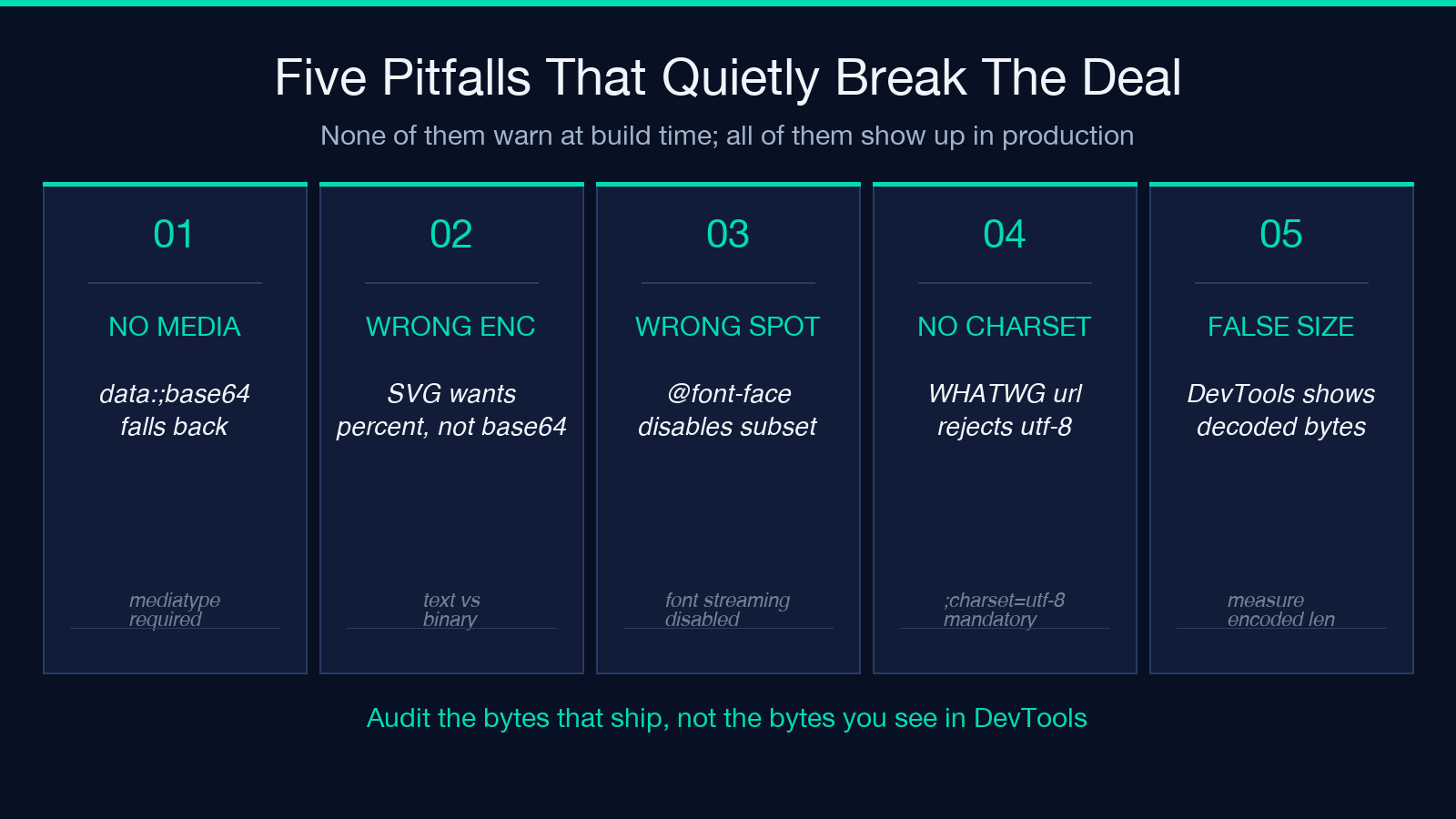
1. Forgetting the media type. A Data URI without a media type becomes data:;base64,... and most browsers default to text/plain;charset=US-ASCII. The browser downloads the bytes, fails to decode them as ASCII, and the image never renders. The fix is mechanical — every output of the generator carries data:image/png;base64, or data:image/svg+xml;utf8, — but it is easy to hand-edit a string and forget the image/ prefix.
2. Using the wrong encoding for the wrong binary. Text-like formats (SVG, JSON, plain text) compress better with percent-encoding. Binary formats (PNG, JPEG, WOFF2) compress better with Base64 — Base64 is what the standard uses, and the percent-encoder wastes 3x the bytes on each non-printable byte. Most generators default to Base64 because it is the safe answer; you only flip to percent-encoding when the file is text-shaped.
3. Inlining in the wrong place. A Data URI in the HTML body is fine. A Data URI inside an external CSS file counts against that CSS’s gzip window. A Data URI inside a @font-face declaration disables sub-setting in some renderers and prevents the browser from streaming the font as a separate resource. The right place for an inlined asset depends on the asset’s lifecycle — the rest of this guide walks each case.
4. Missing the ;charset=utf-8 on percent-encoded SVG. SVG without ;charset=utf-8 is interpreted as US-ASCII by browsers that strictly follow the WHATWG URL standard, and any non-ASCII character in the markup (emoji, accented letters, mathematical symbols) becomes a parse error. The fix: every percent-encoded SVG URI carries data:image/svg+xml;charset=utf-8,....
5. Trusting the size you see in DevTools. Browsers show Data URIs at their decoded length (the original file size), not at the Base64-inflated length. A 4 KB JPEG shows up as “4 KB” in the Network tab even though the inlined CSS carries 5.3 KB of encoded bytes. The size that matters is the encoded size, measured against your gzip-compressed CSS bundle.
Where to inline and where to keep the file
The decision tree is shorter than it looks. Start with the question “does this file render above the fold?” — the answer drives everything else.
- Above-the-fold logo or critical icon → inline in the HTML
<head>as a<link rel="preload" as="image" href="data:...">so the browser fetches it as part of the critical path without a second round-trip. Below the fold, the preload is wasted bandwidth. - Repeated UI icon (close button, arrow, status dot) → inline as a CSS background-image in a single utility class. One declaration, every component picks it up, no extra HTTP request, no separate cache entry to manage.
- One-off illustration referenced from one page → keep as a file. The HTTP request is cheap, the cache benefit is real, and the CSS stays small.
- Custom font glyphs that render immediately → inline in the
@font-facedeclaration’ssrcfield for the smallest 5-10 KB subset only. Inline the whole font only if you cannot host it. - Favicons and PWA icons → inline the SVG variant for the SVG-capable browsers and let the rest fall through to the file. This is the only place where serving a different resource per User-Agent is the design, not a fallback.
A concrete example: the Elysia Tools Data URI Generator converts a 1.4 KB arrow SVG into data:image/svg+xml;charset=utf-8,<svg ...> for an in-CSS background-image, while keeping the 24 KB hero illustration as a file. The arrow renders instantly on first paint; the hero renders 200 ms later, cacheable, and progressive.
The lifecycle question that decides caching
A Data URI cannot be cached separately from its container. Every page that carries an inlined 5 KB logo re-downloads the same 5 KB string; the browser has no way to share the bytes across pages because they live inside the HTML or CSS, not at a URL. The implication is concrete.
For a one-page document (a single-page app, a Markdown README, a generated PDF, an email template) — Data URIs are unconditionally better. The document is the cache; you cannot cache anything finer-grained than the document itself, and the saved round-trip is real.
For a multi-page site — Data URIs cost you on every page after the first. A regular <img src="logo.png"> request lets the browser cache once and serve from disk on pages 2 through N; a Data URI forces the browser to re-decode and re-parse the same string on every navigation. The break-even shifts in favor of files the moment the document count crosses 5-10.
For a component library — the worst case. A 2 KB SVG icon inlined in every component means every page that uses 30 components carries 30 copies of the same string. The CSS bundle bloats, gzip stops helping because the redundancy is per-component instead of per-document, and a single icon update invalidates every CSS file that includes it.
The right cache strategy is not “use Data URIs sparingly” — it is “use Data URIs in the documents where the inlined bytes are served exactly once.” For multi-page sites and component libraries, the file-and-cache path is the default; the Data URI is the exception you justify with measurement.
Measuring the break-even for your own assets
The break-even rule from the first section is a starting point, not a guarantee. Two measurements close the loop:
1. Round-trip time saved. A Data URI saves one HTTP round-trip. On a cold connection (mobile, slow Wi-Fi, captive portals), that is 100–300 ms. On a warm connection, it is 1–10 ms. If the asset renders above the fold, the round-trip matters. If it renders below the fold, the round-trip is wasted because the user is already reading content.
2. Bundle-size penalty. Multiply the file size by 1.33 for Base64 or 3 for percent-encoding, add to your CSS bundle, run gzip on the result, and compare against the round-trip time saved. If the bundle penalty costs more compression than the round-trip saves, leave the file alone.
The two measurements come together in the Elysia Tools Data URI Generator budget — a 5 KB Base64-encoded PNG inlined in critical CSS costs more in blocking time than a 50 ms saved round-trip on a fast connection, and the inverse is true on a slow one. The rule is not “always inline” or “never inline.” The rule is “measure, then decide.”
The encoding format you pick determines everything downstream
Base64 and percent-encoding look interchangeable from the outside but diverge the moment you start measuring:
- Base64 (
data:image/png;base64,...) — every byte becomes a printable ASCII character from a 64-symbol alphabet. Inflates by 33 percent. Gzip-friendly because the output alphabet is dense and predictable. Safe to embed in JSON, XML, YAML, and CSS strings without further processing. - Percent-encoding (
data:image/svg+xml;charset=utf-8,...) — every byte becomes%XXwhere XX is the hex byte. Inflates by ~3x for binary bytes, ~1.3x for ASCII text. Gzip-neutral on SVG because the redundancy is in the markup itself. Unsafe in URLs without further escaping; safe in HTML attribute values.
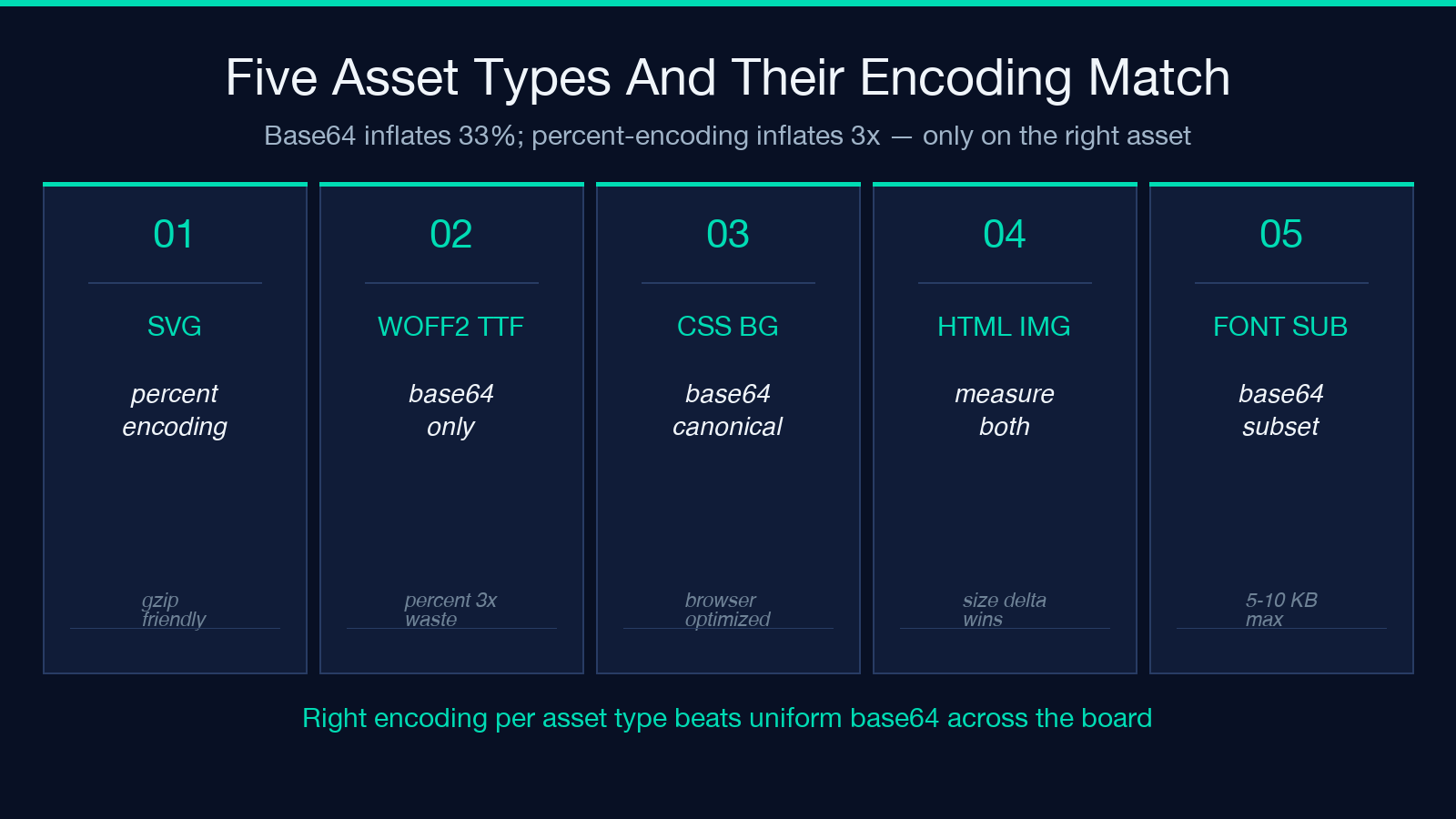
The choice cascades:
- For SVG → use percent-encoding. The XML markup compresses better than the Base64 equivalent under gzip.
- For binary fonts (WOFF2, TTF) → use Base64. Percent-encoding triples the size for no gain.
- For images served as CSS background-image → use Base64. The CSS string parser handles both, but Base64 is the canonical format and the one every browser optimizes for.
- For images inlined in HTML
<img src>→ use whichever the generator emits. Both work; the size delta is the deciding factor.
The Elysia Tools Data URI Generator lets you toggle between the two with a single click and previews the encoded length so you can see the inflation factor before you commit. For SVG icons, the preview makes the encoding choice obvious within a second.
The audit pass before any Data URI ships
Three checks catch every regression the previous sections warned about:
- Verify every inlined URI carries a media type —
data:image/png;base64,..., neverdata:;base64,.... - Verify every percent-encoded SVG carries
;charset=utf-8— the WHATWG URL standard rejects missing charsets on strict parsers. - Measure the encoded length against the original — a 33 percent inflation for Base64, ~3x for percent-encoding on binary. Anything outside that band is a misconfigured encoder.
A simple grep over the built CSS catches the first two. A build step that diffs the encoded length against the source file catches the third. None of them require runtime instrumentation — the regression is in the bytes that ship, and the bytes that ship can be audited before the deploy.
For assets that fail the audit, the answer is the same as for assets that were never inlined in the first place: keep them as files, let the browser cache them, and stop paying for round-trips you cannot win. The Data URI is not a default — it is a tool, and like every tool, it has a job.
Closing the loop: when the tool earns its place
The Data URI Generator earns its place on three specific jobs: inlining the brand logo above the fold as a preload, encoding repeated SVG icons for a CSS utility class, and producing percent-encoded SVG badges for Markdown READMEs where the asset must travel with the document. Every other job — hero images, custom fonts larger than 10 KB, third-party CDN assets — is better served by a file and a cache. The tool is not the decision; the tool is the encoder that runs after the decision is made.
Reach for the Elysia Tools Data URI Generator when the decision is “inline” and you need the encoded bytes fast. Leave the file alone when the decision is “cache” and the round-trip is cheap. The two paths lead to the same page; only one of them ships the regression you forgot to audit.
Explore more inlining and encoding tools at elysiatools.com.
