

Most engineers treat a 200 OK as proof that the server is healthy.
That certainty breaks the moment a stale Cache-Control: max-age=31536000 rides back from a CDN, or a security audit reports a missing Content-Security-Policy that nobody noticed because the page never errored. The HTTP Headers Analyzer is a field tool for reading the headers the response actually carries — request method, status code, caching directives, redirect chain, server fingerprint, and the dozens of subtle signals hiding above the body.
This field guide walks through the five things you actually want to verify with an HTTP header analyzer, what each one tells you about the live site, and the workflows where the extra two seconds of header inspection beat a five-minute debugging session. Try it at Elysia Tools.
Why a Status Code Is Only One Line of the Contract
A status code is one line. The headers around it carry the rest of the contract: how long the response is allowed to cache, whether the body can be served across origins, whether cookies travel with cross-site requests, whether the server is willing to upgrade, and whether the entity tag will let the client skip a round trip next time. Skipping the headers is a common habit because they live above the fold in curl -i output, and most debugging culture stops at the status line.
The catch is that header misconfigurations tend to surface as production incidents, not local errors. A Set-Cookie: Secure flag missing means the cookie leaks over HTTP. A Strict-Transport-Security header missing means the first hit on http://example.com can be hijacked before the redirect fires. A Cache-Control: private mistakenly set on a public asset makes the CDN revalidate every request and your origin absorbs the cost. None of these fail at compile time — they show up in securityheaders.com reports, in inconsistent mobile experiences, and in mystery slowdowns that vanish when someone hands you a fresh browser session.
The HTTP Headers Analyzer shows the raw response header block, the timing and redirect chain, and the security-relevant subset in one view, so the next time a colleague reports “the page is cached” or “the cookie isn’t sticking,” you reach for it instead of guessing.
Where Headers Hide Above the Fold
In curl -i, http --headers, DevTools, and any analyzer you reach for in production, headers live above the body and they are silent most of the time. The browser uses them; the CDN uses them; the framework you wrote last quarter never surfaces them. That invisibility is what makes them so easy to break.
A typical GET to https://example.com/ returns a header block that is ninety percent noise to a casual reader and one hundred percent signal to the systems downstream of your origin. The analyzer renders the block with the field name, value, and any flag-bearing extensions (Cache-Control: max-age=300, immutable is one header, four facts). The benefit of seeing every header at once is that the silent ones — Accept-CH, Critical-CH, Vary, Cross-Origin-* — stop being silent.
Treat the header block the way you treat an environment variable dump: the value is rarely readable, the absence of a value is the entire report.
Verify the Cache Directives First
Caching is the highest-leverage header group, because a single wrong directive can quietly double your origin traffic without anything logged as an error. The analyzer surfaces Cache-Control, Expires, Age, and ETag together, which is the only way to see the full picture.
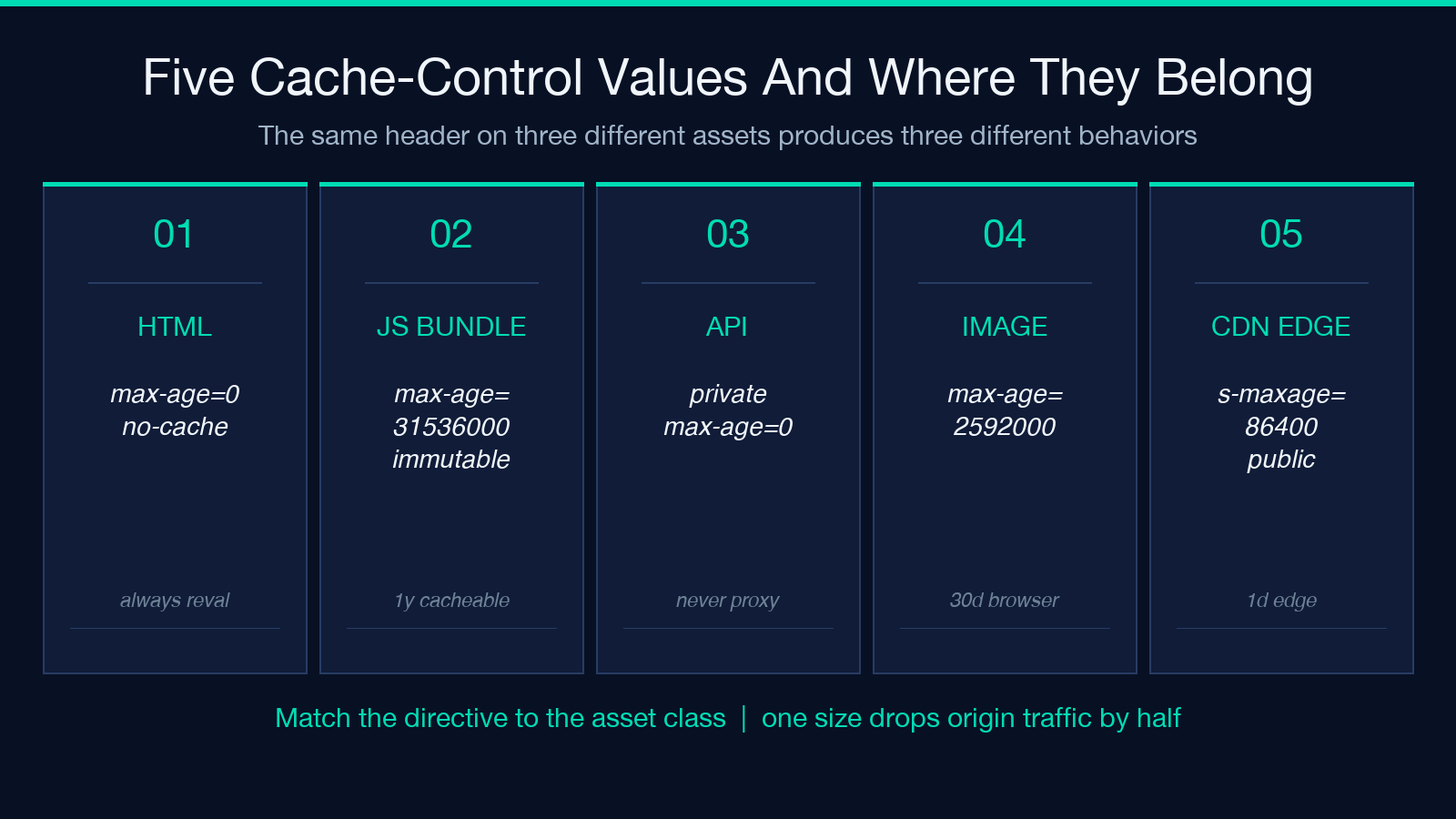
Run a request against your production URL with Cache-Control: max-age=0, no-cache and check what the analyzer returns. If the response carries Cache-Control: public, max-age=31536000, you have a year-long cache — fine for a fingerprinted JS bundle with a content hash in the filename, dangerous for an HTML document. If the response carries no Cache-Control at all, the browser falls back to heuristic freshness, which means production behavior changes when someone finally sets Last-Modified and the heuristic window shifts.
The same header block reveals Vary: Accept-Encoding (CDN is keying on encoding), Surrogate-Control (an edge layer stripping your cache directive), and Age: 0 versus Age: 86400 (which tells you whether the asset just landed or has been sitting at the edge for a day). The analyzer makes the whole header block selectable, so you can paste it straight into your runbook. For comparison, the Network Security and SSL/TLS Configuration sample bundle shows the same header inspection paired with TLS handshake details, which is useful when the cache problem crosses an HSTS boundary.
The fastest habit to build: run the analyzer on three URLs at the start of every release — landing page, the most-loaded JS bundle, and the slowest API endpoint. The three headers will tell you whether the build broke cache invariants.
Spot the Security Headers That Actually Matter
The security header family is small enough to memorize and large enough that one missing entry can fail an audit. The analyzer renders the ones your site has, in the order the server emitted them, and labels the gaps.
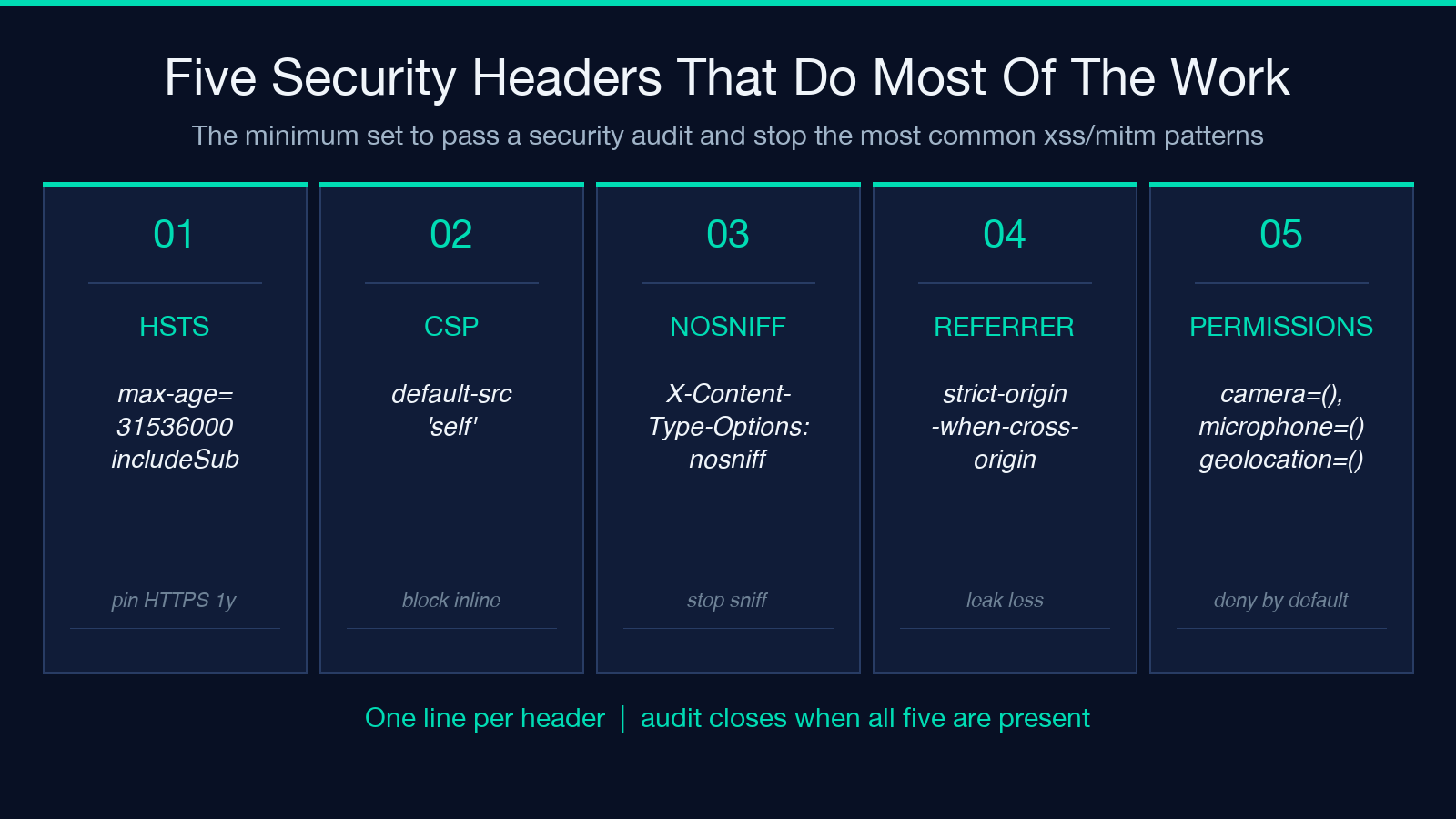
Five headers do most of the work:
– Strict-Transport-Security: max-age=31536000; includeSubDomains; preload — pins HTTPS for a year and submits the domain to the browser preload list. Without it, the first request to http://example.com is hijackable. – Content-Security-Policy: default-src 'self' — blocks inline scripts and remote sources you didn’t approve. The strictest CSP you can ship without breaking the site is the one your team tested. – X-Content-Type-Options: nosniff — stops the browser from MIME-sniffing a .txt file into a script execution context. – Referrer-Policy: strict-origin-when-cross-origin — controls how much of the URL leaks to third-party hosts. – Permissions-Policy: camera=(), microphone=(), geolocation=() — denies sensitive APIs unless a page explicitly opts in.
Run the analyzer on https://yourdomain.com once. If even one of those five is missing, you have a one-line fix and the audit closes. The order in the header block is also a signal — a misconfigured reverse proxy often reorders them, and an analyzer that respects emission order will show you whether the front-door CDN and the origin both appended the same header.
Read a Redirect Chain Without Losing the Cookies
A 301 redirect from / to /en/ should be invisible. A redirect chain — A → B → C → D — slows the first paint by hundreds of milliseconds and breaks the analytics session every time. The analyzer follows the chain step by step, with the response size and Location header at each hop, so you can see exactly where the round trips multiply.
More useful is the cookie audit at each hop. Set-Cookie on a 302 redirect can drop the cookie if the Secure flag is missing and the original request came in over HTTP. The analyzer shows the full Set-Cookie line at every hop, including Domain, Path, SameSite, and HttpOnly. A common production bug looks like this: Set-Cookie: session=...; Path=/; Secure; SameSite=None lands on hop 1, then a different Domain= appears on hop 2, and the user logs in successfully but the dashboard cannot read the session. The analyzer lets you catch it before it ships.
There is one redirect the analyzer should not chase forever: the Refresh: 0; url=... meta-redirect is not an HTTP redirect, it is an HTML one, and the analyzer stops at the original document. If you see headers but no redirect chain listed, that is the answer, not a bug.
Inspect the Server Fingerprint and Response Metadata
Server fingerprinting is partly a security concern and partly a deployment housekeeping concern. The analyzer shows Server, X-Powered-By, Via, and X-AspNet-Version (if present). Every one of those is a hint to a scanner about which CVE list to look at. Most teams set Server: cloudflare or strip the header entirely; the analyzer confirms whether yours does.
The same block reveals X-Request-Id and X-Correlation-Id, which are gold when you trace a slow request back to a single log line. If your platform emits them, paste the value into your log search and the entire request trace appears. The analyzer also picks up Date, Content-Length, and Content-Type — three boring headers that catch two common bugs: a JSON response sent with Content-Type: text/plain (the browser blocks it as a cross-origin read), or a gzipped body with Content-Encoding missing (the client decompresses nothing, gets garbage, and reports a parsing error).
If you ship a Node service behind nginx with proxy_pass, the analyzer’s Via header will show you whether the upstream connection is reused or whether every request opens a fresh TCP socket. That second scenario is the source of mysterious 50ms overhead on otherwise fast endpoints.
Make Sense of Content Negotiation Headers
Content negotiation is the one header system most engineers only think about when it breaks. The analyzer shows Accept, Accept-Encoding, Accept-Language, and the response side of the same contract (Content-Type, Content-Encoding, Content-Language). When a page renders with the wrong charset or the wrong fallback language, the header trace tells you whether the client asked for one thing and the server gave another, or whether the server silently downgraded.
A typical bug: the HTML is served as Content-Type: text/html; charset=utf-8 but the <meta charset> tag inside the body says iso-8859-1. The browser has to pick one, and the pick is non-obvious. The analyzer surfaces both signals so you can decide which one to align.
For a single-page app behind a CDN, the Accept-CH: Sec-CH-UA-Platform and Critical-CH pair is worth knowing — these are how your origin asks the browser for client hints, and the analyzer shows whether your server emits them or whether the CDN strips them at the edge.
Build a Pre-Release Header Smoke Test
The fastest way to make the analyzer part of your workflow is a smoke test that runs before each deploy: pick the five most-loaded URLs from your analytics export, run them through the analyzer, and fail the build when any of the following change:
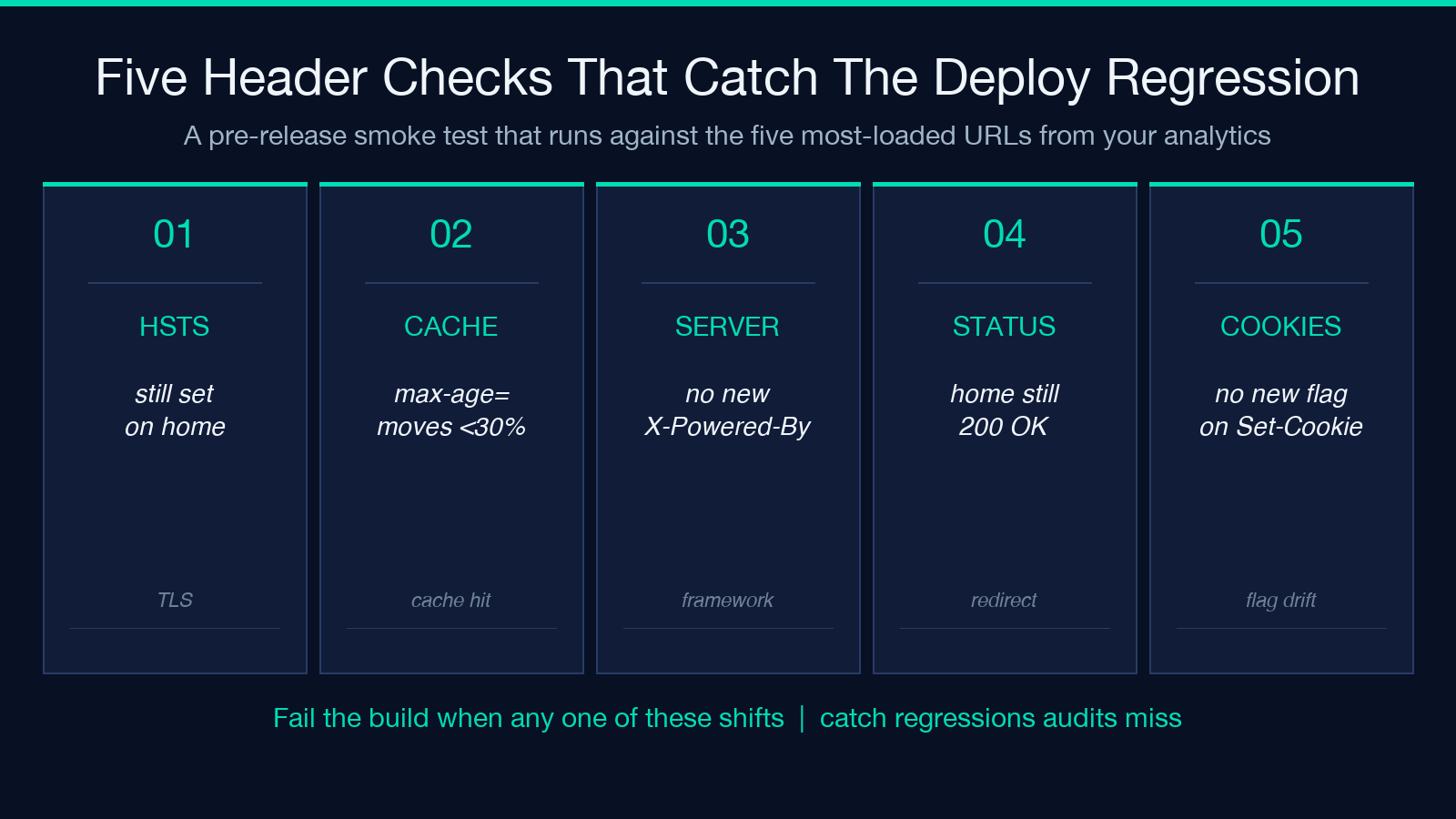
– any previously set Strict-Transport-Security header drops off – Cache-Control: max-age= moves more than 30 percent on the most-cached asset – a new Server or X-Powered-By value appears (a deploy that brought in a new framework) – the status code on the home page changes from 200 to anything else – Set-Cookie adds a new flag on an existing cookie (probably an accidental relaxation)
The analyzer does not need to run inside your CI; a human-readable diff against last week’s headers is enough. The point is not to automate the security audit — it is to catch the regressions that the audit misses because the audit runs quarterly and your deploys ship daily.
When the smoke test fires, the response header block is the first artifact you reach for. With the HTTP Headers Analyzer on hand, the next incident does not start with a guess — it starts with the actual contract the server sent, which is a much better place to debug from.
Explore more developer tooling at elysiatools.com.
