
When Two Unicode Blocks Carry Footnotes And Chemical Formulas — And Why Some Letters Don’t Shrink
Three characters per word, no font swap, copy-paste anywhere. Tiny Text lives inside the small corner of Unicode where exponent-style footnotes and chemistry-formula subscripts both already exist, waiting for someone to type them in. Two blocks — Phonetic Extensions / Modifier Letters (U+02B0-U+02FF and U+1D00-U+1D5A) for the exponent look, and Superscripts/Subscripts (U+2070-U+209F) for the chemical-formula look — give you about half the alphabet’s lowercase plus all ten digits and a handful of operators. The other half falls through unchanged, which is the catch most people notice on their second paste.
What Tiny Text Actually Does
The Tiny Text tool at Elysia Tools takes a string of plain ASCII and walks it character-by-character, swapping each letter, digit, or operator for its superscript or subscript counterpart from the relevant Unicode block. The transformation is a pure lookup table — there is no font, no CSS, no JavaScript re-render. The output is plain Unicode text that survives copy-paste into Sublime Text, Slack, Notion, GitHub markdown, iMessage, or any HTML field that has not been stripped to ASCII.
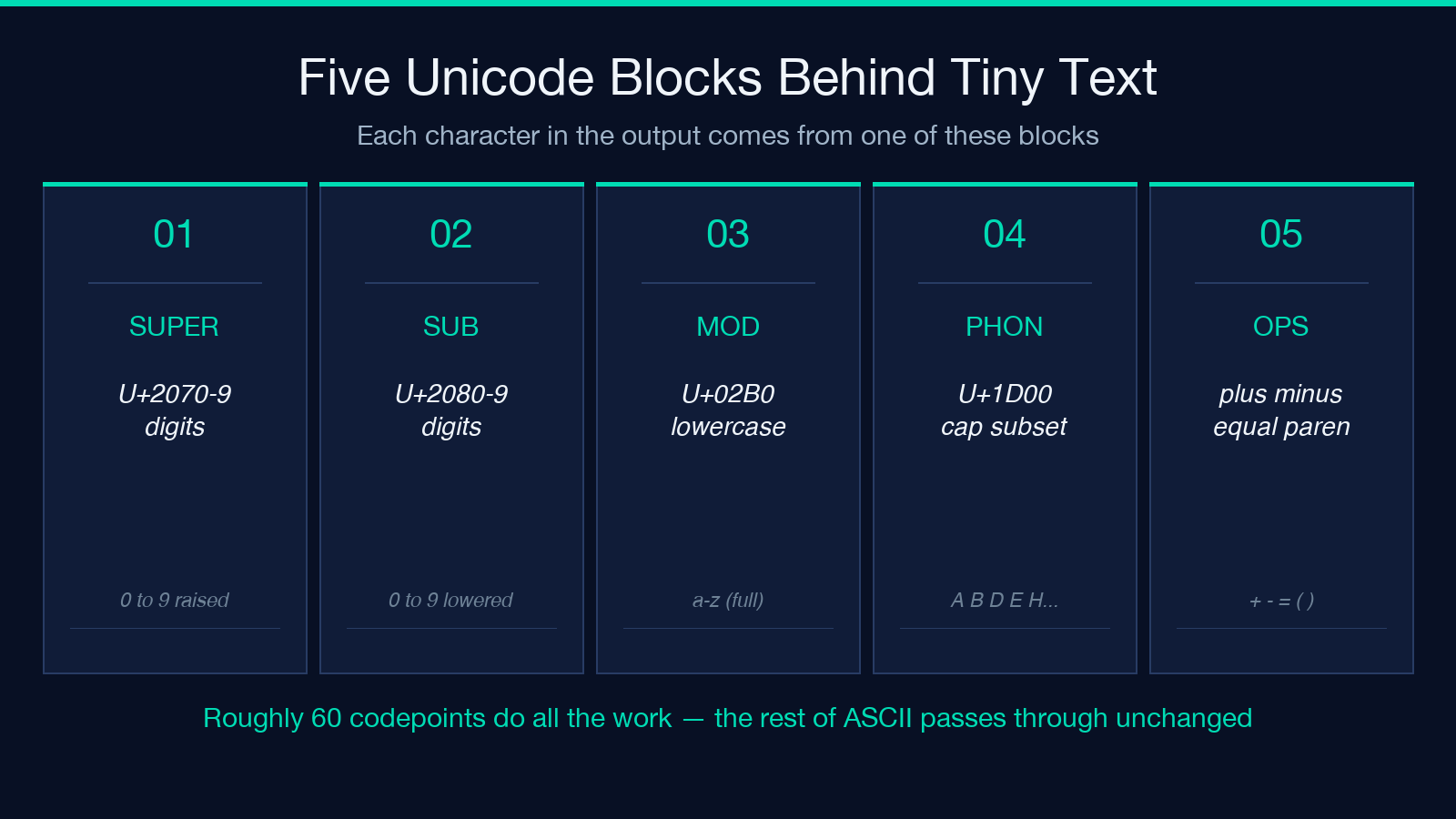
The Two Unicode Blocks Behind Tiny Text
Superscript raises each character into the exponent position (hello → ʰᵉˡˡᵒ), the classic “footnote” or trademark-style look. Subscript lowers each character into the chemical-formula position (hello → ₕₑₗₗₒ), which works for variable names like xₙ, vₑ, or a₂ without touching the surrounding prose.
The two modes pull from different Unicode blocks. Superscript mode reads from the Phonetic Extensions / Modifier Letters range (U+02B0-U+02FF and U+1D00-U+1D5A); subscript mode reads from the Superscripts/Subscripts range (U+2070-U+209F). Digits and the operators + - = ( ) are mapped in both modes, so a string like H2O + 5g becomes ᴴ²ᴼ + ⁵ᵍ or H₂O + ₅g cleanly.
The transformation is local to a single character. There is no contextual awareness — a B after an a is just as unrelated as a B after a Z — so the output has the same length as the input (counted in Unicode code points, not graphemes). For ASCII-only inputs that is identical to counting characters.
Plain Text, No Font Required
The whole point of the tool is that the output is plain Unicode. There is no font file, no CSS class, no SVG glyph map — the small letters are real Unicode codepoints that every modern font already includes (or has a fallback for). That is why v = cₙ²·Δt survives copy-paste from the tool into Slack, then into Notion, then into a Word document, looking the same at every stop.
The alternative — rendering tiny text with CSS font-size: 0.6em or <sup> tags — works on the page it was authored on, but strips to plain text the moment the content leaves that page. For any workflow that crosses boundaries (chat, email, code comments, README files), plain Unicode is the only format that travels intact.
Why Some Letters Stay Normal-Sized
This is the part that surprises first-time users. Type the alphabet in either mode and you will see roughly 13-15 letters shrink, with the rest sitting at regular height. That is not a bug; it is a property of the underlying Unicode blocks.
Superscript coverage is in two adjacent blocks. Phonetic Extensions (U+02B0-U+02FF) and the Modifier Letters section of the same block contains the small caps ᵃ ᵇ ᶜ ᵈ ᵉ ᶠ ᵍ ʰ ⁱ ʲ ᵏ ˡ ᵐ ⁿ ᵒ ᵖ ʳ ˢ ᵗ ᵘ ᵛ ʷ ˣ ʸ ᶻ (full lowercase) plus ᴬ ᴮ ᴰ ᴱ ᴳ ᴴ ᴵ ᴶ ᴷ ᴸ ᴹ ᴺ ᴼ ᴾ ᴿ ᵀ ᵁ ⱽ ᵂ (a subset of uppercase). The lowercase coverage is the generous one. Subscript coverage is in Superscripts/Subscripts (U+2070-U+209F) and is more sparse: ₐ ₑ ₕ ᵢ ⱼ ₖ ₗ ₘ ₙ ₒ ₚ ᵣ ₛ ₜ ᵤ ᵥ ₓ for lowercase (16 letters) and almost no uppercase at all. Digits are covered in both modes: ⁰¹²³⁴⁵⁶⁷⁸⁹ and ₀₁₂₃₄₅₆₇₈₉.
So if you type BIG BOX in superscript mode you get ᴮᴵᴳ ᴮᴼX — the G shrinks because Unicode gave it a modifier-letter form, but Q and X stay at full size because no codepoint exists for them. The tool passes unmapped characters through unchanged, which is the only honest behavior. There is no fallback glyph, no auto-substitution from a different block, no warning. Output stays valid UTF-8 in either case.
A useful side effect: digits always shrink in both modes, which makes Tiny Text surprisingly good for short numeric strings like 2²²² = 4194304 or v = cₙ²·Δt. The “fence” of unmapped capital letters around the shrinking digits draws extra attention to the numbers, which is exactly the visual rhythm a footnote or a formula needs.
Why Mapped Letters Differ Between The Two Modes
Superscript and subscript are not symmetric in Unicode coverage. Superscript mode has roughly 26 lowercase modifier letters available (full alphabet in Phonetic Extensions U+02B0-U+02FF) plus a handful of capitals; subscript mode has only about 16 lowercase letters in the U+2090-U+209F range. That asymmetry is historical — superscript evolved from phonetic transcription (used by linguists to mark pronunciation) while subscript was added later and only for chemistry/math use cases, where the digit and operator coverage mattered more than the letters.
If you need to drop a multi-letter variable name like kin or vel into subscript, expect to see kᵢₙ (the smaller subscript set) where you might have wanted ₖᵢₙ. Some letters will not shrink, and the inconsistency is a property of the Unicode tables — not a defect in the tool.
Practical Patterns Where Tiny Text Earns Its Keep
The tool is overkill for prose — a paragraph of footnote-style text is harder to read, not easier. It earns its keep in five narrow patterns that show up over and over in real documents.
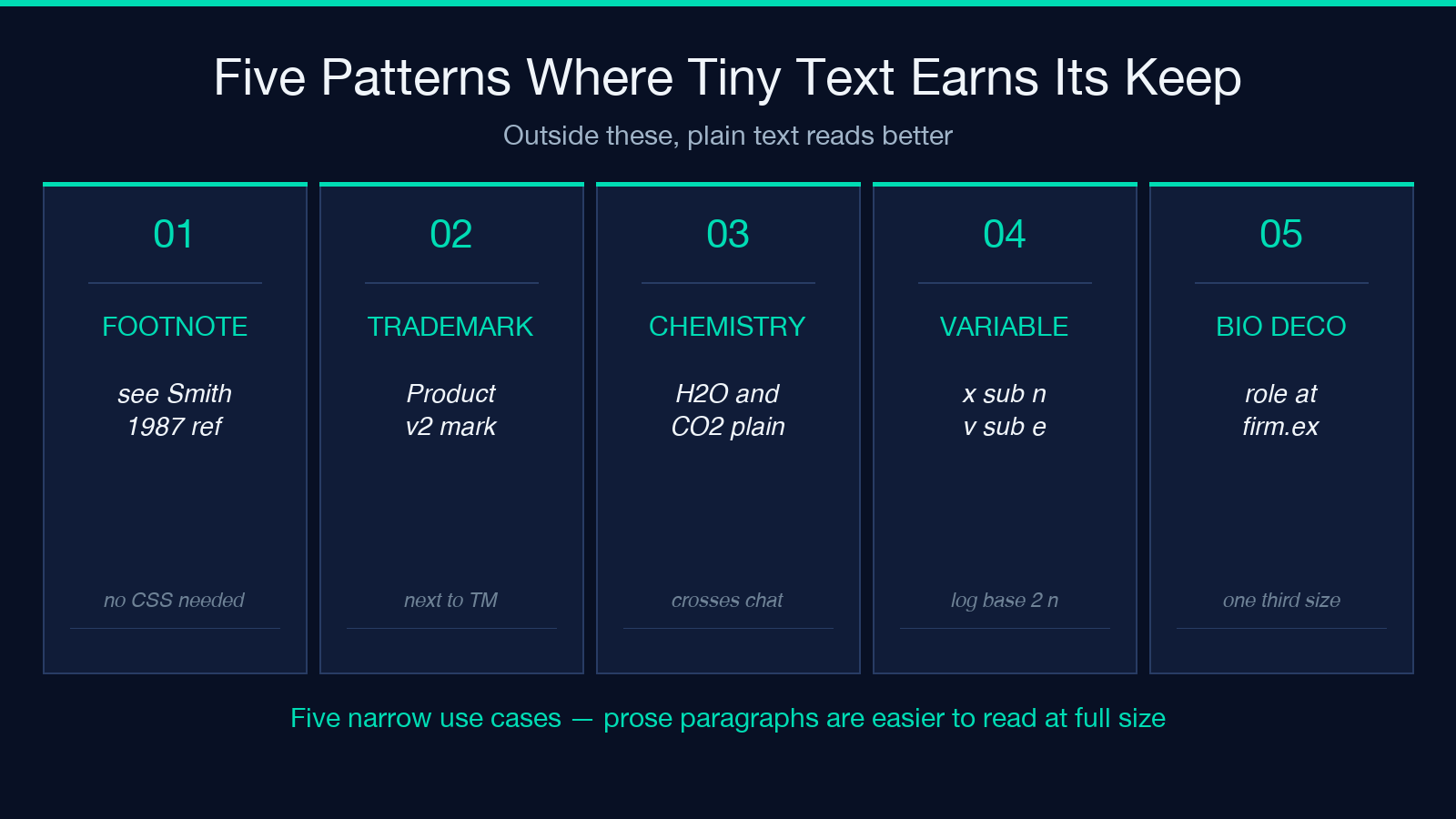
Footnotes and citations in plain markdown. GitHub-flavored markdown, Slack, Notion, and most blog comments do not have a one-keystroke shortcut for superscript. Pasting ¹ or ² is fine for one number; pasting a whole citation (see Smith¹⁹⁸⁷) requires either remembering the exact Unicode codepoints or having a tool that does the lookup. Tiny Text collapses that lookup into a copy-paste.
Trademark and brand-style marks. Brand™ is one of the few TM-style marks with a dedicated codepoint (U+2122). For everything else — registered marks, service marks, version-number stamps — tiny text is the next-best option: Productᵥ² reads as “Product v2” without raising the version number to the top of the line.
Chemistry formulae in plain text. A blog post or chat message about H₂O, CO₂, or NaCl is much easier to read when the digits drop below the line. Most chat systems strip HTML, so the old <sub>2</sub> trick does not survive copy-paste into Slack or iMessage. Plain Unicode subscripts do.
Variable names in math prose. xₙ, vₑ, a₁ + a₂, log₂ n — these are the patterns where subscripts are visually expected but inline CSS would not survive a copy-paste into a different rendering target. Using the Unicode subscript block keeps the formula looking like a formula everywhere it lands.
Decorative social-media bios. ᴄᴇᴏ ᴀᴛ company.ᵉˣ reads as “ceo at company.ex” but takes about a third of the vertical space. Whether that is a feature or an anti-pattern is up to the platform’s culture — but the technical capability is real, and Tiny Text is the easiest way to compose it.
For all five patterns, the workflow is the same: paste plain text into the tool, choose superscript or subscript, copy the result. The output is plain text and works in every system that handles UTF-8.
Edge Cases And Gotchas
Mixed-input rendering. Because the small-letter blocks are incomplete, mixed input renders with some letters staying normal-sized. That is a Unicode limitation, not a bug. The cleanest workaround is to choose your input vocabulary: prefer lowercase (hello shrinks to ʰᵉˡˡᵒ, mostly all tiny) over uppercase (HELLO becomes ᴴᴱᴸᴸᴼ with several letters still at full height because Unicode did not assign them small-caps forms).
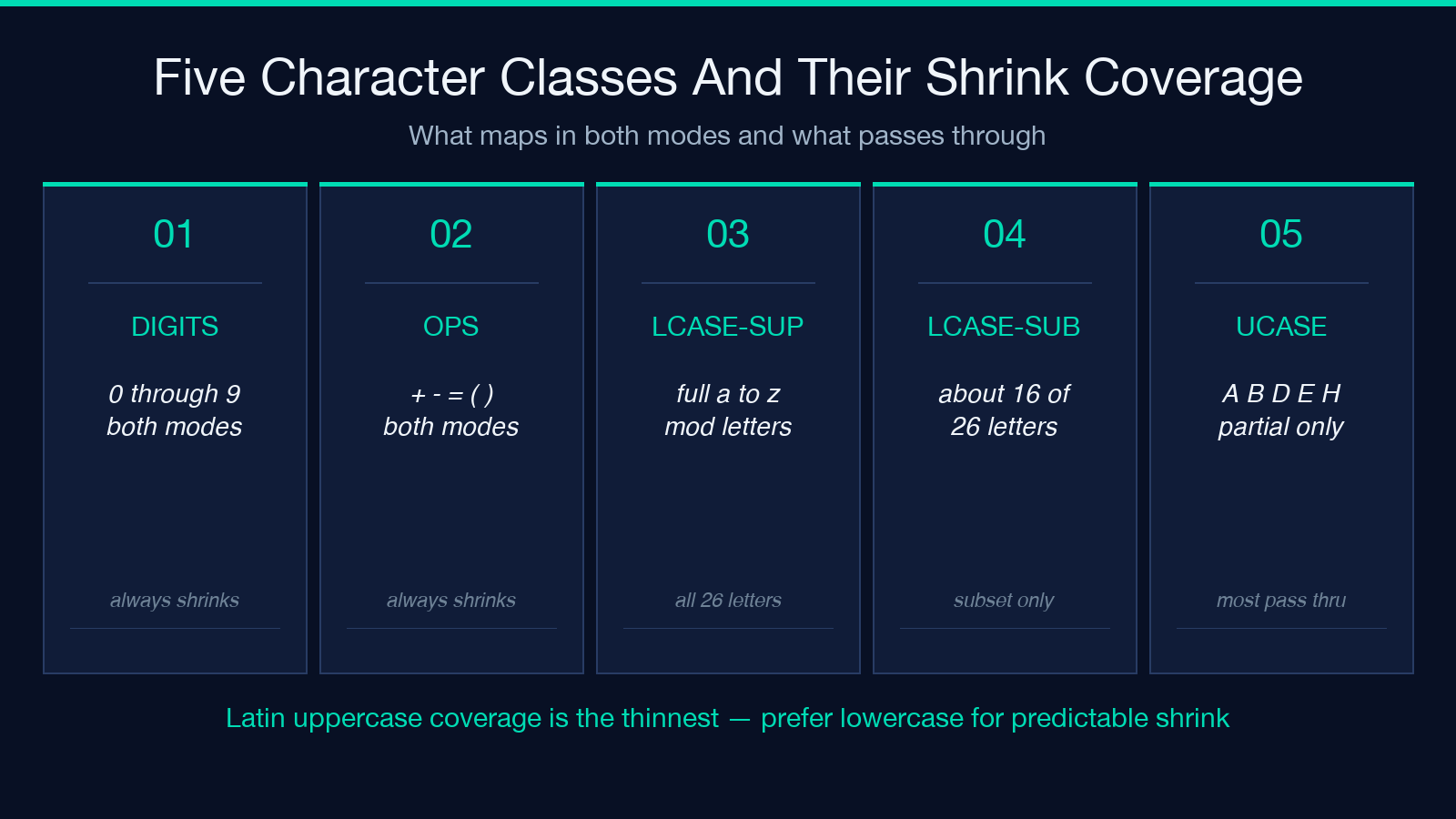
Operators and punctuation. Digits and + - = ( ) map in both modes. Most other punctuation — . , ; : ! ? — does not, and stays at full size. The four basic operators are enough to write ² + ² = ⁴, but if you need a tiny exclamation mark, you are out of luck.
Sorting and search. Tiny text and the original full-size text sort differently in Unicode-aware systems. A database collation that uses ORDER BY column COLLATE utf8mb4_unicode_ci will treat ʰᵉˡˡᵒ as a distinct string from hello. If you are piping tiny text into a database column expecting the original, you will get zero matches. The tool is for visual output, not for indexing.
Font fallback at the destination. A few fonts (mainly older monospace ones in terminal emulators) render ʰ ᵉ ˡ ˡ ᵒ as missing-glyph boxes, because the modifier-letters block is not always included in font coverage. Modern browsers, iOS, Android, macOS, Windows 10+, and most modern chat apps render the block correctly. If a specific destination app shows tofu boxes for the tiny letters, the problem is the app’s font fallback, not the tool.
Length and line-wrapping. Tiny letters occupy less horizontal space than full-size letters at the same font size, so a paragraph of tiny text wraps to fewer lines than the same content in normal size. That is usually a feature for short labels and a hazard for prose.
For a one-shot paste of a single word, none of these edge cases apply. They show up when the output is going to be parsed, indexed, or read by an older system.
When To Reach For Tiny Text — And When Not To
Reach for it when the destination is a modern UTF-8 system and the visual goal is “raise this number into a footnote position” or “drop this digit into a chemical-formula position.” The transformation is one click and survives everywhere.
Do not reach for it when the destination strips non-ASCII (older email gateways, some CSV importers with strict ASCII filters), when the text needs to be searchable as the original, or when the visual goal is “smaller text overall” rather than “raise this specific element to exponent position.” For uniformly small text, font-size CSS or the dedicated small-caps Unicode block (U+1D00-U+1D5A, used by the Small Caps converter) is a better fit.
The tool is small, fast, and completely deterministic. There is no server-side state, no API key, and no log of what you typed. Paste the text, pick the mode, copy the result. Try it at Elysia Tools. For related Unicode tricks, see the Small Caps converter and the Cursive Text tools — both build on the same idea of “plain Unicode text, no font needed.” More text-shaping utilities live in the Text Processing category.
