
Audio engineers, RF designers, and acoustic analysts all use the same word — “decibel” — and arrive at numbers that mean completely different things. A mix engineer writes -3 dBFS on the master fader, a broadcast technician writes +4 dBu on the patch bay, an antenna designer writes 12 dBi on a datasheet. The decibel calculator at Elysia Tools collapses ten of the formulas those three professions actually use into one tool: power ratio, voltage ratio, amplitude ratio, and six absolute-level scales (dBm, dBW, dBV, dBu, dBFS, SIL) cross-referenced against the reference impedance you pick. This guide walks through when each formula applies, where the absolute-scale numbers come from, and how the calculator handles the impedance cross-reference that trips up almost every first-time user.
Why the decibel needs a calculator at all
The decibel is a ratio, not a unit. By itself, “minus six decibels” only means “half the power of whatever I was comparing to.” The instant you say “minus six dBm,” you have added a reference: one milliwatt into a defined impedance. Multiply that by a specific cable length or speaker sensitivity and you are now talking about sound pressure level in dB SPL, where the reference is twenty micropascals. Three different reference anchors, three different conversations, all using the same symbol.
The calculator exists because the formulas diverge in two places. The first is the exponent on the log: power ratios use 10·log10(P/P0), while voltage and amplitude ratios use 20·log10(V/V0) because power scales with the square of voltage. The second is the absolute-scale anchor: dBm references one milliwatt, dBW references one watt, dBu references 0.7746 volts (the voltage that dissipates one milliwatt into 600 ohms), dBV references one volt, dBFS references the full-scale digital peak, and SIL references sound intensity at the threshold of hearing. Pick the wrong exponent or the wrong anchor and the answer is off by a factor of two, three, or ten — silently.
A short worked example: a line-level signal at +4 dBu across 600 ohms dissipates 4.0 dBm of power; across 10 kilohms it dissipates −12.0 dBm. The voltage is identical in both cases. The decibel number that matters depends entirely on which load the next stage presents.
The two exponents and when each one applies
Power ratios — anywhere you are measuring watts, joules, acoustic intensity, or bit energy — use the 10·log10 formula. Doubling the power adds 3.01 dB; halving the power subtracts 3.01 dB. The “+3 dB equals double” rule of thumb comes directly from this formula.
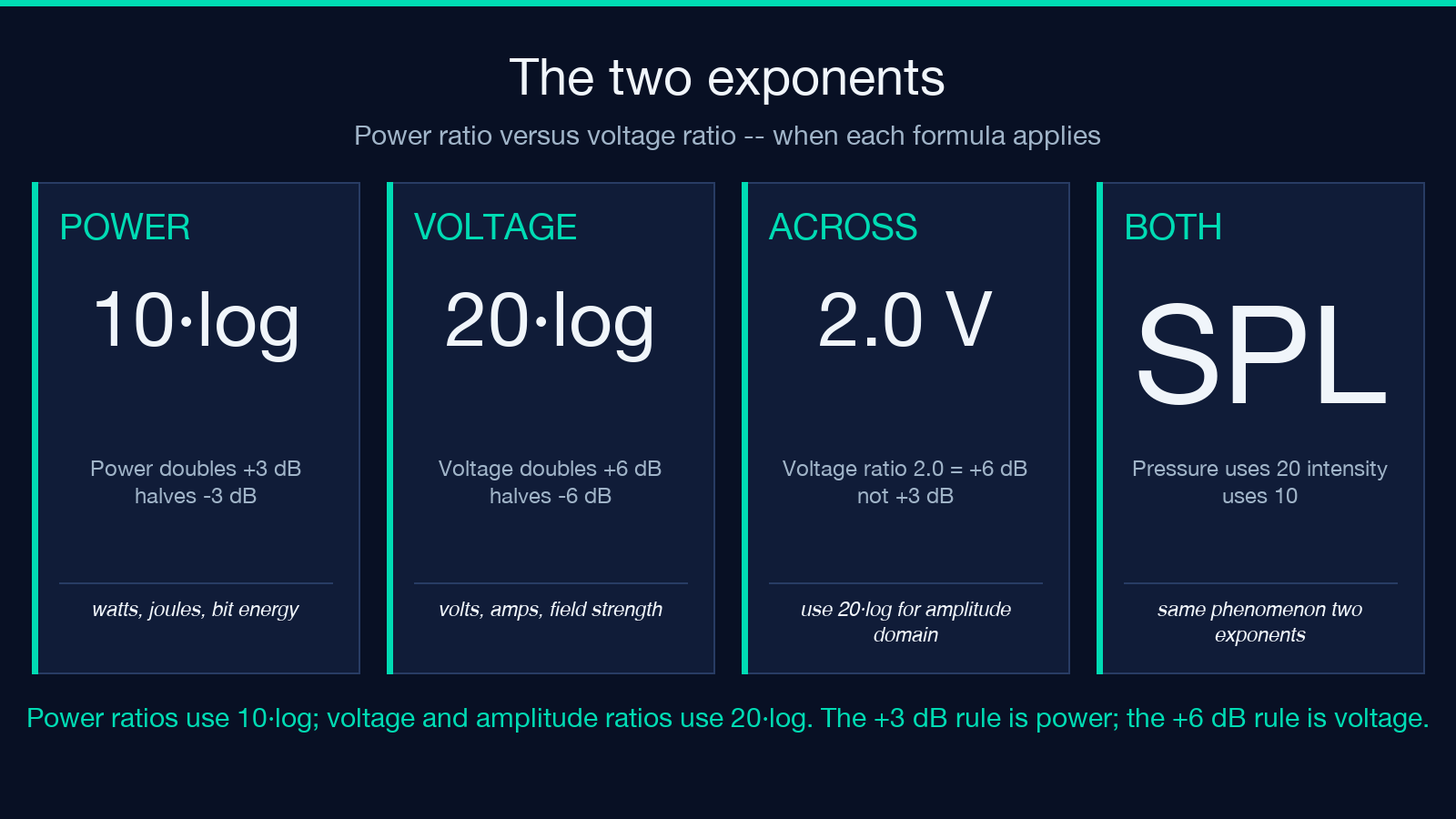
Voltage and amplitude ratios — anywhere you are measuring volts, amps, acoustic pressure, or field strength — use 20·log10. Doubling the voltage adds 6.02 dB; halving subtracts 6.02 dB. The “+6 dB equals double” rule comes from this formula. This is the version most people learn first because audio mixing consoles are labeled in voltage-domain dB (dBu, dBV), but the “+3 dB equals double power” rule keeps tripping people up because the +3 dB comes from the power formula, not the voltage formula.
The calculator exposes both forms as separate inputs. The “Power Ratio (10·log)” tab takes any two power values and returns the dB difference; the “Voltage Ratio (20·log)” tab does the same for voltage. Both directions are supported — feed it dB and get the linear ratio back, or feed it the linear ratio and get dB.
Six absolute-level scales and where each one comes from
Once you cross from a pure ratio into an absolute number, you have to declare a reference. The tool covers the six most common:
- dBm — decibels relative to one milliwatt. Used in RF engineering, telecom, audio power measurements into a known impedance. To convert dBm to dBW, subtract 30.
- dBW — decibels relative to one watt. Same family as dBm but with a 30 dB offset. Common in broadcast transmitter specs and radar.
- dBu — decibels relative to 0.7746 volts (the voltage that dissipates 1 mW into 600 ohms). The "+4 dBu" pro-audio reference level. Notice the "u" stands for "unloaded" — there is no impedance baked into the voltage reference itself, which is why the tool asks separately for load impedance when you want to know the actual power.
- dBV — decibels relative to one volt. Consumer audio equipment historically uses
-10 dBVas its line-level reference. The difference between +4 dBu and -10 dBV is about 11.8 dB — which is why patching a pro mixer into a consumer recorder produces a signal that is roughly twelve dB too hot. - dBFS — decibels relative to full scale, the highest peak a digital system can represent. 0 dBFS is the ceiling; every other digital level is negative. dBFS is the only scale on this list that is intrinsically bounded — you cannot go above 0.
- SIL — sound intensity level, decibels relative to 10⁻¹² watts per square meter, the threshold of human hearing at 1 kHz. Used in acoustic measurements and noise-exposure calculations.
The calculator converts between any pair of these scales, as long as you tell it which one is the source and which is the target. For dBm/dBu/dBV cross-conversions, the reference impedance selector on the right side of the form is what makes the answer physically meaningful.
The impedance selector is the most-skipped field
When you convert a voltage-domain number (dBu or dBV) into a power-domain number (dBm or dBW), the answer depends on the impedance. The relationship is P = V² / Z. For 600 ohms, +4 dBu (1.228 Vrms) is 4.0 dBm. For 10 kilohms, the same +4 dBu signal is only −12.0 dBm — twelve decibels lower, because the same voltage delivers less power into a higher-impedance load. The voltage hasn’t changed. The power has.
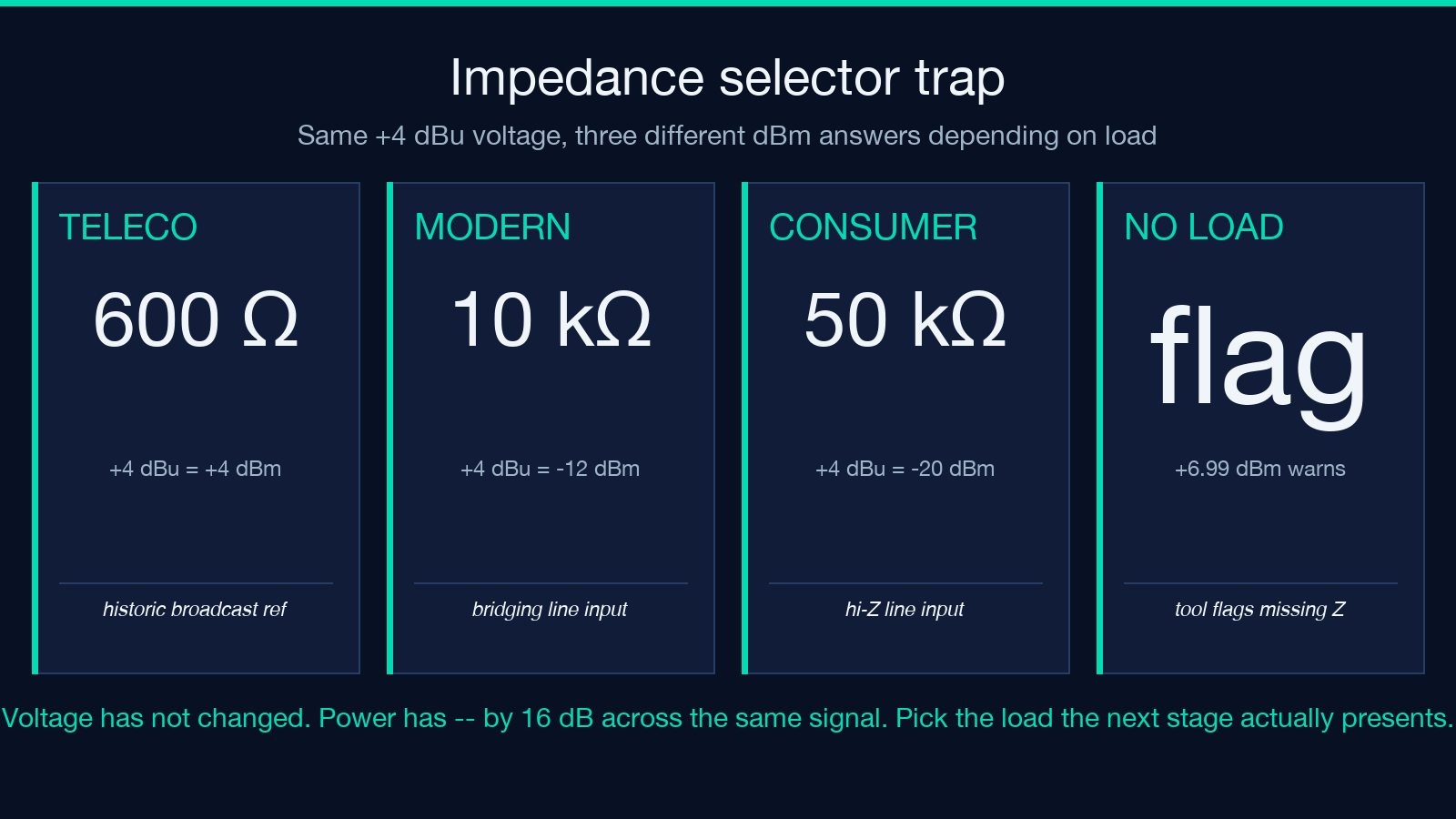
The calculator handles this by keeping the impedance selector visible whenever any power-domain output (dBm, dBW) is in play, and by warning if you cross from a voltage-domain input into a power-domain output without specifying the load. The default is 600 ohms because that is the historical telephone and broadcast reference, but most modern pro-audio gear is 10 kilohms bridging and consumer line inputs are 50 kilohms. Pick the wrong one and the cross-conversion is off by anywhere from 2 to 14 dB.
For dBFS and SIL, impedance is irrelevant. dBFS is a digital-domain reference and SIL is an acoustic-domain reference — neither one ties back to a specific electrical load.
A practical workflow: setting gain staging for a podcast
The most common use case for the tool is gain staging a podcast chain: USB mic preamp → audio interface → DAW → streaming encoder. Each stage has its own reference.
Start at the source. A typical USB condenser mic outputs -36 dBu at conversational loudness into the interface’s mic input. The interface’s preamp adds gain, typically +40 dB, producing +4 dBu at the line output — the pro-audio reference level. Set the preamp gain so the loudest speech peaks land at -12 dBFS in the DAW; that leaves 12 dB of headroom before digital clipping.
If the streaming encoder expects -16 dBFS peaks for loudness normalization to -16 LUFS, you need to attenuate the DAW output by 4 dB. That attenuation lives in the master fader, expressed in dBFS relative to the digital peak.
Where the calculator helps: cross-check the chain end-to-end. Plug in -36 dBu input → set the preamp gain slider to +40 → read +4 dBu line output. Cross to dBFS via the bridge (assume the interface clips at +24 dBu corresponding to 0 dBFS, so +4 dBu is -20 dBFS). Apply the 4 dB master attenuation and the final stream peaks land at -16 dBFS. Three references, two conversions, one calculator.
The same workflow applies to any chain where the signal moves between voltage-domain analog gear, power-domain RF gear, and digital-domain processing.
RF link budget: when dBi joins the conversation
Antenna gain is expressed in dBi (decibels relative to an isotropic radiator) or dBd (decibels relative a half-wave dipole). The isotropic reference is 2.15 dB below the dipole reference, so dBi = dBd + 2.15. The calculator does not directly convert dBi because it is a radiation-pattern reference, not an electrical-level reference, but the same ratio math applies: 3 dBi of antenna gain on each end of a link plus 6 dB of free-space path gain at the relevant distance produces a link budget you can read straight off the voltage/power ratio tabs.
For RF power budgets specifically, the dBm and dBW tabs are what you want. A 100-watt transmitter is +50 dBm or +20 dBW. Feed it into 6 dB of antenna gain and a 3 dB feedline loss and the radiated power is +47 dBm. Cross to absolute field strength at the receive antenna using the free-space path-loss formula, then back to receiver input power in dBm using the receive antenna’s effective aperture.
Common pitfalls and edge cases the calculator defuses
Three mistakes account for most of the “the calculator is wrong” support messages:
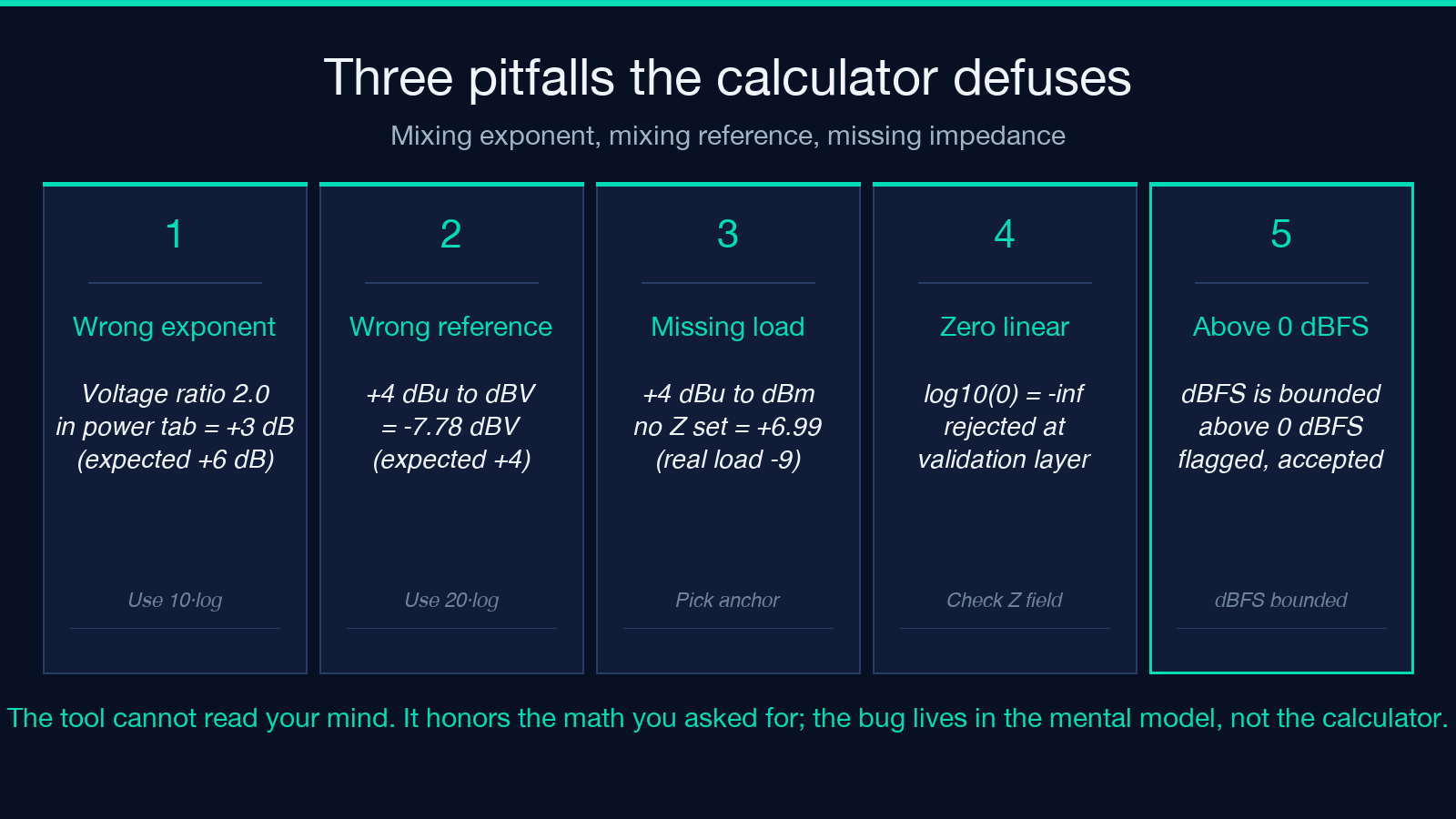
The first is mixing the exponent. Someone types a voltage ratio of 2.0 into the power tab and gets 3.01 dB; they expected 6.02 dB. The fix is to switch to the voltage tab. The tool cannot detect which exponent you meant — it just does the math you asked for.
The second is mixing the reference. Someone types +4 dBu and asks for dBV, expecting +4 dBV. The actual answer is -7.78 dBV because 0.7746 V and 1.0 V differ by 2.22 dB. The tool returns the right number; the user’s mental model of what “the same level” means is the bug.
The third is the impedance trap already discussed. Someone converts +4 dBu to dBm without setting the load and gets +6.99 dBm (the 600-ohm default). Their actual circuit is 10 kilohms, and the real answer is −9.0 dBm. Sixteen decibels of error from a single missed field.
On the edge-case side: inputs of zero linear power or zero linear voltage are rejected at the validation layer with a clear message — dB is undefined for a zero ratio, since log10(0) is negative infinity. Negative dB inputs are fine; the tool converts them to fractional ratios. Inputs above 0 dBFS are flagged but accepted — some workflows work in headroom-relative terms and the tool honors the math.
For absolute-level conversions that cross impedance domains, the tool surfaces a “this conversion depends on the selected impedance” hint next to the output field. The hint disappears when the source and target are both voltage-domain (dBu ↔ dBV, dBu ↔ dBu) or both power-domain (dBm ↔ dBW), since those pairs are impedance-independent.
Tool reference and related workflows
The decibel calculator sits in the Math & Numbers category at Elysia Tools alongside other unit and ratio converters that share its reference-handling pattern. For a broader look at ratio-style calculations across engineering domains, explore the Math & Numbers hub. When you need to convert raw measurement values into the dB-domain anchor of a downstream tool — for example, normalizing an audio sample library to a target loudness — the same form accepts linear inputs on either side and the conversion direction is auto-detected from which field you fill first.
For a working reference table of common decibel anchors (the +4 dBu pro-audio line level, the -10 dBV consumer line level, the 0 dBm 600-ohm broadcast reference, the -3 dBFS streaming headroom target, the 94 dB SPL acoustic calibrator level), the calculator’s reference panel keeps the most-used anchors one click away. Each anchor is annotated with its origin impedance or its domain, so you never have to guess whether a number is voltage-referenced or power-referenced.
If your workflow involves light-to-medium audio file manipulation after you compute the dB-domain targets, the audio batch converter handles format and loudness normalization end-to-end. For pure unit conversion outside the dB-domain — length, mass, time, frequency — the broader Elysia Tools unit-conversion set uses the same form conventions as the decibel calculator, so the muscle memory transfers.
The decibel is a ratio plus a reference. The ratio formula is 10·log10 for power and 20·log10 for voltage; the reference is one of six absolute scales, and the impedance matters whenever voltage-domain and power-domain scales meet on the same signal. The calculator at Elysia Tools handles all six absolute scales, both exponents, and the impedance cross-reference in a single form — feed it the input on the left, pick the scale on the right, and read the answer without doing the log by hand. For audio gain-staging chains, the Power Ratio tab is the right starting point; for RF link budgets, start at the dBm tab and let the impedance selector sit at 50 ohms; for acoustic work, start at the SIL tab and the impedance field becomes irrelevant.
Explore more tools at elysiatools.com.
