
A link that trains to 32 GT/s but then drops every fourth cycle is the recurring PCIe bring-up bug. The LTSSM state timeline, the rate identifier bits in TS1/TS2 ordered sets, and the eye-margin heatmap per lane tell you which of three failure modes you are looking at — and which two you can ignore. The PCIe Link Training LTSSM & Lane Margining Eye Decoder parses both the LTSSM log and the pcilmr margining report so the diagnosis is one paste away from the report.
What the decoder does on a pasted LTSSM log
The first thing the decoder does is parse the state sequence and tag every line with the matching LTSSM state name — Detect.Quiet, Polling.Active, Configuration.Linkwidth.Start, L0, Recovery.RcvrLock, Recovery.Equalization.Phase2. Lines that name a TS1 or TS2 ordered set get the symbol decoded too: link=0 lane=3 rate=0x1F becomes “link number 0, lane 3, rate identifier 0x1F (Gen5 32 GT/s)”. Once the timeline is laid out, the decoder groups the events into phases — Detect/Polling bring-up, Configuration (linkwidth, lanenum, complete), L0 active, Recovery (speed change, equalization, idle), L1 / L1.1 / L1.2 low-power.
The value proposition: you paste a log in, you get back the same fields ltssm_decode.pl or a vendor trace parser would show, but laid out so the eye can follow the phase boundaries. A bring-up that takes 11 milliseconds across Detect → Polling → Configuration → L0 reads at one glance; a bring-up that gets stuck in Polling.Compliance for 40 ms reads at the same glance, with the diagnostic right there.
Why rate identifier 0x1F is the Gen5 marker, and the placeholder stops are not
The rate identifier in a TS1/TS2 ordered set is a 3-bit field packed into bits 2:0 of byte 1, combined with the rate bits in byte 0 to form a 6-bit value. The marker sequence most engineers know — 0x01 (2.5 GT/s Gen1), 0x0F (8 GT/s Gen4), 0x1F (32 GT/s Gen5), and 0x2F for Gen6 64 GT/s — is a contract the spec nails down in Table 4-5. The decoder watches that progression and prints a rate-identifier decode table at the top of the report so a log that says “Gen5” at line 17 but “Gen1” at line 31 is impossible to miss.
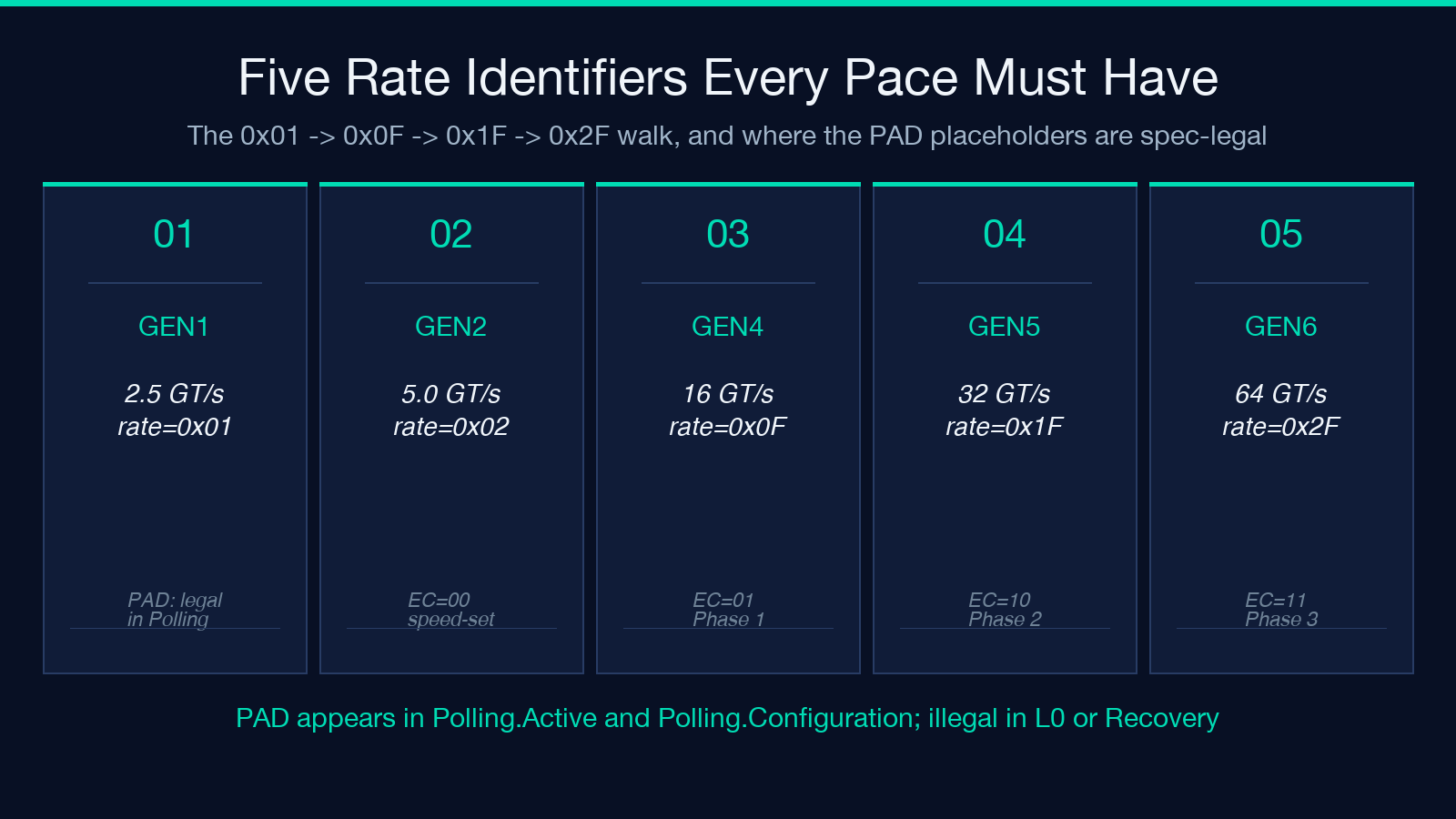
The placeholder values link=PAD lane=PAD show up in Polling.Active and Polling.Configuration and mean “no lane or link has been assigned yet” — they are spec-legal in those states but illegal in L0 or Recovery. The decoder prints the transition out of Polling.Configuration as a separate event, so a log that goes Polling.Configuration link=PAD lane=PAD → L0 link=0 lane=0 reads correctly even though the PAD values were never replaced.
For a worked example of the rate-identifier walk and the PAD transition, the Elysia Tools hub has the LTSSM decoder pre-loaded with the Gen5 bring-up log.
Lane margining versus link training: which log tells you which problem
A speed-change failure and a marginal-eye failure look the same on the wire — both cause retransmits and link flaps — but the diagnostic log is different. A speed-change failure shows up in the LTSSM trace as a Recovery.RcvrLock → Recovery.Speed → Recovery.Equalization.Phase1 sequence that never reaches Recovery.Idle, or as a hot reset (HotReset) that fires before the equalization phases complete. A marginal-eye failure shows up in the pcilmr CSV as one or more lanes falling below the spec minimum eye width or eye height even when the LTSSM reaches L0 cleanly.
The decoder accepts both inputs in the same UI panel and grades them independently. Pasting an LTSSM log that ends in L0 tells you the speed-change path completed; pasting a pcilmr CSV that shows Lane 2: Fail on the same link tells you the eye is too closed to run reliably even though the training succeeded. The two findings have different fixes (transmitter EQ preset tuning vs CTLE/DFE receiver tuning), and the report makes the distinction explicit so the bring-up engineer reads the right one first.
Lane reversal and polarity inversion change which lane you are debugging
A x4 link where the lanes are physically numbered 0-3 on the board but the silicon has them in reverse order is a Lane reversal: enabled log line away. The decoder reads the Configuration.Linkwidth.Start → Configuration.Linkwidth.Accept exchange and the Configuration.Lanenum.Wait → Configuration.Lanenum.Accept handshake, then prints the physical-to-logical lane map as part of the link-negotiation panel. A debug session that is chasing a “Lane 2 EQ failure” when the silicon is actually failing Lane 1 (because of reversal) wastes an afternoon; the lane map makes that mistake impossible.
Polarity inversion is the same idea one layer down — a TX+ signal physically wired to the RX- pin on the other side is a Polarity inversion: lane N note. The spec allows this and the link still trains; it just changes which lane number you should be calling when you file the bug. The decoder prints polarity alongside the lane map, so the same report that says “lane 2 fails EQ Phase 2” also says “polarity inverted on lane 2” if the inversion is present.
Equalization phases decide which knobs to turn next
Gen4 (16 GT/s) and forward run a three-phase equalization sequence at every speed change. Phase 1 is a coarse-tune where the receiver reports its current TX EQ presets back to the transmitter (EC=01); Phase 2 is the fine-tune where the transmitter sweeps presets based on the receiver’s Phase 1 feedback (EC=10); Phase 3 is the in-band adaptation where the link locks to operating condition. A speed change that gets stuck in Phase 2 is almost always a TX preset problem; one stuck in Phase 3 is almost always a CTLE/DFE receiver problem. The decoder tags each phase with the EC byte so the failure mode shows up in the report before you have to read the register spec.
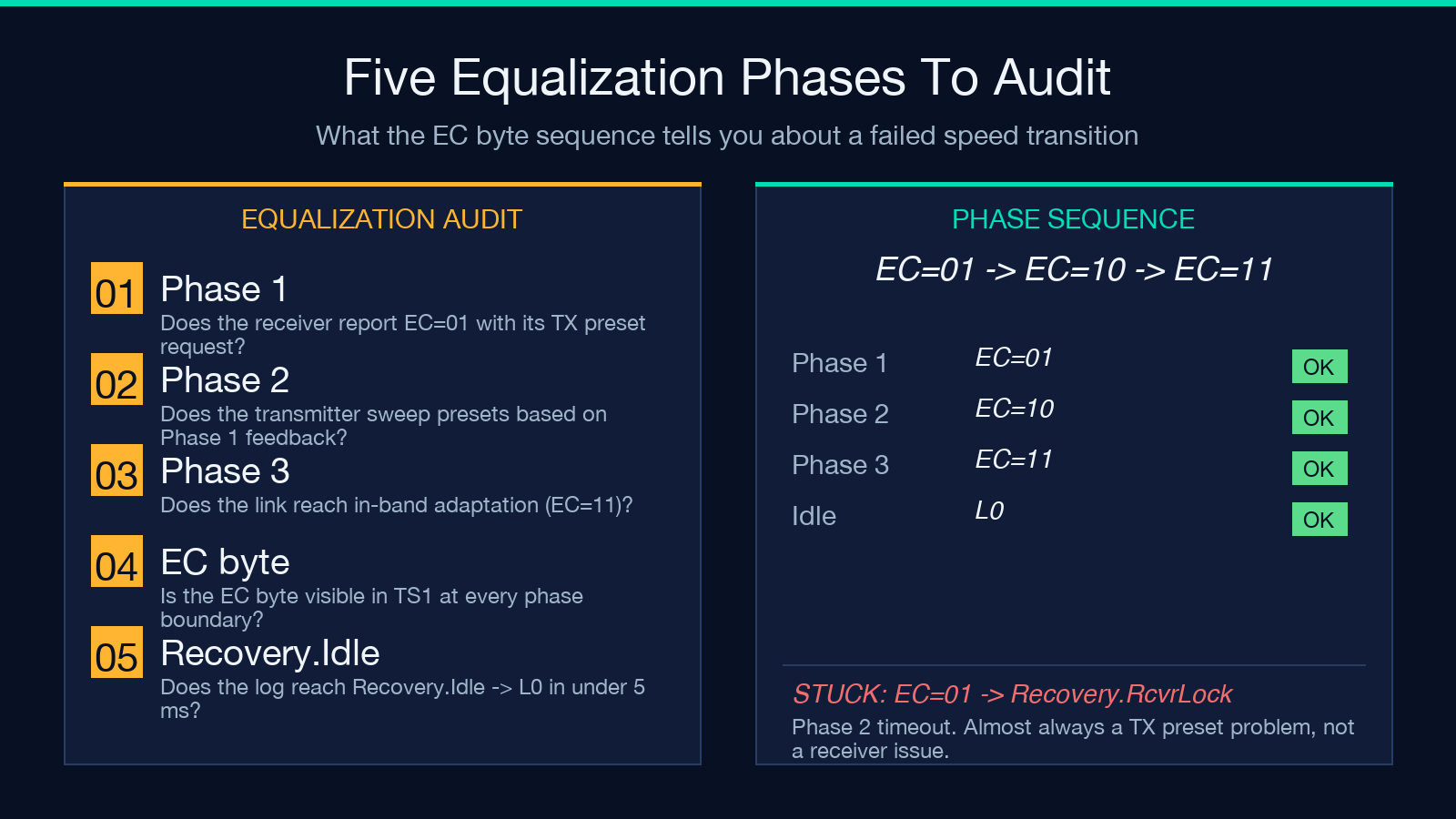
A full Phase 1 → 2 → 3 pass with EC=01 → EC=10 in the log and a Recovery.Idle → L0 exit is a successful 32 GT/s Gen5 transition. Anything else — a Phase 1 → Recovery.RcvrLock restart, a Phase 3 → Phase 1 rollback — is a diagnostic flag the report prints in red.
The pcilmr margining CSV is where link health becomes numbers
pcilmr is the Linux kernel command for lane margining (-o for CSV output). The output rows look like Lane=0,Vgn=0,Offset=0,EW_Min=22.45 ps,EH_Min=42.10 mV,... and the decoder reads each row, infers the generation from the EW_Min column scale (a Gen4 link has EW_Min in the 18-30 ps band; a Gen5 link has EW_Min in the 6-12 ps band because of PAM4), then grades every lane against the PCIe Base Spec Rev 5.0 §8.4.2 eye minimums and the PHY Test Spec recommendation.
A lane that fails at 16.25 ps on a Gen4 link is the canonical marginal-link case — close to the spec floor, will pass most functional tests, will fail every corner of the compliance suite. The decoder prints the per-lane grades as colored badges (Perfect, Pass, Fail) and the verdict line at the bottom, so the bring-up engineer sees Lane 2: Fail at EW_Min=16.25 ps (Gen4 spec floor=18.75 ps) without computing anything.
The eye-margin heatmap turns row data into one picture
The eye-margin heatmap the decoder writes is a per-lane grid of cells, where each cell is colored by the joint (eye width, eye height) tuple at one voltage offset. A lane that opens up across all voltages is a sheet of green; a lane that collapses at one voltage is a red column. The heatmap is the one place where a four-lane link looks like a four-lane link — the other report views (timing-only, voltage-only, per-spec) require the eye to assemble the picture.
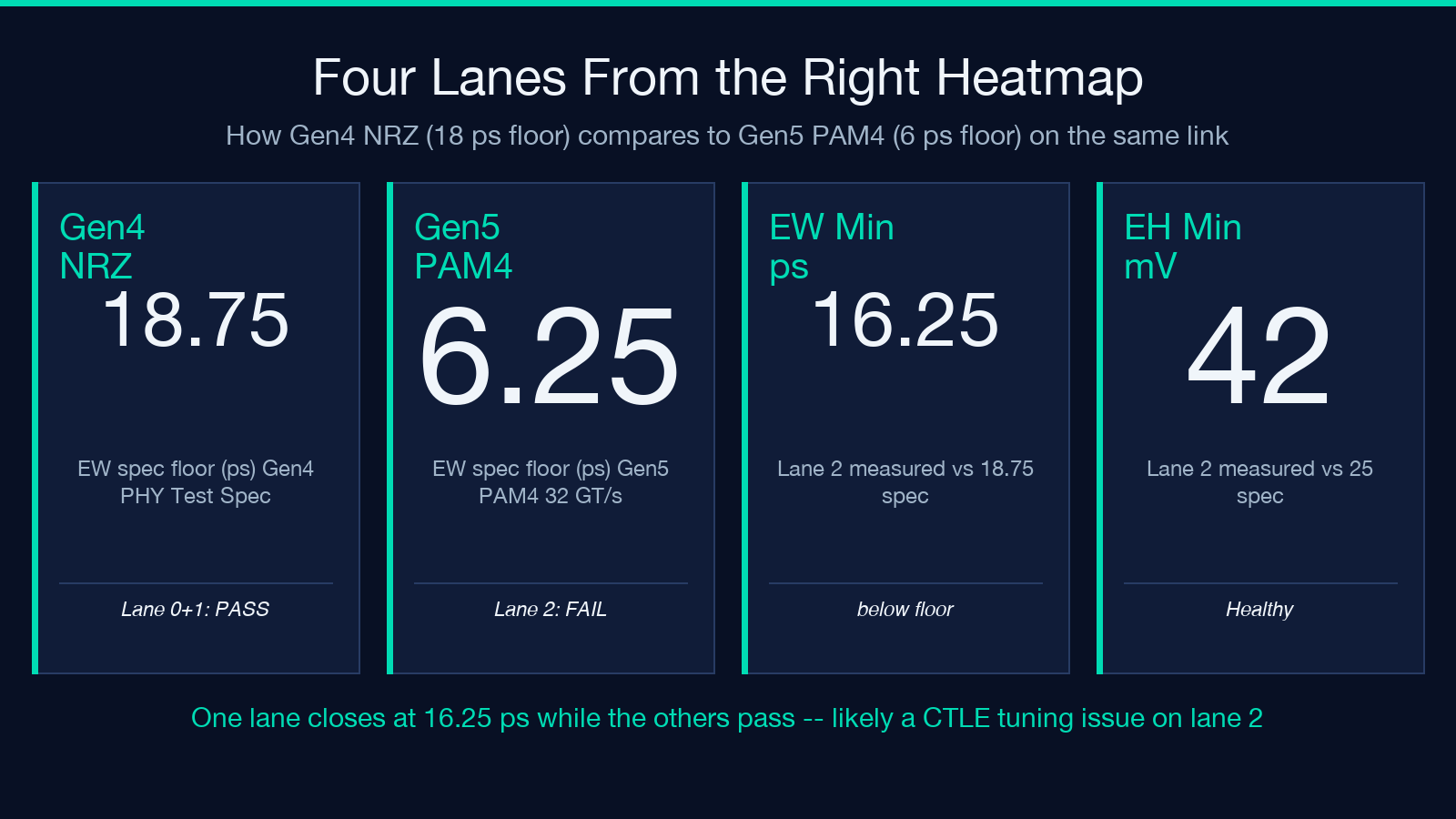
For a Gen5 PAM4 link the eye diagram is half the height of a Gen4 NRZ eye (because PAM4 has four voltage levels squeezed into the same swing), so the eye-height numbers in the report look alarming even on a healthy link. The heatmap normalizes the view: a healthy PAM4 link is small but uniformly open; a failing PAM4 link has cells that close at the upper and lower PAM levels. The decoder scales the color bands to the inferred generation so a Gen5 heatmap and a Gen4 heatmap compare correctly side by side.
When to use the decoder and when to reach for a hardware tracer
The decoder is the right tool for the 90 percent case: a captured LTSSM log, a pcilmr CSV, three-to-six lanes, in the browser, no install. It is not a live LTSSM state machine, an IBIS-AMI simulator, or a SerDes parameter sweeper. If you need to step through the state machine one cycle at a time, model the channel S-parameters, or sweep CTLE/DFE coefficients against a vendor model, the decoder tells you which lane to focus on, but the actual analysis lives in the vendor’s hardware tracer or in a system like MATLAB SerDes Toolbox.
For bring-up sanity checks — rate identifier transitions, lane reversal, polarity inversion, equalization phase completion, eye-margin against the spec — the decoder is faster than the trace parser and the report is shareable with the silicon team. For deep signal-integrity work it is the triage step before the heavy tools come out. Either way, the LTSSM log stops being a wall of text.
Explore more network and protocol tools at elysiatools.com/en/tools.
