The first time you ask a JavaScript client to consume a SOAP response, you learn an important lesson about XML: the brackets are not the problem. The problem is that XML and JSON are not the same data model wearing different syntax. XML has attributes, namespaces, repeating siblings, mixed content, and processing instructions. JSON has none of those. So when a “simple” XML-to-JSON conversion produces a single nested object where the same XML payload used to give you an array of three, something has been silently simplified, and you are about to spend forty minutes debugging a front-end form that quietly started showing the first result instead of the third. The good news is that the loss of fidelity is almost never random. It is the predictable consequence of five distinct decisions, and once you can name each decision, the loss of fidelity becomes a choice rather than a surprise. That is what the XML to JSON Converter at Elysia Tools is really for. It is not a magic box. It is a five-dial instrument panel that lets you see exactly which of those decisions is being made on your behalf, and flip the one you disagree with.
Behind every conversion sits an unstated mental model. You paste a few hundred lines of XML into a textarea, you click a button, and you get back a JSON object. What you do not see is the parser making five choices, in order, about how to render a hierarchical tagged document as a flat key-value structure. Each choice is a tradeoff between fidelity, ergonomics, and developer convenience. Run the same XML through five different converters, and you will get five different JSONs. That is not a bug. It is the entire design space of XML-to-JSON conversion, and the article you are reading is a map of it. By the time you reach the closing paragraph, you will know which dial to reach for first the next time the output looks slightly wrong, and you will know the name of the rule it implements.
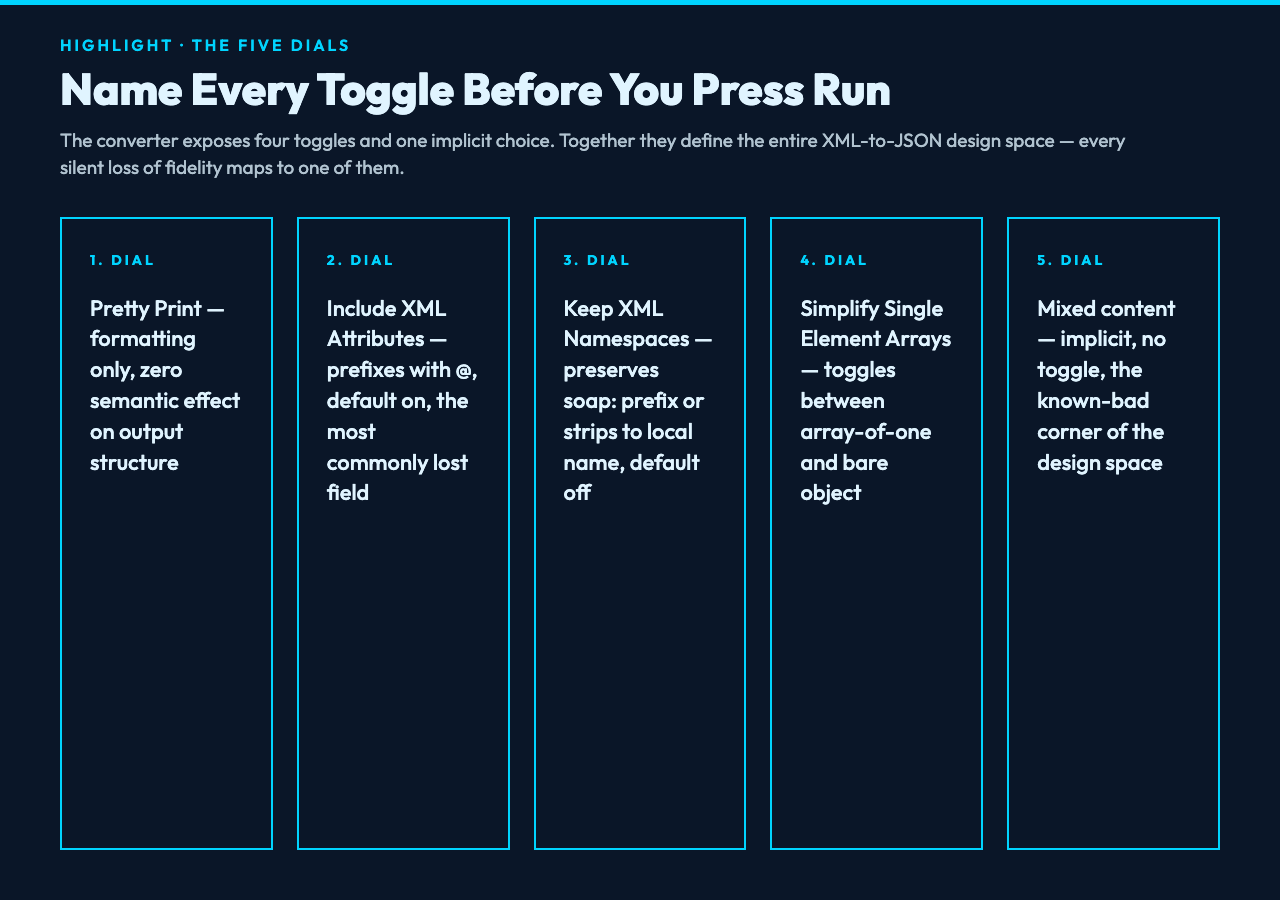
The five dials, in the order they appear in the converter, are: Pretty Print Output, Include XML Attributes, Keep XML Namespaces, Simplify Single Element Arrays, and the implicit choice of how to render repeated sibling elements. Most conversions look correct at the default settings, which is why most engineers never think about the model. But “looks correct” is a sample-size-one statement. Push a real legacy system through, and one of the dials will betray you. The remainder of the article walks each dial, with concrete input and output pairs you can copy into a tool like the XML to JSON Converter and verify on the spot.
The first dial: pretty print is the cheapest dial, and the one that matters least
The Pretty Print Output toggle does exactly what it says: it controls whether the resulting JSON is indented with two spaces or emitted as a single minified line. Pretty Print defaults to on, and there is almost no reason to turn it off in interactive work. You want to read the output, and you want the diff between two runs to be obvious. The one place pretty print becomes a tax is when the JSON is being shipped over the wire as a response body. In that case, minify the result before serving. But that is a post-processing concern, not a conversion concern. Pretty print has zero semantic effect on the output. Flip it freely without thinking about the data model.
That might sound trivial, but the reason we start here is that pretty print is the only dial in the list that has no hidden cost. Every other dial changes the structure of the output. Pretty print only changes the formatting. The fact that the converter exposes it as a separate toggle, alongside four structural choices, is a clue about the design philosophy: the developer who built the tool wants you to think of the structural choices as first-class decisions, not as a hidden configuration you discover by reading source code. When in doubt, leave pretty print on, and the next four dials become visible in the diff.
The second dial: include XML attributes, and why they are the most commonly lost field
XML has two ways to associate data with an element. The first is text content between the open and close tags. The second is attributes on the opening tag. Most JSON-as-target code paths treat attributes as second-class citizens, because the JSON object model has no native equivalent of an attribute. A converter that defaults to dropping attributes will produce a JSON object that is missing every field that lived in an attribute on the source XML. This is, by a wide margin, the single most common reason a “successful” XML-to-JSON conversion produces data the consuming code can find.
The fix is the Include XML Attributes toggle, which defaults to on in the XML to JSON Converter. With it on, an element like <user id="42" role="admin">Quyue</user> becomes {"user": {"@id": "42", "@role": "admin", "#text": "Quyue"}}. The convention of prefixing attribute keys with @ and the text content with #text is not a standard, but it is the convention every reasonable JSON library agrees on, and the one the converter uses. With it off, the same input collapses to {"user": "Quyue"}, and the id and role fields are simply gone. If you find that a downstream field is mysteriously empty, this is the first dial to verify.
The third dial: keep XML namespaces, or why your XPath stops working
Namespaces in XML are the system that prevents two different schemas from colliding when one document imports another. They look like xmlns:soap="http://www.w3.org/2003/05/soap-envelope" on the root element, and they propagate down through every child that does not override them. A converter that strips namespaces by default will produce JSON keys that look clean to a human reading the document, but completely unrecognizable to any code that was written against the original namespace. The element <soap:Body> becomes "Body", and every library that was looking for "soap:Body" silently fails to match.
The Keep XML Namespaces toggle defaults to off, which is the right call for human-facing output but the wrong call for anything that will be consumed by code. Turn it on, and the keys become the literal string the source XML used, including the prefix. Turn it off, and the prefix is stripped, leaving only the local name. The third dial matters whenever the source XML has any xmlns attribute at all, and the safe rule is: if the consuming code uses any kind of structural lookup, leave namespaces on. If you are rendering the JSON for a human who needs to read it without context, turn them off and accept the loss of fidelity. The choice is yours, but the loss of fidelity is not random. It is the predictable cost of the toggle.
The fourth dial: simplify single element arrays, and the silent “first result only” bug
XML treats repeated sibling elements as a list, but the same XML element appearing exactly once is treated as a singular value. JSON has no concept of either: an object property is just a property, and arrays are arrays. The most useful rule converters agree on is “always emit an array, even for one element, so the consuming code can iterate uniformly.” The fourth dial is the inverse: simplify single-element arrays back to a single object. It defaults to on, because most engineers find an array of one confusing. But the same rule that makes single elements feel natural is the rule that breaks the moment the source XML has two elements, because then the JSON has a singular object where the consuming code is now iterating over nothing.
To make this concrete, take an XML input like <order><item>A</item></order>. With the toggle on, the output is {"order": {"item": "A"}}, and any code that does data.order.item works. The moment a second <item> appears in the source, the same converter, with the same toggle, emits {"order": {"item": ["A", "B"]}}, and the same data.order.item is now an array. The downstream code crashes on the second order, and the first one still works. The fix is to leave the toggle off if your schema can ever repeat the element, or to write defensive code that handles both cases. The converter cannot make the choice for you, because the right answer depends on whether the element is semantically a list or a singleton in the consuming code.
The fifth dial: implicit, and the one no toggle can fix
The fifth decision is not a toggle. It is the question of how to render mixed content: an XML element that contains both text and child elements interleaved, like <p>Hello <em>world</em>, how are you?</p>. There is no clean JSON equivalent. The convention the converter uses is to emit a string field with the entire concatenated text, and a child field for the structured children, and the two can disagree on word order. The five-dial instrument panel does not expose a control for this case, because every reasonable strategy is wrong in some way. The right response is to recognize that mixed content is a sign the source XML was designed for human rendering, not for data interchange, and to either pre-process the source to flatten the structure, or post-process the output to re-stitch the children back into the right positions.
The five dials, taken together, define the entire design space of XML-to-JSON conversion. Pretty print is formatting. Attributes are fidelity. Namespaces are compatibility. Single-element arrays are ergonomics. Mixed content is a known loss. Once you can name all five, you stop being at the mercy of the converter, and you start being the engineer who decides which loss of fidelity is acceptable for the situation at hand. That is the entire job.
How to use the converter without getting burned
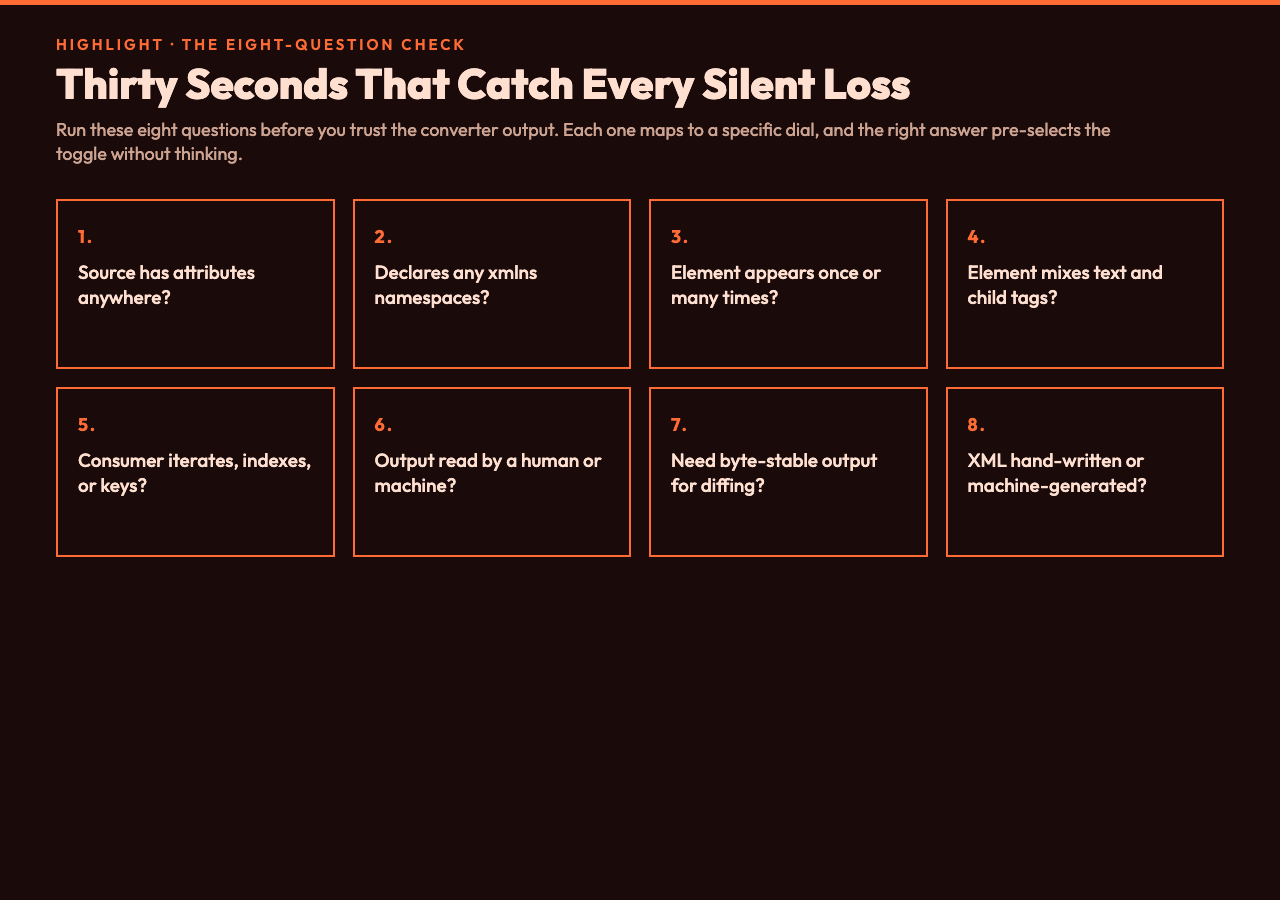
The pragmatic workflow, given those five decisions, is to never paste raw production XML into a converter and trust the first output. Instead, build an eight-question mental check that you walk through every time. The check costs you thirty seconds, and it catches every category of silent loss of fidelity that the dials hide. The questions are: (1) does the source have attributes anywhere? (2) does the source declare any namespaces? (3) does any element appear with both a single occurrence and a multiple occurrence in different records? (4) does any element contain mixed text and child elements? (5) does the consuming code iterate, index, or look up by key? (6) is the output being read by a human or by a machine? (7) do you need byte-stable output for diffing? (8) is the XML hand-written or machine-generated?
Each question maps to a specific dial, and each answer pre-selects the right setting. Hand-written XML almost always uses attributes; machine-generated XML often does not. Consuming code that iterates wants arrays even for single elements; consuming code that indexes wants single objects even for arrays. Output read by a human wants pretty print and stripped namespaces; output read by code wants the reverse. Build the eight-question check into your muscle memory, and the converter becomes a tool you operate rather than a black box you hope.
Five sample formats that exercise every dial
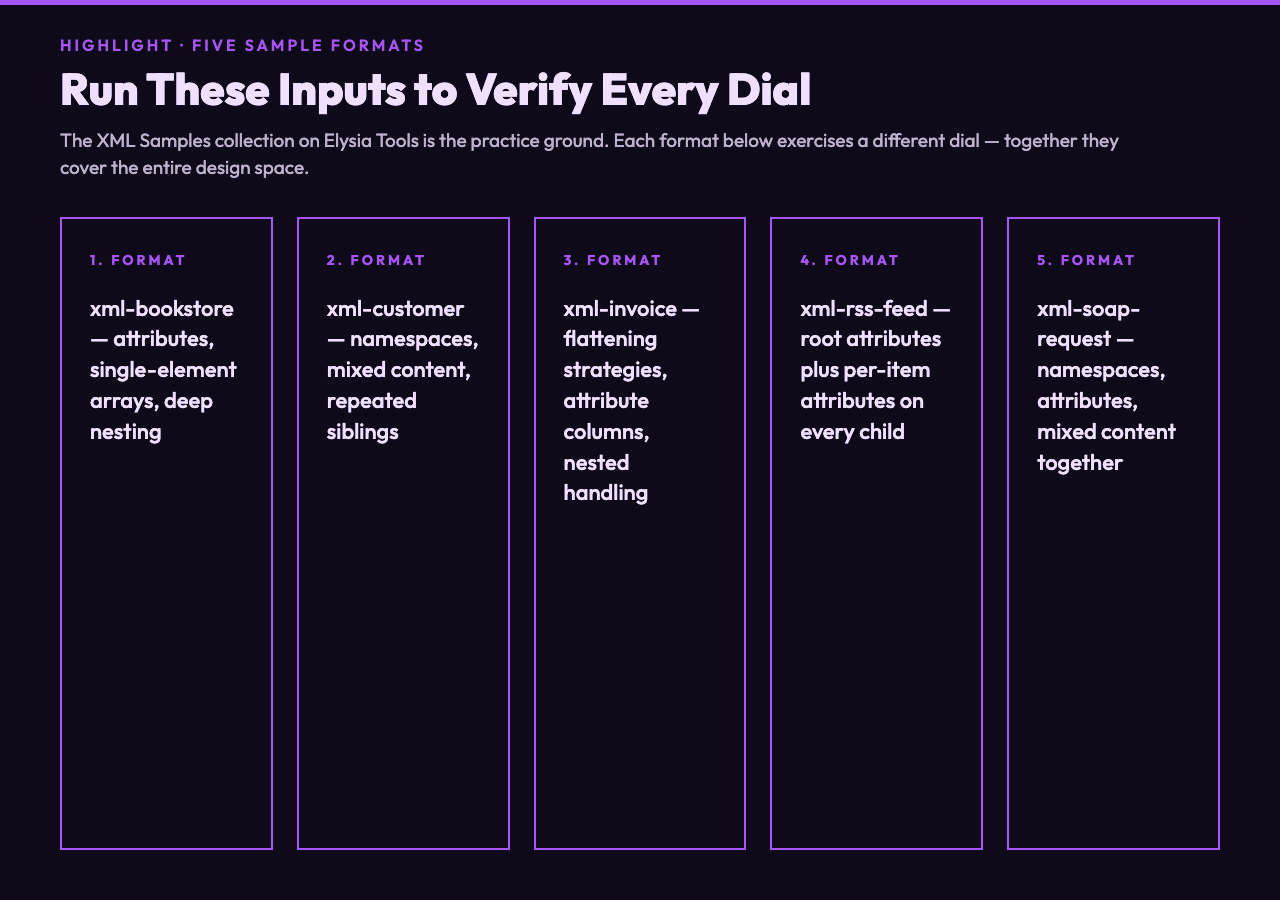
The fastest way to internalize the five dials is to run a curated set of sample inputs through the converter and watch which dial changes the output. The XML samples collection on Elysia Tools is built for this kind of exercise. The bookstore example exercises attributes and single-element arrays. The customer data example exercises namespaces and mixed content. The invoice example exercises deep nesting and repeated siblings. The RSS feed example exercises attributes on the root and on every child. The SOAP request example exercises namespaces, attributes, and mixed content in the same payload. The sitemap example exercises long uniform lists that are easy to misread as a single object. None of these samples is exotic. They are the formats real production systems emit, and they are exactly the ones the dials were designed to address.
Pair the XML samples with the XML viewer samples when you want to see the same data with formatting preserved, and pair both with the JSON samples collection when you want to compare the output structure against canonical JSON shapes. Between the three sample sets, you have enough input to verify every dial against real-world data, and enough output variation to confirm that the converter is doing what you expect. If a sample behaves differently than the five-dial model predicts, that is a signal to dig into the source XML and understand why, not a signal to flip a toggle and hope.
Putting it together
XML-to-JSON conversion is a small, well-defined design space. Five dials, eight questions, and a few dozen canonical sample formats. The work of becoming fluent is not memorizing the dials. The work is internalizing the eight-question check until it runs in the background of every conversion you do. The next time a legacy system hands you a deeply nested SOAP response, you will not paste it into a converter and hope. You will run the check, predict the output, then run the conversion and confirm the prediction. That is the difference between an engineer who treats XML as a necessary evil and an engineer who treats it as a data contract with known tradeoffs. The XML to JSON Converter on Elysia Tools is the instrument. The eight-question check is the skill. Sample formats like the XML samples set are the practice ground. Everything else is muscle memory.
XML is not a legacy relic. It is the most disciplined data contract on the web, and the people who treat it that way stop apologizing for its angle brackets. Walk away with the five toggles, the eight-question mental check, and the explicit knowledge of which sample format sits behind each scenario, and every XML-to-JSON conversion becomes a quick decision rather than a code spelunking session. Tools like the XML to JSON Converter are not magic boxes that turn messy SOAP envelopes into pretty React state; they are a five-dial instrument panel, and the muscle you build is the muscle of deciding which dial to turn before you press run. The next time a legacy system hands you a deeply nested response with attributes, namespaces, and repeated elements, you will not stare at the result wondering why one of the fields is missing. You will already know exactly which toggle explains it, and which one to flip.