
Your File Extension Is a Lie: A Field Guide to Magic-Number Detection
You uploaded a .txt and the antivirus ignored it. You uploaded a .jpg and the browser treated it like an MP4. You uploaded a .docx and the file tool told you it was a ZIP — which is correct, because .docx is a ZIP. Every one of those surprises happened because the extension lied, and the bytes were honest.
file — the Unix command — has been telling the truth from byte zero since 1973. The modern version is a database of ~70 magic-number signatures: short, anchored byte sequences that uniquely identify a format regardless of what filename someone slapped on it. Most apps only check the extension. Magic-number detection reads the actual file and asks the data what it is. When that mismatch between the two answers is security-relevant, malicious, or plain wrong about what you uploaded, magic numbers are the only authority that matters.
This is a field guide for the case where your extension is a lie and your bytes are not.
What a magic number looks like in the first eight bytes
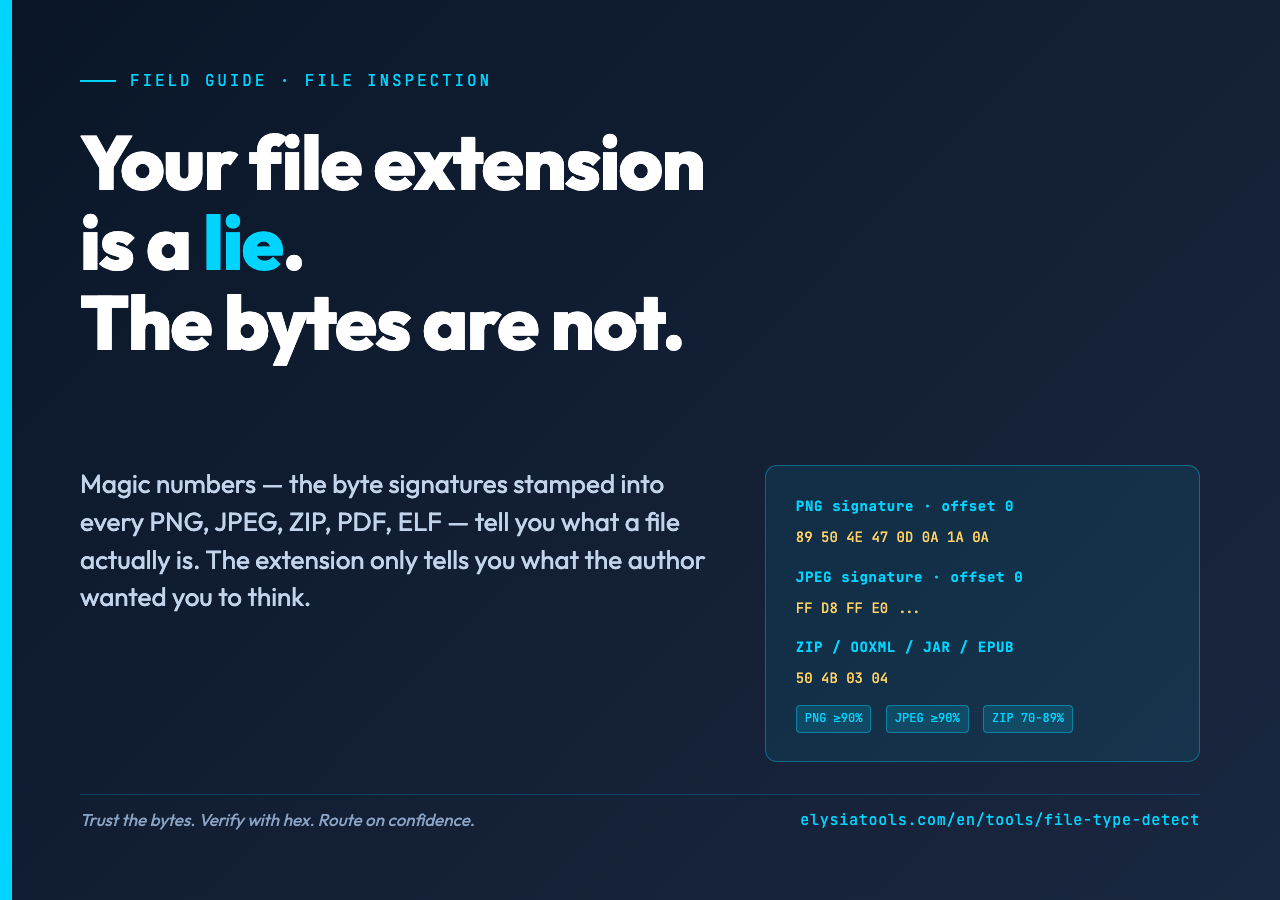
Every common binary format stamps its identity in the first handful of bytes. PNG always begins with 89 50 4E 47 0D 0A 1A 0A — the eight-byte sequence ‰PNGrnx1an. JPEG begins with FF D8 FF. PDF begins with %PDF- (25 50 44 46 2D). ZIP begins with PKx03x04 (50 4B 03 04) — and that is also why every .docx, .xlsx, .pptx, .jar, .apk, .epub, and .odt file starts with the same four bytes. The byte signature is the format’s true name.
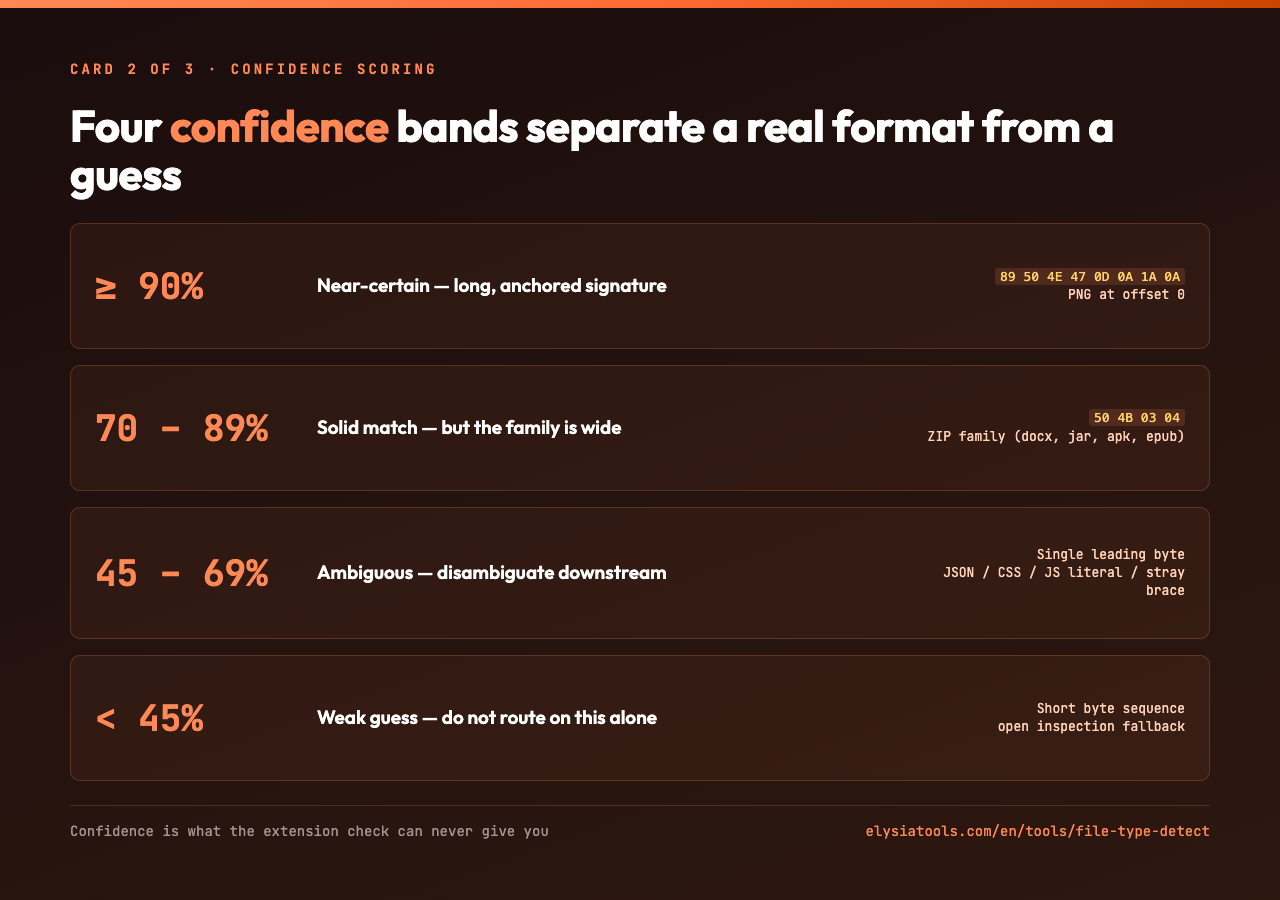
Magic-number detection reads those bytes, runs them through a signature database, and reports the match along with a confidence score. Long, anchored signatures (PNG’s eight-byte sequence at offset 0) get ≥90% confidence. Short or offset-based signatures get less. A single leading byte { is a 45-69% guess between JSON, a JS object literal, a CSS rule, or just a stray brace.
The detection rule is not “guess from one byte.” It is “ask the file, byte by byte, what format its author wrote.”
If you want to try this on a real upload — no install, no CLI, no config — open the File Type Detector on Elysia Tools. Drop any file in. The tool reads the bytes, surfaces the signature match, and shows you the hex dump of the first 64 bytes so you can verify by eye.
The four cases where the extension lies
There are four common ways the extension and the bytes disagree. Each one has a different reason and a different fix.
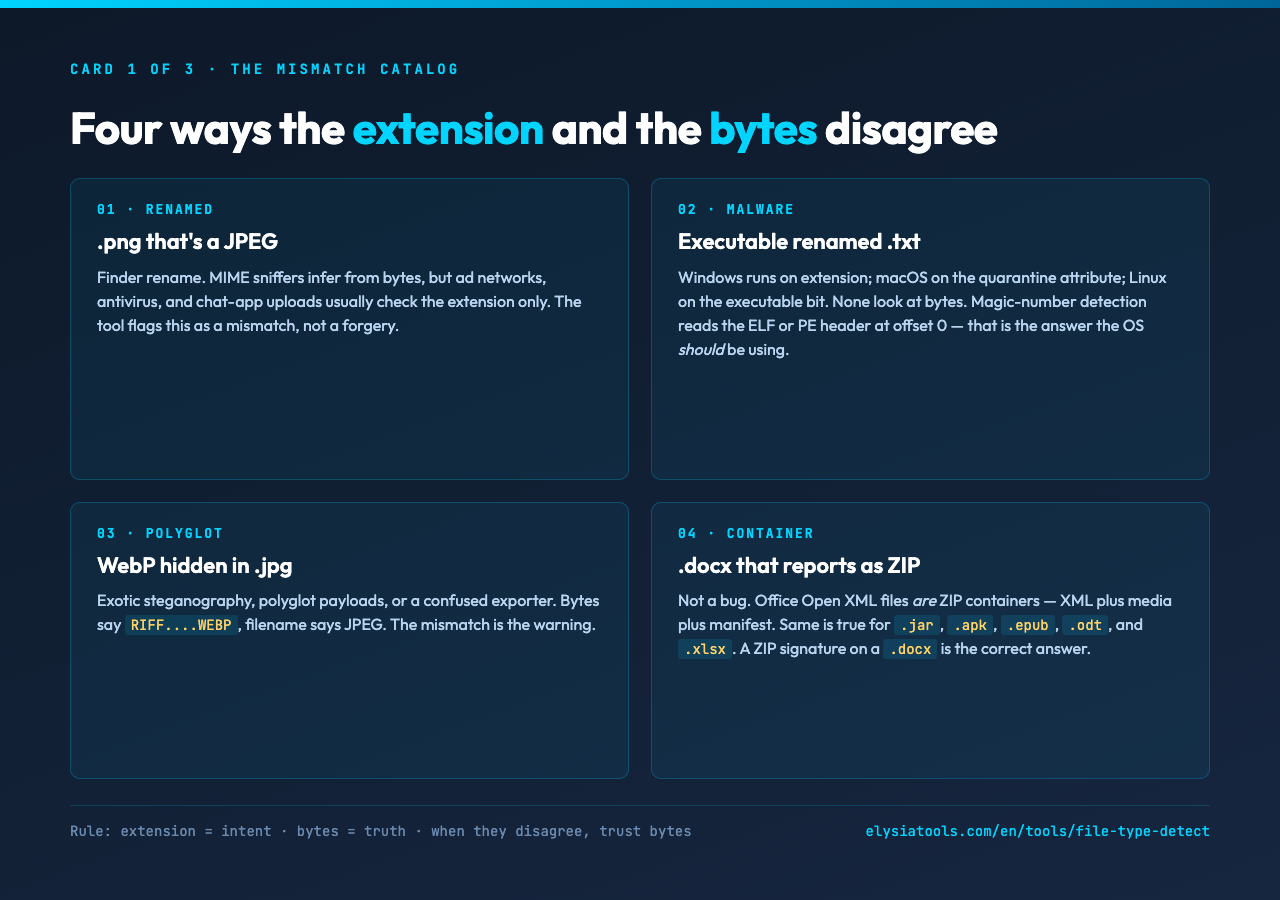
A .png that is a JPEG. Someone renamed the file in Finder. The web platform’s MIME sniffers will infer from the bytes anyway, but ad networks, antivirus engines, and chat-app uploads usually check the extension only. The detection tool flags this as an extension / content mismatch, not as a forgery.
An executable renamed .txt. The classic malware pattern. Windows uses the extension to decide whether to run the file; macOS uses the quarantine attribute; Linux uses the executable bit. None of those look at the bytes. Magic-number detection reads the ELF header (7F 45 4C 46 for Linux) or PE header (4D 5A for Windows) at offset 0 and reports it as an executable. That is the answer the OS should be using.
A WebP hidden inside a .jpg. Exotic steganography, polyglot payloads, or a confused exporter. The bytes say WebP (RIFF....WEBP), the filename says JPEG. The mismatch is the warning.
A .docx that reports as ZIP. That is not a bug. Office Open XML files are ZIP containers — they contain XML files plus media plus a manifest. The same is true for .jar, .apk, .epub, .odt, and .xlsx. A ZIP signature on a .docx is the correct answer.
The general rule: the extension is a hint from the author about what they intended the file to be. The bytes are the truth about what the file is. When the two disagree, you should treat the bytes as authoritative and the extension as a label.
How confidence scoring separates a real format from a guess
The hardest part of magic-number detection is not matching a known signature. It is knowing how much to trust the match when multiple signatures could plausibly fit.
A leading { could be JSON, a CSS rule, a JS object literal, or a stray brace in a text file. The detection engine has no way to disambiguate that from one byte. Confidence on that match lands in the 45-69% band — “ambiguous, do not trust this alone.”
A four-byte sequence 50 4B 03 04 is almost certainly a ZIP-family file. But the ZIP family is large, and the detection engine cannot tell you whether you are looking at a .docx, a .jar, or a plain ZIP without unzipping it. Confidence in the 70-89% band — “solid match, but the family is wide.”
PNG’s eight-byte signature at offset 0 is unambiguous. Confidence ≥90% — “near-certain, this is a PNG.”
The confidence score is the part the extension check can never give you. It is also the part you need when you are deciding whether to block an upload, treat a file as safe, or hand it off to a downstream parser.
The File Type Detector surfaces this confidence band directly in the result, alongside the MIME type and the recommended extension. The hex dump of the first 64 bytes is always shown so you can verify the signature yourself.
What the tool catches that file does not
The standard Unix file command is excellent but limited. It runs against the local filesystem, applies a fixed signature database, and does not surface ambiguity the way a modern web tool can.
The Elysia Tools version of this idea goes further in three concrete ways:
– It reads the uploaded file directly, not a typed hex string. There is a related tool that takes a hex string you type by hand and looks it up in the signature database — useful when you only have the bytes, not the file. The File Type Detector takes the file itself.
– It supports offset-based signatures — the ZIP-relative markers that sit at byte 4 inside container formats, the RIFF size field at byte 4 that varies per file and must be masked out, the MPEG-PS sequence that starts at byte 0 but the MPEG-TS variant that starts at byte 188.
– It applies bitmasks so variable-length fields in a signature do not produce false rejections. The RIFF container’s size field is the canonical example — it changes per file, and a naive byte-equality match would fail every RIFF file past the first one.
– It surfaces all candidates when multiple signatures match. A four-byte sequence that matches both Microsoft Compound File Binary and a generic OLE container should appear as two candidates with confidence scores, not collapsed into one.
If you have ever debugged a media pipeline where a video fails to play and you cannot tell whether the file is an MP4 or a renamed MKV, this is the tool that ends the guessing.
Reading the hex dump before you trust the answer
The detection result is not the only thing to look at. Every result includes a hex dump of the first 64 bytes of the file, formatted as offset + 16 bytes + ASCII. Read it.
For a PNG you should see 89 50 4E 47 0D 0A 1A 0A at offset 0 — that is the PNG signature. After the signature, the next eight bytes are the IHDR chunk: length (4 bytes, big-endian), 49 48 44 52 (IHDR), then width and height (each 4 bytes). If the IHDR is missing or the width is zero, the PNG is corrupt even though the signature matched.
For a JPEG, FF D8 FF at offset 0 and then a marker byte — E0 for JFIF, E1 for EXIF, DB for DQT. The marker byte tells you what kind of JPEG you are looking at. A JFIF JPEG with no EXIF and a corrupted DQT is a JPEG-shaped file with broken content.
For a PDF, %PDF- at offset 0 and then a version byte — %PDF-1.4, %PDF-1.7, %PDF-2.0. The version tells you which spec to check against when validating the rest of the structure.
Hex-dump verification takes thirty seconds and it is the difference between “the tool said PNG” and “I confirmed it is a valid PNG with a sane IHDR.” For a security-relevant upload, that thirty seconds is worth it.
When to trust the answer and when to dig deeper
Magic-number detection answers the question “what format is this file?” It does not answer “is this file safe?” “Is this file valid?” or “is this file what the uploader claimed it is?”
For a quick content-type sniff in an upload pipeline, the answer is enough.
For a security check on an untrusted upload, the answer plus the extension mismatch check tells you whether the uploader lied. Mismatch on its own is not malice — someone renamed a file in Finder all the time — but it is a reason to scan harder.
For a validity check, you need to parse the file. A PNG signature does not mean the PNG is well-formed; it means the first eight bytes match. A JPEG signature does not mean the JPEG will decode. The signature is a necessary condition, not a sufficient one.
For a content claim, you need to inspect the file’s actual payload. A file that says it is a PDF in its signature can still contain a malicious script in its JavaScript action. Magic numbers do not catch that.
Use the detection result as the first filter. Trust it for routing. Verify it for security. Parse it for content.
Where this fits in your pipeline
The detection step belongs at the boundary — where files enter your system from outside. Upload handlers, email attachment scanners, antivirus front-ends, content-type inference layers, and any code path that decides what to do with a file based on its type. The Unix file command is already there on Linux servers, but its output is a one-line string with no confidence and no candidate list. A detection tool that returns the confidence score, the candidates, the MIME type, and the recommended extension is the version you want when the wrong routing decision costs you a security incident.
The File Type Detector is browser-side and reads the actual uploaded file, so you can wire it into a client-side pre-check before the upload even reaches your server. Drop the file, get the answer, decide whether to proceed.
For more on this family of inspection tools, the elysiatools.com utilities hub collects related inspectors — hex viewers, header analyzers, signature databases — so you can keep the detection step close to the rest of your file-handling workflow.
Closing thought: trust the bytes

File extensions are a convention. They are what the author intended the file to be. Magic numbers are what the file is. When the two disagree — and they disagree more often than most pipelines assume — the bytes are the answer your system should be using. A detection tool that reads the actual file, scores the confidence, surfaces all candidates, and shows you the hex dump is the version of file that fits a modern web pipeline. Use it at the boundary, trust it for routing, and verify with the hex dump whenever the answer will drive a security decision.
Explore more tools at elysiatools.com.
