
Why Two Rows That Look Like Duplicates Are Not Always the Same Person: A Field Guide to Multi-Column CSV Deduplication
A CSV of customer records can have two rows that look identical and still be different people. Two customers can share an email address and still be two separate accounts. Two transactions can have the same timestamp and amount and still be different events. The Data Deduplicator is built around this exact ambiguity: deduplication is not a single decision, it is a stack of decisions about which columns to compare, how to handle case and whitespace, whether to match near-duplicates fuzzily, and which row to keep when a duplicate is found. Get any one of those wrong and you either merge two real customers into one record (a data loss bug) or split one real customer across multiple records (a fragmentation bug). The tool makes every one of those decisions explicit, configurable, and reviewable — so the policy you wrote down is the policy that ran, and the duplicates you removed are the duplicates you meant to remove.
What “duplicate” actually means in a CSV
A duplicate is not a property of the data — it is a property of the comparison rule. The same CSV can be 30% duplicates under one rule and 2% duplicates under another.
If you compare on email only, two rows with different email addresses are not duplicates, even if every other column matches. If you compare on email + phone, two rows with the same email and same phone are duplicates, regardless of whether the name column differs. If you compare on email + phone + name, three rows with the same email and phone but different name spellings are duplicates of each other (under the email+phone rule) and not duplicates of each other (under the email+phone+name rule). The same input data produces three different “duplicate counts” depending on the comparison rule.
The tool exposes this with the deduplicationColumns option. Pass email and the deduplication runs on that column alone. Pass email, phone and the deduplication runs on the combination. Pass nothing and the deduplication runs on every column — full-row equality, the strictest possible rule. The choice of columns is the single most important decision in the entire deduplication workflow, because every downstream strategy depends on it. Pick too few columns and you merge records that should be separate. Pick too many columns and you split records that should be merged. The right answer is the smallest set of columns that, taken together, uniquely identify a record in your domain.
Three strategies: keep first, keep last, keep most complete
Once the duplicate set is identified, the tool still has to choose which row to keep. The three strategies — first, last, and most_complete — answer that question differently, and the right answer depends on which row carries the most recent or the most complete information.
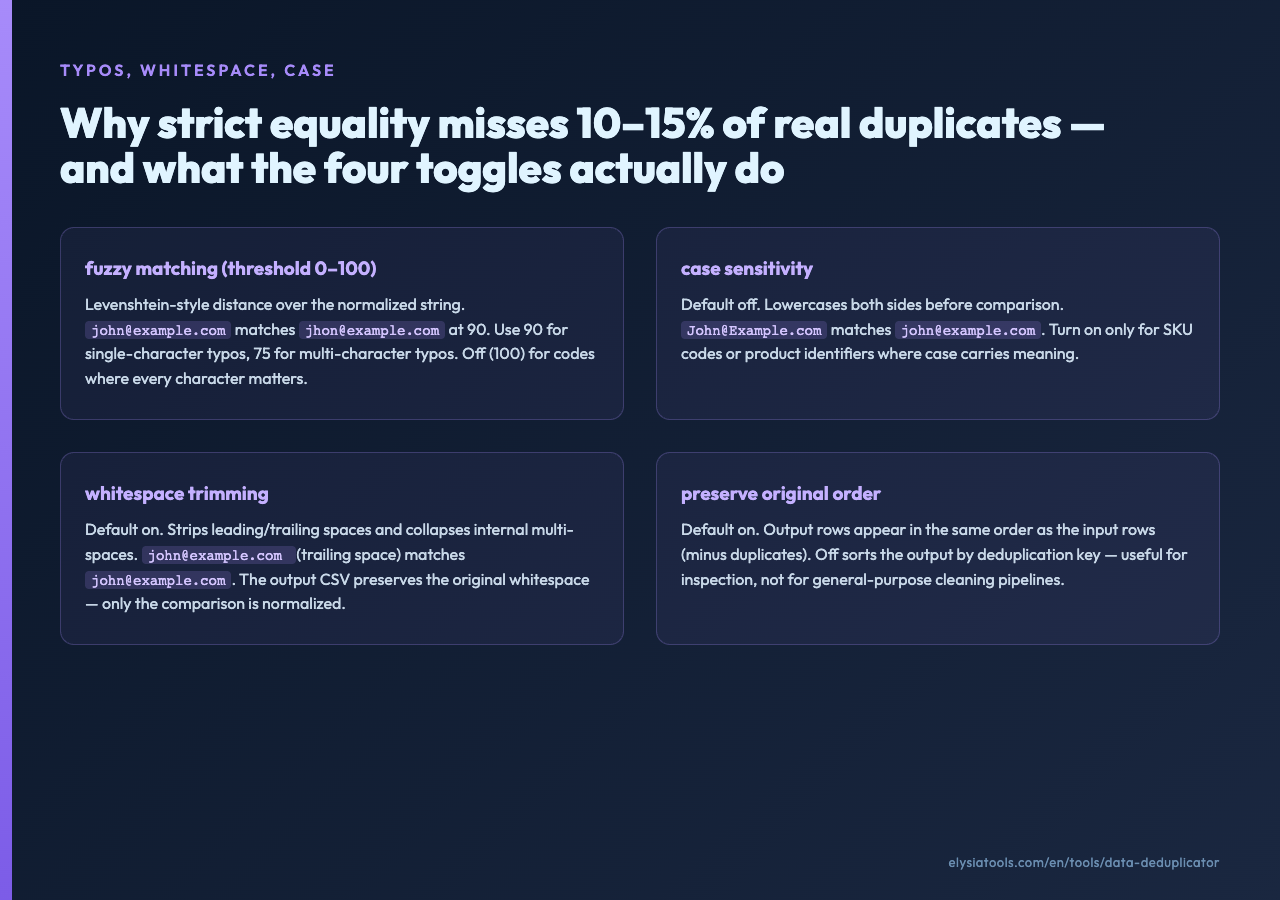
Keep First Record preserves the first occurrence of each duplicate group. This is the right choice when the CSV is sorted in a meaningful order — by signup date, by transaction date, by record creation time — and the first row in the group is the oldest. For a customer list where the original signup is the most complete record (full address, full name, original email), keeping first preserves the original context and discards later updates.
Keep Last Record preserves the last occurrence. This is the right choice when the CSV is sorted with the most recent data last — typical for exports from systems that append updates to the end of the file — and the last row in the group carries the freshest information. For a marketing list where the most recent export overrides older exports, keeping last is the correct policy.
Keep Most Complete Record scores each row by the number of non-empty cells and preserves the row with the highest count. This is the right choice when the CSV has no reliable order — a merged import from two systems, a customer list assembled from multiple exports — and you want the deduplication to pick the “best” row without trusting either the first or the last occurrence. For a contact import where some rows have full addresses and others have only names and emails, keeping most complete preserves the rows with the most information and discards the sparser versions of the same contact.
The strategy is set on the tool’s Deduplication Strategy dropdown. It is the second-most-important decision after column selection, and the two interact: keep-first + sort-by-date-oldest-first gives you “keep the original”; keep-last + sort-by-date-newest-last gives you “keep the latest”; keep-most-complete ignores the sort entirely. The full workflow lives at Elysia Tools.
Multi-column combination: why email + phone is not the same as email and phone
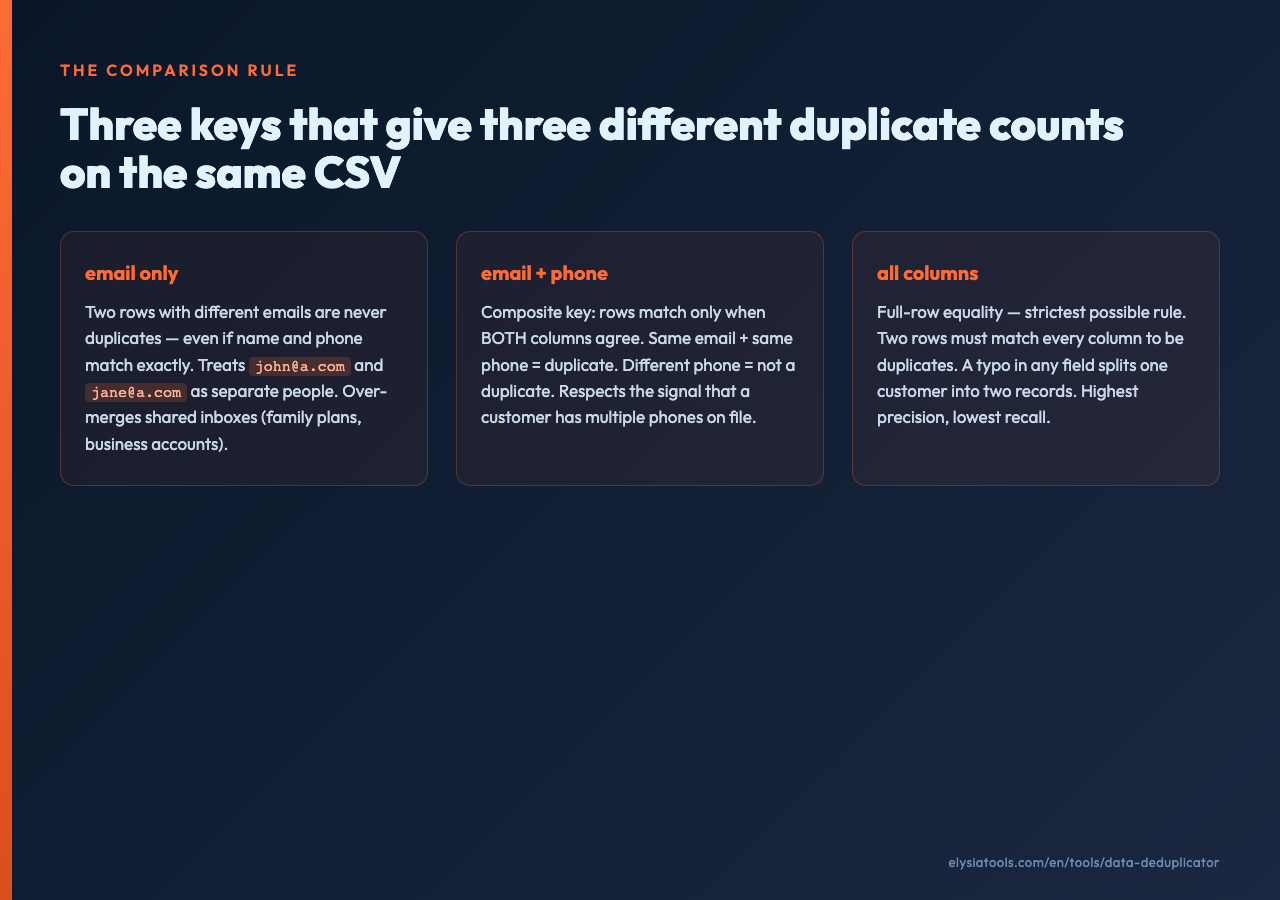
The single most misunderstood deduplication option is multi-column combination. The deduplicationColumns field is a single string with column names separated by commas, and the tool parses it as one logical key — a composite of all listed columns — not as a list of independent keys. email, phone means “the deduplication key is the pair (email, phone),” not “deduplicate on email and also deduplicate on phone.”
This distinction matters because the two interpretations produce different duplicate counts. Under the “combination” interpretation, two rows with the same email and same phone are duplicates; two rows with the same email but different phones are not. Under the “independent” interpretation, the same two rows would both be considered duplicates (matching on email alone). The first interpretation is stricter and preserves more records. The second interpretation is more aggressive and merges more records.
For most customer-data workflows, the combination interpretation is the right one. You want to treat a record as a duplicate only when all the identifying columns agree. If the email matches but the phone differs, the customer likely has multiple phone numbers on file, or the phone was updated. If the phone matches but the email differs, the customer has multiple email addresses on file. Neither case is a duplicate — they are signal that the customer’s contact information has multiple legitimate values. The combination rule respects that signal; the independent rule overwrites it.
Fuzzy matching for the typos that deduplication needs to handle
Real-world data has typos. [email protected] and [email protected] are the same person. 123-456-7890 and 123-456-789 (a missing digit) are the same phone number. Strict equality dedup misses both cases.
The tool’s Enable Fuzzy Matching toggle addresses this with a configurable Fuzzy Match Threshold (0-100). At threshold 85, two strings need to be at least 85% similar to count as a match. At threshold 100, fuzzy matching is effectively disabled (the strings must be exactly equal except for case and whitespace). The threshold is a Levenshtein-style distance over the normalized string, not a substring or prefix match — so [email protected] and [email protected] (missing m) are closer than [email protected] and [email protected] (different local part).
Fuzzy matching is expensive — comparing every row against every other row is O(n²) in the worst case — and the threshold is the lever that controls the cost. At 85%, the tool surfaces obvious typos (single-character substitutions) and rejects obvious non-matches (different local parts). At 95%, the tool becomes strict again, only matching strings that differ by a single character or transposition. For a 10,000-row customer list, threshold 85 typically runs in seconds; threshold 95 is faster but misses more legitimate duplicates; threshold 70 catches more typos but starts merging unrelated records that happen to share most characters.
The fuzzy match interacts with caseSensitive: false (the default). The tool lowercases both sides of the comparison before computing the fuzzy distance, so [email protected] and [email protected] are a perfect match before fuzzy matching even runs. Case-sensitive mode is for cases where case carries meaning (e.g. SKU codes, product identifiers) and should be off for typical customer data.
Whitespace trimming: the silent deduplication killer
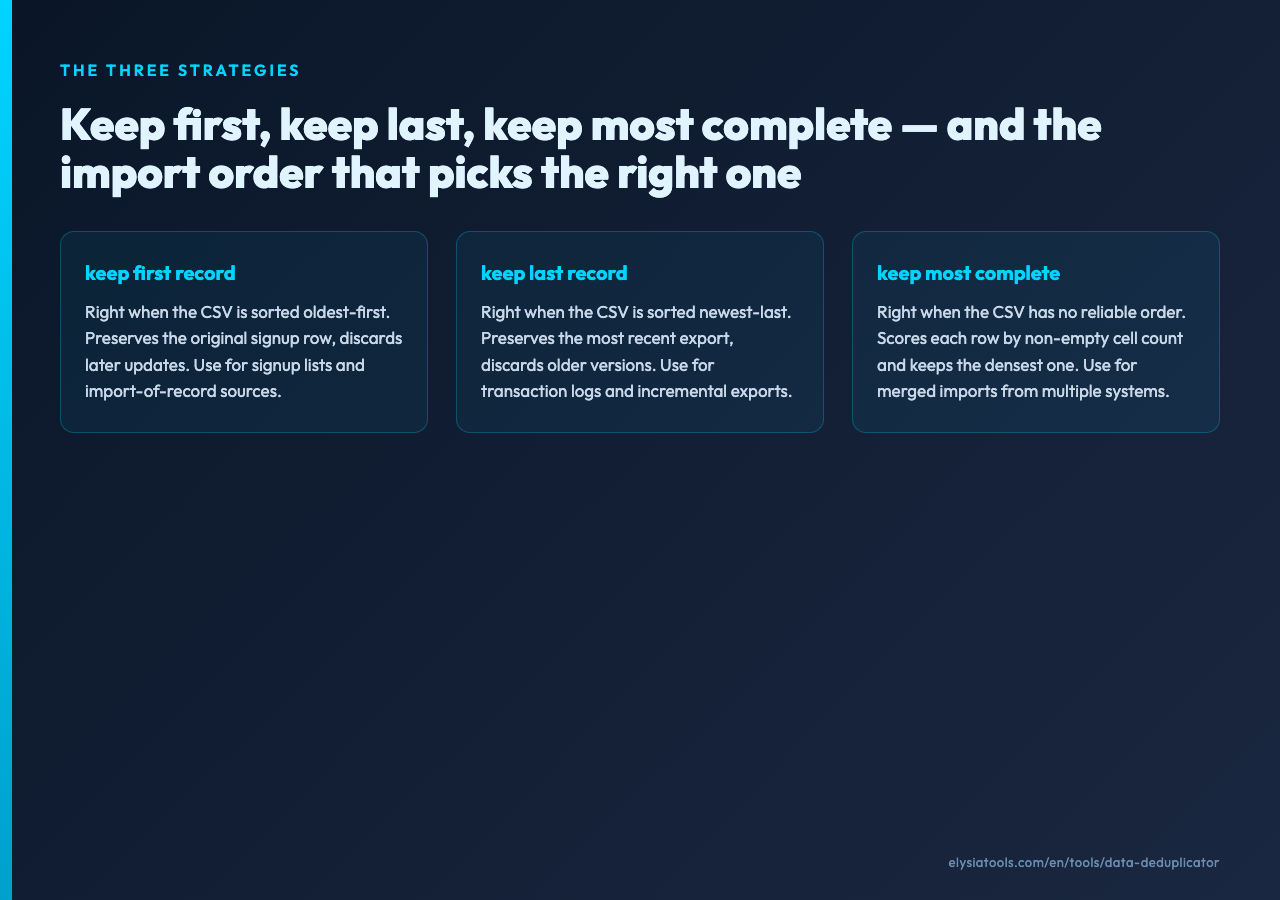
A space at the end of an email address is not a space at the end of an email address. [email protected] (trailing space) and [email protected] are not the same string under strict equality, but they are the same email address under any reasonable interpretation. Whitespace trimming is the option that resolves this, and the default is on.
The Trim Whitespace toggle applies to every column involved in the deduplication. Leading spaces, trailing spaces, internal multiple spaces, and tabs are normalized to single spaces before comparison. The tool does not modify the row content itself — the output CSV preserves the original whitespace — but the deduplication decision treats trimmed and untrimmed strings as equal.
This option is almost always on. The off case is for fields where whitespace is semantically meaningful — fixed-width codes, formatted identifiers — but those are rare in typical CSV workflows. For email addresses, names, phone numbers, addresses, and most other text fields, trimming is correct. Leaving it off produces duplicate counts that include rows that should not be counted, and the reviewer will spend their time debugging “duplicates” that are actually whitespace artifacts.
Preserve Original Order vs sort by clean output
The Preserve Original Order toggle is independent of the deduplication strategy. With it on, the output CSV has the same row order as the input CSV (minus the duplicates). With it off, the output is sorted by the deduplication key — useful when you want to inspect the remaining records grouped by their key.
For most workflows, preserving original order is the right choice. The original order often carries meaning (chronological, by record ID, by signup date) that the deduplication should not overwrite. Sorting by key after deduplication is for specific review or analysis tasks, not for general-purpose cleaning.
A concrete workflow: deduplicating a customer import
The fastest way to see the deduplication decisions land is to take a real CSV with obvious duplicates and walk through the options.
1. Paste the CSV into the tool. The first row is auto-detected as the header. The remaining rows are auto-parsed. 2. Specify the deduplication columns. For a customer list, email, phone is the right choice — two records with the same email and same phone are the same customer. 3. Pick the strategy. For an export where the most recent record carries the freshest data, Keep Last Record. For a signup list where the original is the most complete, Keep First Record. 4. Toggle fuzzy matching on if the data has known typos, and set the threshold based on the typo severity (single-character typos: 90; multi-character typos: 75). 5. Keep whitespace trimming on (the default). 6. Keep preserve original order on (the default). 7. Run, copy the deduplicated CSV, and inspect the duplicate count and statistics in the metadata block.
The metadata block reports originalRecords, uniqueRecords, duplicateRecords, deduplicationColumns, strategy, fuzzyMatching, fuzzyThreshold, and a statistics object. The originalRecords minus uniqueRecords equals duplicateRecords. If the difference is zero, your columns or strategy did not match anything. If the difference is suspiciously high (say, 30% of the original), your columns or strategy are too aggressive. The right answer depends on the dataset, but a typical customer import deduplicates 5-15% of records under reasonable settings. See a worked example at Elysia Tools Samples.
When deduplication goes wrong
Three failure modes show up reliably when deduplication is set up without a clear comparison rule.
Merging records that should be separate. The deduplication rule is too broad — typically a single column (just email, just phone) when the data should be compared on a combination. The result is two distinct customers with a shared email merged into one record, and one of them is silently lost. Fix: add the second identifying column to the rule.
Splitting records that should be merged. The deduplication rule is too narrow — typically all columns (full-row equality) when the data has minor formatting differences that strict equality rejects. The result is the same customer appearing twice in the output with a small typo on one of the rows. Fix: enable fuzzy matching, trim whitespace, or normalize case.
Inconsistent results across runs. The deduplication rule uses a non-deterministic key — typically a hash of an object property whose iteration order is not stable, or a database query whose ORDER BY is not deterministic. The result is the same input producing different outputs across runs. Fix: sort the input by a stable column before deduplicating, or set Preserve Original Order to true and rely on the input sort.
The statistics block is the audit trail
The deduplication metadata is not a side effect — it is the audit trail. The statistics object reports the per-column breakdown of which values were flagged as duplicates, which column combinations triggered the dedup, and the strategy applied to each group. Without this block, the deduplication is a one-line transformation that nobody can review. With it, the deduplication is a piece of policy that anyone can inspect, replicate, or modify.
Run deduplication with the metadata block enabled every time. Review the block before the cleaned CSV moves to the next pipeline. The five minutes spent on the review is the difference between a deduplicated dataset and a quietly-corrupted dataset.
The right way to think about deduplication
Deduplication is not a transformation. It is a policy. The policy says: “Records matching rule X under comparison Y with strategy Z are the same record, and we keep the one with property W.” Every one of those variables — X, Y, Z, W — is a configuration choice, and every configuration choice changes the output.
Pick the rule that matches the source of authority in your domain. Pick the comparison that respects the meaning of your data. Pick the strategy that preserves the rows you actually want. Pick the property (first, last, most complete) that matches the freshness assumption of your import. Then write the policy down, run it, review the statistics, and ship the deduplicated CSV as a documented artifact rather than a one-off transformation.
You can try the Data Deduplicator with the multi-column rule, three strategies, fuzzy matching, case-insensitive comparison, and whitespace trimming. The clean-fingerprint baseline at threshold 100 (fuzzy off, case-insensitive, trim on) is a useful starting point; the typo-tolerant sweet spot for most customer imports is in the 80-90 fuzzy threshold range. Pick the columns, pick the strategy, run the policy, and review the statistics before the dataset ships downstream. Explore more tools at elysiatools.com.
