
Lead phrase. Eight text-input flags decide whether your Base64 round-trip is byte-perfect or quietly corrupts bytes your pipeline never notices. Most “Base64 is universal” claims collapse the moment a JWT decoder rejects a token because the URL-safe variant wasn’t selected, an atob() call returns a string your downstream code can’t .read(), or a 4-character tail like = / == / === got truncated by a CSV export. The Base64 Encoder/Decoder tool surfaces every knob on one screen — encoding direction, URL-safe alphabet, padding toggle, line wrapping, charset (UTF-8 / Latin-1 / ASCII), and per-line byte count — so the silent defaults stop being silent.
Why Base64 Looks Universal but Isn’t
Base64 is one of the few formats where every library seems to agree and almost no two implementations agree on the inputs they accept. The reason is that the wire format (RFC 4648 §4) is exactly 64 printable ASCII characters plus = for padding — and that’s the only part the spec pins down. Everything else — how the input is interpreted as bytes, whether + and / get replaced with - and _, whether padding is mandatory, whether line wrapping at 76 chars is required — is a per-implementation choice. The four encoders below look identical on the surface and produce different output for the same input:
| Input bytes | Standard (RFC 4648 §4) | URL-safe (RFC 4648 §5) | No-padding | MIME line-wrapped |
|---|---|---|---|---|
0xFF 0xFE | /w== (16 chars) | _w== | /w | (single line) |
0x00 0x00 0x00 | AAAA | AAAA | AAAA | AAAA |
ASCII "Man" (3 bytes) | TWFu (4 chars) | TWFu | TWFu | TWFu |
| 60-byte input | ...AAAA (80 chars) | ...AAAA | ...AAAA | 2 lines × 76 chars |
A tool that exposes these flags lets you answer the question “why does my decode work locally and fail on the server” in five seconds instead of an afternoon.
The 3-Byte → 4-Char Algorithm, Audited
Every Base64 encoder, regardless of language or library, runs the same 24-bit-at-a-time algorithm. Take three bytes — say M (0x4D), a (0x61), n (0x6E) — concatenate them into a 24-bit word 0x4D616E, then split into four 6-bit groups: 010011 010110 000101 101110. Map each 6-bit value through the Base64 alphabet:
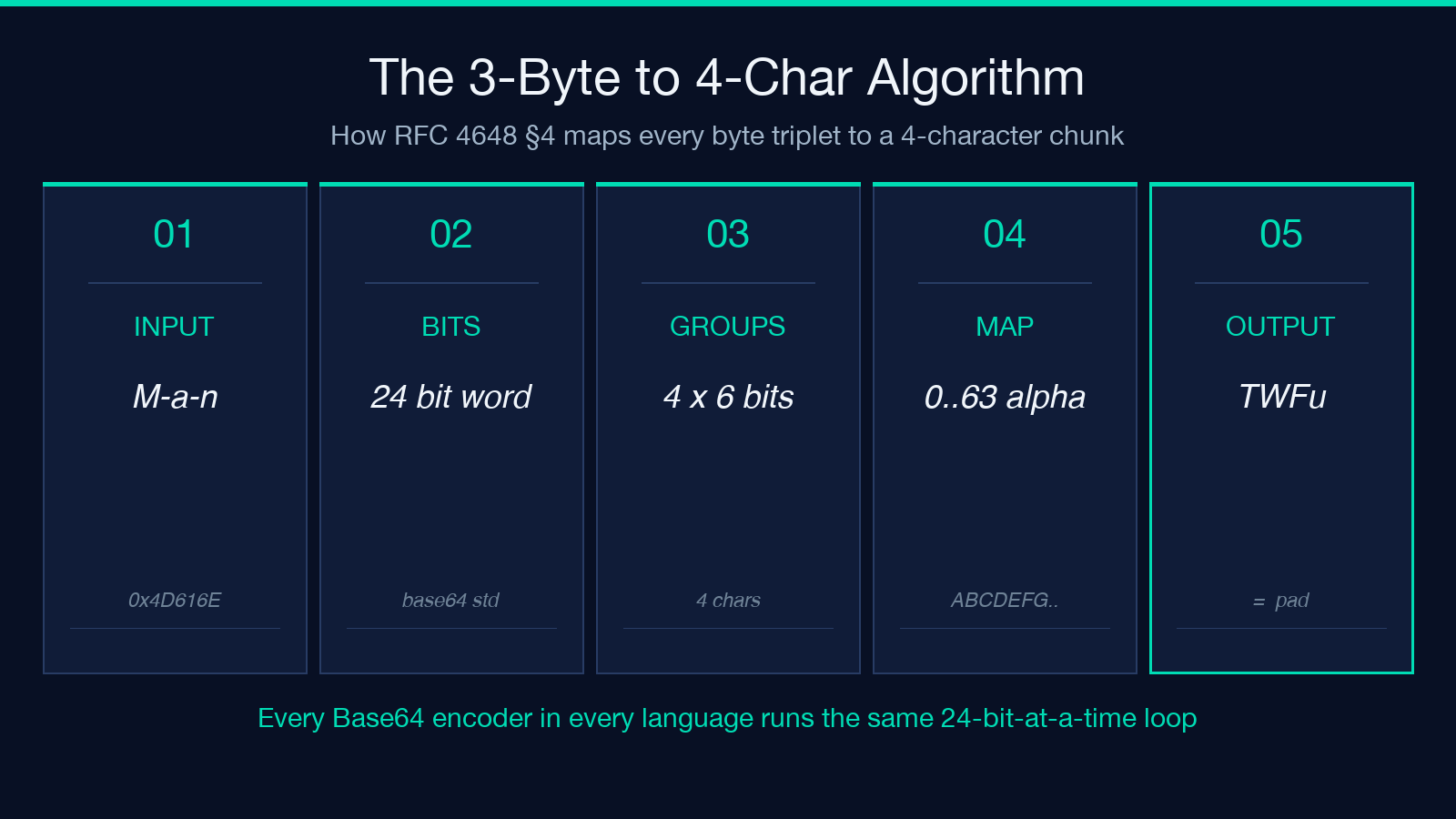
– 010011 = 19 = T – 010110 = 22 = W – 000101 = 5 = F – 101110 = 46 = u
Result: "Man" → "TWFu". This is the exact example RFC 4648 uses to anchor the spec. Every tool’s correctness hinges on this 3-byte, 4-character, no-remainder path. The interesting cases are what happens when the input isn’t a multiple of 3 bytes.
For a 2-byte tail ("Ma" → 16 bits), the encoder pads the 16 bits to 18 with two zero bits, emits three Base64 characters, then a single = padding character: "Ma" → "TWE=". For a 1-byte tail ("M" → 8 bits), the encoder pads to 12 bits with four zero bits, emits two Base64 characters, then ==: "M" → "TQ==". These two padding shapes (X= and XX==) are the only legal tail patterns; anything else means the encoded string is malformed and atob() will throw.
The Four Alphabet Trade-offs You Actually Need to Care About
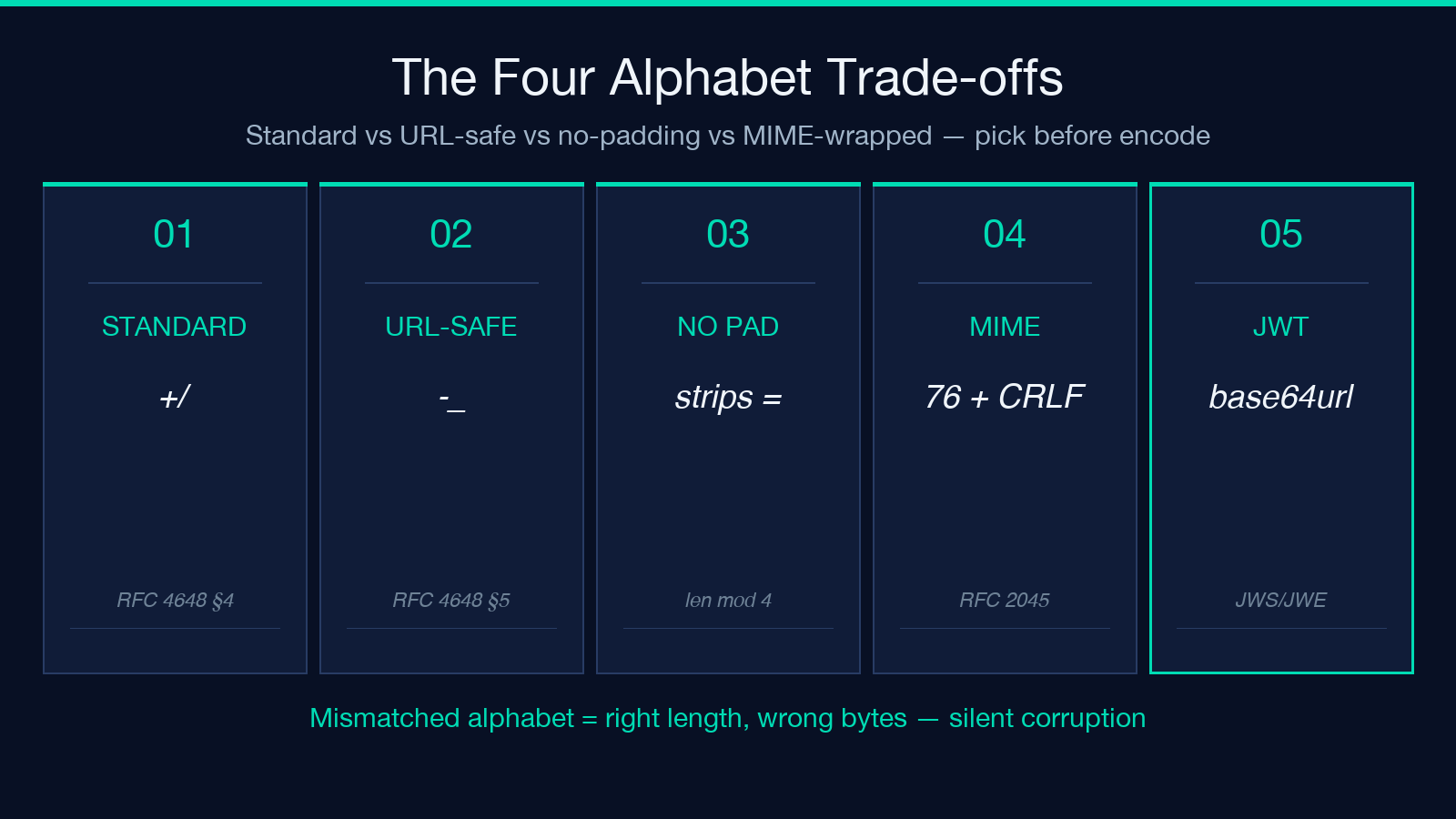
Base64 has more variants than most developers realize, and they exist because the original 64-character alphabet includes two characters that aren’t legal in URLs and filenames without percent-encoding:
+and/— present in RFC 4648 §4 (the “standard” alphabet) and in MIME (RFC 2045). These break inside URL query strings, path segments, JSON, and most filesystem paths.-and_— present in RFC 4648 §5 (the “URL and filename safe” alphabet, often called Base64URL). These are legal everywhere ASCII is legal, and they’re the alphabet JWT, JWS, JWE, and WebAuthn use.- No padding (
=removed) — many JSON / HTTP header transports strip=because trailing=is also illegal in some URL encoders. Decoders usually tolerate missing padding, but a strict validator will rejectTWFu(no=) if RFC 4648 §3.5 is enforced. - MIME line-wrapping at 76 chars + CRLF — required by RFC 2045 for email body parts; tolerated by everything else; rejected by some strict JWT decoders because they expect a single-line token.
The same input bytes produce different outputs across these four alphabets, and the choice you make on encode must match the choice the decoder expects on decode — silently mismatching them produces the right length but the wrong bytes. The Base64 Encoder/Decoder tool exposes all four as flags so you can produce whichever variant the consuming system expects without rewriting your library.
Charset: The Quiet Killer of atob() Round-trips
The single most common silent-corruption bug in Base64 code is charset confusion. JavaScript’s atob() and btoa() operate on one byte per character and assume Latin-1 (ISO-8859-1) — they do not handle multi-byte UTF-8 sequences correctly. The result is that "Hello, 世界" encoded with naive btoa() then decoded with atob() produces "Hello, 世" (the trailing byte gets truncated). Three defenses exist:
- Encode UTF-8 first, then Base64. Use
btoa(unescape(encodeURIComponent(s)))or a library that callsTextEncoderunder the hood. The bytes you encode are the UTF-8 representation of the input string. - Decode Base64 first, then UTF-8. The reverse:
decodeURIComponent(escape(atob(b64)))orTextDecoder('utf-8').decode(Uint8Array.from(atob(b64), c => c.charCodeAt(0))). - Use a library that does both. Modern
Buffer.from(s).toString('base64')in Node andbase64Python stdlib both handle UTF-8 correctly out of the box.
The charset flag on the Base64 Encoder/Decoder tool lets you switch between UTF-8 (default, recommended), Latin-1 (for legacy MIME payloads), and ASCII (for stripping anything outside 7-bit). When the round-trip breaks and you’re sure the alphabet is right, the charset is almost always where the bug lives.
When Base64 Is the Right Tool (and When It Isn’t)
Base64 is right for exactly three jobs: transporting binary as text across text-only channels (HTTP headers, JSON values, email bodies, XML CDATA), encoding small binary keys/tokens in URLs (with the URL-safe alphabet), and acting as a checksum-ish canonical representation where the same bytes must hash to the same string on different platforms. It’s wrong for the things people often reach for it for:
- Encryption. Base64 is encoding, not encryption. It produces no confidentiality; anyone who can read the string can read the bytes. For encryption use a real cipher (AES-GCM, ChaCha20-Poly1305) and then Base64 the ciphertext if you need a text transport.
- Compression. Base64 expands 3 bytes to 4 characters — a 33% size increase before any transport overhead. For compressing JSON or text payloads, use gzip or brotli first, then Base64 the compressed bytes.
- URL signatures without length-budget thinking. Base64 inflates a 32-byte HMAC to 44 characters. If you need short URLs, switch to Base64URL with no padding (43 chars) or use a hex-encoded HMAC with truncation.
The Base64URL Encoder/Decoder is the sibling tool for JWT/JWS/JWE work — same algorithm, URL-safe alphabet, no padding by default.
Round-trip Verification: The One Test That Catches Everything
The cheapest way to validate a Base64 implementation is to encode a payload, then decode it, and assert byte-equality. The Text Hash Generator can verify the encoding-decoding pair by hashing both the original and the round-tripped output — if the SHA-256 of the original bytes doesn’t match the SHA-256 of the decoded bytes, somewhere along the chain a byte was lost, a charset was misread, or a padding character got stripped.
# Pseudocode for a deterministic round-trip test
original   = bytes from disk or stdin
encoded    = base64_encode(original, alphabet='urlsafe', padding=true, charset='utf-8')
decoded    = base64_decode(encoded, alphabet='urlsafe', padding=true, charset='utf-8')
assert hash(decoded) == hash(original), 'round-trip byte mismatch'
This test catches the four silent failure modes — charset drift, alphabet mismatch, padding strip, and line-wrap corruption — in one assertion. Run it on a few edge cases (empty string, single byte, exact-3-byte input, multi-byte UTF-8, 1024-byte random binary) and you’ve covered the matrix.
Common Pitfalls and Their Fixes
Eight flags on one panel only helps if you know which to flip. The recurring failure modes in production code:
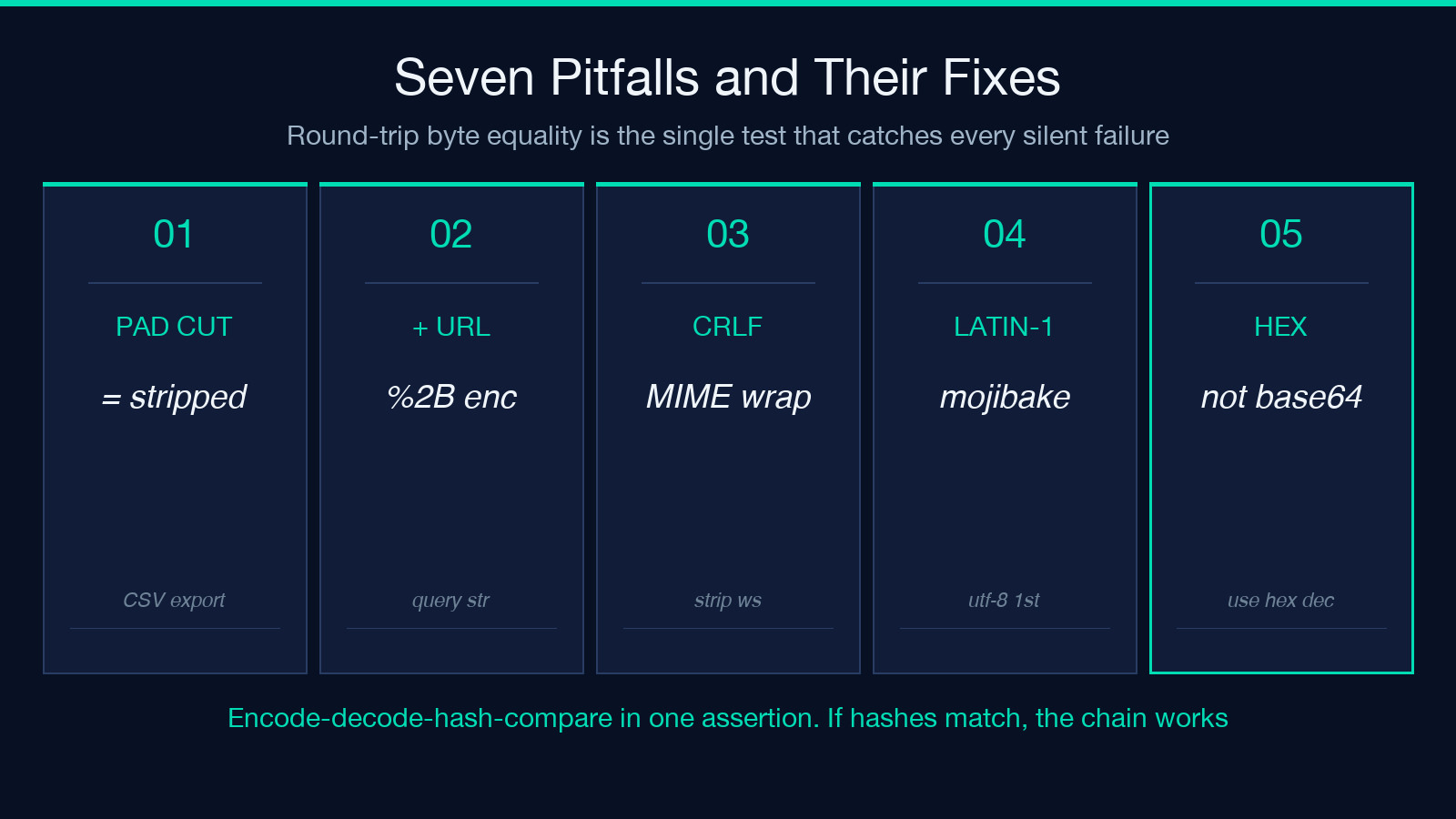
- Trailing
=stripped by a CSV export or YAML serializer. Symptom: decode succeeds but the last 1-2 bytes are wrong. Fix: re-add the padding to a multiple of 4 before decoding, or set the decoder’s padding-tolerance flag. +percent-encoded to%2Bin a URL. Symptom: the URL-safe variant decoder accepts the string, the standard variant decoder throws. Fix: pick the URL-safe alphabet on encode so the encoded string is URL-safe by construction.- Newlines in the encoded string (
\nevery 76 chars, MIME-style). Symptom: a strict decoder rejects the input. Fix: strip whitespace before decoding, or encode without line-wrapping for non-MIME transports. - UTF-8 multi-byte sequence encoded as Latin-1. Symptom: round-trip produces mojibake (
"é"instead of"é"). Fix: encode as UTF-8 first. - Hex string mistaken for Base64. Symptom: the input contains characters like
0-9 a-f, the encoder produces output that decodes to garbage. Fix: hex is a separate alphabet — use a hex decoder, not Base64. - Empty input produces empty output, but
nullproduces a literal"bnVsbA==". Symptom: a downstream JSON parser chokes on the literal string. Fix: handle empty input explicitly before encoding. - Padding
=replaced with.in some legacy systems. Symptom: a strict decoder rejects what looks like a valid Base64 string. Fix: replace.with=before decoding, or set the lenient-pad flag.
The Checksum Comparator is the natural companion for verifying that an encoded payload survived a transport hop — hash the source, hash the destination, compare.
Verifying It Worked: The Three-Question Audit
Before shipping a Base64-encoded payload to production, run three questions against your pipeline. First: did the round-trip survive? Encode the payload, decode it back, hash both — the SHA-256 of the original bytes must match the SHA-256 of the decoded bytes. Second: does the alphabet match the consumer? If the consumer is a JWT library, the alphabet must be URL-safe (hyphen-underscore). If it’s an email MIME parser, it must be standard (plus-slash) with CRLF line wrapping. If it’s a generic JSON field, either works as long as both sides agree. Third: is the padding intact? Inspect the encoded string’s length modulo 4 — it must be 0, 1, 2, or 3 with the last 1-2 characters being equals-sign. If not, either re-pad before transport or set the decoder to tolerate missing padding.
A tool that surfaces all eight flags — direction, alphabet, padding, line wrapping, charset, line count, byte size, and validation — turns these three questions from a 20-minute debugging session into a 10-second panel inspection. Encode, decode, and verify round-trip byte equality in one pass, then move on to the next layer of the stack. Explore more tools at elysiatools.com.
