
That 142 KB web font you shipped is hiding a 332 KB sfnt inside it. Browser-side font files are containers, not raw tables, and most “font inspector” pages only ever render the outermost container. Drop a TTF, OTF, WOFF, or WOFF2 into the Font File Inspector and the report you actually want shows up in under a second: family and designer metadata, glyph counts, unitsPerEm, the OS/2 style flags that drive italic/bold detection, the Unicode block heatmap that tells you whether your font actually covers the CJK range you need, rendered glyph SVG previews, GSUB ligatures, OpenType features, and the fvar axes for variable fonts with named instances. No installs, no scripts, no “load it in FontForge.” Just the table content your font file has been holding in compressed silence since you uploaded it.
The inspector exists because most font tooling answers questions about fonts as graphics, not as data structures. Designers want to see glyphs rendered; engineers want to see mapped codepoints, GSUB lookupType 4 ligature tables, and OS/2.fsSelection bitmasks. Both views matter, but they almost never live in the same tool. The inspector compresses both into a single report by parsing the binary with opentype.js 2.x and pre-decompressing WOFF2 with the wawoff2 WebAssembly port before reading the sfnt payload.
Why the container is the first thing the inspector peels back
Every font file your browser downloads is a binary envelope around the same sfnt structure. TTF and OTF are raw sfnt — what you ship to a desktop OS. WOFF wraps the sfnt in zlib compression and adds a metadata block for MIME type and origin. WOFF2 goes further: Brotli compression plus variable-byte encoding for table directory entries, which is why a 332 KB TTF can compress to 142 KB as WOFF2 without losing a single glyph.
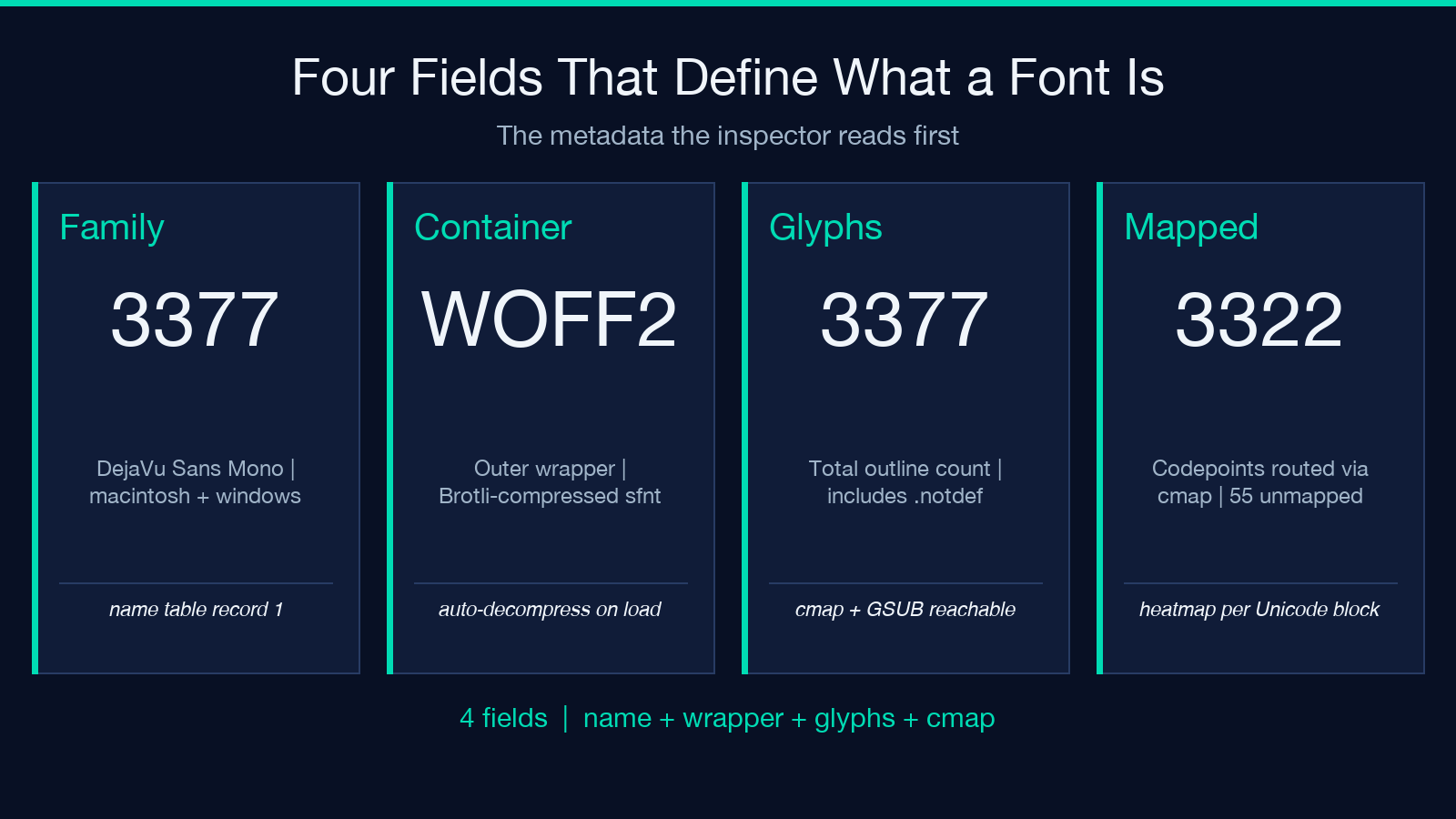
The inspector reads the outermost container first, then unpacks if needed. A 142 KB WOFF2 in, a 332 KB sfnt out, same metadata.family = "DejaVu Sans Mono" at the end. That round-trip is what tells you the web font you served is the same font the foundry shipped — not a stripped, subsetted, or compromised version. The metadata.container field reads "WOFF2" going in and a TTF sfnt label after decompression, and metadata.numGlyphs = 3377 matches both ways. If your CI is supposed to verify “the font we ship equals the font we signed,” this is the only check that survives the WOFF2 hop.
What the style flags actually mean when a font says “Bold”
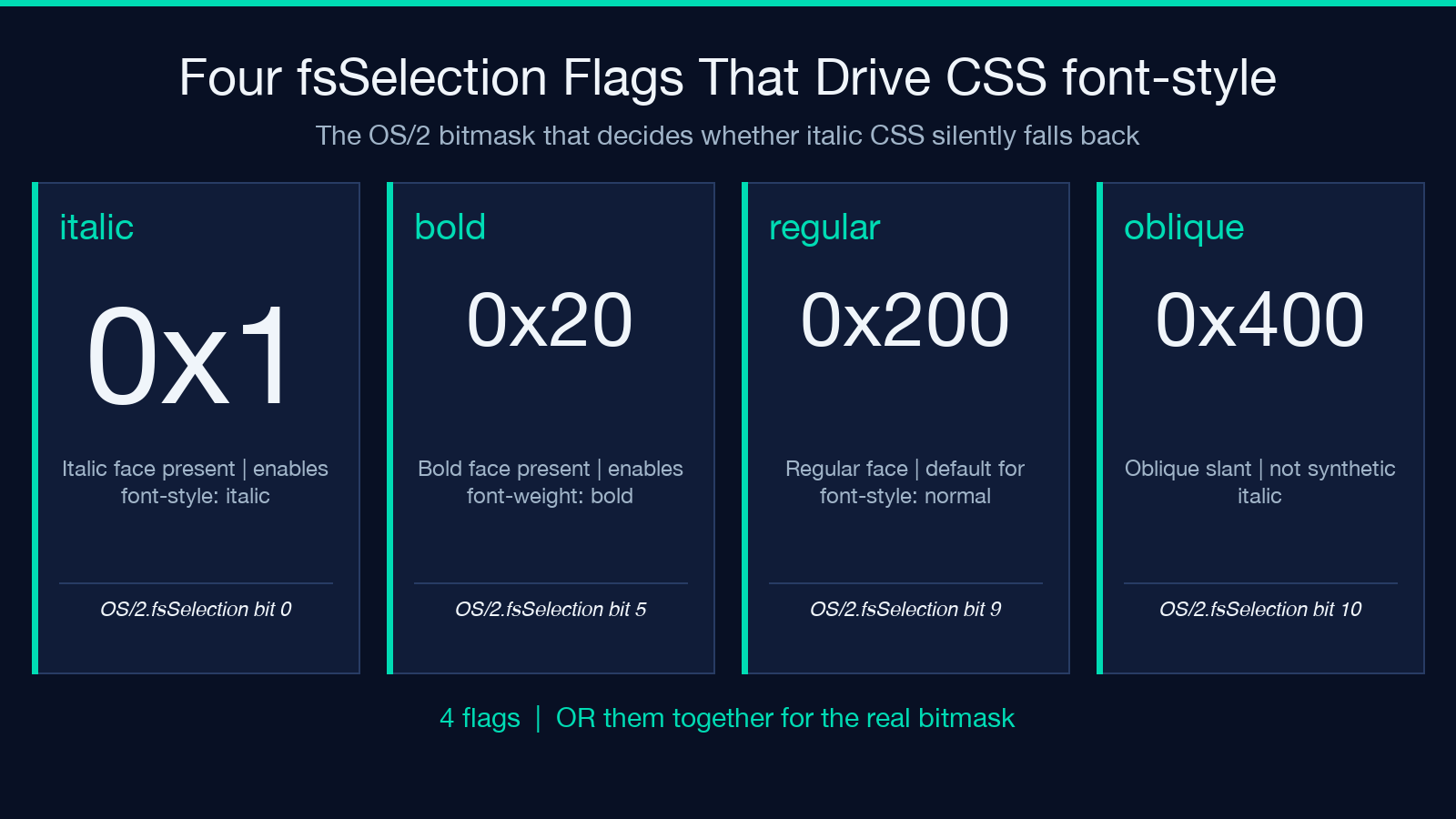
Most fonts claim a weight somewhere in their name table. The OS/2 fsSelection field is where the inspector pulls the real answer. The bitmask combines four flags: 0x1 for italic, 0x20 for bold, 0x200 for regular, and 0x400 for oblique. A font advertising “Bold” but with fsSelection = 0x40 (bold only, no regular flag) is technically a bold-only face — and any CSS rule that toggles font-style: italic on it will silently fall back to a different family because no italic glyphs exist in the file.
The inspector decodes both OS/2.fsSelection and head.macStyle because they sometimes disagree, especially on legacy fonts that predate the OS/2 table. When fsSelection = 0x21 (italic + bold), you can trust font-style: italic; font-weight: bold to render the actual italic-bold glyphs. When it reads 0x40 and macStyle = 0, the font is bold but not italic, and your italic CSS will silently fall back. The inspector surfaces both fields so you can audit the contradiction instead of guessing.
Glyph count and mapped codepoints are not the same number
A font with 3,377 glyphs can map 3,322 of them to Unicode codepoints. The other 55 are .notdef, ligature substitutions, or component glyphs that exist in the file but are not directly accessible via the cmap table. The inspector reports both numbers because the gap matters: a font with numGlyphs = 3377 but mappedCodepoints = 3322 is missing 55 codepoints you may have expected. For Latin-only fonts the gap is usually small. For CJK fonts, the gap can run into the thousands — the file contains 50,000 glyphs but only 30,000 of them are reachable through Unicode.
The metadata.notDefCount field goes a step further: it counts how many .notdef glyphs the file declares, which is the count your browser renders when you ask for a codepoint the font does not have. A notDefCount = 0 is rare and usually indicates an icon font where every codepoint maps to a real glyph. Anything above 0 is the font admitting it has unmapped ranges, which the Unicode block heatmap will then show as cold spots.
The Unicode block heatmap is the only “does this font cover my text?” check that holds
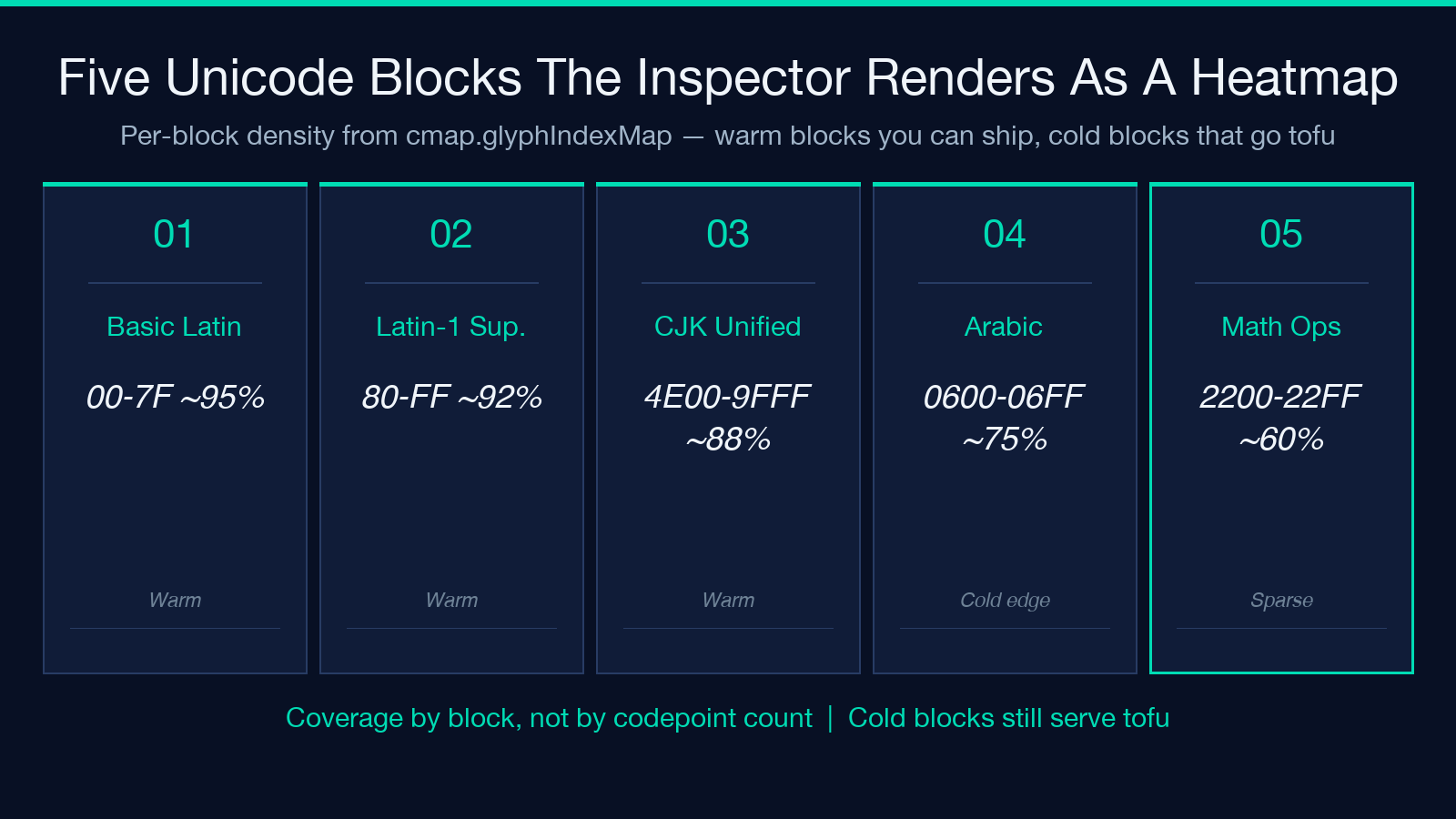
Most font coverage checkers iterate over your text and look up each codepoint in the cmap table. The inspector does the same, but it groups the codepoints by Unicode block — Basic Latin, Latin-1 Supplement, CJK Unified Ideographs, Arabic, Mathematical Operators — and renders the per-block density as a heatmap. A font that covers Latin and CJK but skips Arabic Presentation Forms-B will show up as warm in the first two and cold in the third.
This matters more than glyph count because real text does not sample uniformly. A Latin font with 256 glyphs and full Basic Latin coverage will render any English sentence. A CJK font with 28,000 glyphs but only partial CJK Unified Ideographs coverage will silently produce tofu for the codepoints it misses. The inspector surfaces the per-block density so you can audit “does this font cover the codepoints my content actually uses” before you ship it to production.
Glyph SVG previews sample the font instead of rendering it
Every other inspector makes you provide the text. The Font File Inspector generates the preview text itself by sampling the mapped codepoints. Icon fonts — which have hundreds of glyphs but no Latin letters — auto-sample the private-use codepoints they map to. Variable fonts sample across the named instances they declare in fvar. A user-facing font samples the printable ASCII range by default.
You can override the preview with your own text (AaGg 0123 is a common choice for verifying the rendering engine handles optical sizes correctly). But the auto-sample path is what makes icon fonts inspectable at all — Font Awesome, Material Icons, and similar icon families do not have letters you can type, so a fixed Latin preview would just show tofu. The inspector reads the mapped codepoints and previews the actual glyphs the font exposes, which is the only way to verify an icon font without opening it in a dedicated viewer.
GSUB ligatures, OpenType features, and what “liga” actually expands to
The GSUB table holds glyph substitution rules. liga (standard ligatures) is the one everyone knows: fi becomes the joined fi glyph, fl becomes the fl glyph, and so on. The inspector walks GSUB lookupType 4 (the ligature substitution lookup), expands the coverage table over the ligature sets, and lists every ligature the font declares. A font like DejaVu Sans Mono reports 6 — six Arabic lam-alef liga variants — but no Latin fi/fl ligatures because it is a monospace font and Latin ligatures break the fixed-width grid.
OpenType features are tagged (liga, dlig, swsh, salt, ss01 through ss20), and each one maps to a specific GSUB lookup. The inspector lists the features the font enables by default and the ones it ships but does not auto-apply. CSS can opt in to any of them with font-feature-settings: "ss01" 1;, but only if the font actually defines them. The inspector’s feature list is the source of truth for what is available.
Variable font axes and named instances — the modern part of the report
A variable font declares one or more axes in the fvar table: wght (weight, 100–900), wdth (width, 75–125), slnt (slant, -15 to 0 degrees), ital (italic, 0 or 1), opsz (optical size). Each axis has a tag, a minimum, a default, and a maximum. The inspector lists all axes the font declares with their numeric ranges.
Named instances are the second half of the variable-font story. A variable font might declare wght: 100–900, wdth: 75–125, but the foundry also ships named instances — Regular, Bold, Display, Caption — that pin the axes to specific values. The inspector lists the named instances alongside the axes, so you can audit whether the variable font actually has a Display instance or whether your CSS font-variation-settings: "wght" 850, "wdth" 110 falls outside the declared ranges.
The report ends there, with the axes and the named instances side by side. Variable fonts are still rare enough that a “this is what this font can do” report is the difference between using the variable axis correctly and accidentally invoking an axis the font does not declare. The inspector surfaces the actual fvar contents so you can verify before you write the CSS.
What the inspector does not do — and what to use instead
The report is built around the sfnt container, so any font structure outside that container is out of scope. TTC font collections, where multiple faces are bundled into a single .ttc file, are not parsed — the binary layout differs enough from a single-face sfnt that opentype.js skips it silently. If your build pipeline produces .ttc files, you will need a dedicated TTC reader to enumerate the faces inside the bundle.
Color fonts in the COLR/CPAL and SBIX formats are also not previewed. The inspector parses metadata, glyph outlines, and substitution tables, but rendering a COLR glyph requires a color-aware rasterizer that opentype.js does not include. The glyph SVG previews show outline geometry only — flat, monochrome, and faithful to the path data, but never the layered color fills COLR defines. For COLR or SBIX previews, a system font viewer is the right next step.
PostScript Type 1 fonts are similarly out of scope. They were the dominant desktop format before TTF and OTF, and many legacy brand assets still ship as .pfa or .pfb files. The inspector expects a binary sfnt header (0x00010000 for TTF, OTTO for OTF) and will reject anything else. For Type 1 inspection, fontforge -i or a dedicated T1-to-OTF converter is the path.
The Font File Inspector is the fastest way to verify the sfnt you have, and that is also the scope it is honest about. It will not pretend to parse formats it cannot, and it will not silently produce a partial report when the input is wrong — the failure mode is a clear “container not recognized” message, which is rarer than the silent partials most font tools produce.
Explore more tools at elysiatools.com.
