
“””Markdown source for the Markdown<->AsciiDoc field-guide article.
8 H2 sections, 3 of which will be card anchors: – “Five Constructs That Round-Trip Cleanly” (card 1 anchor) – “Five Constructs That Need Manual Attention” (card 2 anchor) – “A Release Notes Page, Side-by-Side” (card 3 anchor)
Elysia anchors (validated post-md_to_html): – https://elysiatools.com/en/tools/markdown-asciidoc-converter (primary, real tool ID) – https://elysiatools.com/en/tools/format-conversion (category root, whitelisted) “”” ARTICLE_MD = r”””Five heading levels, three admonition forms, two table dialects, and one link-syntax flip decide whether your GitHub-Flavored Markdown survives the trip into AsciiDoc — and back again. Migrating documentation from a Markdown repo to an Antora site (or the reverse) looks trivial in marketing copy, but the markup grammar between the two has just enough overlap to be dangerous: a # in source is a chapter in AsciiDoc, a [cols="1,1"] directive is invisible to GitHub, a [NOTE] blockquote and a NOTE: paragraph are spelled differently and parsed differently. The Markdown ↔ AsciiDoc Converter handles the 80 percent that’s mechanical — heading promotion, link-bracket inversion, GFM pipe tables → |=== blocks, fenced code → [source] blocks, admonition blockquotes → NOTE: paragraphs — but the last 20 percent needs a human eye, and this field guide is the checklist.
Why Two Markup Grammars Exist At All
GitHub-Flavored Markdown was designed for README files: short documents, inline HTML allowed, headings by # count, links with the friendly text syntax. AsciiDoc was designed for books and reference manuals: long documents, no inline HTML by default, headings by = count (where the count is offset by the document level), links with the parser-friendly url[text] form. The two diverge most visibly in three places: heading promotion (every # needs to be re-counted when document nesting changes), tables (GFM pipe syntax vs |=== blocks with optional [cols] directive), and admonitions (Markdown blockquote convention vs AsciiDoc labeled paragraph). When you move a 200-page manual from one to the other, every one of those constructs needs a decision.
Five Constructs That Round-Trip Cleanly
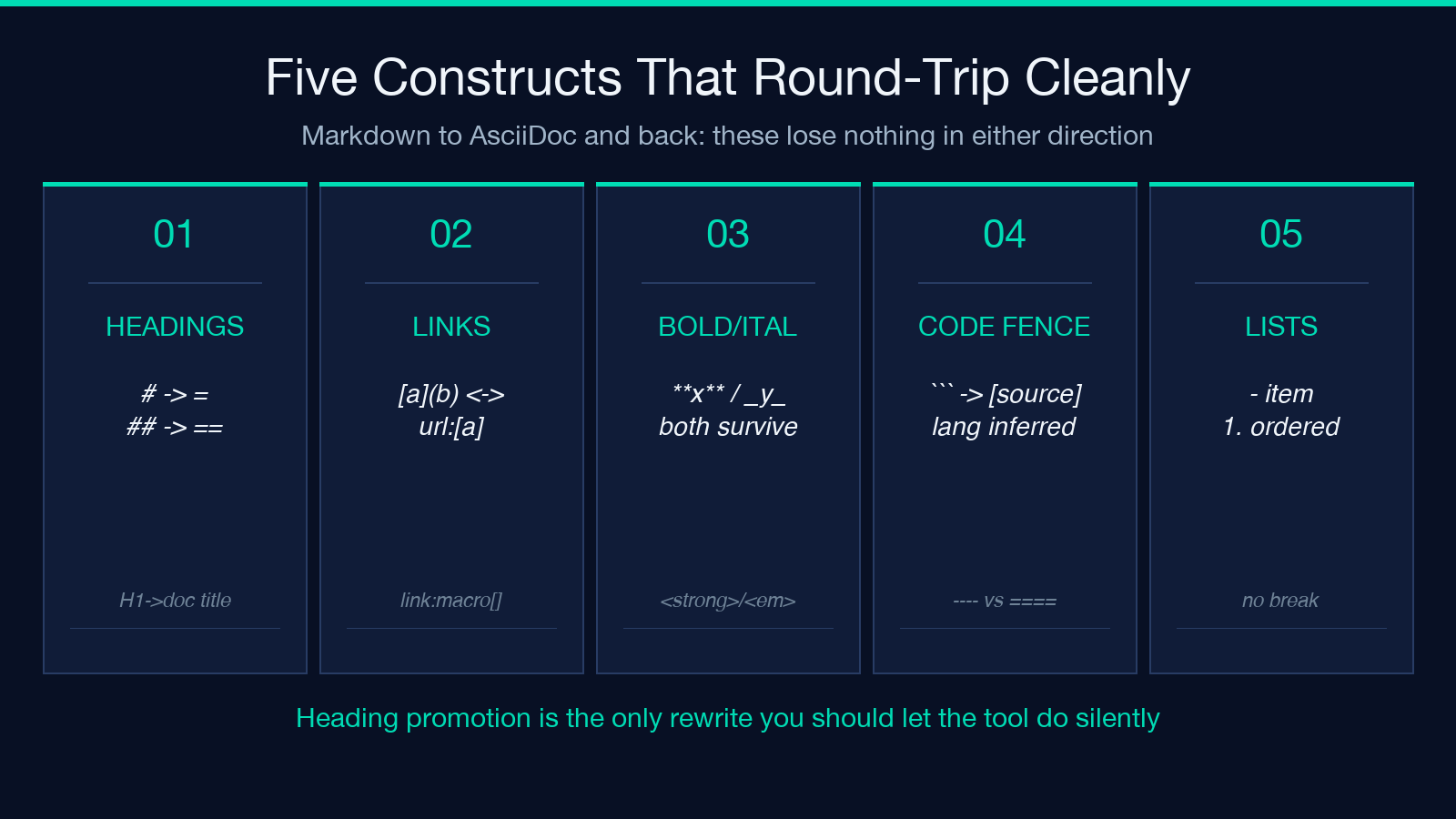
The first set of constructs is what most teams think they’re paying the converter for. These do round-trip cleanly: heading promotion respects the document-level offset, link brackets flip in both directions, fenced code blocks carry the language tag through [source,python], bold and italic survive because both grammars use the same inline spans, and unordered lists keep their bullet character. If your document is made entirely of these five, the converter is a copy-paste replacement.
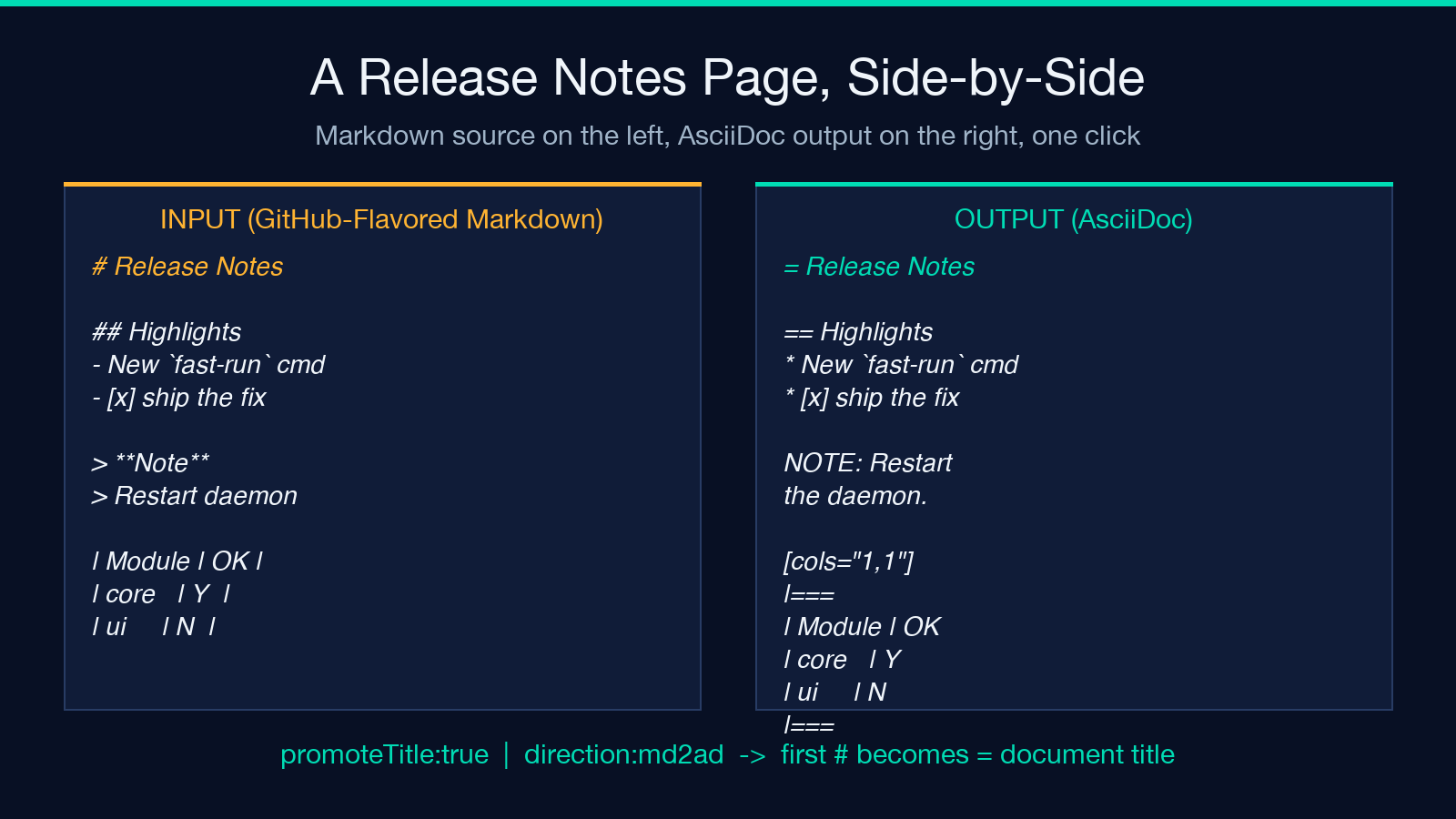
In practice, however, almost no real document is made entirely of these five. The release-notes sample in card 3 below uses all five in a single 12-line block and still surfaces a manual-attention note for one of them (the GFM table’s |:------:| alignment cell needs an explicit [cols="1,1", options="header"] directive on the AsciiDoc side).
Five Constructs That Need Manual Attention
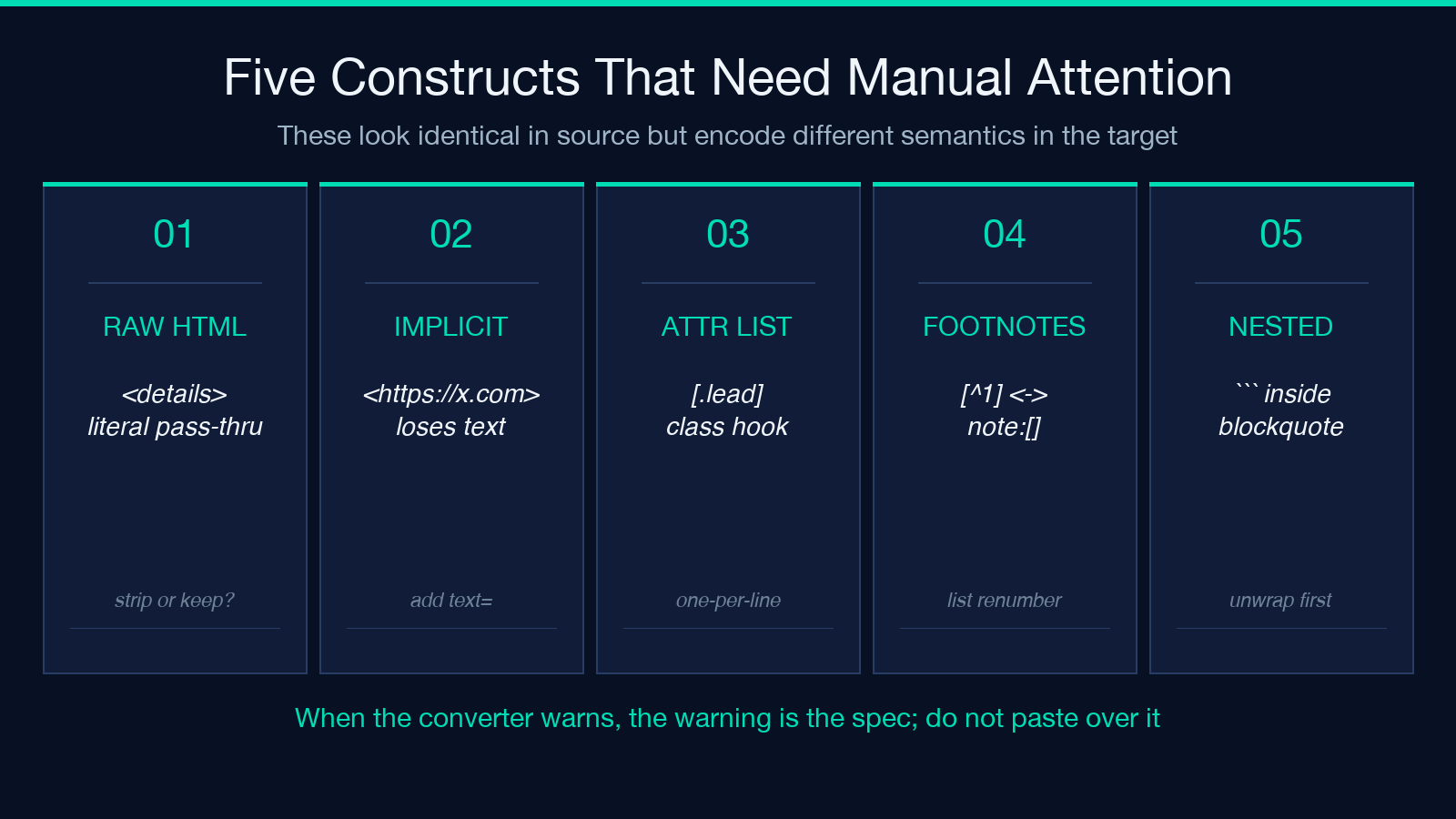
The second set of constructs is what the converter flags but does not silently rewrite, because the right answer depends on context you have to provide. Raw HTML blocks (a
element, an embed) survive the parser but mean nothing in Antora’s strict-mode renderer — the converter keeps them with a warning so you can decide whether to port them to a passthrough block. Implicit links (Markdown’s url[] requires an explicit label. Attribute lists ([.lead] to set a CSS role, [source%hardbreaks]) have no Markdown equivalent and arrive in the reverse direction as comments. Footnotes ([^1] in Markdown, footnote:[...] in AsciiDoc) renumber correctly but lose their semantic position across the round-trip. Nested constructs — a fenced code block inside a blockquote, an admonition inside a list item — sometimes flatten into the outer container, and you have to unwrap them by hand.
The Three Decisions That Decide A Migration
When the converter outputs a notes panel, the notes panel is the spec. Do not paste over the warnings; the warnings are the documentation for the five constructs above. The three decisions that decide whether a migration is one-click or one-week are: (1) should the first # heading in your Markdown source become the = document title in AsciiDoc, or stay as a section header (toggle promoteTitle); (2) should unresolved Markdown links (a [label] with no destination) be kept as warnings or stripped silently (toggle keepUnresolved); (3) should inline HTML be passed through, escaped, or dropped entirely (depends on your Antora site’s allow-uri-read settings). Once you have answers for those three, every other construct falls out mechanically.
If you are migrating in the other direction — from an Antora repo to a GitHub-Flavored Markdown site — the same three decisions apply, but the default answers flip. promoteTitle should usually be false (the document title lives in the Antora nav, not in the body), and keepUnresolved should usually be false (GitHub’s broken-link linter will catch what AsciiDoc’s strict parser let through). The converter exposes the same flags in both directions for exactly this reason.
A Release Notes Page, Side-by-Side
The most useful feature of the Markdown ↔ AsciiDoc Converter is its diff-style side-by-side view: Markdown source on the left, AsciiDoc output on the right, with a notes band underneath the output flagging every construct that needs a manual decision. This is what Pandoc’s pandoc -t asciidoc does not give you — Pandoc gives you a single output buffer with warnings on stderr, and you have to mentally diff against the input. The side-by-side view turns the migration from a code-review task into a documentation-review task, which is what it always was.
For teams migrating a single large repo, the recommended workflow is to start with a small, low-risk document (a README, a CHANGELOG) and run the converter against it. Treat the output as a learning artifact, not as the final migration. Walk through every flagged construct with the original author and write the answers down as project-specific conventions (“we always strip raw HTML”, “we always promote the first H1”, “implicit links get a placeholder URL”). Once those conventions are written, the next 50 documents migrate in a tenth of the time because the converter’s notes panel stops surfacing surprises.
What The Converter Does Not Do
The converter is not a content rewriter. It does not rename your variables, refactor your callouts, change your sentence structure, or rebalance your headings. If your AsciiDoc source uses :sectnums: (auto-numbered sections) and your Markdown target does not, the converter leaves the sectnums directive in place as a passthrough block — which your Markdown renderer will ignore, but which will trip strict-mode Markdown linters. If your Markdown uses GFM task lists (- [x]) and your AsciiDoc target has the experimental tasks extension enabled, the converter maps them correctly; if not, it leaves the task list as a plain bullet list and warns you. The notes panel is the boundary between automated and manual; respect it.
The converter also does not handle cross-references between documents. AsciiDoc’s < form and Markdown’s text form both reference intra-document targets, but the cross-document form (xref:module:file.adoc[label]) has no Markdown equivalent at all. If your Antora site uses xref: macros heavily, those have to be rewritten as plain https://... links or as relative Markdown paths before the converter can do useful work — and that rewrite is a manual step.
When Not To Use The Converter
There are two cases where the converter is the wrong tool. The first is when your source document is already in both formats and you just need to keep them in sync — in that case, you want a two-way sync tool, not a one-way converter, because round-tripping through a third representation always loses something (usually whitespace inside table cells, or the exact phrasing of an admonition label). The second is when your source is in a third format entirely — reStructuredText, MediaWiki, DITA — and you need to land in either Markdown or AsciiDoc; in that case, Pandoc is the right starting point because it can ingest more formats and its pandoc -t asciidoc output is closer to canonical AsciiDoc than any single-purpose tool produces.
For everything else — a single Markdown-to-AsciiDoc migration, a small Antora-to-GitHub conversion, a one-off doc-page port — the converter is the right tool, and the notes panel is the documentation. Treat it as such, and the migration stops being a project and starts being a checklist.
Explore more tools at elysiatools.com.
The One-Page Migration Checklist
If you have to migrate a single document and you do not have time for a full conventions document, this is the shortest checklist that catches the 80 percent: (1) run the converter once on the source document, copy the notes panel into a new file; (2) for every warning in that file, decide one of three answers — keep, strip, rewrite — and write the decision next to the warning; (3) re-run the converter with promoteTitle and keepUnresolved set to the values those decisions imply; (4) diff the new output against the first run; (5) walk the diff with the document owner and sign off on the remaining manual edits. The whole loop takes about 30 minutes for a 50-page document, and the resulting diff is a permanent record of the project’s markup conventions — which is what the next 50 documents will migrate against.
For teams standardizing on AsciiDoc across an entire docs site, the Markdown ↔ AsciiDoc Converter is most useful as a convention-discovery tool, not as a one-shot migration utility. The first migration is hard because you discover the conventions. Every migration after that is easy because the conventions are written down. The side-by-side view is the surface where those conventions become visible — once a team has run it two or three times, the notes panel stops being a surprise and starts being a checklist. That is the goal. “””
