
A 256-bit secret is not “a long string”; it is a measure of work an attacker must do. If you picked a 24-character “secure” password out of Secure Random Generator, the alphabet you sampled from quietly decides whether your secret resists a million guesses per second or folds in under an hour. This field guide walks through the five decisions that turn a random-looking string into something an attacker cannot model: entropy budget, CSPRNG source, byte encoding, custom-alphabet rejection sampling, and the audit step that catches the moment “256-bit” stops meaning what you thought it meant.
A common production mistake is to ask for “a 32-character random string” and accept whatever the tool returns. But character count is a length metric, not a security metric. A 32-character string drawn from abcdefghijklmnopqrstuvwxyz is 32 × log₂(26) ≈ 151 bits, not 256 — and once you restrict the alphabet to lowercase letters to make it “easy to type”, you have already cut a quarter of the entropy budget. The first decision is to flip the framing: ask for N bits of entropy and let the tool derive the byte count, the encoding width, and the alphabet length for you.
What “Cryptographically Secure” Actually Means in Node.js
Two pieces of the Node.js standard library draw from the OS CSPRNG: crypto.randomBytes(n) returns n raw bytes, and crypto.randomInt(max) returns a uniformly distributed integer in 0, max). Everything else — Math.random(), Date.now() mod something, hash chains of the time — is deterministic from an attacker’s perspective once they have any signal about your environment. The [Secure Random Generator tool calls crypto.randomBytes and crypto.randomInt directly, which means the underlying randomness comes from the same entropy pool your TLS handshake, your SSH keygen, and your /dev/urandom reads come from.
What this gives you in practice is a property called unpredictability under chosen-input attack: even if an attacker knows every detail of your request — the exact entropy budget, the encoding format, the timestamp down to the microsecond — they cannot precompute the output, because the entropy pool is fed by hardware events (disk seeks, interrupt timing, thermal noise) that are not under their control. That property is the whole reason crypto.randomBytes exists as a separate API from Math.random(), and the reason any tool that wires secrets through Math.random() is unfit for production secrets — even if its output looks random to you.
A second property the CSPRNG buys you is uniformity: every byte in the output is independent of every other byte. That sounds obvious, but it rules out a class of subtle bugs where weak PRNGs leak structure. For example, a linear congruential generator produces output that looks uniform on a histogram but fails spectral tests — adjacent outputs sit on a small number of parallel lines in N-dimensional space, and an attacker who has seen a few outputs can extrapolate the rest. crypto.randomBytes does not have this defect. The internal state is reseeded from the entropy pool on every call, so there is no carry-over between requests and no linear structure to exploit.
Five Decisions That Drive a Secure Random Output
When you click “Generate” on a secure-random tool, the result is the intersection of five choices. Each one has a default that fits most cases and a knob for the case where the default is wrong. The order matters: changing the entropy budget ripples through every downstream metric.
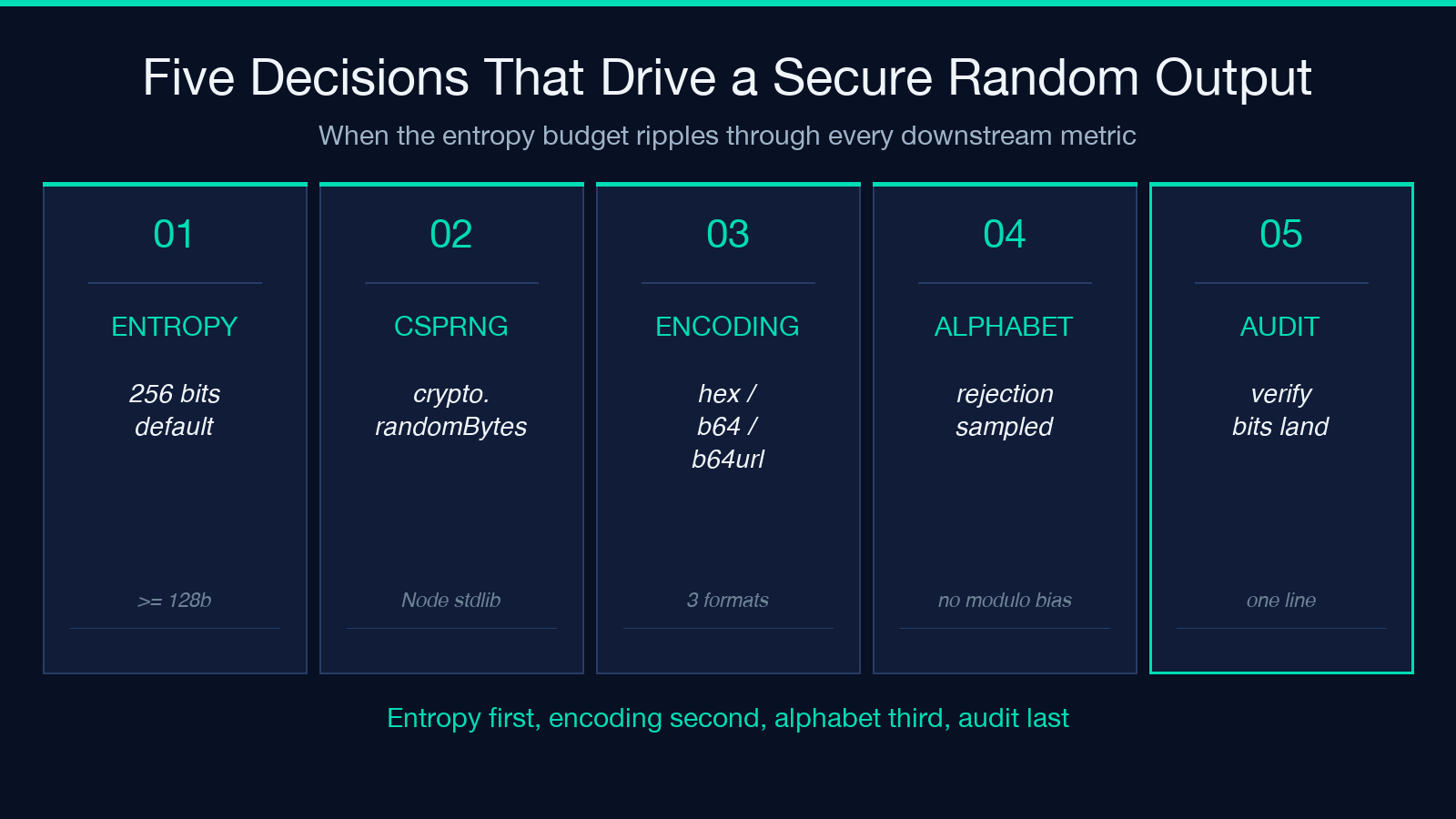
1. Entropy Budget (Bits) — Not Character Count
Set the entropy budget first. 128 bits is the floor for “an attacker with modest resources cannot brute-force this in your threat window”; 256 bits is the standard for long-lived secrets like JWT signing keys, master encryption keys, and database root passwords. Going higher than 256 bits costs you nothing in security (an attacker with 2¹²⁸ operations is already not in your threat model) but does cost you in storage and readability.
The default 256 bits at the Secure Random Generator is set deliberately: it matches the security strength of AES-256, the block cipher most cloud KMS systems use for envelope encryption. When you generate a key to wrap an AES-256 data key, your wrapping key needs 256 bits of entropy or you have created a bottleneck where the data key is stronger than the key that protects it. If your consumer is HMAC-SHA256, the same logic applies: 256 bits matches the digest size.
For session tokens and short-lived CSRF tokens, 128 bits is the right call — the token is invalidated server-side after one request, so the threat window is seconds, not years. Going to 256 for these is harmless but signals to a code reviewer that you are compensating for something; lowering it to 128 with a comment explaining the lifetime is cleaner.
2. Encoding Choice — Hex, Base64, or Base64url
Once you have N bytes of CSPRNG output, the tool renders the same material in three encodings side by side. The choice between them is not about entropy — all three represent the same N bytes, so they have the same security strength — but about what your consumer expects.
Hex is the default for most key-shuffling code: it is what openssl rand -hex 32 prints, what AWS access key IDs start with, and what shows up in 90% of stack-overflow snippets. It is also the most wasteful: every byte becomes two ASCII characters, so 32 bytes of CSPRNG output is 64 hex chars. Base64 is denser (~1.33 chars per byte) but uses + and /, which break inside URLs and shell scripts. Base64url swaps those for - and _ and drops the padding = — the encoding required by RFC 7518 for JWT and RFC 4648 for URL-safe transport.
If your consumer is a JSON Web Token, copy the base64url row. If it is an env var on a Kubernetes secret, copy the base64 row (Kubernetes tolerates + and /). If you are pasting into a .env file that gets cat‘d into a shell script, hex is the safest choice because it never needs quoting. The same N bits, three rows, one copy operation. For worked examples of JWT construction with a generated secret, see the JWT samples walkthrough.
3. Custom Alphabet — The Modulo Bias Trap
Fill the “Custom Alphabet” field and the tool switches from byte mode to character mode: it samples one character per position, rejection-sampling from crypto.randomInt(alphabetSize) so no character is favored. This is the point where most hand-rolled implementations fail. A naive implementation looks like chars[Math.floor(Math.random() chars.length)] — and Math.floor(Math.random() 26) does not give a perfectly uniform distribution over 26 letters when the random source is biased even slightly. The Math.random() floor of a 26-multiplied float has a slight over-representation of the lower 12 indices on most platforms.
The rejection-sampling fix is conceptually simple: ask for a random integer in 0, alphabetSize), and if the underlying source returns a value outside that range (it never will for crypto.randomInt, which uses rejection internally), resample. The Node.js crypto.randomInt(max) API does this for you — no hand-written loop needed. The [Secure Random Generator wraps crypto.randomInt(alphabetSize) per position, so a 64-character alphanumeric code with a 62-symbol alphabet is genuinely uniform across all 62 symbols.
But here is the trade-off: a custom-alphabet string has less entropy than you might think. A 32-symbol alphabet × 10 characters = 10 × log₂(32) = 50 bits, even if you typed “256” in the entropy field. The tool flags this with a red warning, because a custom-alphabet string that looks “long” can be far weaker than it appears. The right mental model is to compute length × log₂(alphabetSize) and verify it meets your threat model before you ship.
4. Count — How Many Independent Outputs
The “count” field asks how many independent keys you want generated in one call. This is a quality-of-life feature, not a security feature — five 256-bit keys generated in one call are exactly as independent as five 256-bit keys generated in five separate calls, because each draw from crypto.randomBytes is independent of the previous. The only reason to bundle them is that one HTTP round-trip generates them all, which is faster than five.
If you are rotating a fleet of API keys, set count to the size of your fleet and copy each row into your vault. If you are generating one master key per database, count = 1 is fine. The tool does not deduplicate, so a five-key batch could in theory contain a duplicate — vanishingly unlikely at 256 bits, but worth a one-line check before you commit.
5. Audit Step — Verify the Entropy Actually Landed
The single most common production failure is “I asked for 256 bits and got 200 bits because I picked a small alphabet”. The audit step is a 10-second check: after you copy the output, run len(key) × log₂(alphabetSize) and confirm it exceeds your threat threshold. The Secure Random Generator shows this number in the result card — look for the “bits” badge. If you typed 256 and the badge says 200, your custom alphabet is the bottleneck, not the entropy budget.
A second audit step is to confirm the encoding you copied matches the encoding your consumer expects. A 256-bit key as hex is 64 chars; as base64 is 44 chars; as base64url is 43 chars. If your JWT library expects a base64url secret and you pasted hex, the library will treat the wrong-format string as a valid but weak secret and your signature verification will silently accept tokens forged with a hex-format secret of equivalent length. The mismatch is invisible until an audit catches it.
The Math That Decides Whether Your Secret Survives
Three numbers matter when sizing a secret: the entropy in bits, the alphabet size, and the length. The relationship is entropy = length × log₂(alphabetSize). Everything else — character count, format, presence of special characters — is downstream of this equation.
For reference, a 256-bit secret is 2²⁵⁶ ≈ 1.16 × 10⁷⁷ possible values. To put that in perspective, if every computer on Earth (roughly 3 billion devices) tried 10 billion keys per second, they would need ~1.2 × 10⁵⁰ years to exhaust the keyspace. The universe is ~1.4 × 10¹⁰ years old. The number is large enough that the entropy is not the bottleneck — the bottleneck is always the implementation, never the math. For a deeper look at how this entropy lands in real cipher implementations, the cryptography samples walk through AES, RSA, and Ed25519 with full key-gen examples.
The math tells you the upper bound on attacker cost. It does not tell you whether your actual implementation achieves that bound. That is what crypto.randomBytes vs Math.random() decides. A Math.random()-based generator with a 256-bit seed space produces output that is uniformly distributed but predictable to an attacker who has any signal about your seed or state. The seed space size is a property of the random source, not a property of the bit width you typed into a UI.
When to Reach for This Tool vs a Password Generator
A common question is: “Do I need entropy-driven random for everything, or is a password generator good enough?” The answer is driven by the threat model. If the value an attacker must not guess is a secret — a JWT signing key, an HMAC key, an API key, a database root password, a session cookie signing secret, an envelope-encryption data key — entropy-driven random is the only correct choice. Password generators that include syllables, words, or “easy to type” constraints trade entropy for memorability, and memorability is the wrong axis when the value lives in a vault, not in your head.
If the value is a user-facing password that a human must type — a login password, a WiFi password, a phone unlock code — a password generator with diceware-style word combinations or constrained character sets is the right tool, because the human-side constraint (memorability, typeability) is the bottleneck, not the entropy. Mixing the two tools — using a password generator to create a JWT signing secret — is the production failure mode this field guide is built to prevent.
Worked Example: Generating a JWT HS256 Signing Secret
A JWT HS256 token is signed with HMAC-SHA256 using a shared secret. The secret should have 256 bits of entropy (matching the digest size) and be encoded as base64url (matching RFC 7518). Here is the canonical sequence:
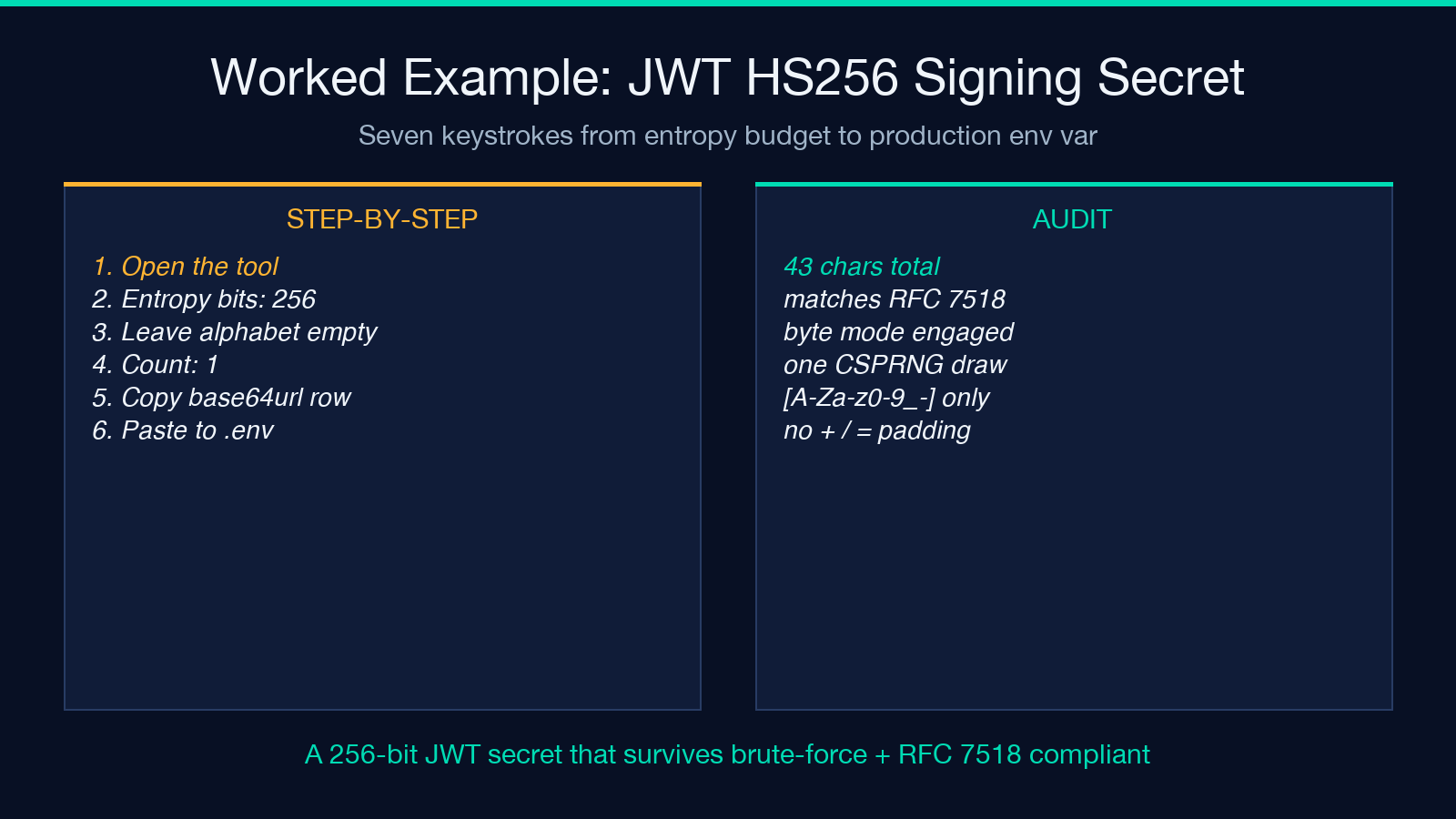
1. Open Secure Random Generator. 2. Set entropy bits to 256. 3. Leave Custom Alphabet empty (byte mode). 4. Set count to 1. 5. Copy the base64url row — it will be 43 characters. 6. Paste into your .env file as JWT_SECRET=<copied-value>. 7. Audit: confirm the value is 43 chars long and contains only [A-Za-z0-9_-].
The result is a 256-bit JWT signing secret that survives brute-force, satisfies RFC 7518, and is one keystroke away from your HS256 verifier. The same workflow generates an AES-256 master key, an HMAC-SHA256 keyed-hash secret, or a CSPRNG-seeded nonce for any consumer that takes raw bytes.
Common Production Bugs and How to Catch Them
Five patterns show up over and over in production key-management code, and each one is detectable with a one-line audit. None of them are subtle from the entropy-budget perspective — they all reduce the entropy the attacker must defeat without telling you the budget changed.
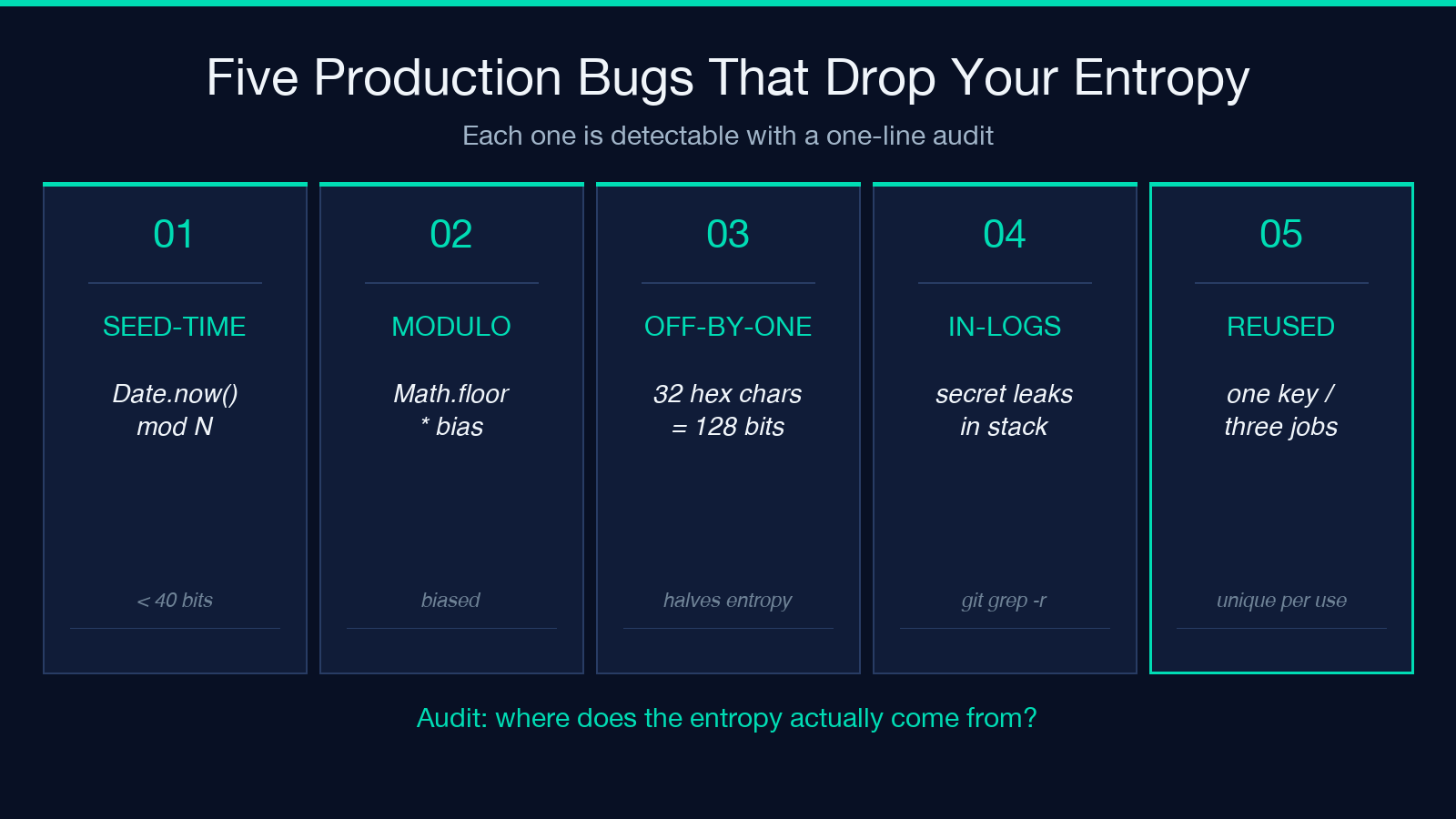
1. Seed-from-time. A “random” string generated from Date.now() mod something has at most ~40 bits of effective entropy, regardless of how many characters you render. Audit: ask “where does the entropy come from?” If the answer is “the current time”, Math.random(), “a hash of the user’s email”, or “the session ID”, the secret is not random.
2. Modulo bias. A chars[Math.floor(Math.random() * chars.length)] pattern is biased when chars.length does not divide 2^32 evenly. Audit: confirm the implementation uses crypto.randomInt(max) or an explicit rejection loop, not Math.random().
3. Off-by-one on the encoding. Generating 32 bytes of CSPRNG output and storing them as a 32-character hex string drops half the entropy — 32 hex chars is only 128 bits. Audit: confirm 2 × hex_length ≥ entropy_bits.
4. Storing secrets in source code or logs. Even a 256-bit key is compromised if it ships in a public GitHub repo or appears in a stack trace. Audit: git log -p | grep <secret-prefix> and grep -r <secret-prefix> . after any rotation.
5. Reusing the same key across consumers. A JWT signing secret that also encrypts the database and signs webhook payloads gives an attacker three independent paths to compromise the same secret. Audit: every consumer of a secret should have a unique secret.
The Secure Random Generator tool mitigates 1, 2, and 3 by routing through crypto.randomBytes and crypto.randomInt and rendering three encodings side-by-side so the off-by-one is visible. Mitigations 4 and 5 are operational — they live in your secret-management policy, not the random source.
Frequently Asked Edge Cases
What if my consumer wants exactly 64 hex characters and my tool outputs 32 bytes by default? 32 bytes is 256 bits, which renders as 64 hex characters in the hex row. The byte count, the bit count, and the hex char count are linked: doubling any one doubles the others.
What if I need to generate 1000 keys for a fleet rotation? Set count to 1000 and the tool returns 1000 independent rows. Each is a separate draw from the CSPRNG, so there is no shared state and no statistical correlation between rows. Bulk output is one HTTP request, which is faster than 1000 sequential requests.
What if my alphabet includes unicode? The crypto.randomInt(alphabetSize) path supports any alphabet — emoji, CJK characters, mixed-script symbols — as long as the alphabet size is correctly specified. The math does not care that the alphabet is “🦄🐉🎯” instead of “abc”; entropy per character is still log₂(alphabetSize).
Can I run this offline? The tool requires no network call after the page loads. All randomness comes from the browser’s WebCrypto API (crypto.getRandomValues), which draws from the same OS entropy pool as Node’s crypto.randomBytes. Run it in an air-gapped browser tab if you need to and the output is identical to the online version.
Closing: The Three Numbers That Always Matter
When you finish generating a secret, before you commit it anywhere, write down three numbers: the entropy bits you asked for, the entropy bits the output actually carries, and the threat window in years. If actual entropy ≥ threat-window bits, the secret is fit for purpose. If it is below, switch to byte mode or lengthen the alphabet. If you cannot get to the threshold without making the secret unusable, the threat model is mis-sized — revisit what you are actually defending against.
The right tool makes this check one line of arithmetic instead of a code review. That is the entire point of the Secure Random Generator — entropy-driven input, CSPRNG-backed output, three encodings side by side, and a custom-alphabet path that refuses to lie about your entropy budget. Generate once, audit once, ship.
Explore more entropy, encoding, and security tools at elysiatools.com.
