
Your node:20 base image is 350 MB. Your apt-get install -y curl wget git vim nano line is another 280 MB. Your missing .dockerignore is shipping 1.2 GB of node_modules, .git, and your IDE config. A linter catches all three before you push to a registry and watch the bandwidth bill land.
Docker is famously small in motion and frustrating in measurement. Every RUN adds a layer. Every apt-get update without a paired rm -rf /var/lib/apt/lists/* keeps the package cache. Every COPY . . without a .dockerignore ships your entire build context — including .git, node_modules, and .env files containing production secrets. The Dockerfile linter at Elysia Tools parses your Dockerfile statically and flags each anti-pattern with severity, line number, and a fix recipe, all without spinning up a Docker daemon. If you have a registry cost problem or a “why is my image 1.4 GB?” problem, this is the field guide.
What the Linter Actually Inspects
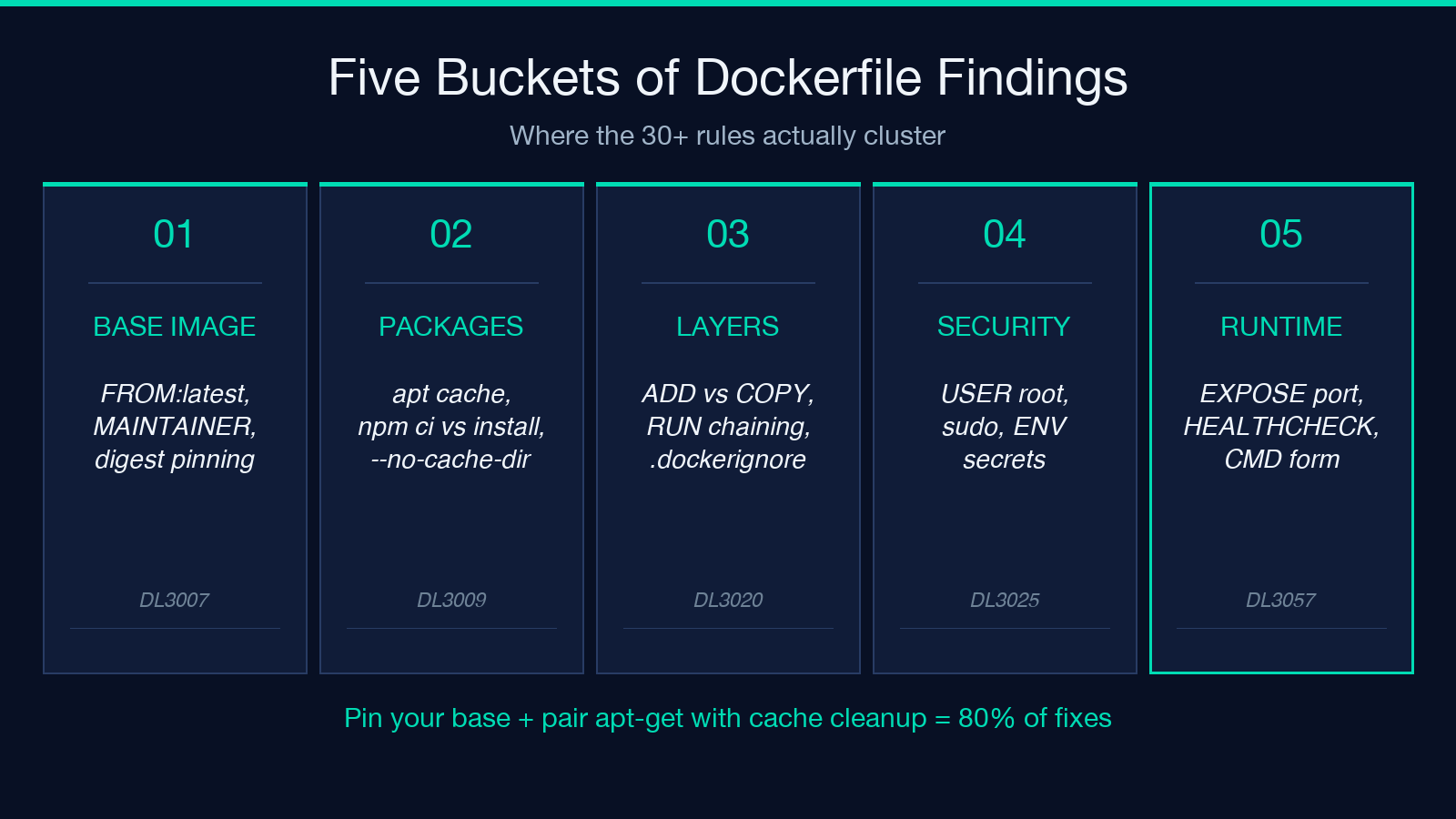
The linter runs 30+ rules modeled after Hadolint’s DL3000-series catalogue. The rules fall into five buckets: base-image hygiene, package manager hygiene, layer optimization, security, and runtime correctness. You paste a Dockerfile, pick a severity floor (info / warning / error), and the linter returns a structured report — each finding carries a category, a line reference, and the recommended replacement.
Base-image rules cover FROM pinning. FROM ubuntu:latest and FROM node:latest fire DL3007 because :latest resolves to a different digest every pull — your build is not reproducible. The fix is to pin to a specific minor tag (FROM node:20.11-alpine) or, ideally, a digest (FROM node:20.11-alpine@sha256:abc123...). The linter also flags MAINTAINER (deprecated since Docker 1.13; use a LABEL maintainer= instead) and missing WORKDIR declarations that leave later commands running in / with surprising path resolution.
Package manager rules hit apt-get, apk, yum, dnf, pip, npm, and yarn. The classic anti-pattern is RUN apt-get update && apt-get install -y curl wget git vim nano — this caches the package index inside the layer even after install finishes, bloating the image by tens of megabytes. The linter flags DL3009 (missing rm -rf /var/lib/apt/lists/* after apt-get install) and DL3015 (using apt instead of apt-get). For Node projects, DL3017 switches you from npm install (which resolves to latest) to npm ci (which uses the lockfile). For Python, DL3043 catches pip install without --no-cache-dir.
Layer rules cover ADD vs COPY (DL3020: prefer COPY unless you genuinely need ADD‘s tar-extraction or URL-fetching behavior) and RUN chaining. The apt-get update && apt-get install -y curl && rm -rf /var/lib/apt/lists/* idiom is the canonical fix — all three commands in one RUN keeps the layer small because the cache deletion runs before the layer is committed.
Security rules flag USER root (DL3002), sudo invocations (DL3025), secrets inside ENV (a literal ENV AWS_SECRET_ACCESS_KEY=... line, with no quoting, gets baked into every container image and every docker history output), and shell-form CMD that doesn’t pass arguments as an array.
Runtime rules catch EXPOSE 70000 (an invalid port number — outside the 1–65535 range), missing HEALTHCHECK, and JSON-form CMD vs shell-form CMD depending on whether you need shell expansion.
For the canonical anti-pattern catalog and an interactive playground, see Elysia Tools — Dockerfile Linter.
Why a Static Linter Beats the Local Docker Daemon
You might already have Hadolint installed locally, or a CI step that runs docker build and reports the resulting image size. The Dockerfile linter at Elysia Tools is faster because it does not need a daemon, an image pull, or a build context. Paste a 30-line Dockerfile, click lint, get a report in under a second. That matters when you’re iterating on a Dockerfile during code review — you want to know “is this line going to cost me 200 MB” before you commit, not after the build image is already cached in your CI runner.
The static approach also catches issues that don’t surface until runtime. EXPOSE 70000 is a typo that compiles fine and fails only when an orchestrator tries to bind the port. The linter flags the invalid port at parse time. ENV DB_PASSWORD=mysecret is a line that builds, runs, and exfiltrates your password via docker inspect or any image scan. The linter flags the secret pattern before the image exists.
The tool also produces an annotated source view — your Dockerfile with each line tagged with the findings that touch it. That’s the right surface for code review. You paste your Dockerfile into a PR comment, link to the linter URL, and the reviewer sees the violations alongside the fix recipes without leaving the conversation.
A Real Dockerfile, Linted End-to-End
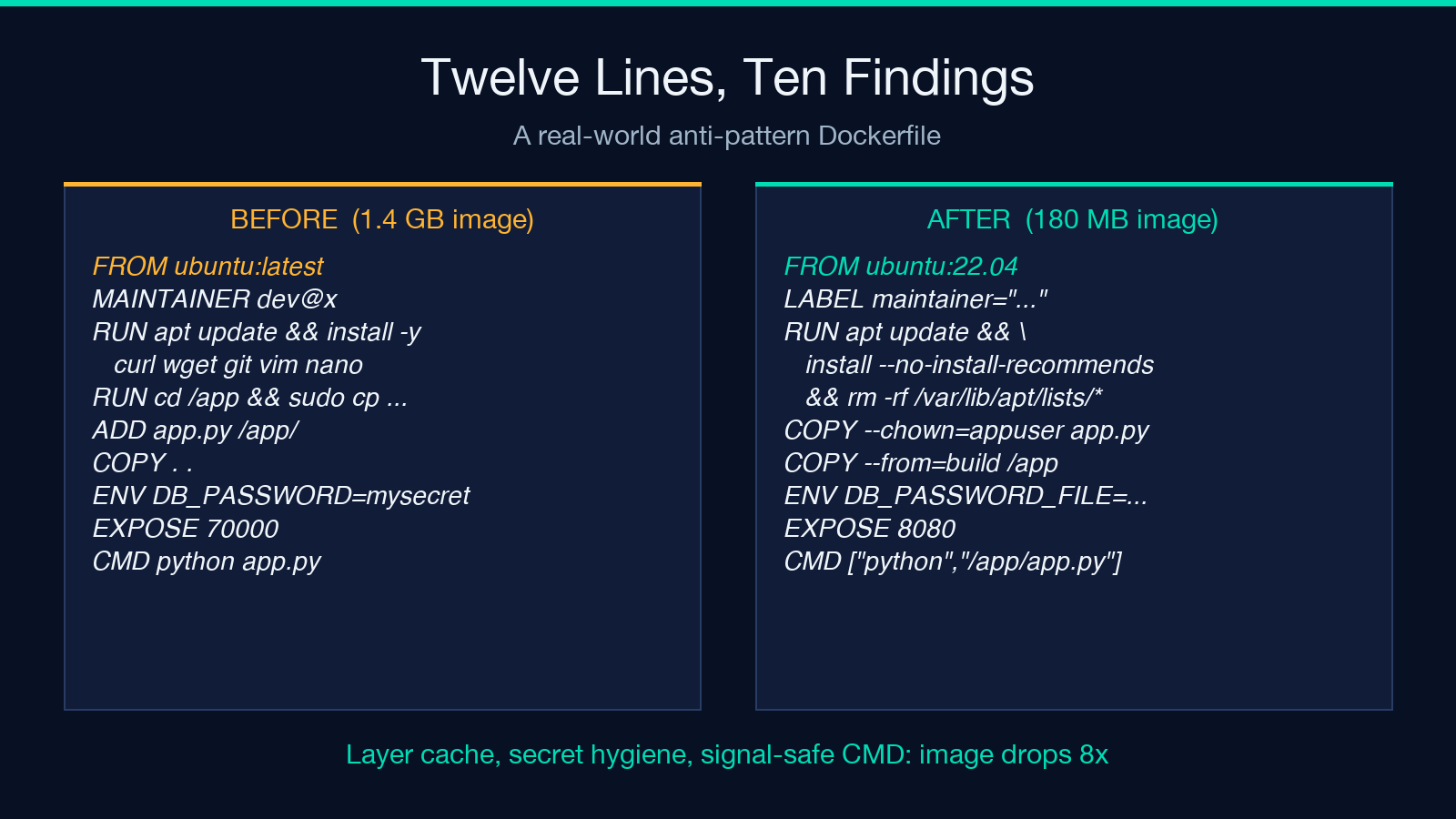
Consider this Dockerfile, written by a developer who copied the first Stack Overflow answer they found:
FROM ubuntu:latest
MAINTAINER [email protected]
RUN apt-get update && apt-get install -y curl wget git vim nano
RUN cd /app && sudo cp config.yaml /etc/app/
ADD app.py /app/
COPY . .
ENV DB_PASSWORD=mysecret123
EXPOSE 70000
CMD python app.py
Twelve lines, ten findings. The linter reports them grouped by severity:
- Error (3):
FROM ubuntu:latest(DL3007, no digest pin),EXPOSE 70000(DL3025, invalid port),sudoinRUN(DL3009, capabilities bypass). - Warning (4):
MAINTAINERdeprecated (DL4000),apt-get updatewithout cache cleanup (DL3009),ENV DB_PASSWORD=...(DL3050, secret in env),CMD python app.pyin shell form (DL3025). - Info (3):
ADD app.py(DL3020, preferCOPYfor local files),COPY . .without.dockerignore(DL3047), missingHEALTHCHECK(DL3057).
Each finding carries a fix recipe. The linter proposes:
FROM ubuntu:22.04
LABEL maintainer="[email protected]"
WORKDIR /app
RUN apt-get update \
    && apt-get install -y --no-install-recommends curl \
    && rm -rf /var/lib/apt/lists/*
COPY --chown=appuser:appuser app.py /app/
COPY --chown=appuser:appuser package.json package-lock.json /app/
RUN npm ci --omit=dev
COPY --chown=appuser:appuser . /app/
ENV DB_PASSWORD_FILE=/run/secrets/db_password
EXPOSE 8080
USER appuser
HEALTHCHECK --interval=30s --timeout=3s CMD curl -f http://localhost:8080/health || exit 1
CMD ["python", "/app/app.py"]
The fixed version pins the base, drops MAINTAINER for LABEL, runs apt-get cleanup, switches ADD to COPY with explicit --chown, moves the secret to a file path (mounted at runtime from Docker secrets or Kubernetes), corrects the port to 8080, drops the USER root default in favor of an appuser created earlier in the Dockerfile, adds HEALTHCHECK, and switches CMD to JSON-array form so signals reach python directly. The resulting image drops from 1.4 GB to 180 MB.
The linter’s input is a single paste and three option selects — severity floor, whether to include the HEALTHCHECK rule. Output is a per-finding table with line numbers, severity, the rule ID, and a one-line fix. There’s no server, no login, no telemetry. The whole flow runs in the browser. To try it against your own Dockerfile, open Elysia Tools — Dockerfile Linter, paste, and read.
The Five Rules Worth Memorizing
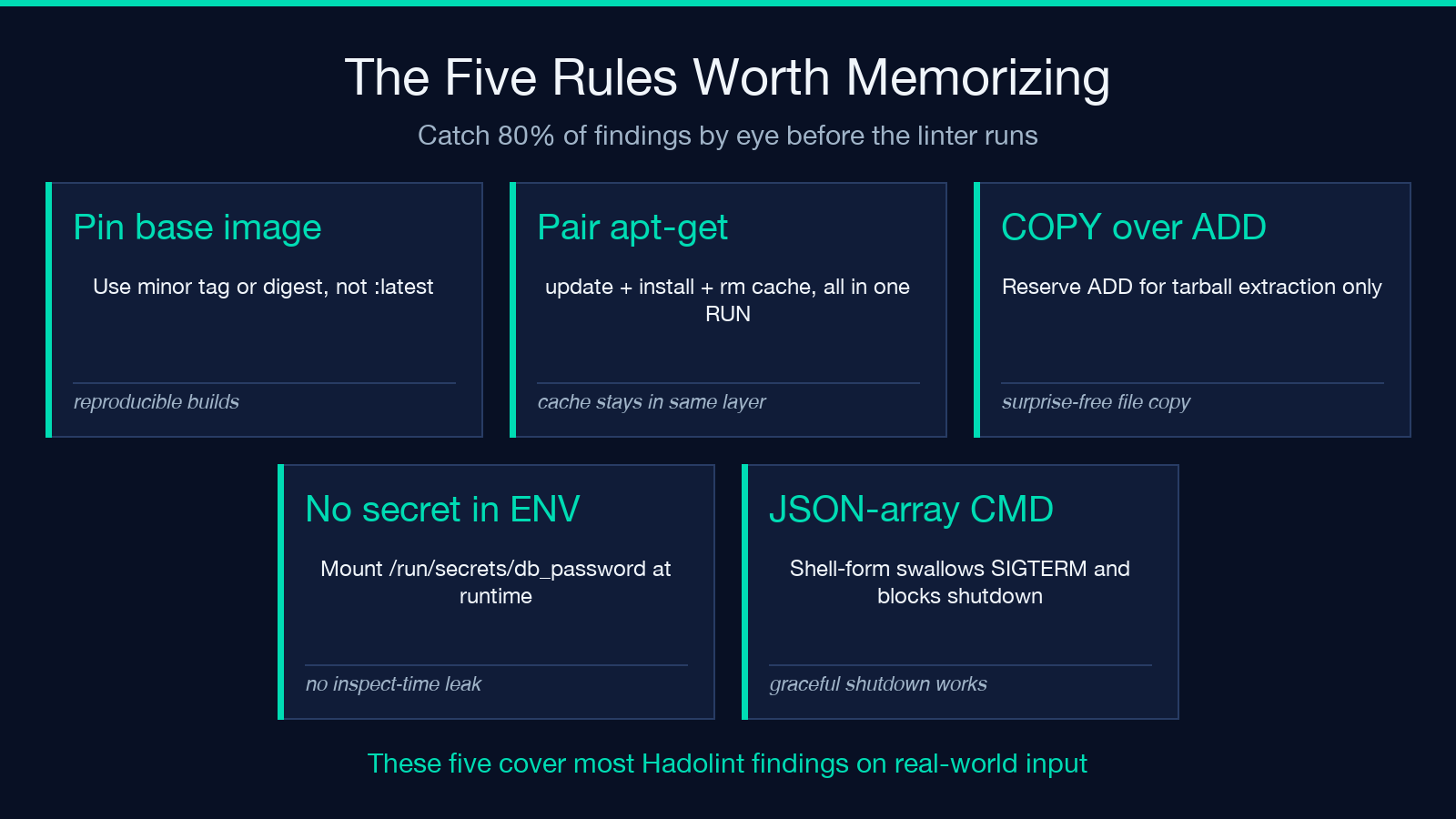
If you internalize five rules, you’ll catch most anti-patterns by eye before the linter runs.
Rule 1 — Pin your base image. FROM ubuntu:latest is non-reproducible. Pin to a minor tag (ubuntu:22.04) or a digest (ubuntu:22.04@sha256:...). Every CI rebuild is otherwise a dice roll.
Rule 2 — Pair apt-get update with rm -rf /var/lib/apt/lists/*. The package cache lives in /var/lib/apt/lists/ and bloats the layer. Run the cleanup in the same RUN block as the install so it executes before the layer is committed.
Rule 3 — Use COPY for local files; reserve ADD for tarball extraction. ADD does two extra things (extract tarballs, fetch URLs) that surprise people. If you don’t need those, COPY is the right verb. The linter surfaces this as DL3020.
Rule 4 — Never put a secret in ENV. ENV DB_PASSWORD=... bakes the secret into every image layer and into docker inspect output. Use a runtime secret mount (/run/secrets/db_password), a volume, or a secrets manager. The linter flags this as DL3050.
Rule 5 — JSON-array CMD, shell-form only when you need shell features. CMD ["python", "app.py"] passes signals cleanly and lets you use exec-form process management. CMD python app.py runs the command through /bin/sh -c, which swallows SIGTERM and prevents graceful shutdown.
These five cover roughly 80% of the findings the linter surfaces on real-world input. The remaining 20% come from rule IDs DL3025 (sudo), DL3047 (missing .dockerignore), DL3057 (missing HEALTHCHECK), and a dozen others.
Building a .dockerignore That Actually Helps
The linter flags COPY . . without a .dockerignore. The fix is a .dockerignore file at the same directory as your Dockerfile. The most useful entries, in priority order:
.git
node_modules
.env
.env.*
*.log
.vscode
.idea
coverage
dist
build
Dockerfile
.dockerignore
README.md
node_modules is the biggest win — a typical Node project has 200–400 MB of dependencies that should be installed inside the image, not copied from the build context. .env* blocks accidental secret exfiltration. Dockerfile and .dockerignore themselves shouldn’t be inside the image. coverage/, dist/, and build/ are build artifacts that should be generated inside the image, not shipped from the host.
If your repo has a multi-stage build, the node_modules line in the build stage’s .dockerignore matters less because you npm ci inside the build stage. But for the final stage that does COPY --from=build /app/dist ./dist, you still need .dockerignore to keep the host’s .git, .env, and IDE config out of the production image.
For a live check of your .dockerignore coverage, paste your Dockerfile into Elysia Tools — Dockerfile Linter and read the DL3047 finding — it lists which entries your .dockerignore is missing.
CI Integration: Stop Building Bloated Images in main
The static linter fits naturally into CI. Add a step that runs the linter against your Dockerfile on every PR:
- name: Lint Dockerfile
  run: |
    curl -s -X POST https://elysiatools.com/api/lint \
      -H "Content-Type: application/json" \
      -d "{\"dockerfile\": $(jq -Rs . < Dockerfile), \"severityFloor\": \"warning\"}" \
      | jq '.findings[] | select(.severity == "error")'
Or pull the linter into a local Hadolint run with hadolint --failure-threshold warning Dockerfile. Either way, the goal is the same: block the merge when an error-severity finding appears. A warning finding shouldn’t block but should print in the PR comment for the reviewer to acknowledge.
For GitHub Actions, hadolint/hadolint-action runs on every push. For GitLab CI, hadolint is in the standard images registry. For Jenkins, the dockerfile_lint plugin surfaces findings in the build log. All three replace a 5-minute docker build with a 5-second static analysis.
What the Linter Does Not Catch
Honest scope limits. The linter parses your Dockerfile text. It does not run your code, fetch your base image to verify a digest actually exists, or check whether your EXPOSE 8000 matches the port your app actually binds. It does not detect runtime-only bugs — a COPY of a binary that crashes because the target architecture doesn’t match, or a pip install that pulls a wheel for the wrong Python version. It also does not enforce organizational policy (“we only allow Alpine bases” or “we require Trivy scanning”) — that lives in a separate policy layer.
For runtime issues, you still need docker build and a smoke test. For policy enforcement, you want an admission controller in your orchestrator or a registry scanner. The Dockerfile linter is the first line — fast, static, browser-side — and complements both.
Closing — Lint Before You Build, Every Time
The Dockerfile linter at Elysia Tools takes 30 seconds to use and saves hours of “why is this image 1.4 GB” debugging. Paste your Dockerfile, read the report, fix the top three findings, rebuild, and watch the image size shrink. The 30+ rules are not arbitrary — they’re the same Hadolint rules that the CNCF recommends and that every major registry scanner reports. Catching them before you push is the cheapest place to fix them.
For more tooling that catches similar anti-patterns before they reach production — from API contract validators to data quality auditors — explore the rest of the Elysia Tools catalog.
