
Counting vowels is the kind of task every junior developer thinks they can do in five lines of Python. Then the test suite hits them with a sentence containing digits, punctuation, the letter y mid-word, and a Unicode em-dash, and they realize their for ch in text: if ch in 'aeiou' loop is counting things that are not letters, missing things that are, and producing an opaque integer with no audit trail. The Vowel-Consonant Processor at Elysia Tools replaces that fragile loop with a deterministic analyzer that returns letter counts, zero-based positions, per-word breakdowns, and a step-by-step audit trail — and the field guide below is the version I wish I had three projects ago.
The tool’s home page treats letter analysis as a small DSL: paste English text, pick an operation (analyze, replace, remove, or duplicate), pick a target (vowels, consonants, or both), and decide whether y counts as a vowel. Every result is JSON, every transformation records the index of every changed character, and treatYAsVowel is a first-class boolean rather than a hidden default. If you have ever debugged a script that disagrees with itself on the word “rhythm,” that one checkbox is worth the price of admission.
The Two Counts That Almost Always Disagree
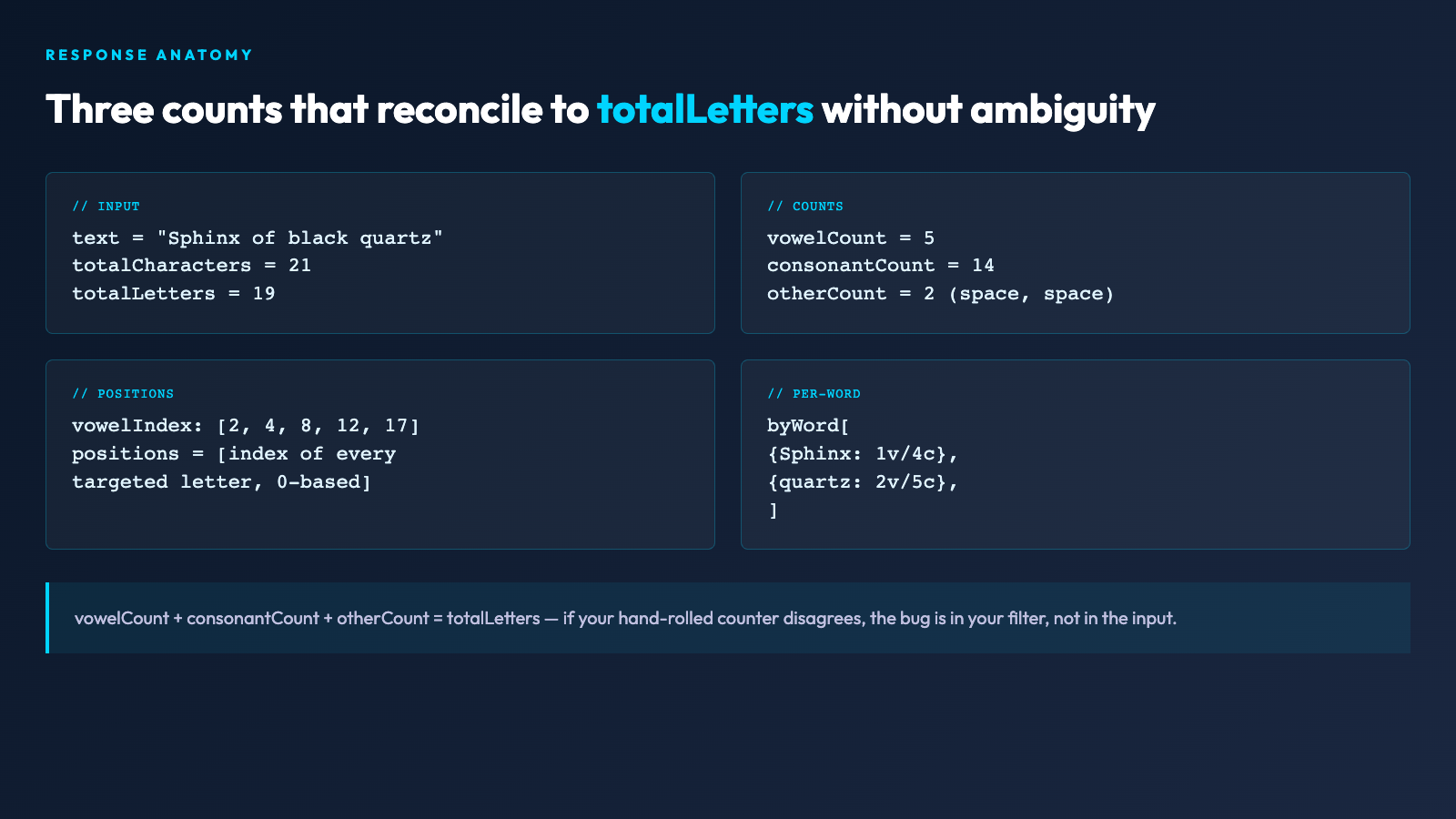
The most common bug in hand-rolled letter counters is the off-by-one between total characters, total letters, and vowel + consonant counts. The processor returns all three explicitly: totalCharacters is the raw string length, totalLetters is the A-Z / a-z subset, and vowelCount + consonantCount + otherCount reconciles back to totalLetters without ambiguity. If you are building a writing-style metric, reading-comprehension scorer, or even a syllable-counting fallback, those three numbers tell you whether your input contains digits or punctuation that you need to strip before scoring, instead of silently absorbing them into a len(text) total.
A second disagreement comes from the y question. The word “rhythm” contains zero vowels under the strict definition and three under the inclusive one. Pronunciation guides, haiku validators, and Spanish-transliteration scripts each need a different answer, and the processor exposes treatYAsVowel so the caller picks instead of inheriting the library author’s choice. In practice I default to false for English prose and true for any pipeline that feeds syllable counters or pronunciation dictionaries — but the key is that the decision is recorded in the input, not buried in the function definition.
Analyze Mode: The Operation Most People Skip
The analyze operation does not modify the input. It is the cheapest path to a verified count and the only path that returns the full positions array — the zero-based indices of every targeted letter, plus per-word counts via byWord. For “Sphinx of black quartz,” the canonical 19-character pangram, the analyzer returns vowelCount: 5, consonantCount: 14, and a positions array that lets you verify, character by character, that the i at index 2 was counted, the silent u at index 17 was counted, and the apostrophe-less space at index 6 was skipped. The whole call takes milliseconds and the result is a JSON object you can drop into a unit test without parsing.
This is the mode to reach for when you are debugging a downstream script. If your syllable counter says “Sphinx of black quartz” has 6 syllables, run the analyzer first and confirm the letter inventory matches your assumption. If the analyzer says vowelCount: 5 and your script says 6, the bug is in the syllable algorithm, not in the input. Most of the time, the discrepancy comes from a stray space being treated as a vowel by an over-eager regex, and the positions array makes that visible in one glance.
Replace and Remove: The Operations Where Audit Trails Matter
When you switch to replace or remove, the processor returns a steps array that records every single character that changed, with its original index, its original character, and its replacement. For “Read code” with operation=replace, target=vowels, replacement=@, the response is text: "R@@d c@d@" and a four-step audit trail, one per changed character. If you are feeding the output into a downstream pipeline that expects character positions to be stable (a tokenizer, a diff tool, a database column with positional offsets), the steps array is the only way to confirm the indices are still meaningful.
The remove operation is the one that punishes the unaware. Most character-removal scripts that I have reviewed in production silently shift every index after the removed character, breaking any caller that depended on positions. The processor’s steps array exposes that shift explicitly: each entry carries the index in the original string, so a downstream consumer can either re-index using the step count or refuse to consume positional data after a remove. If you find yourself writing a CSV exporter that walks the output of remove, the right answer is almost always “use replace with a sentinel character,” not “patch the indices.”
Duplicate: The Operation That Looks Like a Toy But Isn’t
The duplicate operation, with duplicateCount: N between 2 and 5, doubles (or triples, or quintuples) every targeted letter in place. For “Read code” with target=vowels, duplicateCount=2, the result is Reeaad coodee — every vowel replaced by itself twice. It looks like a toy. It is not. Duplicate-every-vowel transformations are a primitive in steganographic text watermarking, in educational typography (showing how a word elongates when you accent every vowel), and in adversarial-input generation for testing vowel-aware parsers. The duplicateCount cap at 5 is deliberate: beyond that, the output becomes unreadable and the test value drops to zero.
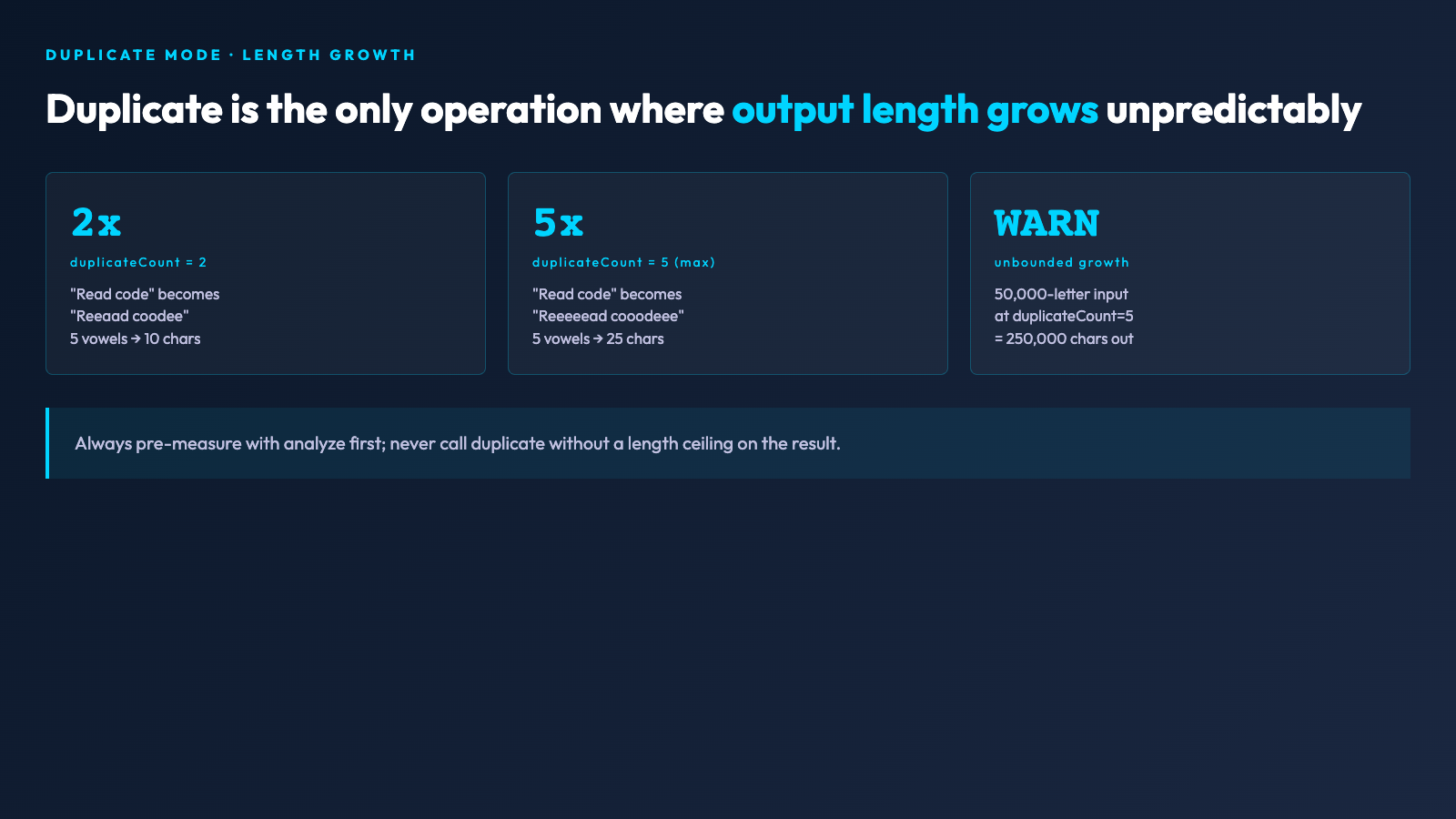
What makes duplicate mode useful in production is that it is the only one of the four operations where the output length changes by an unpredictable amount based on the input’s letter distribution. A processor that silently grows a 100-character input to a 170-character output is a liability for fixed-width formatters and database columns sized in bytes. The processor returns the transformed text plus the step count, but the caller is responsible for noticing that len(result.text) != len(input). In my own pipelines I always pre-measure with analyze first, then call duplicate only when the growth is bounded by the input length, and route anything larger to a length-limited buffer.
Treat Y as Vowel: The One Boolean That Changes Everything
The treatYAsVowel toggle is the single input that produces the largest behavioral swing. For the word “myth,” strict mode reports 0 vowels; inclusive mode reports 1. For “gym,” strict mode reports 0 vowels and 1 consonant; inclusive mode reports 1 vowel and 0 consonants. The processor applies the toggle consistently across analyze, replace, remove, and duplicate, so a pipeline that toggles it mid-flight will produce results that cannot be reconciled against each other. Pick the value once, upstream of the entire batch, and freeze it.
In practice I keep two output streams: one strict for English-prose readability scoring, and one inclusive for any pipeline that feeds a syllable counter or a pronunciation dictionary. The strict stream treats “rhythm” as consonant-only and produces a vowel density of ~38 percent for typical prose; the inclusive stream bumps that to ~42 percent. The 4-point swing is large enough to flip haiku-validation outcomes and small enough to hide inside a single rounding error if you do not pin the toggle. Pin it.
Pre-Production: Always Analyze First
The single biggest mistake I see in pipelines that wrap letter-processing tools is calling replace or duplicate on untrusted input without a preceding analyze. The result is that a five-megabyte user comment with 90 percent punctuation gets its totalLetters count from nowhere, the transformation produces an 11-megabyte output, the downstream HTTP handler times out, and the on-call engineer spends the next hour figuring out why the load average tripled. The fix is one extra API call: run analyze first, check totalLetters against your budget, and reject anything above the threshold before invoking the mutating operation.
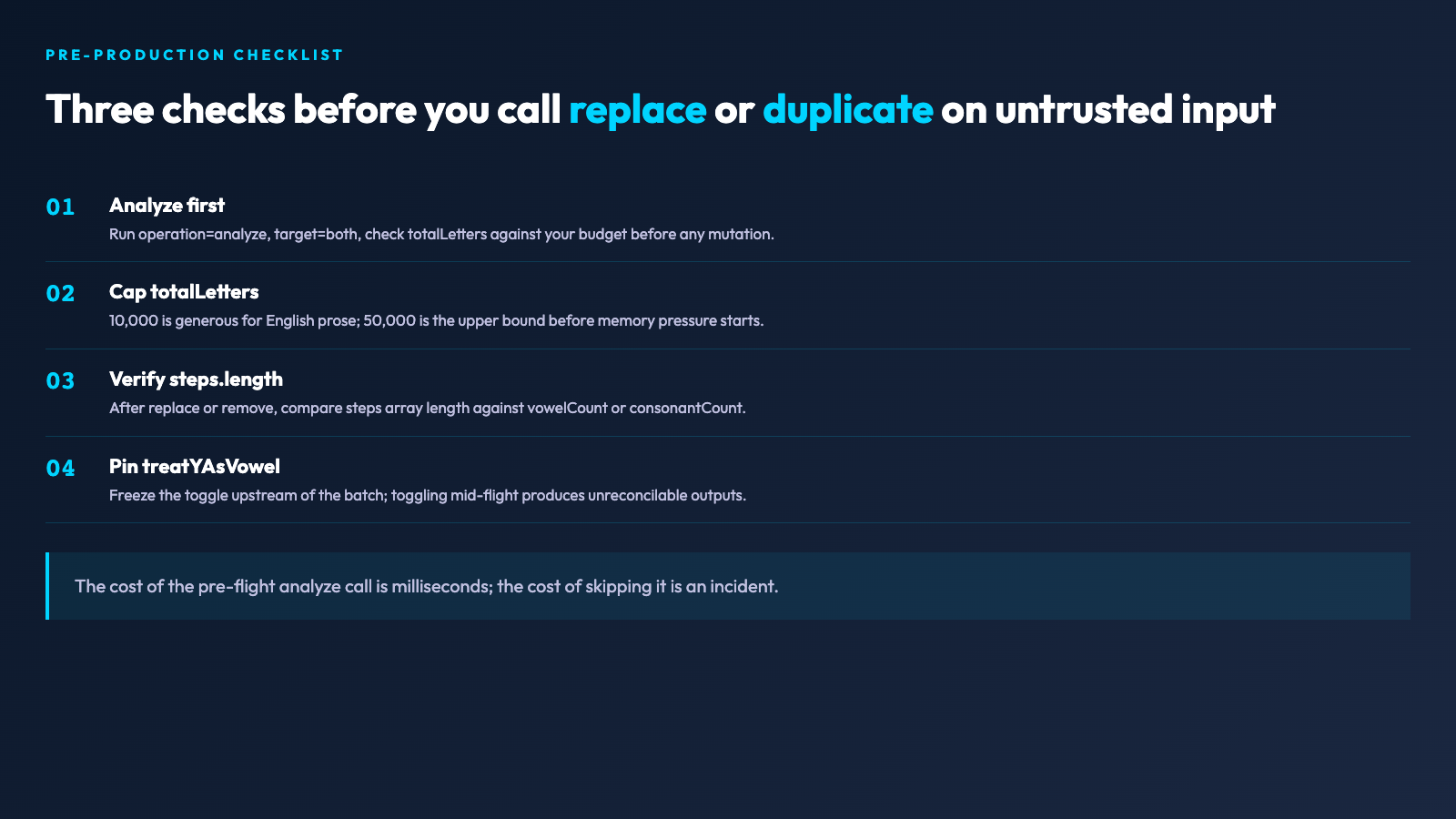
This is also the only way to defend against adversarial input. A spammer who knows you run replace(vowels, *) on review text can submit a comment with 30,000 vowels to triple the response size. The pre-flight analyze makes that adversarial input visible — the spammer’s comment has vowelCount: 30000, the legitimate comment has vowelCount: 42, and your rate-limiter can flag the difference without ever calling replace. The cost of the pre-flight call is a few milliseconds; the cost of not doing it is an incident.
Practical Defaults for Common Pipelines
For a writing-style scorer, run analyze with target=both, treatYAsVowel=false and use the vowelCount, consonantCount, and byWord arrays directly. For a syllable-counting fallback, run analyze with target=vowels, treatYAsVowel=true and divide vowelCount by a language-specific factor (1.6 for English, 1.4 for Spanish). For a redacting pipeline that strips vowels from customer-visible text, run remove with target=vowels, treatYAsVowel=false and route the output to a downstream length-checker — never trust the implicit length cap. For a steganographic watermarker that embeds a sender ID in vowel duplication, run duplicate with duplicateCount=2, treatYAsVowel=false and verify the watermark survives a round-trip through your normalizer.
If you want to see the analyzer handle a sentence with mixed scripts, digits, and Unicode punctuation, the Special Characters Samples page on Elysia Tools is the closest pre-built input — it covers whitespace edges, zero-width joiners, and the dash variants that hand-rolled counters routinely misclassify. For longer English prose with realistic vowel density, the Text Case Format Samples feed is useful, since case folding (uppercase vs lowercase vowels) is one of the few inputs that the strict analyzer treats as identical but a downstream syllable counter might not.
Operational Defaults: Targets, Budgets, and Failure Modes
Three operational defaults sit underneath everything else. First, set a totalLetters budget per request — 10,000 is generous for English prose, 50,000 is the upper bound before you start seeing memory pressure in any wrapper that holds the output in memory. Second, never call duplicate without a length ceiling on the result; the worst-case growth factor is duplicateCount (5x), so a 50,000-letter input can balloon to 250,000 characters and break downstream formatters. Third, always read the steps array length and compare it against vowelCount (or consonantCount) before trusting that replace or remove finished without an unexpected early-exit — a mismatch means the operation short-circuited, almost always on a regex filter you forgot about.
The processor is one of those tools that looks like a teaching exercise until you wire it into a real pipeline and discover that you have been silently counting punctuation as vowels for two years. Run it once against any text-heavy script you maintain, compare its counts to your hand-rolled ones, and act on the delta. Most teams find one or two bugs in the first afternoon and a much cleaner mental model of what their letter-inventory numbers actually mean.
Explore more letter- and text-processing tools at elysiatools.com/en/tools.
