
Three invisible bytes at the start of a UTF-8 file can wreck a CSV join before a single row is parsed. When your spreadsheet app writes a CSV with a Byte Order Mark, then your downstream script reads it line-by-line with a strict utf-8-sig expectation, the first column header quietly turns into ufeffProduct,SKU — invisible to the eye, fatal to a split(',') call, and exactly the kind of bug that lives in production for months before someone notices that one column is misaligned on every report.
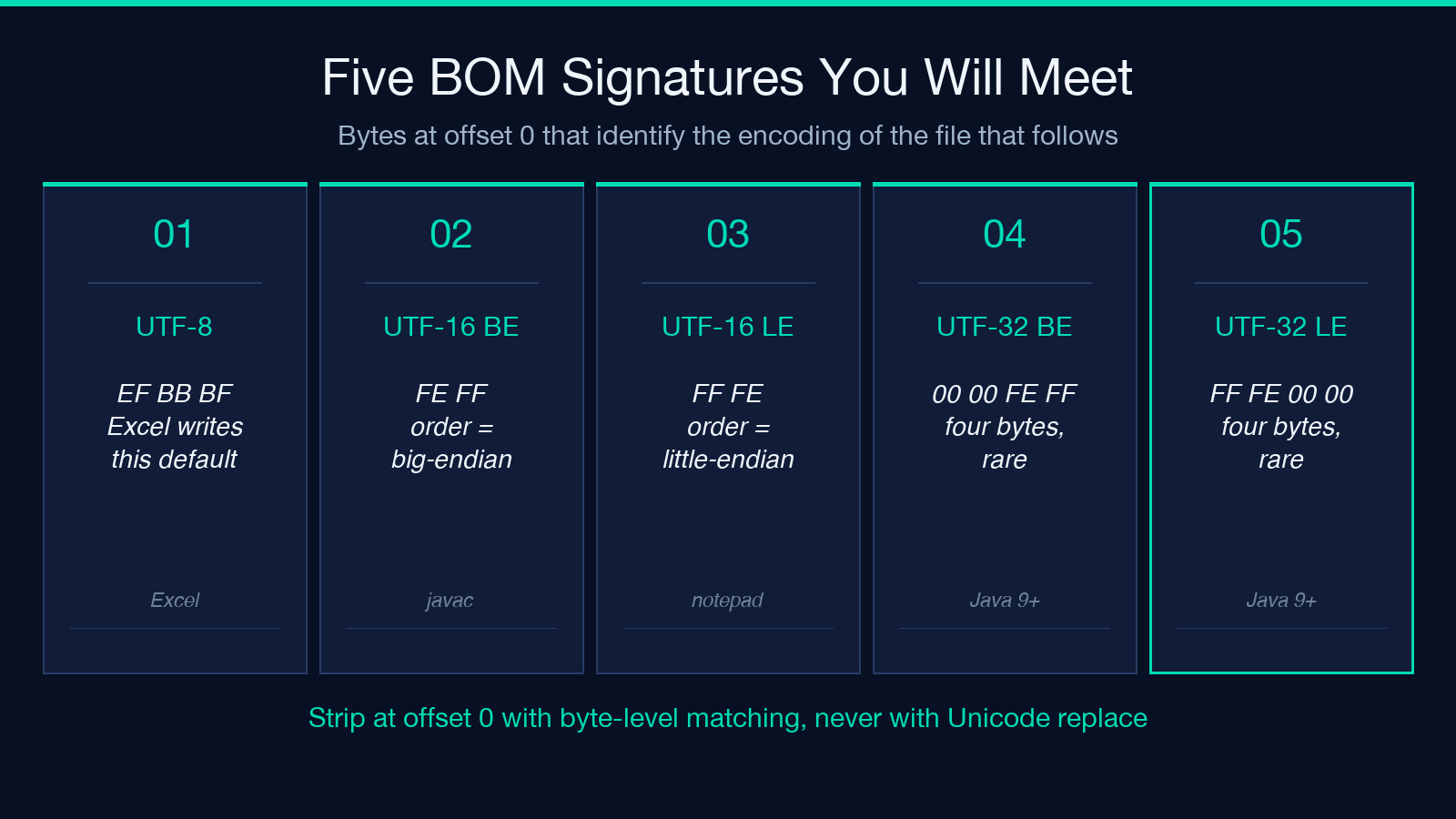
The BOM Character Remover lives for this. It detects and strips the leading byte sequences — EF BB BF (UTF-8), FE FF / FF FE (UTF-16), 00 00 FE FF / FF FE 00 00 (UTF-32) — and hands you back clean content plus a structured report of what it removed. But understanding when a BOM actually exists, why it slips past most naive pipelines, and which downstream tools blow up first is more useful than the stripper itself. This field guide walks through the byte-level mechanics, the three places where the strip should happen, and the audit pattern that catches a BOM regression before it ships.
What the byte order mark actually is
A BOM is a magic number, not a character. Three bytes at offset zero that tell a reader the byte order (big-endian or little-endian) and the encoding of the file that follows. UTF-8 files are byte-order-independent, so the UTF-8 BOM (EF BB BF) is technically optional — Microsoft Excel still writes it by default on every CSV export, and that single decision is responsible for the majority of “first column is misaligned” tickets in data engineering teams.
UTF-16 and UTF-32 BOMs are non-optional: without FE FF or FF FE at the start of a UTF-16 file, the reader cannot tell whether byte sequence 00 4D means “M” (big-endian) or some other glyph (little-endian). UTF-32 follows the same logic at 4x the size. A BOM is also valid as a zero-width no-break space inside the file content — Python’s open() with encoding='utf-8-sig' strips it at read time, but encoding='utf-8' does not, so the same bytes can appear as ufeff mid-stream when the file is concatenated with non-BOM content.
Why naive pipelines break on BOM
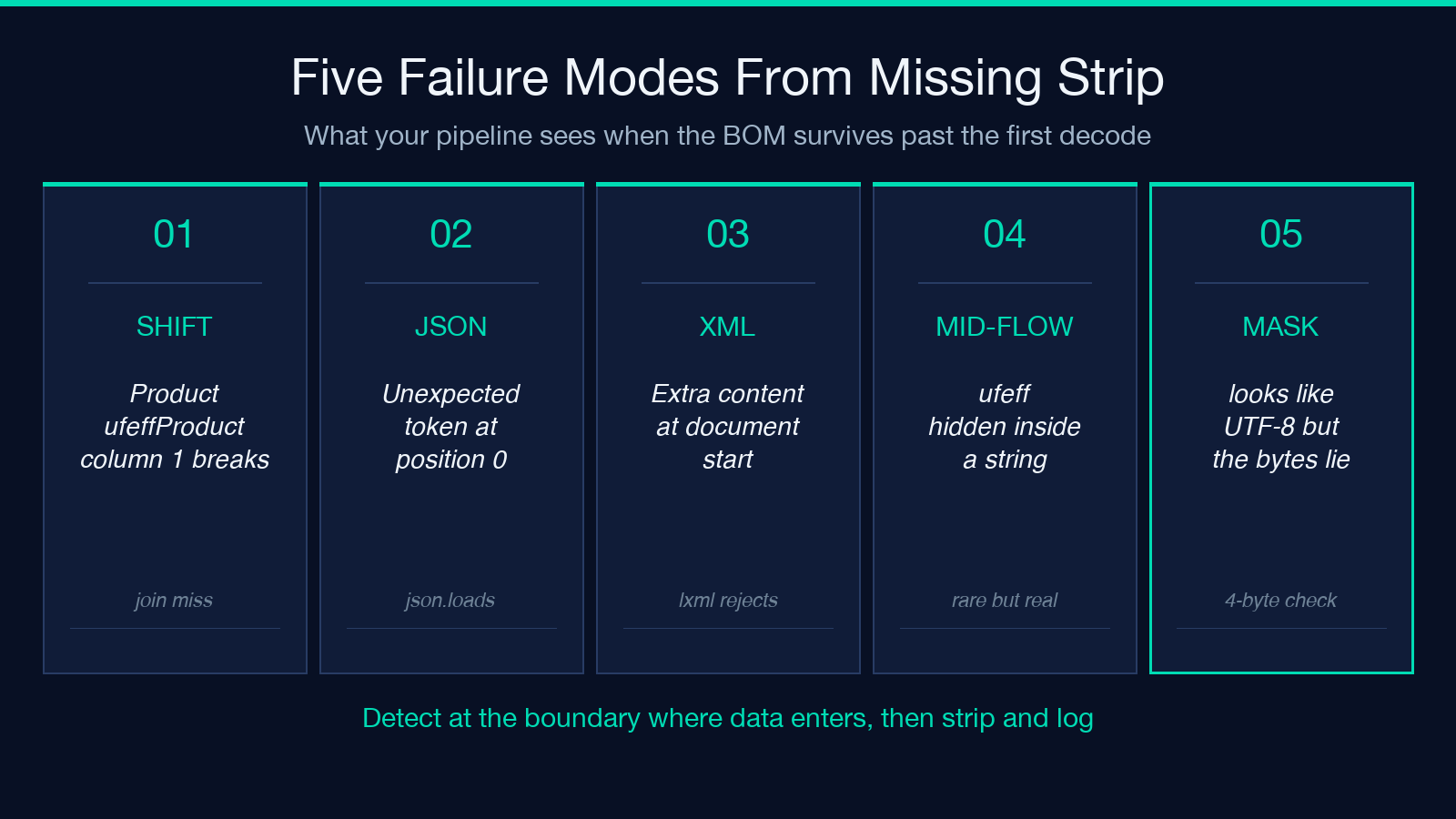
The most common failure mode is invisible-column-shift. A CSV reader that uses read().split('n')[0].split(',') will return the first cell as 'ufeffProduct' rather than 'Product'. Downstream code that joins on 'Product' fails to match 'ufeffProduct', so every row from this file becomes orphaned. The bug looks like a data-quality issue, not an encoding issue — every reviewer stares at the data for hours before someone runs xxd | head and sees the three magic bytes.
The second failure is the strict-JSON parser. Python’s json.loads() rejects a file that begins with EF BB BF even though the rest of the content is valid JSON. JavaScript’s JSON.parse() has the same behaviour. The error message (“Unexpected token”) does not mention encoding, so the developer reaches for a CSV repair tool instead of an encoding fix. A regex stripper that targets ufeff only handles the in-memory representation — it does nothing for byte-level UTF-8 BOMs that have not yet been decoded.
The third failure is the XML parser. XML 1.0 forbids XML at the very start of the document, but XML 1.1 supports it under specific namespace rules. Most XML parsers reject BOM-prefixed input with Extra content at the start of the document even when the rest of the XML is well-formed. The error is recoverable — open the file with encoding='utf-8-sig' and reparse — but only if you recognise it as a BOM problem rather than a schema problem.
The three places to strip a BOM
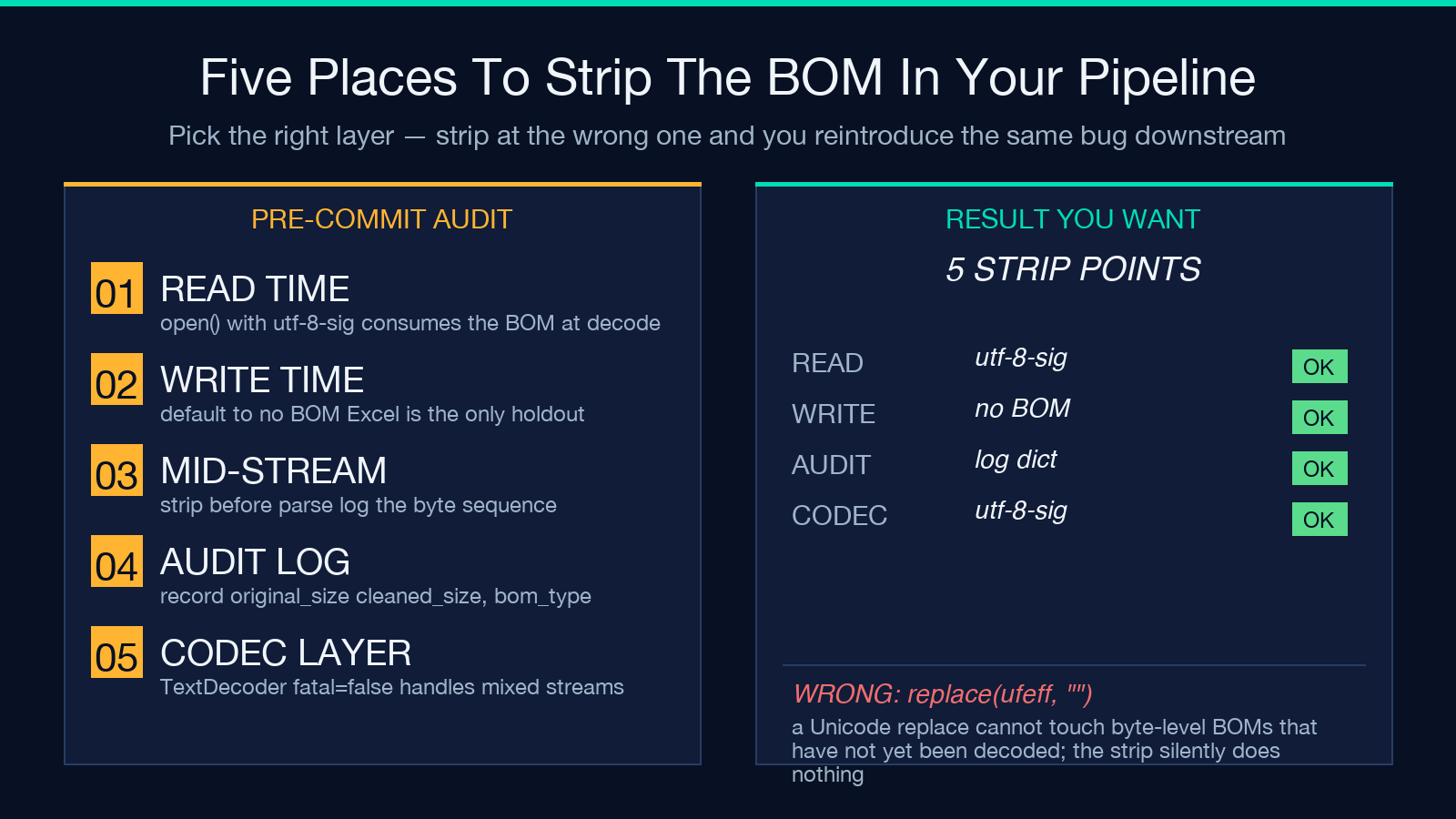
Stripping at the wrong layer is almost as bad as not stripping at all. The canonical order is: read time, write time, and mid-stream.
Read time is the safest. Open the file with encoding='utf-8-sig' (Python) or text-encoding: 'utf-8' plus a manual strip of the leading three bytes (JavaScript TextDecoder). The BOM is consumed at decode and never enters your application’s string handling. This is the default position for any new code path.
Write time is the second line of defence. When you generate a CSV or a JSON file that downstream systems consume, write the BOM only if the consumer is known to require it. Modern pipelines do not require it. Microsoft Excel still expects it on Windows-only toolchains but ignores it on Mac and recent Windows builds. Default to “no BOM” on write.
Mid-stream is the fallback. When you receive a BOM from a third-party system that you cannot modify at the source, strip it before the data enters your processing pipeline. This is the role of the BOM Character Remover — a single-pass cleaner that takes content (text or pasted bytes), identifies which BOMs are present, removes them, and reports exactly what was stripped. The report is the part that matters: a future auditor reading your pipeline should be able to see “BOM EF BB BF removed from input on 2026-10-05 by stage=pre-parse” without digging through code.
Choosing between strip-and-forget and report-and-track
The temptation is to write a one-line .replace('ufeff', '') and move on. That works for the in-memory case where the BOM has already been decoded as ufeff. It fails for the byte-level case where the file is still on disk in raw UTF-8. It also fails silently: if the file does not contain a BOM, the replace is a no-op; if the file contains a BOM, you have no record of the strip happening.
The right pattern is to detect first, strip second, log third. The BOM Character Remover implements exactly this three-step flow. Detection scans the first 4 bytes for any of the five BOM signatures. Strip uses the matching byte sequence (not a generic replace), so a UTF-16 BOM is removed with FE FF removal, not a Unicode replace that could corrupt other content. Logging produces a structured report — encoding detected, bytes removed, byte positions, original byte count, cleaned byte count — that can be persisted alongside the file or returned in the API response.
For audit-heavy workflows (PCI, HIPAA, GDPR), this report is the difference between “we cleaned the data” and “we have a tamper-evident record of which data was cleaned and when.”
A worked example: CSV → JSON pipeline
1. Read the CSV as bytes: with open('export.csv', 'rb') as f: raw = f.read() 2. Detect and strip the BOM: if raw.startswith(b'xefxbbxbf'): raw = raw[4:] 3. Decode the cleaned bytes: text = raw.decode('utf-8') 4. Pass to the JSON parser: data = json.loads(text)
A variant of the BOM Character Remover accepts the raw bytes directly, performs step 2, and returns both the cleaned text and a structured report. The report would include detected_encoding: 'utf-8-bom', bom_bytes: 'ef bb bf', bom_position: 0, original_size: 24517, cleaned_size: 24514. That JSON report becomes the audit trail.
For pipelines that ingest from APIs, the BOM may arrive in the HTTP response body when the server misconfigures Content-Type: text/csv; charset=utf-8. Same fix, different location — read the response as bytes, detect, strip, then decode.
For the other side of the problem — files that arrived without a BOM but were decoded as the wrong charset — pair the cleaner with the Mojibake Repair tool, which diagnoses the original encoding and reconstructs the right bytes.
Common false positives
A BOM stripper can over-strip in two ways. First, the ufeff zero-width no-break space is valid Unicode content in some contexts (rare, but legal in markup). A naive replace('ufeff', '') will strip those too. The byte-level detector only strips the leading sequence, so a mid-stream ufeff is preserved.
Second, the stripper can misidentify a UTF-16 BOM as a UTF-8 BOM if the file has been corrupted. The signature overlap is rare, but a binary file masquerading as a text file can produce confusing detection results. The BOM Character Remover checks the full 2-4 byte signature before stripping — UTF-16 LE requires FF FE and the absence of FF FE 00 00 at the next offset.
Bringing it together: a one-screen reference
The full lifecycle in five lines of code:
import codecs
def clean_bom(path):
    with open(path, 'rb') as f: raw = f.read()
    report = {'original_size': len(raw), 'bom_removed': None}
    for name, sig in [('utf-8', b'xefxbbxbf'), ('utf-16-be', b'xfexff'),
                      ('utf-16-le', b'xffxfe'), ('utf-32-be', b'x00x00xfexff'),
                      ('utf-32-le', b'xffxfex00x00')]:
        if raw.startswith(sig):
            raw = raw[len(sig):]
            report['bom_removed'] = name
            report['cleaned_size'] = len(raw)
            break
    if report['bom_removed'] is None:
        report['cleaned_size'] = len(raw)
    return raw.decode('utf-8'), report
This is the pattern the BOM Character Remover uses internally. The dict returned alongside the cleaned text is exactly the audit log you persist alongside the file. One call, one log line, one tamper-evident record of what happened.
When the data is already in spreadsheet form rather than text — XLSX exports with embedded BOM sequences in cell content, or CSV files with mixed encodings across columns — the XLSX CSV Detect Normalize tool handles the structural variant of the same problem.
When you should not strip
A BOM is sometimes load-bearing. PowerShell scripts that pipe UTF-16 files between cmdlets rely on the BOM to tell each stage the encoding. Java source files compiled with javac on Windows used to require a UTF-8 BOM (Java 8 era — modern javac accepts both). Windows batch files that chcp 65001 then type a UTF-8 file need the BOM for correct console output. If your pipeline interacts with these toolchains, strip only after the toolchain has finished reading.
For everything else — modern web APIs, modern databases, modern data engineering tools — strip the BOM as early as possible and never think about it again. The BOM Character Remover at Elysia Tools is the canonical implementation: detection, strip, structured report, in one pass.
Explore more tools at elysiatools.com.
The pattern that holds across every case is the same: detect the byte sequence at the boundary where data enters your system, strip it there, and persist a record of what was removed. The bytes are three. The cost of not handling them is uncounted joins, unparseable JSON, and silent column shifts that age like milk in a reporting dashboard. Strip once. Audit forever.
