
One misplaced quantifier inside one capture group can take down the API on a Tuesday afternoon. Catastrophic backtracking is a regex failure mode where a pattern looks fine in tests, runs in microseconds on the developer’s laptop, and then spikes to multi-minute CPU on production data because a single long input forces the engine to explore an exponential number of paths through the backtracking graph. The Regex Linter is built to flag that family — and three more anti-pattern families — before the pattern ever reaches a request handler. This guide walks through the eight things it checks, why each one matters, and how to read its rewrite suggestions.
Why regex can lock up a server: backtracking, the basic case
A regex engine that supports backtracking runs in linear time on well-behaved patterns and exponential time on adversarial ones. The classic example is (a+)+ against a long string of as followed by a single non-a: the engine sees the outer group, captures as, tries to match the inner a+ again, fails, backtracks one capture, tries again — and at every failure the inner group re-evaluates from scratch. The result is that matching a 30-character string takes billions of steps, and a 60-character string takes longer than the rest of the request budget combined.
This is not a rare problem. The Cloudflare ReDoS writeup catalogues 143 production patterns that exhibited the same shape — nested quantifiers, alternating wildcards, overlapped alternations. A 2019 paper measured 467 ReDoS-prone regexes in the npm registry alone. The pattern slips into frameworks via copy-paste from Stack Overflow, and once it lands in a request validator or a routing matcher it stays until somebody notices a latency spike.
The four severity bands the linter reports
The Regex Linter classifies findings into four bands, ordered by impact:
- Critical — patterns the engine may evaluate in super-linear time. Nested quantifiers, ambiguous alternations, unbounded repetitions on hot paths.
- Error — patterns that match the wrong substring on at least some inputs. Unescaped dots outside intended literals, character-class ranges like
[a-Z]that include unexpected bytes, missing anchors on validation rules. - Warning — patterns that work but confuse the next reader. Observable non-greedy, double negation, redundant backslashes, ambiguous alternation ordering.
- Info — patterns that work and are correct but verbose. Capturing groups used as non-capturing, verbose quantifiers like
dddinstead ofd{3}.
The recommendation from the tool itself is to run <strong>standard</strong> in CI and <strong>strict</strong> before merging a new pattern into a shared library — basic is for hot-path CI where any latency from the linter itself is unwelcome. Each band has a per-rule description, a concrete test case, and a rewrite suggestion. Three bands worth digging into next.
Critical: catastrophic backtracking and how to defuse it
The catastrophic-backtracking rule fires on patterns that match the ReDoS shape. The signature is one of three:
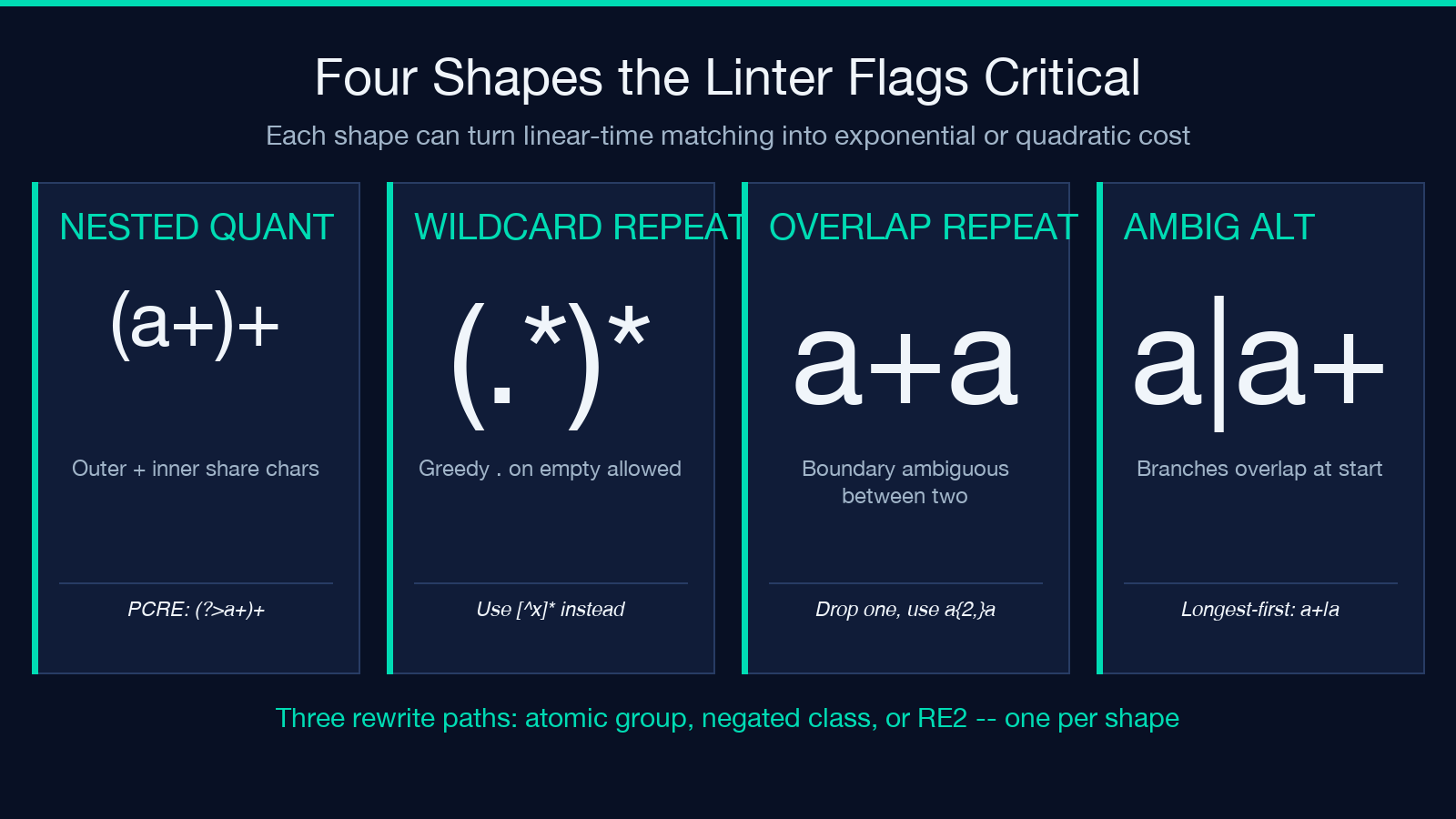
- Nested quantifier on an overlapping group — patterns like
(a+)+,(.),([a-z]+)+. The inner repetition and the outer repetition share characters; the engine explores every split. - Adjacent overlapping repetitions — patterns like
a+aor\d+\d+. The two quantifiers can each own the boundary, so the engine tries every split point. - Alternation with overlapping branches — patterns like
a|a+where one branch is a prefix of the next.
The fix is mechanical but depends on the shape of the input:
- Use a possessive quantifier or atomic group (when the engine supports it):
(?:[a-z]+)+becomes[a-z]++in PCRE / Java, or(?>[a-z]+)+as the portable atomic-group form. The engine commits the first capture without backtracking. - Use a negated character class:
[^a]*ais linear;(a+)+is exponential. Rewriting the inner quantifier to “any character that is not the boundary” cuts the alternatives to one. - Use the RE2 engine if you can (Go’s
regexp, re2 library in Python). RE2 refuses to backtrack; it always runs in linear time at the cost of dropping backreferences and lookaround. If you can use it, every catastrophic-backtracking finding disappears.
The Regex Linter emits one of these three rewrite suggestions automatically when it flags the pattern. The “strict” check level also adds a warning when the pattern relies on a backreference — RE2 will not run it.
Error: unescaped dots and the “matches anywhere” trap
The next band catches patterns that look right to the author and match the wrong substring on real input. Two patterns recur:
- Unescaped dots outside literal context —
2026.01.15looks like a date matcher, but the dots are wildcard metacharacters; it matches 2026X01X15 and 202600115 equally well. The fix is2026.01.15, or use[.]as the portable form that survives dot-all modes. - Character-class ranges that include unexpected codepoints —
[a-Z]is technically valid and matchesatoZin ASCII, but in between it sweeps in<code>[</code>,,<code>]</code>,^,<code>_</code>, and</code>. Most validators intended "letters" want[a-zA-Z], not the half-range.
The linter also flags octal escapes like in modern dialect contexts — browsers warn on them, PCRE treats them differently than Python’s re does, and the safest fix is to use the hex form x00 explicitly. For typical application patterns the rewrite suggestion collapses the bad range or escape into the canonical form.
Warning: redundant escapes and double negation
The warning band catches patterns that work correctly but invite the next reader to misread them:
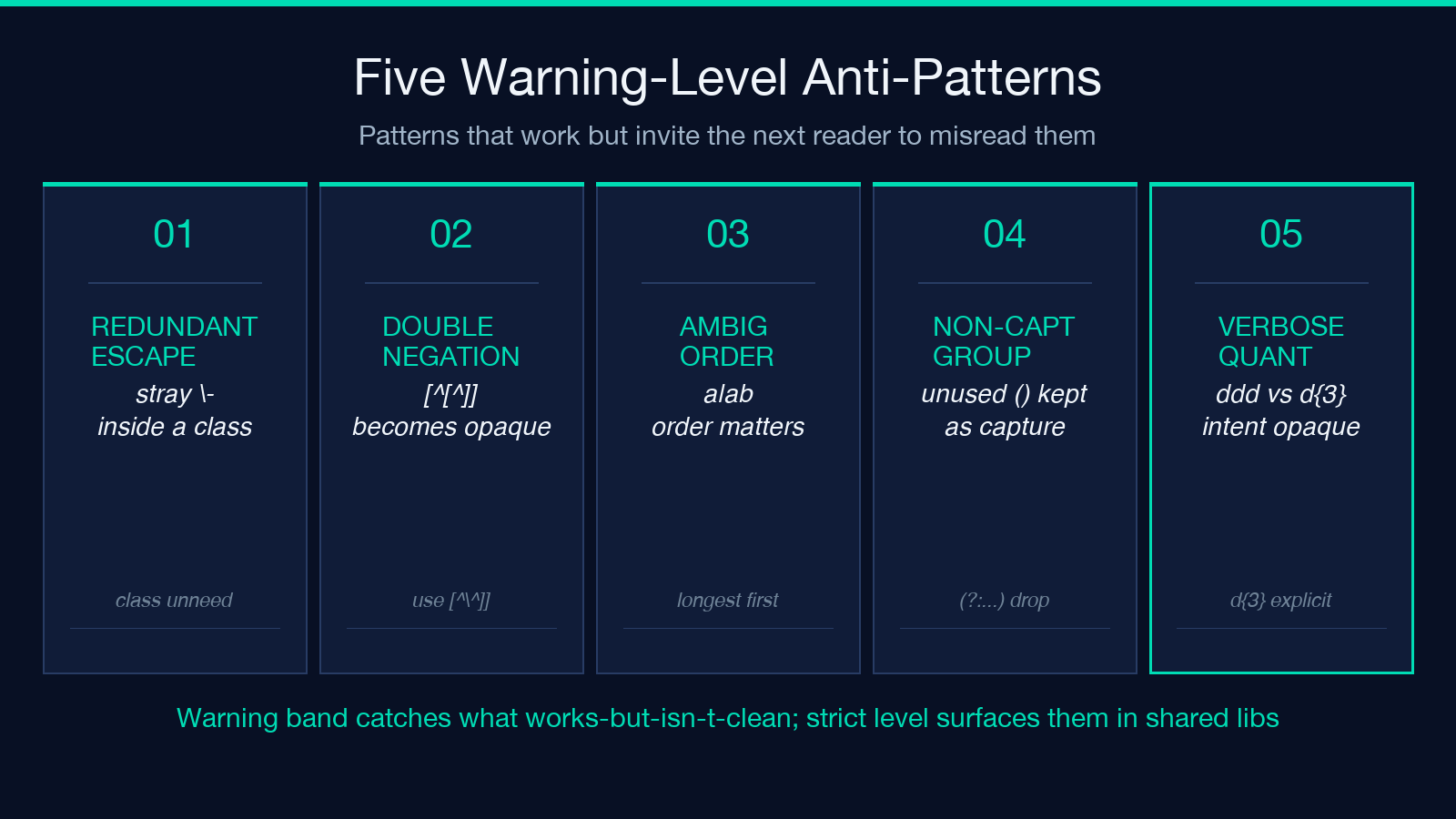
- Redundant backslashes —
-,.inside character classes where the character does not need escaping in the first place. Some dialects are permissive; others rejoin the wrong character class. Dropping the redundant slash is one character less to misread. - Double negation —
[^[^]]and similar. The intent is “any character that is not^or]” but the form reads as “not-not”. Rewriting to[^^]]preserves the meaning and removes the cognitive load. - Ambiguous alternation ordering —
a|abmatches the prefix first. For most patterns that is fine; for the ones where it is not, the engine returns a different match than the reader expected. The linter flags it so you can decide explicitly.
None of these break the pattern; they are maintenance-burden warnings. They are the reason the “strict” level exists — the rule is that strict is for the moment you save the pattern in a shared library, and warnings become interesting at that point.
Info: non-capturing groups and verbose quantifiers
The info band is the cleanup pass:
- Capturing groups that are never referenced —
([a-z]+)becomes(?:[a-z]+). The capture-cost is small per match, but it matters when the regex runs in a hot loop. - Verbose quantifiers —
dddbecomesd{3};.repeated a literal number of times becomes.{N}. The rewrite makes the count explicit and the intent obvious.
These are style suggestions, not correctness improvements. The linter emits them at the “strict” level and as part of the rewrite hint when the user requests rewrite suggestions.
Pick the right dialect for the right rewrite
The linter picks the dialect from a dropdown — JavaScript, Python, PCRE, Go (RE2), or Java — and adjusts its suggestions accordingly:
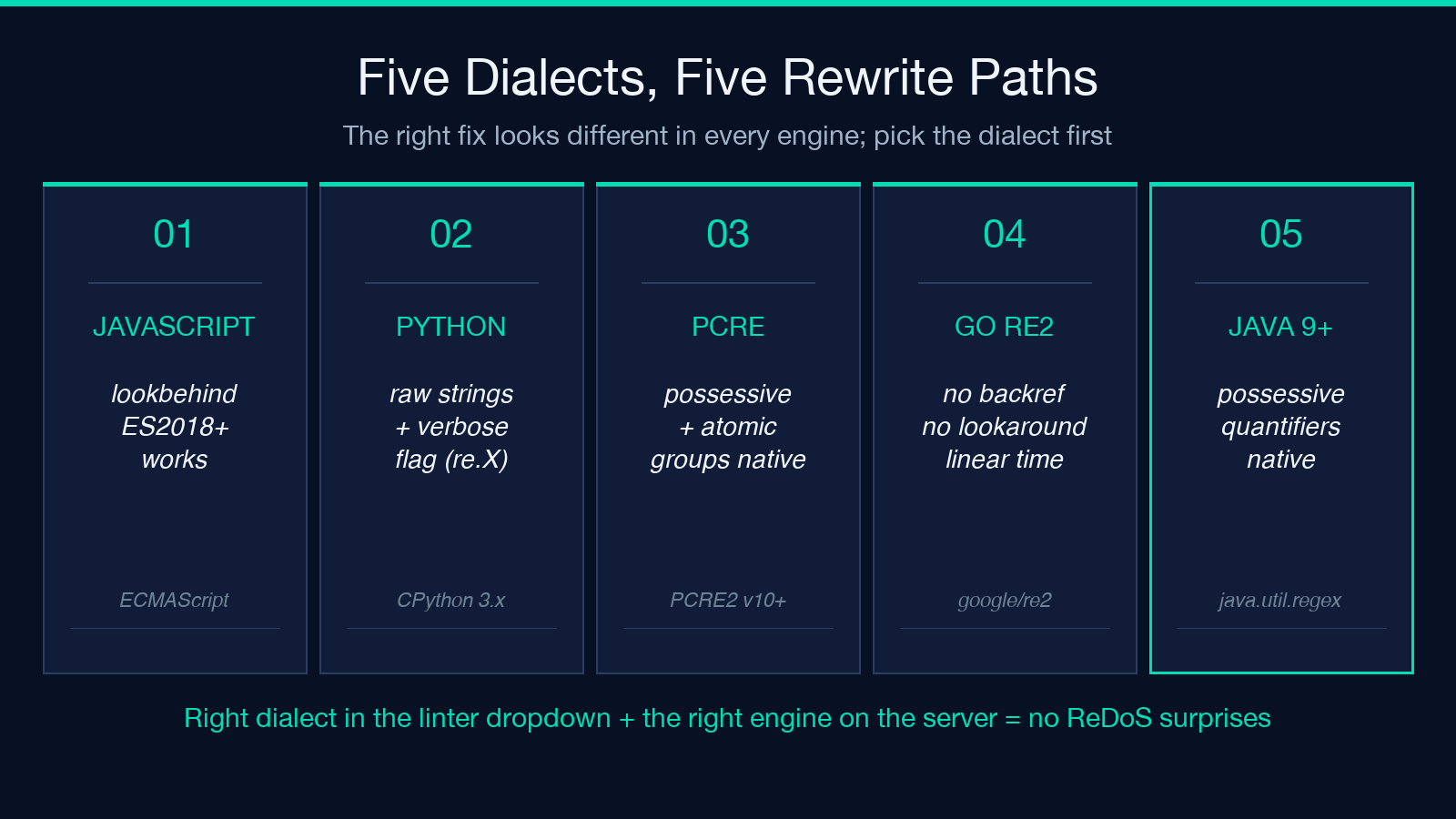
- JavaScript — supports lookahead and lookbehind, supports the
s(dotAll) flag from ES2018 onward, supports named capture groups. Unicode property escapes (p{Letter}) work in theuflag. - Python — supports lookbehind and named groups; recommends raw strings (
r'...') so the Python literal does not absorb the regex backslash. The verbose flag (re.VERBOSE) is offered as the readability toggle. - PCRE — supports possessive quantifiers and atomic groups out of the box. The linter emits these as the rewrite target by default for critical findings.
- Go (RE2) — backreferences and lookaround are unsupported; the linter warns when a critical or warning finding depends on a feature RE2 does not have. The rewrite hint steers the user toward a Go-safe form.
- Java — supports atomic groups via
(?>...)and possessive quantifiers from Java 9 onward. The linter flags Java versions when the rewrite would target a feature not available in the runtime.
The right dialect matters because the same fix looks different across engines. The Python equivalent of “use a possessive quantifier” is to wrap the group in (?:...) and use the third-party regex library; the JavaScript equivalent is to keep backtracking on and rely on the engine’s “match once” path; the Go equivalent is to rewrite the pattern so it never needs backtracking at all.
Try it on real risky-regex inputs
For a working set of patterns to test against, the Risky Regex Patterns sample pack ships 30+ patterns that have all been flagged by at least one of the four bands, with the original source and a rewritten safe version side by side. The companion packs — Common Regex Patterns and Regex Named Capture Groups — give you the validation patterns and the structured-extraction patterns to test against.
Run each pattern through the Regex Linter with <strong>strict</strong> and the right dialect; the tool returns the per-band findings, the suggested rewrite, and a severity score on a 0-100 scale. Patterns scoring 80+ are safe to merge; patterns scoring below 50 deserve a rewrite before they reach the shared library.
For related tooling in the same family, browse the Development category on Elysia Tools — the Named Group Tester parses named-capture groups out of a pattern to verify they actually exist, which is the natural companion step after linting passes.
