
When Three Log Formats Hide Inside One Paste And The Export Format Decides Whether Your Pipeline Lands As A Table Or A Mess
Three formats in one buffer is the default state of every real-world log dump. Structured Log Analyzer is the tool that turns JSON Lines, Apache access logs, and syslog snippets into rows with inferred types — no manual parsing, no regex babysitting. You paste the mixed log, pick an export format, and the analyzer walks every line, decides what kind of record each one is, and ships a normalized table out as JSON, CSV, or SQL inserts.
Most teams normalize logs by hand because the obvious path looks cheaper than learning a parser library. Then they hit the first Apache line and the regex starts breaking, then they hit the first syslog line and the date format changes, and by line 200 they’re writing five different parsers for what should have been one job. This guide walks through what the analyzer actually does, where it draws the format-detection line, and how to keep your output table from collapsing back into a string-salad the moment your stack changes.
If you want the live tool while reading, the canonical entry point is at Structured Log Analyzer.
How Format Detection Walks Each Line
The analyzer’s first job is not parsing — it is classification. Every line you paste goes through three short probes in order: a strict JSON parse, a timestamp-prefix match, and a named-regex match against a handful of common syslog and Apache shapes. The first probe that wins owns the line. The remaining lines keep getting probed until every row has a label.
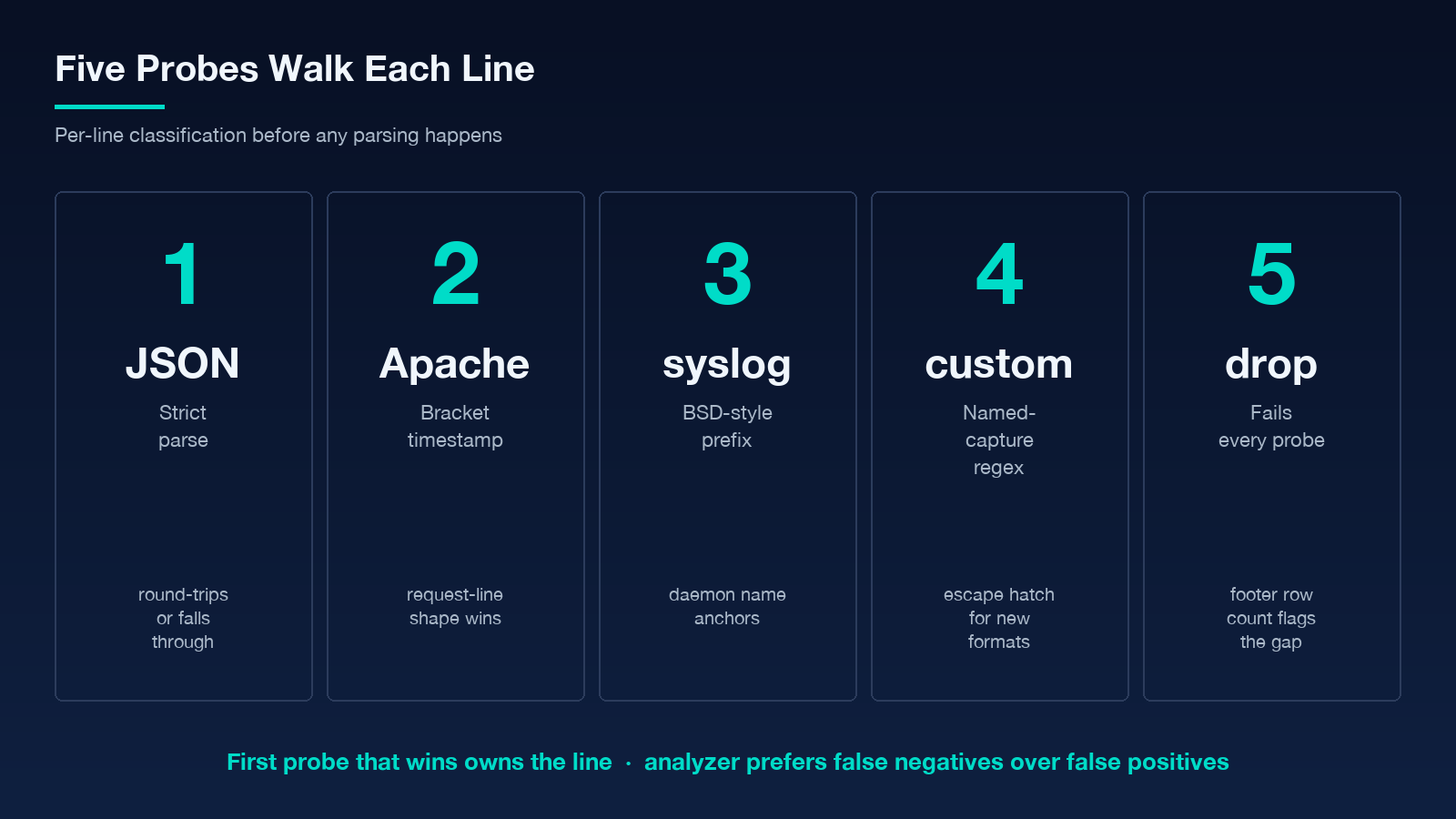
The strict JSON probe is the strictest. A line has to round-trip through JSON.parse cleanly to count as JSON Lines, so partial fragments, single-quoted strings, or trailing commas fall through to the next probe. Once a line is JSON, the analyzer records the field set and walks the values to infer types — strings stay strings, ISO-8601 timestamps get a date stamp, integers and floats get numeric stamps, booleans get boolean stamps. Anything that does not match a type stays as a string, but the analyzer notes the inconsistency so you can see it in the type report.
The Apache probe looks for the bracket-enclosed timestamp combined with the request line shape. The syslog probe looks for the BSD-style timestamp prefix combined with the daemon name. Both probes are narrow on purpose: if your line is close to Apache but the timestamp is missing, it falls through. The analyzer prefers false negatives over false positives, because misclassifying an Apache line as JSON Lines would silently corrupt the schema of the whole output table.
The third probe covers lines that look like neither JSON nor any named format. These usually come in as a custom regex option in the tool — you write a named-capture pattern, the analyzer tries it on every unclassified line, and the captures become fields. This is the escape hatch that keeps the tool useful once your stack starts emitting something the built-in probes have never seen.
Why Mixed Buffers Are The Real Test
The reason the analyzer exists is that real log dumps are mixed. A copy-paste from a triage session pulls JSON from one service, a syslog tail from another, and an Apache access log snippet from a third. None of those formats is exotic on its own, but the moment they sit next to each other in the same buffer, every hand-written parser starts dropping rows or duplicating fields.
The analyzer handles mixed buffers with two design decisions. The first is per-line probing instead of whole-buffer detection: a single misformatted JSON line does not cause the analyzer to abandon the JSON Lines path for the rest of the buffer. The second is field-set union with type promotion: each format’s fields are added to the row schema as they appear, and the analyzer promotes the type of a field the first time it sees a stricter version. So if JSON Lines gives you level: string and syslog gives you level: enum("INFO","WARN","ERROR"), the promoted type ends up as a string union rather than picking one side arbitrarily.
The aggregate-multiline option exists for exactly this case. Stack traces, multi-line JSON strings, and wrapped Apache request bodies are all signals that the next line belongs to the previous one. The option tells the analyzer to keep accumulating until it sees a fresh line that classifies as a complete record on its own, then emit the merged record as one row.
What The Export Format Actually Changes
The export selector — JSON, CSV, or SQL inserts — sounds like a presentation choice, but each one makes a different promise about what comes out.
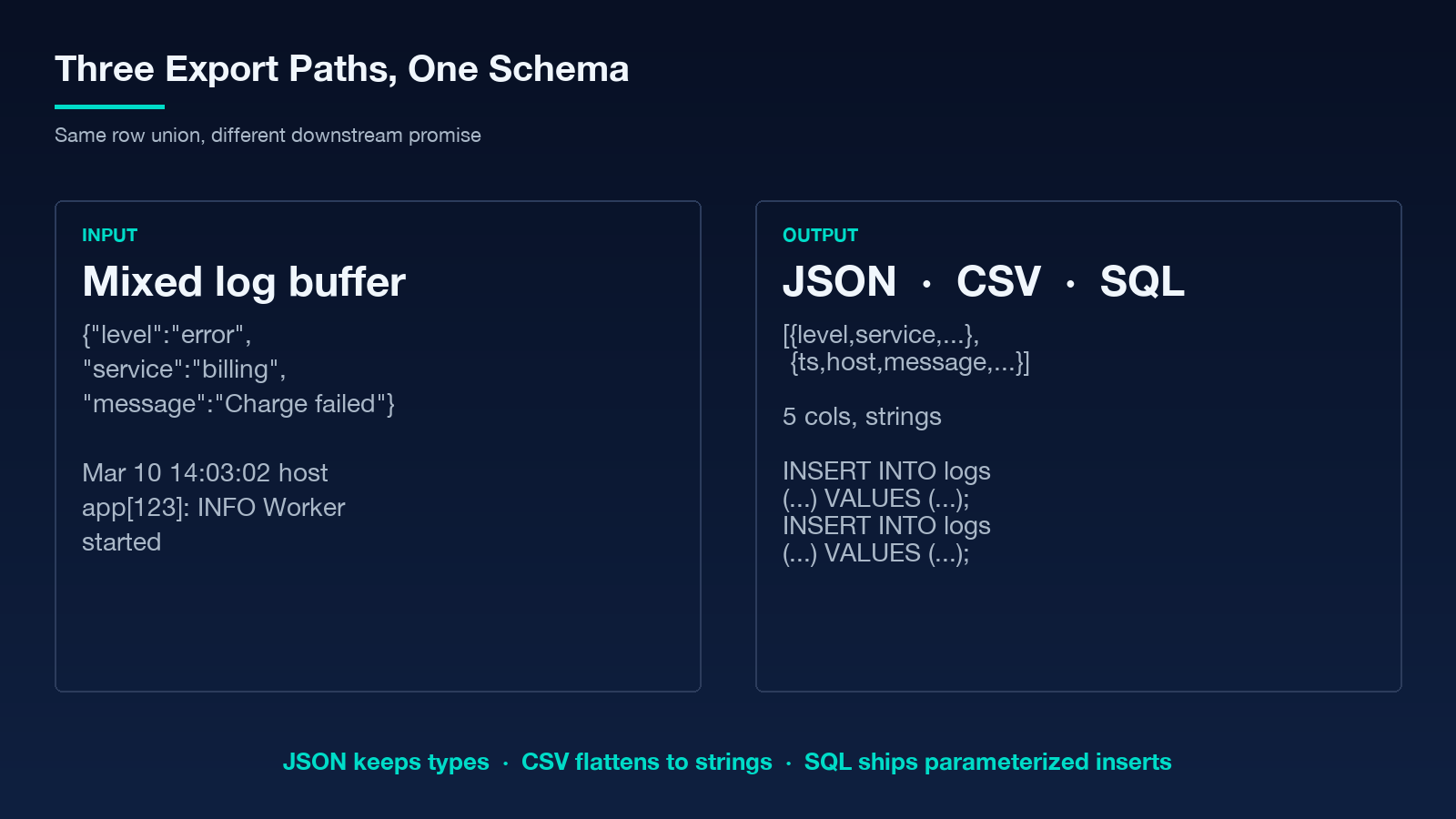
JSON is the canonical export. Every row is a flat object with the union of fields seen across formats, and the type stamps are preserved as a sibling schema object. Downstream tooling can reconstruct types without guessing. CSV flattens the union and casts every cell to a string, so a level column ends up with "INFO" and "WARN" and "error" and "INFO" mixed together — readable in Excel, useless for a typed join. SQL inserts are the middle path: each row is a parameterized INSERT statement with the typed values bound as SQL literals, so you can pipe the output straight into a database without a serializer round-trip.
The right choice depends on where the table goes next. If the output is heading into a spreadsheet or a quick analyst review, CSV is fine. If the output is heading into a data lake or a downstream API, JSON. If the output is heading into a database table that already exists, SQL inserts. The analyzer does not try to be smarter than this — it produces whichever format you ask for, and the field-set union stays identical across all three.
A worked example is worth more than the rule. Take the snippet in the example results pane:
{"level":"error","service":"billing","message":"Charge failed"}
Mar 10 14:03:02 host app[123]: INFO Worker started
The first line parses as JSON Lines, contributes level, service, and message. The second line matches the BSD-style syslog probe, contributes a timestamp, a host, and a message derived from the daemon line. The final output has five columns, three from the JSON row and two from the syslog row, with level and message appearing as nullable across formats. Export as CSV and you have a five-column table. Export as SQL inserts and you have two INSERT statements, one per row, with the missing fields rendered as NULL. Export as JSON and you have an array of two objects sharing a five-field schema.
If you want to see the live flow against a longer mixed buffer, the nginx log samples page provides a working fixture.
Field Inference Beats A Static Schema
The reason field inference matters more than a static schema is that logs evolve faster than schemas. A static schema asks you to commit to the field set before you know what the parsed output will look like. Field inference walks the input, builds the schema as it goes, and never tells you the input did not match — it just keeps adding fields as they appear.
This has one trade-off. If a single malformed JSON line has a field that no other line in the buffer shares, the analyzer still includes that field in the union, and it ends up as a mostly-null column in the output. That is the price of building the schema from the data instead of against the data. For the use cases the analyzer is designed for — triage, ad-hoc analysis, one-shot ETL — that price is fine. For long-running pipelines where every null column is a regression, the right move is to gate the input with a stricter format and let the type-promotion rules do their work.
The type-promotion rules themselves are deliberately conservative. A field stays as a string unless every occurrence is parseable as a stricter type. So if you have a column that is 200 for ten rows and "200 OK" for one row, the column stays as a string. If you have 200, 200.5, and 200.7 across all rows, the column promotes to a float. This conservatism is what keeps a single stray "N/A" from corrupting an otherwise-numeric column into a string column downstream.
Where Custom Regex Saves The Day
The custom-regex option is the analyzer’s escape hatch for formats the built-in probes do not cover. You write a named-capture pattern that matches the lines you want to parse, the analyzer runs it on every unclassified line, and the captures become fields in the row.
The right way to write the regex is to anchor it on a part of the line that is stable across the buffer. A timestamp prefix is usually the right anchor, because timestamps are the one field every log format agrees on. From the anchor, named groups extract the level, the source, and the message, with the message group as a non-greedy catch-all at the end. The placeholder in the analyzer’s options shows the canonical shape:
^(?<timestamp>S+) (?<level>w+) (?<source>w+) (?<message>.+)$That pattern covers a wide class of plain-text log formats — anything that puts a timestamp first, then a level word, then a source word, then a free-form message. The moment your format deviates from that shape, write a tighter regex and keep the named-group naming consistent across versions so the column set stays stable.
A common mistake is to write the regex greedier than the line warrants. If your message can contain spaces and the timestamp prefix is the only stable anchor, the non-greedy (? keeps the message intact instead of bleeding into the next field. A second mistake is to forget that the analyzer only runs custom regex on lines that did not match the JSON, Apache, or syslog probes — so a custom regex that overlaps with one of those formats will silently never fire. Test the regex against a sample line from the buffer you actually want to parse, not a synthetic example.
For more patterns and a small library of common shapes, the changelog extractor samples page carries formats that often get mixed into the same triage buffer.
What Goes Wrong And How The Tool Catches It
Three failure modes show up in practice. The first is silently dropped lines: a line that fails every probe and also fails the custom regex, if any. The analyzer flags dropped lines in a footer row count so you can see the gap, but the row does not appear in the output table. The second is type drift: a column that is mostly numeric but contains a single sentinel value like -1 or "unknown", which keeps the column as a string instead of promoting to a number. The third is multiline bleed: a stack trace whose closing frame happens to look like a fresh syslog line, which the aggregate-multiline option then treats as the start of a new record.
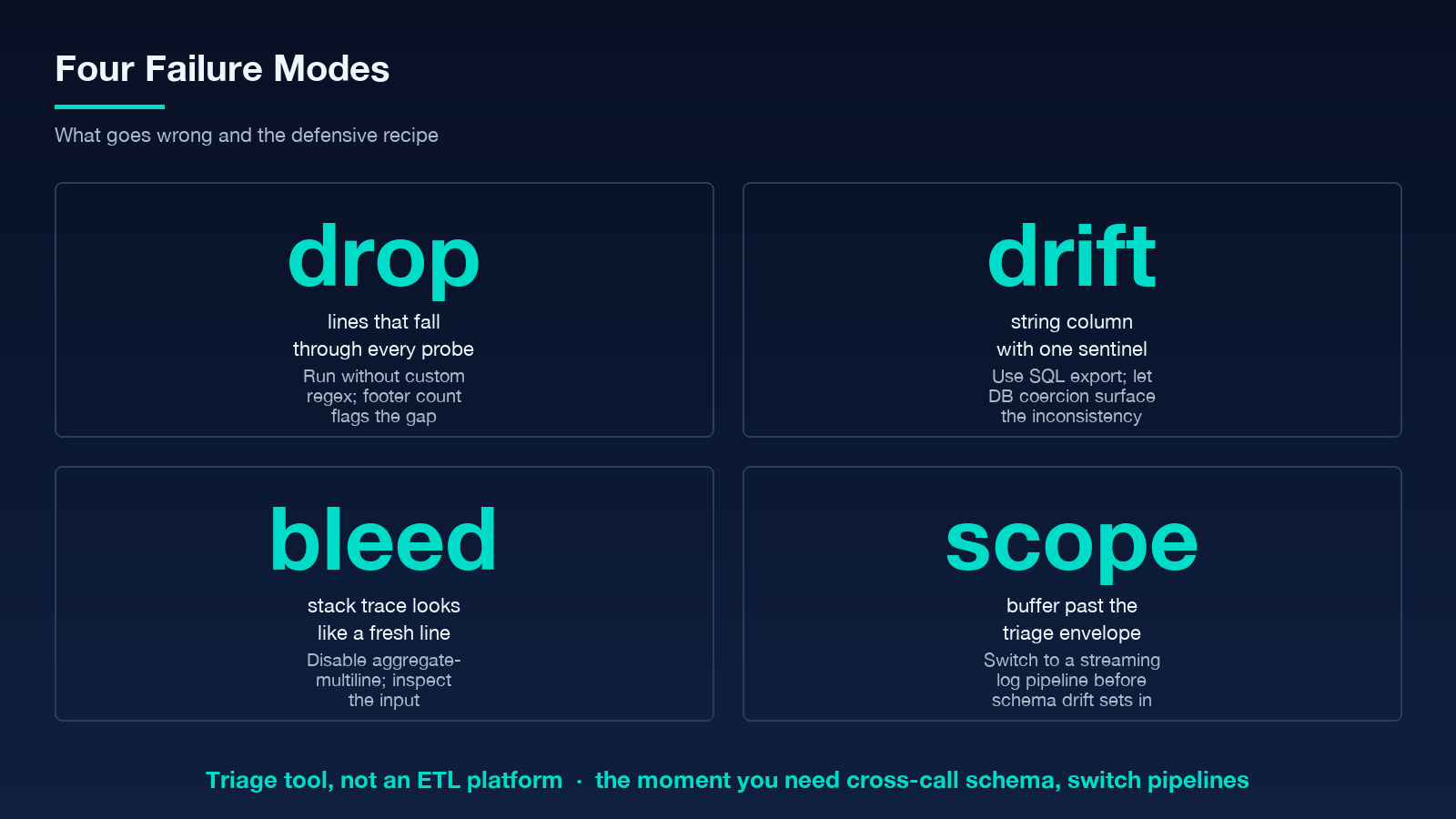
Each of these has a defensive recipe. For dropped lines, run the analyzer without a custom regex first to see how many lines the built-in probes classify, then add the regex to recover the rest. For type drift, use the SQL export and let the database coercion surface the inconsistency instead of letting CSV swallow it. For multiline bleed, turn off aggregate-multiline and inspect the input buffer manually, then re-enable it once the input is cleaned.
A wider reference for these patterns is the log files with sensitive data page, which covers redaction-aware triage as well as the parsing concerns above.
Where The Analyzer Stops Being The Right Tool
The analyzer is a triage tool, not an ETL platform. It runs entirely in the browser, has no streaming mode, and does not maintain a schema across calls. The moment your log buffer is in the hundreds of megabytes, the moment you need cross-call schema consistency, or the moment you need to merge the parsed output against an existing table with referential integrity, you have left the analyzer’s design envelope and need a streaming log pipeline instead.
For everything before that line — ad-hoc triage, one-shot dumps, quick exports into a spreadsheet or a SQL playground — the analyzer stays the fastest way from raw buffer to a normalized table. The reason it works is the same reason hand-written parsers fail: the analyzer never asks you to commit to a schema before you know what the input looks like, and it never gets confused by the format changes between lines.
If you want to extend the coverage to other formats before the built-in probes catch up, file a feature request through the samples feedback path so the next format gets a probe instead of a regex workaround.
Explore more tools at elysiatools.com.
