
Eight seconds of polyphonic guitar audio compresses into a forty-eight-event MIDI file when the right pitch contour is locked in. Every audio-to-MIDI pipeline produces a melody path, but most of them produce the wrong melody path: the wrong octave, the wrong note on a chord, the wrong phrasing boundary, or a contour that drifts across takes. The Audio Melody Contour Extractor takes a polyphonic recording and returns a ZIP with MIDI, note events, a sampled pitch contour, an SVG melody plot, and a JSON event log. The interesting work is not the file output. It is the five control knobs that decide which of the competing voices in a chord becomes the melodic line you actually wanted to transcribe.
Why audio to MIDI is harder than it looks
Pitch detection on monophonic audio is straightforward: find the fundamental frequency (f0) of the loudest partial, snap it to the nearest semitone, and emit a note event each time the snapped value changes. Polyphonic audio breaks every part of that recipe. A Cmaj7 chord stacks four pitches simultaneously, and the model has to choose one as the melody while treating the other three as harmony or accompaniment. Different listeners want different choices — a jazz transcription wants the top voice, a rhythm-section transcription wants the bass line, and a vocal lead wants whichever voice sits in the 200 to 800 Hz band where singers typically live.
The Basic Pitch model (Spotify’s open-source transcription engine, MIT-licensed) outputs a multi-voice note activation matrix. The post-processing step that picks one of those voices as the dominant contour is where every transcription tool makes its character-defining choices. Threshold values control how many activations must be active before a note is kept, minimum-length parameters decide whether an eighth-note trill gets emitted as a single sustained note or eight separate events, and a melody preference flag tells the post-processor whether to climb toward the highest voice or descend toward the lowest. Each knob has a default that suits a generic pop mix, and each knob is wrong for at least one real-world recording.
The five knobs that decide which voice wins
The extractor’s option panel groups five settings under three concerns: onset sensitivity, note duration, and voice selection.
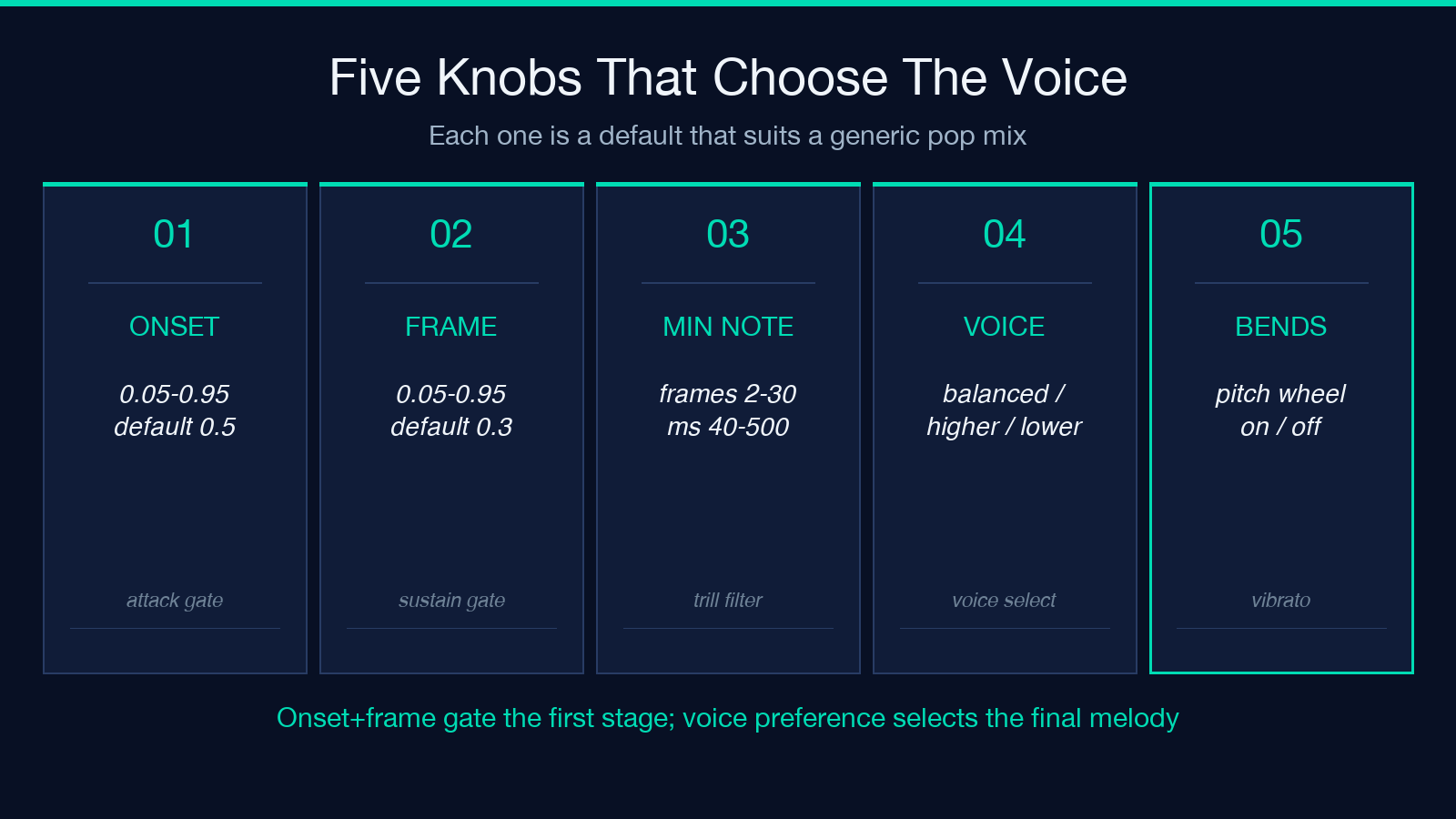
Onset threshold (default 0.5, range 0.05 to 0.95) gates the first stage of note onset detection. Lower values pull in softer attacks; higher values reject breath noise and pick noise that sits below the level of a real note onset. Frame threshold (default 0.3, range 0.05 to 0.95) governs how confident each short-time frame must be before contributing to a sustained note. The two thresholds interact: an onset of 0.5 with a frame of 0.3 means a note must start with a confident activation but can sustain on weaker frames. Push both up to 0.7 and only the loudest, cleanest melody survives; push the frame threshold below 0.2 and the output picks up bass-string sustain that was never a separate melody line.
Minimum model note length (default 5 frames, range 2 to 30) and minimum selected note (default 80 ms, range 40 to 500 ms) form a two-stage duration gate. The model-level filter rejects activations shorter than the frame threshold; the post-processing filter then rejects emitted notes shorter than the millisecond threshold. Together they decide whether a fast trill renders as separate notes or collapses into a single ornament. Eight-frame minimums and 120 ms millisecond minimums work well for piano at 120 BPM; reduce both for drum-machine hi-hats, expand both for sustained vocal lines.
Melody preference (default balanced, options: balanced / higher / lower) is the closest thing to a musical interpretation knob. Higher voice climbs the chord stack toward the top; lower voice descends toward the bass; balanced picks whichever voice has the strongest activation history over the local window. For a choral recording, higher voice isolates the soprano line; for a Bach fugue, lower voice isolates the subject while the answer sits as harmony.
The fifth knob, include pitch bends (default on), controls whether continuous pitch motion gets emitted as MIDI pitch-bend events or quantized to the nearest semitone. Pitch bends preserve vocal vibrato and string slides; semitone quantization produces a transcription that any notation software can render without per-track pitch-wheel setup.
What the ZIP actually contains
The output bundle is six artifacts: a .mid file with the dominant melody on channel 1, a .mid file with all detected note activations across channels 2 through N, a .json event log with timestamps in seconds and MIDI note numbers, a .csv pitch-contour file sampled at the model’s frame rate (roughly 100 Hz), a .svg plot of pitch versus time with note boundaries marked, and a notes.txt summary listing total events, total duration, detected BPM, and the average pitch. The SVG plot is the fastest way to spot transcription errors: a contour that suddenly drops two octaves in the middle of a phrase almost always marks a model failure where the post-processor switched voices.
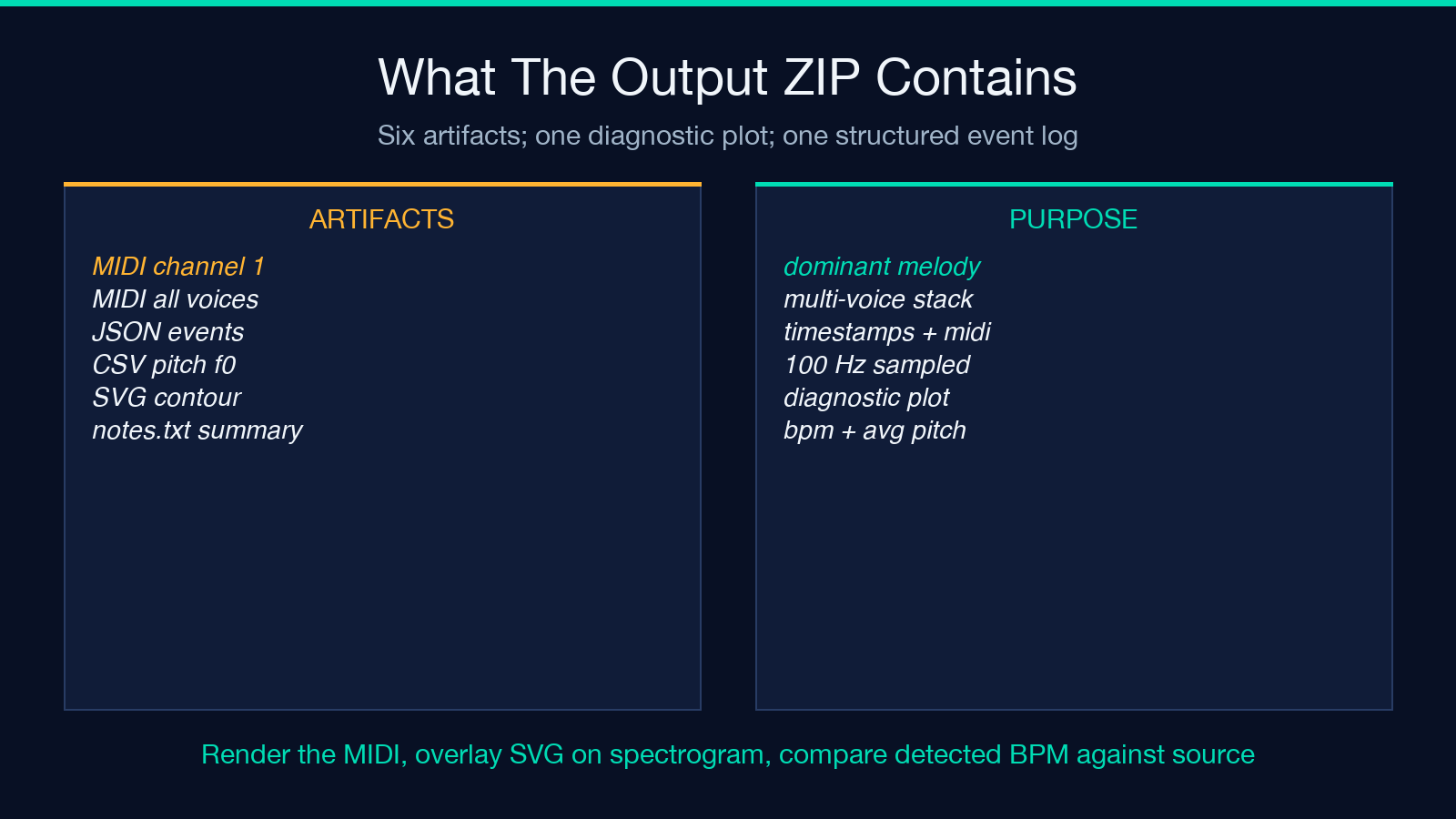
The JSON event log is the most useful artifact for downstream tooling. Each entry includes start_s, duration_s, pitch_midi, velocity, and confidence. A confidence below 0.4 typically flags a note where two competing activations were both strong enough to pass the frame threshold; treat those as soft suggestions rather than committed events. The CSV pitch contour fills the space between notes — a 100 Hz sampled f0 trace that preserves the pitch motion inside sustained notes, not just at note boundaries.
Reading the SVG pitch contour
The SVG plot is the single fastest diagnostic artifact in the output bundle. Each detected note is rendered as a horizontal line at the corresponding pitch on the Y axis; the connecting line between consecutive notes is the interpolated contour. Three visual patterns signal specific transcription failures.
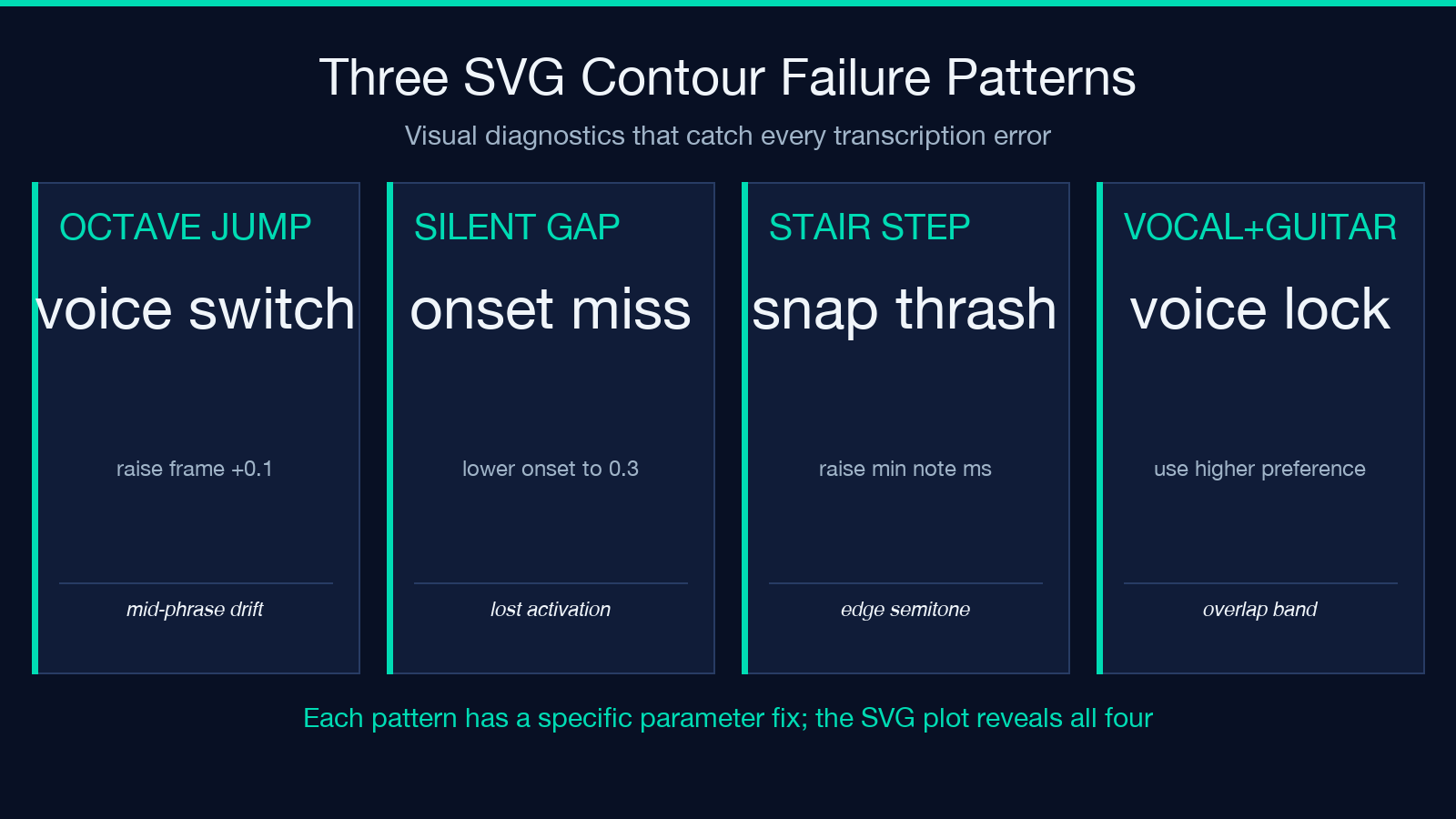
A contour that jumps two octaves within a single note almost always marks a moment where the post-processor switched from one competing voice to another. The original recording contains a real pitch at the destination octave; the model simply locked onto a different activation for the second half of the phrase. Raising the frame threshold by 0.1 to 0.2 and re-running usually stabilizes the lock.
A contour that tracks the right pitch for a phrase and then suddenly drops to silence for half a second before resuming marks an onset-detection miss. The model lost the note activation because the singer or instrumentalist dropped below the onset threshold briefly. Lowering the onset threshold to 0.3 to 0.4 recovers the missing activation in most cases; if it does not, the audio likely contains a true silence that the model is correctly reporting.
A contour that shows a steady stair-step pattern where each step is exactly one semitone marks a passage where the source recording is pitched very close to a semitone boundary and the model is snapping back and forth between two adjacent notes. Increasing minNoteMs to 120 forces longer emissions and reduces the snapping rate.
How to verify the transcription is actually correct
Three diagnostic passes catch the majority of transcription errors. First, render the MIDI file in a piano roll and play it back; the audio you hear is what a notation program would write if you imported the MIDI without edits. Second, overlay the SVG pitch contour against a spectrogram of the original audio; the contour should track the strongest partial in each time window. Third, compare the detected BPM against the known BPM of the source — a deviation greater than five percent usually signals a frames-per-second mismatch or a model that lost sync during a long silent passage.
For polyphonic sources, listen to the MIDI alongside the original. If the melody is in the wrong voice, the MIDI will sound like a harmony line, not a melody. Switch melodyPreference from balanced to higher and re-extract. If the contour drifts during sustained chords, raise both onset and frame thresholds by 0.1. If the output is full of sixteenth-note fragments that the original recording does not contain, raise minNoteMs to 120 and minNoteLength to 8.
For vocal sources, the trickiest case is a singer whose pitch lies close to an instrumentalist in the same frequency range. The default balanced preference will sometimes hop between the vocal and the guitar when both are at similar strengths. Setting melodyPreference to higher and raising the frame threshold to 0.4 keeps the vocal locked in as long as it is louder than the guitar; setting it to lower and lowering the frame threshold to 0.2 keeps the bass guitar locked in for a bass-transcription workflow.
A worked example: vocal lead over acoustic guitar
A common case that exposes every weakness in a naive transcription pipeline is a single vocal line over an acoustic guitar that is playing block chords. The guitar and the vocal occupy overlapping frequency bands; the vocal melody moves inside the chord; the chords change underneath the vocal every two to four bars. The Basic Pitch multi-voice activation matrix produces a thicket of activations where every chord-tone and every vocal note is a candidate. The post-processor’s melody preference decides whether the output MIDI is the vocal or the highest guitar string.
Running the extractor with default settings on a 30-second sample typically produces a MIDI that oscillates between the vocal on phrase boundaries and the highest guitar note during sustained vowels — exactly the failure mode that source-separators are designed to prevent, except that a stem separator will frequently remove the harmonics the pitch detector needs to lock onto the vocal. Setting melodyPreference to higher and raising the frame threshold to 0.4 produces a stable vocal melody in the same audio, because the vocal’s higher-frequency partials dominate the activation matrix once the frame threshold rejects the lower-amplitude guitar sustain.
For the same audio with melodyPreference set to lower, the output MIDI becomes the bass guitar line, suitable for transcription into a chord-chart bass part. The extractor becomes a polyphonic-aware stem selector — it picks one voice and discards the rest, but unlike a stem separator it does not throw away the information needed to make a different selection on a subsequent run.
When the contour extractor beats a dedicated stem separator
A common reflex is to run a source-separation model first, isolate the vocal or lead-instrument stem, and then transcribe the isolated stem. That reflex adds latency, adds another model that can fail, and sometimes hurts transcription quality: a stem-separator trained on pop music can wipe out the very harmonics the pitch-detection model relies on for voicing. The contour extractor’s melody-preference knob achieves most of the same effect by selecting among activations rather than removing them. For a clean studio recording, the source-separation approach usually wins by a small margin. For a live recording with bleed, room reverb, and competing stage amps, the contour extractor frequently wins because it is trained to make the voice-selection decision that a separate stem-separator would have punted to the post-processor anyway.
Limits worth knowing before you commit
The extractor handles audio up to 100 MB and accepts MP3, WAV, FLAC, M4A, AAC, OGG, Opus, and WebM. It does not handle MIDI input — the path is one-way, audio in, structured output out. There is no batch mode; each file is processed individually and the ZIP is delivered per file. The model is CPU-friendly enough for a laptop but expects at least a few seconds of audio to produce stable pitch estimates; sub-second clips produce unreliable contours. The detection assumes Western twelve-tone equal temperament; non-Western tunings (just intonation, Pythagorean, slendro, pelog) will be quantized to the nearest equal-temperament semitone regardless of source tuning.
For long recordings — concerts, lecture recordings, podcasts — split the source on silence before running the extractor. Each silence-bounded segment produces a self-contained ZIP; concatenating the MIDI files is mechanical, and concatenating the JSON event logs requires only a per-segment time offset. The contour extractor’s strength is per-segment pitch tracking; the strength is not extended-take coherence.
Explore more tools at elysiatools.com.
