
Lead phrase. An infusion-rate calculation looks like arithmetic on a worksheet — total volume divided by total time — and most of the time it is. The trap is that “the drip” only lands where the order said once three other things line up first: the pump must be set in the units the order uses, the bag must contain what the order says it contains, and the time window must be interpreted the way the order intended. Get any one of those wrong and you do not get an obviously broken drip; you get a drip that looks fine on the screen and infuses at the wrong rate for thirty minutes before anyone notices.

This field guide walks through the calculation, then through the three unit-of-failure checks that decide whether the rate you computed is the rate the patient actually receives. The reference tool here is Elysia Tools — Infusion Rate Calculator (mL/hr), but every section applies to any volumetric pump titration you set up manually.
The One-Formula Core, and the Three Numbers Behind It
The arithmetic is rate (mL/hr) = total volume (mL) / total time (hr). The whole calculation lives or dies by how those three numbers are read off the bag, the order, and the clock.
The first number, total volume, comes from the bag label, not from the prescription. A 100 mL piggyback of ceftriaxone and a 50 mL vial of vancomycin are both labeled with their own volume; mixing them into a 250 mL secondary bag is not 100 + 50 = 150 mL, it is 250 mL of final admixture. The second number, total time, is where most field errors come from. An order that says “infuse over 30 minutes” is unambiguously 0.5 hours. An order that says “infuse over 1 hour” is unambiguously 1 hour. An order that says “run at maintenance” with no further number, in an adult, almost always means 25 to 30 mL/kg/day, which for a 70 kg patient is roughly 70 to 90 mL/hr — but only after you have confirmed the unit weight and confirmed the patient is on a maintenance prescription at all. The third number, the rate itself, is what you set on the pump.
The reason the formula is so simple is that volumetric pumps do the rest. They take the rate you enter, drive the syringe or the peristaltic mechanism, and alarm on occlusion, air-in-line, and end-of-infusion. The pump does not check whether the rate you entered matches the order; it does not check whether the units are mL/hr or mL/24h or mL/kg/hr; it does not check whether the bag label says what you think it says. The pump’s job is to deliver what you told it to deliver. Your job is to tell it the right thing. Try the rate against a different volume on Elysia Tools to see how the mL/min and decimal-duration outputs change with the input.
Pump Units: mL/hr vs mL/24h vs mL/kg/hr
This is the most common silent-failure mode in the field. The order reads “Infuse at 80 mL/hr.” The pump you pick up defaults to mL/24h. You enter 80. The pump displays 80 mL/24h and begins infusing at 3.3 mL/hr — twenty-four times slower than the order intended. Nothing alarms. The drip looks normal because at 3.3 mL/hr a 100 mL bag still takes 30 hours, which is longer than any bag should hang, so the bag is replaced on schedule and the patient has effectively received almost no drug.
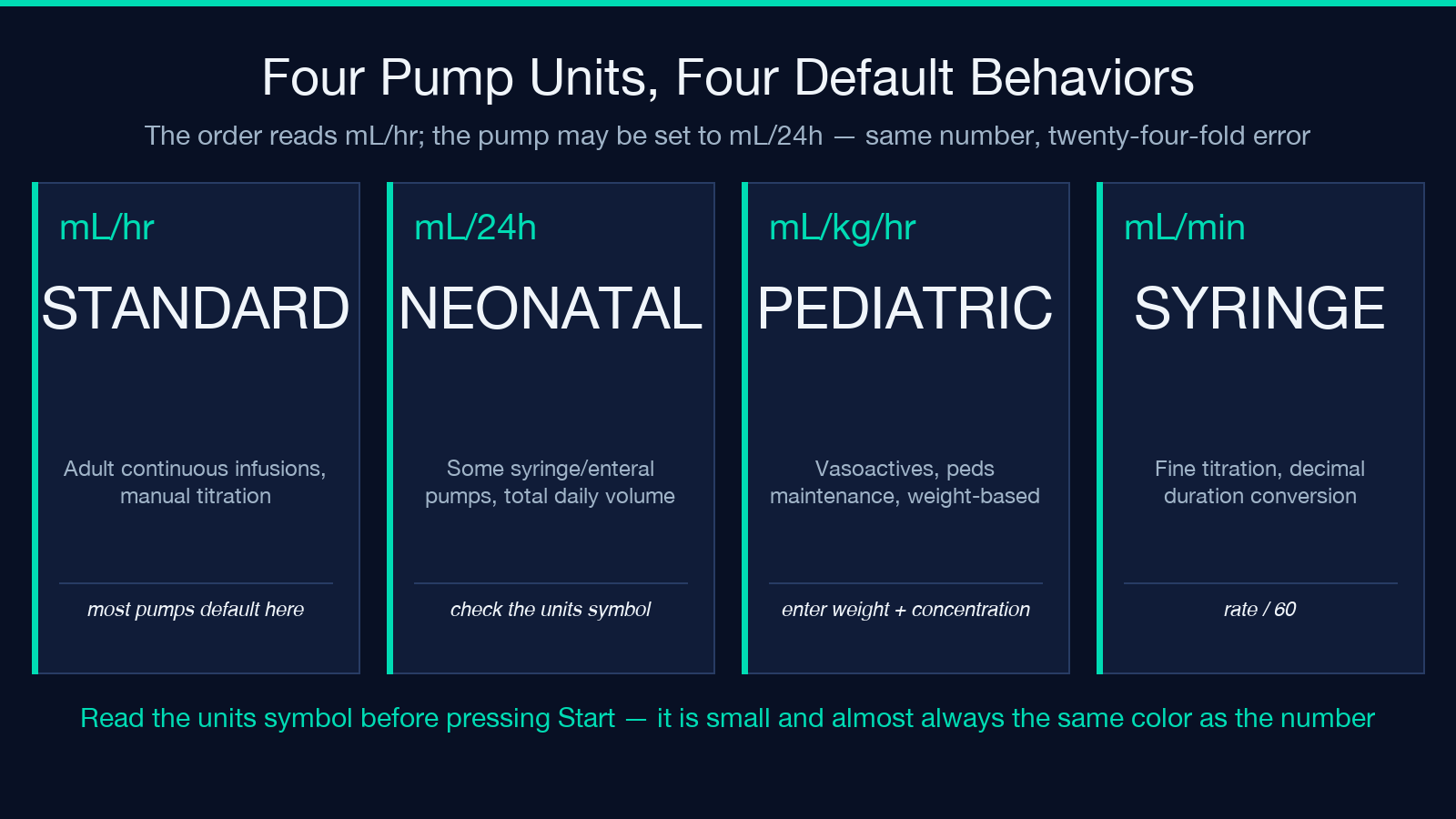
Three unit families are in clinical use:
- – mL/hr — the standard for most adult continuous infusions and for any rate that needs to be set by hand.
- mL/24h — used by some syringe pumps and some enteral feed pumps, especially in neonatal units.
- mL/kg/hr — used by almost every vasoactive drug (noradrenaline, vasopressin, dopamine) and by every pediatric maintenance-fluid calculator. With this unit you must enter the patient’s weight and the drug concentration together.
The defense is mechanical, not arithmetic. Before you press Start, look at the units symbol on the pump screen. It is small, it is often at the top right corner, and it is almost always the same color as the number you just entered. If you cannot see the units symbol, the screen is too dim and you should not be titrating. The Elysia Tools infusion calculator reports mL/hr and mL/min side by side; the mL/min row is mostly for syringe-pump fine-tuning where you want to see the same rate expressed in a unit the syringe pump might be displaying.
Bag Contents vs Order Contents: What Is Actually in the Syringe
The second silent-failure mode is volume drift. A bag labeled “100 mL” is 100 mL when it leaves the pharmacy. By the time it has been spiked, primed through 30 cm of tubing, and hung for an hour, the bag contains less than 100 mL and the tubing contains more. The pump measures what passes through its mechanism, not what is in the bag, so this drift does not cause a rate error. The rate is fine.
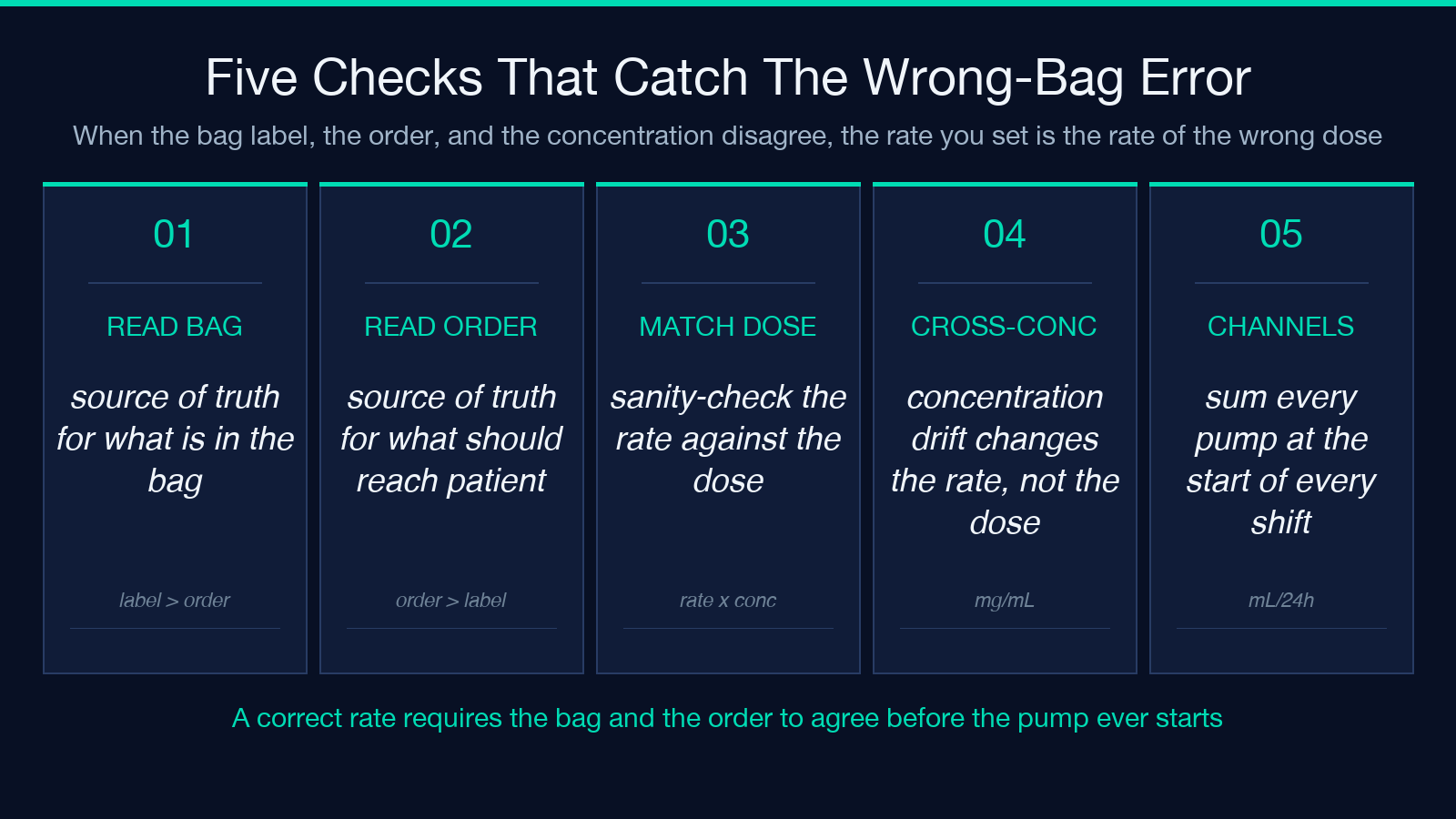
The error is on the order side. An order that says “give 1 g of vancomycin” plus a label that says “concentration 10 mg/mL” implies the bag contains 100 mL of fluid. If the pharmacy actually sent a 250 mL bag with 5 mg/mL, the patient is still getting 1 g of vancomycin — but at one-fortieth the concentration, over a longer time, with the same pump rate you would have set for the 100 mL bag. You have just underrun the dose over a longer window.
Two checks catch this:
- – Read the bag label, not the order. The label is the source of truth for what is in the bag. The order is the source of truth for what should be in the patient.
- Sanity-check the rate against the dose. 1 g over 60 minutes at 10 mg/mL is 100 mL/hr. 1 g over 60 minutes at 5 mg/mL is 200 mL/hr. If the pump is set to 100 mL/hr and the bag is at 5 mg/mL, you are giving 500 mg, not 1 g, over 60 minutes.
The Decimal Duration, and Why mL/min Matters
Most orders read in hours, but the syringe pump sits next to you in mL/min. When the order says “titrate by 1 mL/hr every 5 minutes,” the syringe pump requires you to translate that into mL/min increments, set the new rate, and watch the new rate for 5 minutes before re-checking the patient’s MAP. The translation is mL/min = mL/hr / 60, and the smallest syringe pump increment is typically 0.1 mL/hr, which is 0.00167 mL/min — below the resolution of most syringe pumps. That is why most titration orders round to the nearest whole mL/hr.
The decimal duration is the third output the Elysia Tools rate calculator gives you: total time expressed as a decimal number of hours. “1 hour 30 minutes” is 1.5 hours; “45 minutes” is 0.75 hours; “2 hours 15 minutes” is 2.25 hours. The decimal form is what the formula takes; the human form is what the order writes. If you do the calculation in your head with the human form and round each time conversion, the rounding error compounds. Use the calculator.
Daily Fluid Balance: When the Rate Is the Whole Story
For a patient on a fluid restriction — heart failure, AKI on dialysis, hyponatremia — the infusion rate is not just a delivery speed, it is an input to the day’s total intake. A bag running at 80 mL/hr for 24 hours is 1,920 mL of intake, before you count oral fluids, IV meds, and enteral feeds. Sum the channels: maintenance IV, antibiotic piggyback, vasoactive drip, sedation drip, enteral feed. If the sum is over the prescribed daily fluid target, the rate that is correct for that one channel is wrong for the day.
Two operational rules apply:
- – Total every channel at the start of every shift, not just at the start of the day. A change in one channel at 14:00 is invisible to the 09:00 total.
- Write the rate next to the volume, not next to the duration. “100 mL/hr over 30 minutes” puts the operational number where the eye lands; “30 min @ 100 mL” is harder to read at the bedside.
The Out-of-Range Flags and What They Catch
The rate calculator flags anything below 5 mL/hr and anything above 999 mL/hr. The lower flag catches KVO (keep-vein-open) rates that should probably be a saline lock instead of an active pump — at 5 mL/hr a 1 L bag takes 200 hours, which is longer than the bag is sterile. The upper flag catches mis-entered values, especially when a user enters mL/24h by mistake and types the 24-hour volume into the mL/hr field. 1,920 mL/24h is 80 mL/hr, not 1,920 mL/hr.
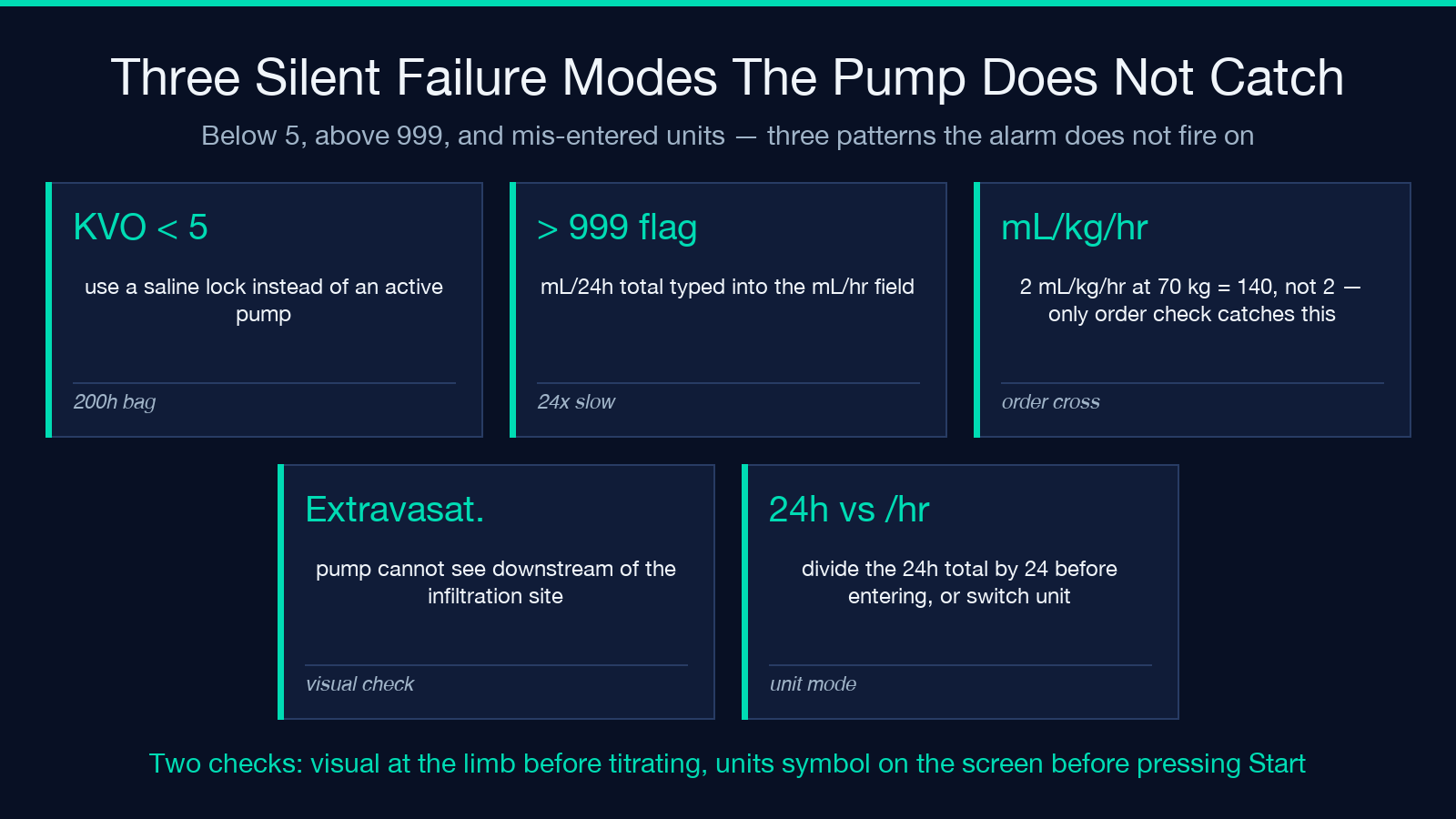
Two patterns worth noting:
- – Entering a 24-hour total into the mL/hr field is the single most common reason for an out-of-range flag. The fix is to divide the 24-hour total by 24 before entering it, or to set the pump to mL/24h mode if that is the intended unit.
- Entering a body-weight rate (mL/kg/hr) into the mL/hr field is the second most common. 2 mL/kg/hr for a 70 kg patient is 140 mL/hr, not 2 mL/hr. The flag will not catch this one because 140 mL/hr is inside the band; only the order cross-check catches it.
Occlusion Alarms and Line Patency
An infusion pump alarms on occlusion when downstream pressure exceeds the threshold. This is a useful safety net for kinked tubing, closed clamps, and positional IVs that have stopped flowing. It is not a useful safety net for extravasation, where the fluid is leaving the vein and pooling in the surrounding tissue; the pump cannot see downstream of the infiltration site, so the alarm does not fire and the pump continues to count down.
The bedside check that catches extravasation is visual, not auditory. Before titrating a vasoactive drug up, look at the limb. Look at the insertion site. Look at the skin proximal to the cannula. If the skin is blanched, swollen, cool, or tender, the line is not patent and the pump is infusing into tissue. Stop the pump. Do not silence the alarm and titrate — silencing the alarm does not fix the extravasation.
Closing the Loop: Order, Bag, Pump, Units, Patient
The order sets the rate. The bag sets the contents. The pump sets the units. The patient sets the response. A correct calculation requires all four to be read off their own source of truth and then reconciled against each other:
– The order says “X mg/hr of drug Y at concentration Z mg/mL.” – The bag label says “Y drug, Z mg/mL, total volume V mL.” – The pump says “rate R mL/hr, units U.” – The patient’s vitals say “MAP rising toward target” or “MAP not responding.”
If the order says one rate and the pump says another, the pump wins until you change it. If the pump says one rate and the patient’s vitals say another, the patient wins until you change the pump. The arithmetic in the middle is the easy part; the four-way reconciliation is the part that decides whether the drip lands where the order said or somewhere you have to chase.
Run any volume-over-time combination through the Elysia Tools infusion rate calculator before you set the pump. The numbers come out in less than a second; the alternative is to set the pump and discover the error at the next vitals check.
